AI Floor Plan Visualizer for Home Renovation Planning
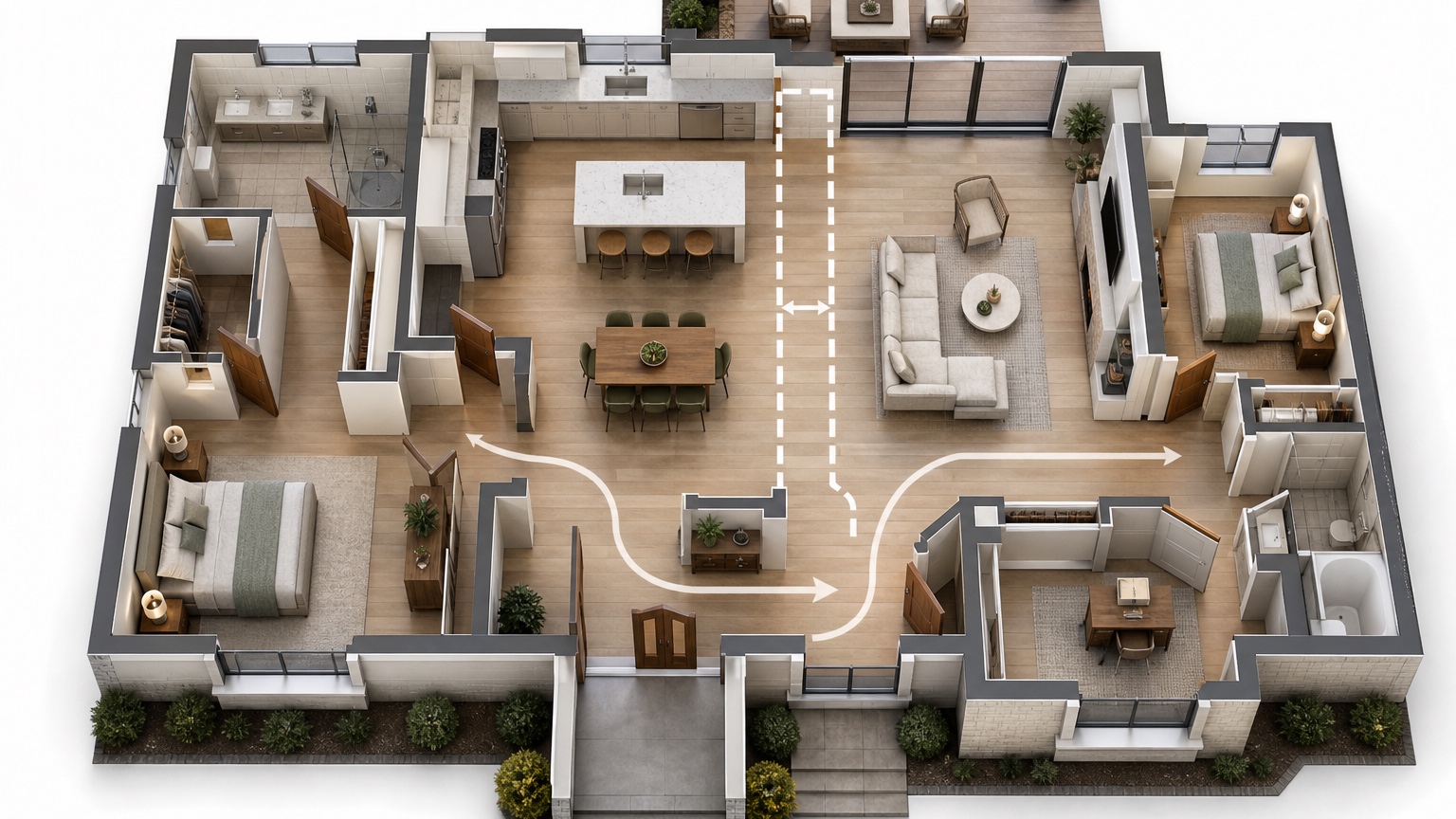
An AI floor plan visualizer is most helpful before a renovation becomes expensive. It gives homeowners and drafters a fast way to picture how a plan might feel: where people enter, how furniture groups form, whether the kitchen connects naturally to the living area, and where a proposed wall removal could improve or weaken the room. The image is not a measured construction drawing, but it can make early conversations much clearer.
The strongest use is not asking AI to invent a dream plan from nothing. Start with what exists: walls, windows, stairs, plumbing zones, doors, fixed cabinets, structural clues, and furniture you may keep. Then use visual versions to compare renovation flow. A homeowner can see why a wider opening changes the living room. A drafter can receive better notes because the client has already tested which option they actually prefer.
RedesAIgn can support this early planning workflow with prompt-based editing, remix and reference images, saved prompts, and history across 10 AI editors. You can start with 5 free AI credits and no credit card, then buy one-time credit packs only if more layout rounds are useful. Treat the output as a planning visual for discussion, not as permit documentation. Any structural change, egress issue, electrical plan, plumbing change, or code question still belongs with qualified professionals.
Start with the renovation question, not the style
A floor plan visualizer becomes more practical when every generation answers one decision. “Make this open concept” is vague. “Compare keeping the partial wall versus removing it between the kitchen and living room while preserving windows, stairs, exterior doors, and the sink wall” gives the system a job. The difference matters because renovation planning is usually constrained by things you cannot casually move.
Write down the current pain point before opening the tool. Is the dining table blocking the patio door? Does the kitchen feel cut off from guests? Does the front entry dump people straight into the sofa? Is there no place for a desk, pantry, toy storage, or mudroom bench? A useful visual should make one of those problems easier to discuss.
For homeowners, this keeps the session from becoming a gallery of attractive but irrelevant rooms. For drafters, it produces notes that can be translated into drawings: “client prefers wider cased opening,” “keep dining near window,” “test island with seating only if 42-inch clearance is possible,” or “avoid door swing conflict at powder room.”
If your project is still a photo-based room makeover, use AI room design generator or AI interior design from photo. If the question is specifically presentation-style plan imagery, compare this guide with AI 3D floor plan generator.
Give the visualizer fixed conditions it must respect
Before generating options, prepare a plain-language brief that separates fixed features from flexible features. Fixed features may include exterior walls, window locations, stairs, fireplace, utility room, bathroom stack, structural beams, major plumbing walls, ceiling height, and existing flooring transitions. Flexible features may include non-structural partitions, furniture placement, cabinet run, island size, pantry storage, closet openings, and built-ins.
A homeowner does not need to write like an architect, but the prompt should read like a renovation note. For example: “Create a realistic floor plan visualization for this main level. Preserve exterior walls, front door, rear patio doors, stair location, fireplace, kitchen sink wall, and all window openings. Test removing the wall between kitchen and living room. Show practical furniture zones for a family living room, dining table for six, and a kitchen island only if circulation remains believable.”
If you have a hand sketch, old listing plan, builder plan, or measured drawing, use it as a reference image when possible. If you only have room photos, include enough context to understand adjacency: kitchen looking toward dining, living room toward kitchen, entry toward stair, and any hallway connection. The output will be more useful when the prompt states what each photo represents.
Do not ask the AI to confirm whether a wall is load-bearing. It cannot. Instead, ask for visual options that assume professional review is required: “Show this as a concept only; keep a header or beam zone visible where the wall might be removed.” That wording helps prevent overconfident fantasy images.
Test wall-removal ideas as conversation pieces
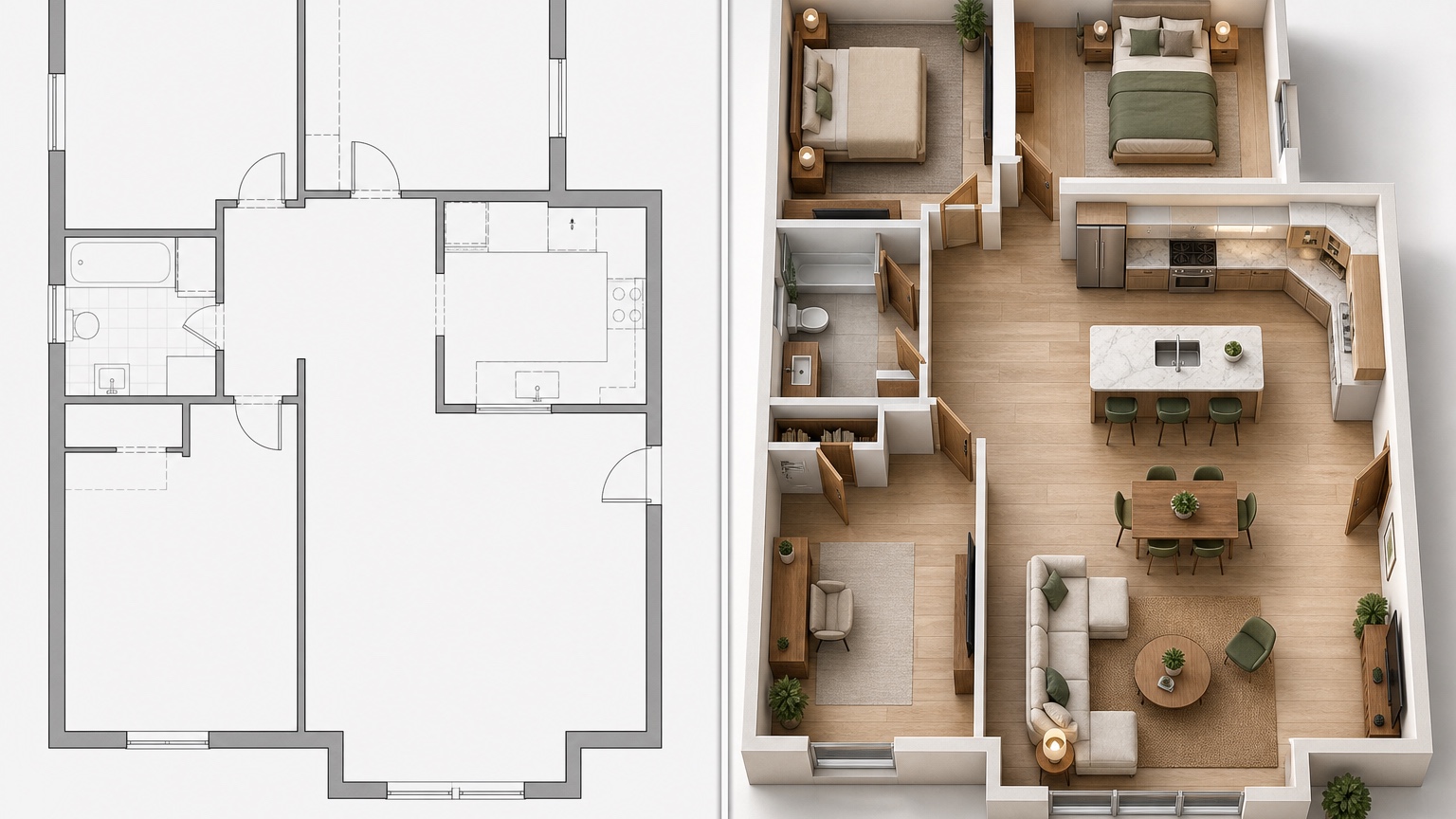
Wall removal is where floor plan visuals can save a lot of back-and-forth. A homeowner may say they want everything open, but the visual might reveal that the sofa now floats awkwardly, the TV wall disappears, cooking mess is visible from the entry, or the dining table no longer feels defined. A partial opening, wider doorway, interior window, half wall, or cased beam may solve the real problem without erasing every boundary.
Run versions with different levels of openness. Option one can preserve the wall and improve furniture. Option two can widen the doorway. Option three can remove the wall but keep a beam line or column zone. Option four can create a pass-through or framed opening. Label each result by the decision it tests, not by a style name.
In each version, check the path from entry to kitchen, kitchen to dining, dining to patio, and living room to hallway. If the new opening creates a diagonal shortcut through the seating group, the plan may look spacious but live poorly. If the island pushes people around tight corners, the visual should not be treated as a success.
For drafters, these images can become a useful pre-meeting board. Ask the client to mark what they like and what worries them. Then convert that feedback into measured alternatives. The AI version is not the drawing; it is a faster way to discover which drawing is worth producing.
Watch door swings and circulation before furniture
Door swings are easy to ignore in a pretty plan visual, but they can decide whether a layout works. Interior doors can collide with cabinets, block storage, crowd a dining chair, or make a narrow hall feel worse. Exterior doors and patio sliders shape furniture zones because people need a clear path even when the room is full.
Ask the visualizer to show door swings or at least preserve door clearances. In a renovation prompt, include language such as: “Keep all existing door locations visible and leave clear walking paths at entry, patio, powder room, closets, and hallway.” If you are considering a pocket door, barn door, French door, or swing reversal, make that one separate version rather than mixing it with every other change.
Circulation should be reviewed as loops, not just lines. Can someone enter with groceries, pass another person, reach the refrigerator, and avoid cutting through the conversation area? Can children move from the stairs to the kitchen without squeezing behind dining chairs? Can guests find the powder room without walking through the work zone?
Furniture belongs after those paths are clear. Use sofas, tables, stools, beds, desks, and storage to test scale. If the AI places a sectional where a door needs to open, the concept is not ready. Save the prompt that respected clearances best, then remix from there with different furniture shapes.
Use furniture zones to reveal hidden scope
Furniture zones often expose renovation scope earlier than finishes do. A kitchen-living adjacency may look better once a wall is opened, but the seating zone may require new lighting, relocated outlets, a different heat register, or a new media wall. A dining table may fit only if a closet shrinks. A mudroom bench may need a door swing change. A desk nook may require sound separation from the living area.
Ask for zones with labels: cooking, dining, conversation, storage, entry drop zone, work nook, play area, or reading chair. Labels make the plan easier to evaluate because everyone can see what each space is supposed to do. If a zone has no clear purpose, it may become wasted square footage. If two zones fight for the same path, the renovation probably needs a different move.
For kitchen and living adjacency, compare sight lines. Does the cook face the living room, the backyard, or a wall? Is the dining table close enough for daily meals without blocking prep space? Is the living room still comfortable when someone is using the island? Does the plan create a natural place for stools, or are stools only there because the image looks expected?
RedesAIgn’s saved history is helpful here because you can keep one version for each logic: “best circulation,” “best dining,” “least structural change,” “best storage,” and “most open.” Those labels are more productive than debating one final image too early.
Turn the best version into drafter-ready notes
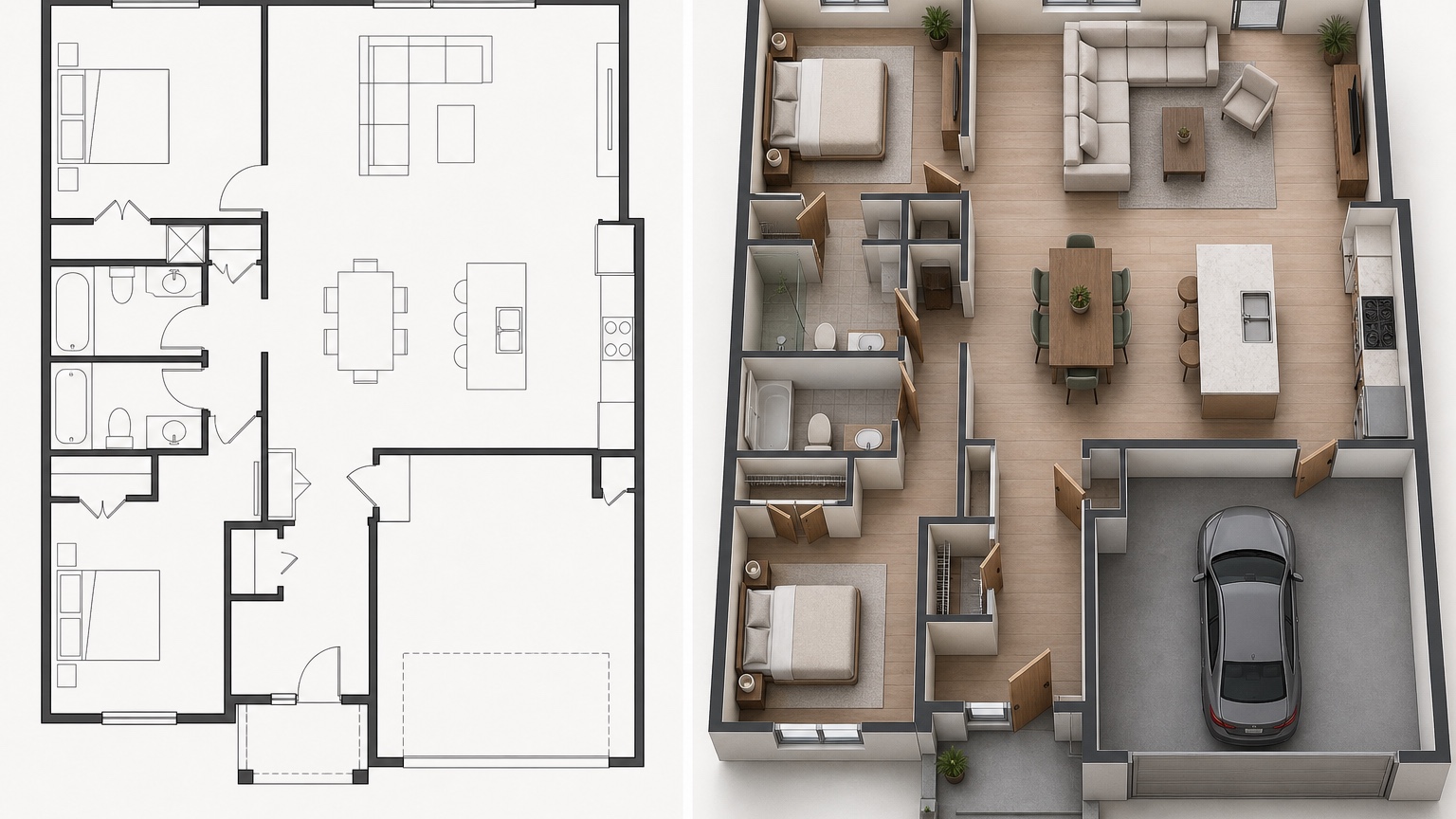
Once a visual direction is promising, translate it into notes a drafter or designer can actually use. Start with the existing conditions: rooms affected, walls being discussed, doors or windows to preserve, plumbing or appliances assumed to stay, and furniture sizes that matter. Then summarize each preferred change in plain language.
A useful note might read: “Preferred concept is partial opening between kitchen and living room, not full open plan. Keep fireplace wall for TV and seating. Explore 7-to-9-foot cased opening centered on dining view. Test island only if circulation around refrigerator and patio door remains practical. Homeowner wants seating for four at island but will accept three if clearances are better.”
Add a caution list too. “Do not remove pantry storage without replacement.” “Avoid blocking front entry view.” “Powder room door swing may conflict with new cabinet run.” “Confirm whether wall is structural.” “Check HVAC register in proposed dining zone.” These notes prevent the visual from being mistaken for approval.
If you continue in RedesAIgn, save the prompt that produced the chosen direction. Remix only the unresolved questions: smaller island, different doorway width, alternate dining placement, or furniture kept from the existing room. The goal is to narrow scope, not generate infinite possibilities.
A practical RedesAIgn workflow for renovation flow
Use the 5 free AI credits as a disciplined first pass: one existing-condition interpretation, one minimal-change option, one partial-opening option, one open-plan option, and one furniture-zone remix of the strongest version. No credit card is required, so the first test can simply decide whether visuals help your project.
If the results clarify the decision, use one-time credit packs for targeted next rounds. Bring in reference images for mood, but keep them secondary to the plan. A beautiful kitchen reference should not cause the visualizer to move windows, ignore door swings, or erase the dining path. Prompt clearly: “Use the reference for material tone only; preserve the plan logic from the selected version.”
For related decisions after the plan feels right, move to focused tools. Use AI kitchen remodel visualizer for cabinet and finish studies, AI furniture visualizer for scale-sensitive pieces, and AI home decor generator when the renovation scope is smaller than expected. A good floor plan visualizer session should leave you with fewer unknowns, clearer questions, and better notes for the person who will draw, price, or build the work.
FAQ: AI floor plan visualizer
What is an AI floor plan visualizer useful for?
It is useful for early renovation planning, especially comparing layout flow, furniture zones, wall-opening ideas, door clearances, and kitchen-living adjacency before paying for detailed drafting.
Can an AI floor plan visualizer tell me if a wall can be removed?
No. It can show visual concepts for different wall-opening ideas, but it cannot verify structure, utilities, codes, or permits. A qualified professional must review any real wall removal.
How should homeowners prepare for a floor plan visualization?
List fixed features, flexible features, problem areas, furniture that may stay, and the decision each version should test. Use sketches, listing plans, measured drawings, or reference photos when available.
Does RedesAIgn require a subscription to test floor plan ideas?
RedesAIgn offers 5 free AI credits with no credit card. If you need more rounds after the first test, one-time credit packs are available.
Try these prompts in redesAIgn
Convert this floor plan into a bright open-concept living area with a kitchen island and natural light.
Show furniture placement for a 2-bedroom layout with a dining nook and entry storage.
Visualize this blueprint as a modern ADU with compact kitchen, loft bed, and bathroom.
Related guides
- AI Floor Plan With Furniture: See How Rooms Could Work
Add furniture to floor plans with RedesAIgn so scale and circulation stay realistic before you buy pieces or rearrange a real room layout.
- AI Kitchen Floor Plan Visualizer for Remodel Layout Ideas
Visualize kitchen floor plans with AI before remodeling. Compare work triangles, islands, storage, and circulation with realistic furniture scale.
- AI Open Concept Floor Plan Ideas From Existing Layouts
Compare open-concept floor plans with AI before removing walls. Preview kitchen, living, and dining flow plus furniture zones and circulation.
- AI ADU Floor Plan Visualizer for Backyard Homes and Rentals
Preview ADU floor plans with AI for backyard homes and rentals. Compare compact layouts, baths, kitchens, and access before permitting talks.
- AI Basement Floor Plan Design: Visualize Finished Basement Layouts
Design finished basement layouts with AI floor plans. Compare recreation, guest, office, and bath options before construction estimates.