AI Exterior Remodel Visualizer for Siding, Paint, Doors, and Windows
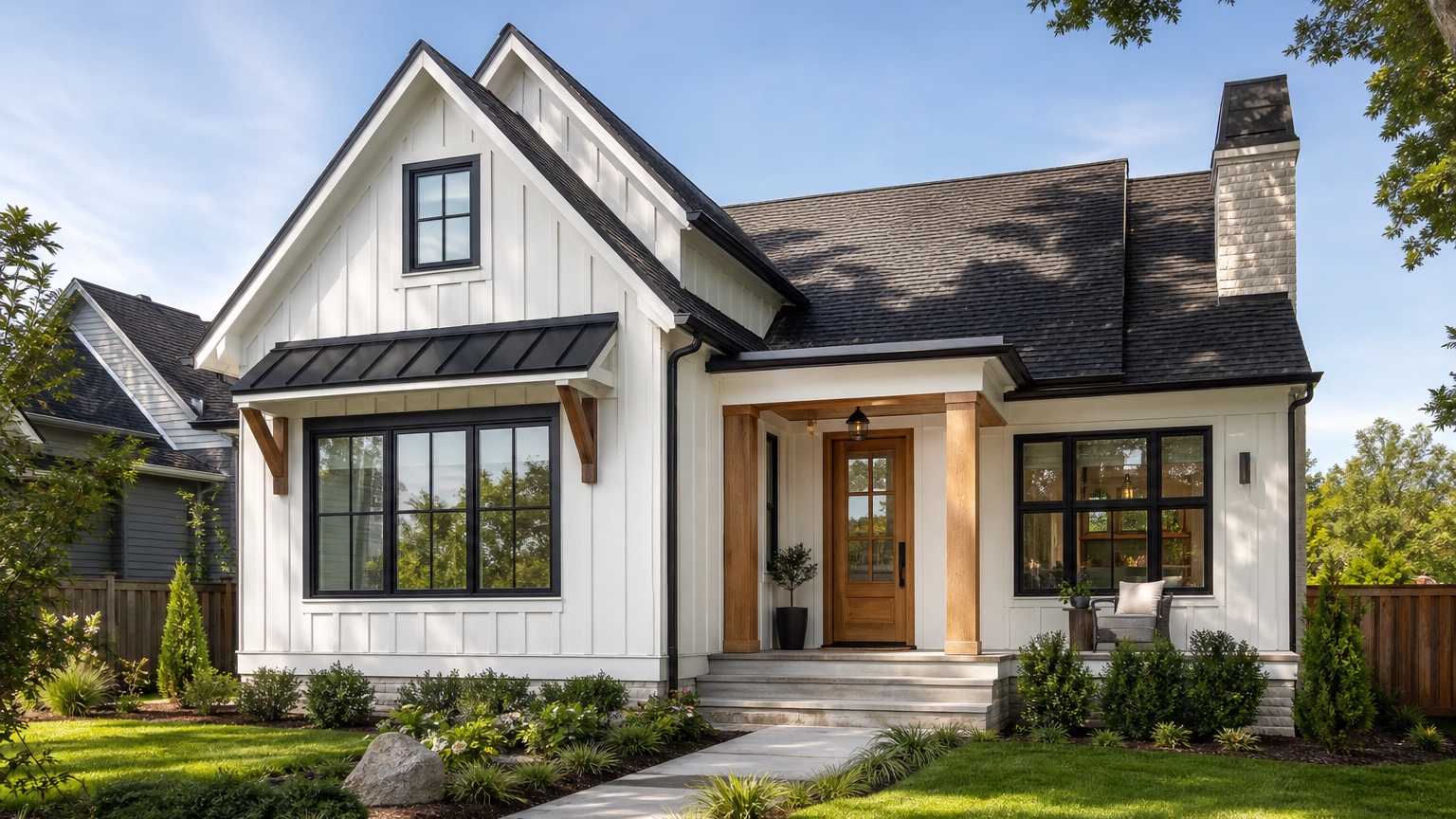
An AI exterior remodel visualizer is valuable when several exterior materials need to be judged together. Siding can look right in isolation and wrong beside the existing roof. A paint color can seem modern until it meets red brick. New doors and black windows can sharpen a facade, but they can also make the garage feel too heavy or the entry feel disconnected. Remodelers and homeowners need a way to preview the full exterior relationship before narrowing scope.
The useful visualizer does not simply decorate a house photo. It helps answer a real remodel question: which combination of siding, paint, trim, doors, windows, garage treatment, and curb appeal details is worth pricing, sampling, or presenting? The strongest result keeps the original home recognizable while showing enough change to make the remodel direction clear.
RedesAIgn can help with that early comparison step. Upload a clear exterior photo, choose the Exterior Editor, and create controlled remodel concepts in the browser. If you want to test exterior remodel ideas on your own house photo, start free with RedesAIgn and use 5 free AI credits with no credit card required.
What an AI exterior remodel visualizer should help you decide
For remodelers, the challenge is coordination. A client might ask for new siding, black-framed windows, a wood-look front door, a darker garage door, updated trim, and a fresh paint palette. Each item can be reasonable by itself, but the final exterior succeeds or fails as a whole. A remodel visualizer helps the remodeler show how those decisions interact before the conversation turns into line items and allowances.
For homeowners, the challenge is confidence. Exterior remodel work is public, expensive, and hard to reverse. Choosing materials from showroom samples or product pages does not show how the combination will sit on the real facade. A photo-based visualizer gives the homeowner a clearer way to compare options before requesting quotes.
The useful answer is a next step. A good preview might show that the siding color should be warmer, the trim should stay lighter, the front door can be upgraded without replacing all windows, or the garage door needs to be quiet instead of dramatic. It might also reveal that a bold inspiration image does not fit the home’s roofline, masonry, or neighborhood context.
Start with a clear remodel scope, not a wish list
A remodel visualizer works best when the scope is organized before the first prompt. Separate the project into categories: must change, might change, and must stay. “Must change” might include failing siding, dated paint, damaged trim, or a front door that needs replacement. “Might change” could include shutters, garage door color, window color, porch details, lighting, or minor landscape cleanup. “Must stay” often includes roofline, roof color, masonry, driveway, window openings, porch footprint, and mature trees.
This structure matters because AI can make almost any exterior look impressive by changing too much. If the remodeler is only quoting siding and trim, a concept that also changes the roof, windows, porch, hardscape, and landscaping creates false expectations. If the homeowner is considering a larger exterior package, a more complete concept can be appropriate, but it should be labeled that way.
Use the visualizer to compare combinations, not random styles. A modern farmhouse option, a warm traditional option, and a clean contemporary option can be useful if each one respects the same constraints. A prompt that only says “make it beautiful” usually produces a polished image that is hard to translate into real work.
Input checklist for a believable exterior remodel preview
Start with a front elevation or three-quarter photo that shows the whole house exterior. Include roofline, siding, trim, windows, doors, garage, porch, gutters, fascia, foundation, driveway, walkway, and visible landscaping. If the remodel affects more than one side, take side photos too, but begin with the primary street-facing view so the curb appeal decision is clear.
Keep the camera level. Distorted photos can make siding courses bend, garages stretch, and windows look misaligned. Stand far enough back to capture the full facade without cutting off roof edges, steps, or the garage. Even daylight is usually better than dramatic light. Heavy shadows under a porch or bright glare on siding can make color and material comparisons less reliable.
Before generating, decide what must remain recognizable. If the roof is staying, say so. If the brick or stone is staying unpainted, say so. If windows will be replaced in the same openings, separate that from changing the window layout. If the front door can change but the porch cannot, include that boundary. Good constraints make the final image more useful for both homeowner and remodeler.
Reference images can help, but they should clarify style rather than override the real house. Use them for vertical siding, warm white paint, black windows, or a natural wood door; keep the actual home as the anchor.
Compare siding, paint, doors, and windows together
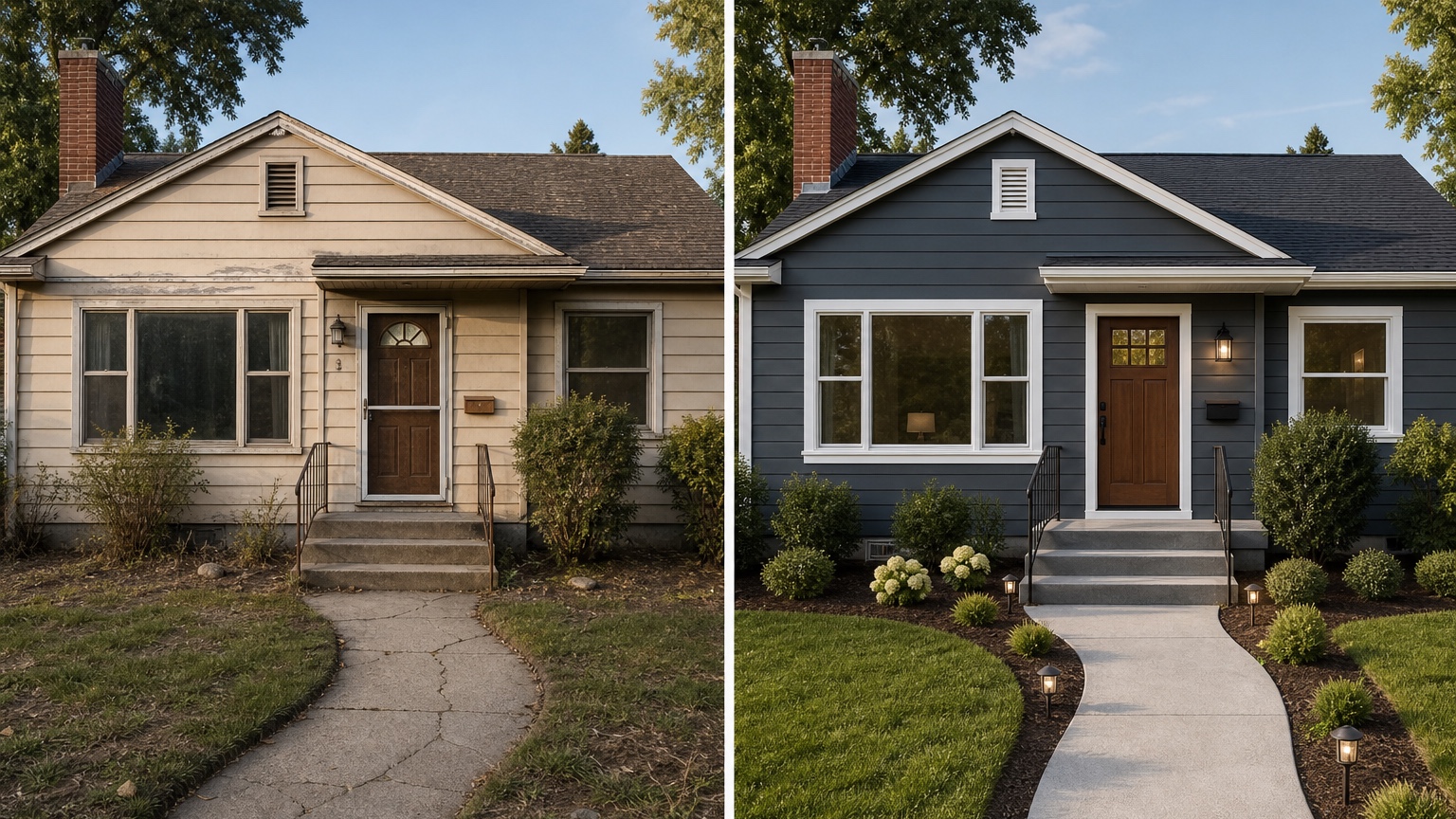
Siding usually sets the largest visual field. Its color, profile, texture, and accent placement affect every other exterior decision. Horizontal lap siding can calm a busy facade. Board and batten can add vertical rhythm. Shake or shingle accents can soften gables. Dark siding can feel modern, but it can also make a small home feel heavy if the roof and windows do not support it.
Paint and trim control contrast. White trim can brighten a facade, while dark trim can sharpen it. Low-contrast trim can make the house feel quiet and cohesive, but it may also flatten important architectural details. A visualizer helps compare these relationships on the real photo instead of relying on swatches alone.
Doors and windows are focal points. A new front door can warm up an exterior without changing every material. Black windows can modernize a home, but if the roof is brown, the brick is warm, or the siding is low contrast, they may need support from other accents. Garage doors need special care because they often occupy a large percentage of the facade. A dramatic garage door can steal attention from the entry; a quieter garage finish can make the front door more important.
The remodel preview should make these tradeoffs visible. If the concept looks good only because the AI replaced every fixed feature, it is not a useful material comparison. If it shows the same house with a coordinated siding, paint, trim, door, and window direction, it becomes a practical planning reference.
Prompt brief for stronger remodel visualizer results
A strong prompt starts with the desired outcome: a realistic exterior remodel concept that can guide a homeowner and remodeler conversation. It should name what changes, what stays, and how practical the result should be.
For a balanced remodel concept, try:
“Create a realistic exterior remodel preview for this home. Preserve the existing roofline, roof color, window openings, driveway, porch footprint, masonry, and landscaping structure. Update the siding, trim, front door, garage door finish, and window color direction so the facade feels cohesive and buildable. Keep the result suitable for a remodeler consultation.”
For a siding, paint, door, and window comparison, try:
“Generate three controlled exterior remodel options on the same house photo: one safe refresh, one practical upgrade, and one bolder curb appeal version. Keep the roof, house shape, driveway, porch size, and masonry unchanged. Compare siding color, trim contrast, front door style, garage treatment, and window color.”
For a contractor or remodeler scope boundary, try:
“Focus on siding, paint, trim, doors, windows, garage door appearance, gutters, and entry details. Do not change roof pitch, add rooms, move windows, rebuild the porch, replace the driveway, or create major landscaping unless requested.”
If HOA rules, structural limits, weather exposure, product warranties, budget, or quote accuracy matter, include those constraints in the prompt. Remodel visualization should reduce uncertainty; it should not create a concept that cannot survive the first site visit.
Use a comparison framework for remodel decisions
The best remodel visualizer workflow compares safe, practical-upgrade, and bold versions. The safe version protects resale, neighborhood fit, and budget discipline. It might keep the roof and masonry unchanged, use a neutral siding color, refresh trim, and improve the door. This version answers whether a modest exterior package solves the curb appeal problem.
The practical-upgrade version should test the changes most likely to be quoted: new siding profile, cleaner trim, coordinated door and garage colors, and possibly a new window color direction. It should feel meaningfully improved without depending on major structural changes.
The bold version explores the edge of the homeowner’s taste. It might include darker siding, stronger trim contrast, black window direction, a warmer wood-look entry, or more defined accents. The bold version is useful even if it is rejected because it clarifies the boundary. The homeowner can say, “We like the cleaner trim and door, but the dark siding is too much.”
Score each option by usefulness, realism, cost, and fit. Usefulness asks whether the image clarifies the decision. Realism asks whether it respects the house. Cost asks whether the implied scope matches the budget. Fit asks whether the design belongs with the roof, masonry, architecture, and neighborhood. The best option is not always the most dramatic image. It is the one that helps the project move forward fastest.
Review the output before anyone trusts the image
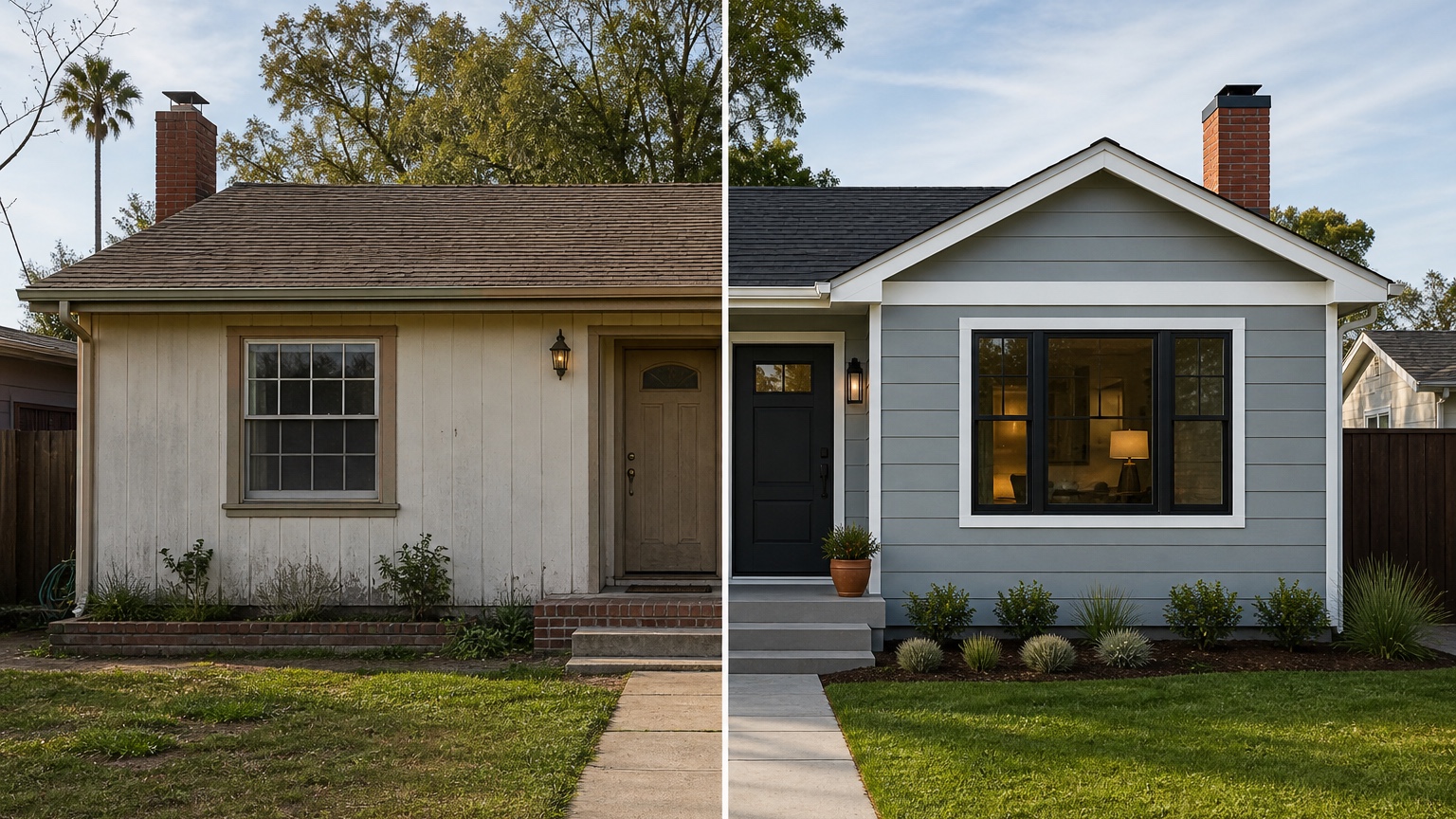
AI exterior remodel previews can look finished while hiding problems. First, check scale. Siding patterns should be plausible. Trim should line up with windows and corners. Doors should fit openings. Window color changes should not quietly move or resize the windows.
Second, check material boundaries. New siding should not run through brick or stone. Paint should not bleed into glass or roofing. Trim should not vanish around windows. If the AI added a new porch roof, changed the roof pitch, or removed a structural column without being asked, treat the result as inspiration rather than a project reference.
Third, compare lighting and color. A remodel concept should feel like it belongs in the source photo. If the visualizer changes the time of day, weather, or surrounding landscape too much, the color and material read may be misleading. For major paint or siding decisions, physical samples still need to be viewed on the home in real daylight.
Finally, compare the concept against practical constraints. A remodeler still needs to inspect wall condition, moisture issues, flashing, sheathing, window and door integration, trim replacement, code requirements, access, product availability, and budget. The image is a planning tool, not a field measurement or construction drawing.
Mistakes that make exterior remodel previews generic
The first mistake is using a weak photo. If trees block the facade, the entry is hidden in shadow, or the house is cropped, the preview will guess at important details. Retake the photo before making decisions.
The second mistake is mixing unrelated changes. New roof, new windows, new porch, new siding, new landscape, new driveway, and new paint may be a real whole-home remodel, but it should not be jammed into one vague prompt. Build the concept in stages so each decision stays clear.
The third mistake is ignoring the original architecture. A compact ranch, brick colonial, split-level, Craftsman, and stucco home each respond differently to the same material palette.
The fourth mistake is skipping the practical handoff. If the image is promising, write down what it means: siding direction, paint family, trim contrast, door style, window color, garage treatment, fixed materials, and open questions. Without that note, the concept can become just another pretty image.
How to use RedesAIgn for exterior remodel visualization
In RedesAIgn, upload the clearest exterior photo and choose the Exterior Editor. Begin with a scope-aware prompt that preserves the home’s structure and fixed materials. Generate a safe version first, then revise the prompt to test a practical upgrade and a bolder curb appeal direction.
Use prompts, remix images, saved prompts, and history to compare revisions without losing track of what changed. If a homeowner likes the siding but dislikes the garage treatment, revise that element. If the door is right but the window color feels too harsh, soften the window direction. The fastest workflow is not random generation; it is controlled comparison.
When a concept is strong, save it as a facade before-and-after reference and add a short material brief. Share that reference with a remodeler, painter, siding contractor, window and door professional, realtor, or client when execution matters. Be clear that the image is a design preview and that product selection, measurements, quotes, and technical details still need professional confirmation.
For narrower decisions, use the AI siding visualizer workflow for siding replacement and the AI exterior paint visualizer workflow for color testing. For broader idea generation from a photo, see AI exterior design from photo.
When you are ready to compare exterior remodel options on your own home, try RedesAIgn for free with 5 free AI credits and no credit card required. One-time credit packs are available if you need additional generations.
FAQ: AI exterior remodel visualizer
What can an AI exterior remodel visualizer show accurately?
It can help preview visual combinations of siding, paint, trim, doors, windows, garage doors, and curb appeal details on a real house photo. It is most useful when the prompt preserves fixed architecture and changes only the intended remodel elements.
What still needs samples, measurements, and professional review?
Material samples, paint colors, window and door products, siding profiles, measurements, installation details, substrate condition, code requirements, HOA approval, permits, repairs, and final quotes all need real-world review.
How should remodelers use the selected concept?
Use it as a conversation reference. Turn the image into a brief that states what changes, what stays, what needs pricing, and what details must be confirmed during inspection or design development.
How should homeowners choose between options?
Compare each version by realism, cost, curb appeal, neighborhood fit, and how clearly it supports the next action. The best image is the one that makes the remodel scope easier to discuss and quote.
Try these prompts in redesAIgn
Refresh this house exterior with modern paint, black trim, and updated front door lighting.
Improve curb appeal with new siding color, shutters, and a clearer entry path.
Keep the roofline, but modernize windows, porch posts, and exterior finishes.
Related guides
- AI Exterior Design App for Homeowners and Remodelers
Use RedesAIgn as an exterior design app to preview paint, trim, roof, and curb appeal ideas from real house photos before you renovate.
- AI Exterior Before and After: Generate Home Makeover Concepts
Create AI exterior before and after previews from real home photos to compare curb appeal concepts, renovation scope, materials, and client options.
- AI Black Windows Exterior Ideas: See the Look on Your House
Use AI black windows exterior previews to see black frames, trim contrast, siding, roof color, and curb appeal on a real home photo before replacement.
- AI House Color Visualizer: Test Exterior Color Palettes From a Photo
Use an AI house color visualizer to compare exterior paint palettes, trim contrast, undertones, and curb appeal from a real home photo before painting.
- AI Exterior Design Online: Redesign a House Photo in Minutes
Use AI exterior design online to preview siding, paint, trim, doors, windows, and curb appeal ideas from a real house photo before renovating.