AI 3D Floor Plan Generator for Early Design Presentations
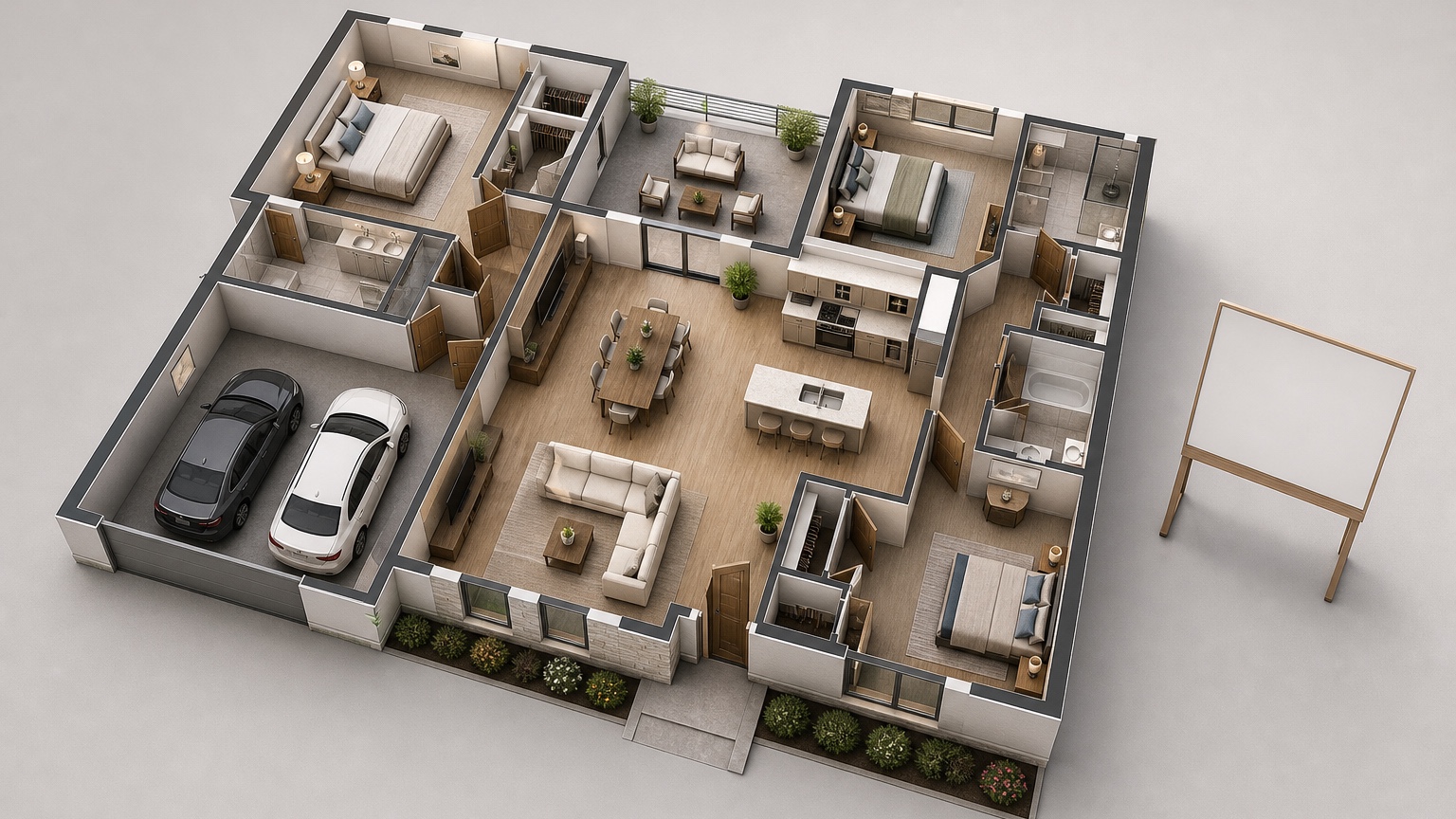
An AI 3D floor plan generator can turn an early layout idea into a visual that clients, buyers, developers, and internal stakeholders understand quickly. A flat plan may be accurate, yet many people still struggle to imagine room relationships, furniture scale, or the difference between two layout options. A simple 3D plan bridges that gap before a full rendering package is justified.
The best use is early presentation, not final documentation. Architects can show a client how a concept is organized before developing drawings. Realtors can explain a listing layout when photos alone do not show flow. Developers can compare unit plans, amenity spaces, or renovation scenarios for non-technical decision-makers. The value is speed and clarity, as long as everyone understands what the visual does and does not prove.
RedesAIgn can help with prompt-based generation, remix and reference images, saved prompts, history, and 10 AI editors for visual exploration. New users can test the workflow with 5 free AI credits and no credit card. If more options are needed, one-time credit packs are available. Generated images can support commercial presentation workflows where relevant, but dimensions, code compliance, accessibility, construction details, and sales claims must be verified separately.
Use 3D plans when the audience needs orientation
A 3D plan is useful when people are asking orientation questions: Where is the primary bedroom in relation to the living room? Does the kitchen feel connected or tucked away? Is the balcony reached through the bedroom or living area? How many workstations fit in the office concept? Why does option B feel more spacious even if the area is similar?
Architects often answer those questions with drawings, but early clients may not read drawings fluently. A 3D plan can make the meeting more efficient because the client reacts to spatial relationships instead of trying to decode symbols. Realtors can use the same advantage for properties with odd circulation, split-level layouts, converted basements, or new developments that lack finished photography.
Decide what the visual must explain before generating it. A listing visual might highlight room order, furniture potential, and natural entry path. A design pitch might emphasize program zones and the concept logic. A development explainer might compare two unit types on one board. Those are different outputs, so the prompt should not be identical.
If your immediate task is renovation flow rather than presentation imagery, read AI floor plan visualizer. For room-level styling after the plan is accepted, AI interior design app and AI room design generator are better next steps.
The input brief: what to include before generating
A presentation-ready 3D plan starts with a concise brief. Include property type, audience, plan status, room list, fixed relationships, furniture assumptions, and what should remain understated. If you already have a plan, sketch, diagram, or reference image, use it to anchor the generation. If not, write the layout sequence in words: entry, kitchen, living, bedrooms, baths, storage, outdoor space, and any important adjacency.
For an architect, the brief might say: “Create a clean 3D floor plan concept for an early client presentation. Show a single-level 1,200-square-foot apartment with entry leading to open kitchen and living area, two bedrooms on the quieter side, two baths, laundry closet, balcony off living room, and built-in storage near entry. Use simple contemporary furniture and neutral materials. Keep the focus on spatial organization, not luxury finishes.”
For a realtor, try: “Create an easy-to-read 3D floor plan visual for a property listing explainer. Show how the living room, dining area, kitchen, two bedrooms, bathroom, and patio relate. Use realistic furniture scale, clear walking paths, and warm neutral styling. Avoid adding rooms, windows, or premium features not shown in the provided plan.”
That final sentence is important. A 3D plan can accidentally overstate a property if it invents larger windows, a different view, custom storage, or furniture that would not fit. Keep prompts conservative when the visual supports marketing or sales.
Build the first presentation board around one message
Instead of presenting a pile of generated images, build the first board around one message. “This plan separates public and private zones.” “This listing has better furniture potential than the photos suggest.” “Option B improves entry storage without reducing the living area.” A focused message helps the audience evaluate the plan rather than judge the image like decoration.
A simple board can include a title, one main 3D plan, three callouts, and a short note about assumptions. For architecture, callouts might be arrival sequence, daylight zone, and private bedroom wing. For real estate, callouts might be entertaining layout, work-from-home corner, and patio connection. For development, callouts might be rentable bedroom count, efficient wet-wall grouping, and storage strategy.
Use furniture sparingly. Too much styling can distract from the plan and make the image feel like a finished interior package. A sofa, dining table, bed, desk, kitchen island, and storage pieces are usually enough to communicate scale. If a finish palette appears, keep it quiet unless finishes are part of the decision.
This is where RedesAIgn’s saved prompts and history help. Save the baseline prompt that produces the clearest orientation. Then remix presentation details without changing the plan logic: lighter flooring, simpler furniture, labels removed, labels added, top-down angle, slightly lower angle, or one version optimized for a slide deck.
Versioning for architects: compare without confusing the client
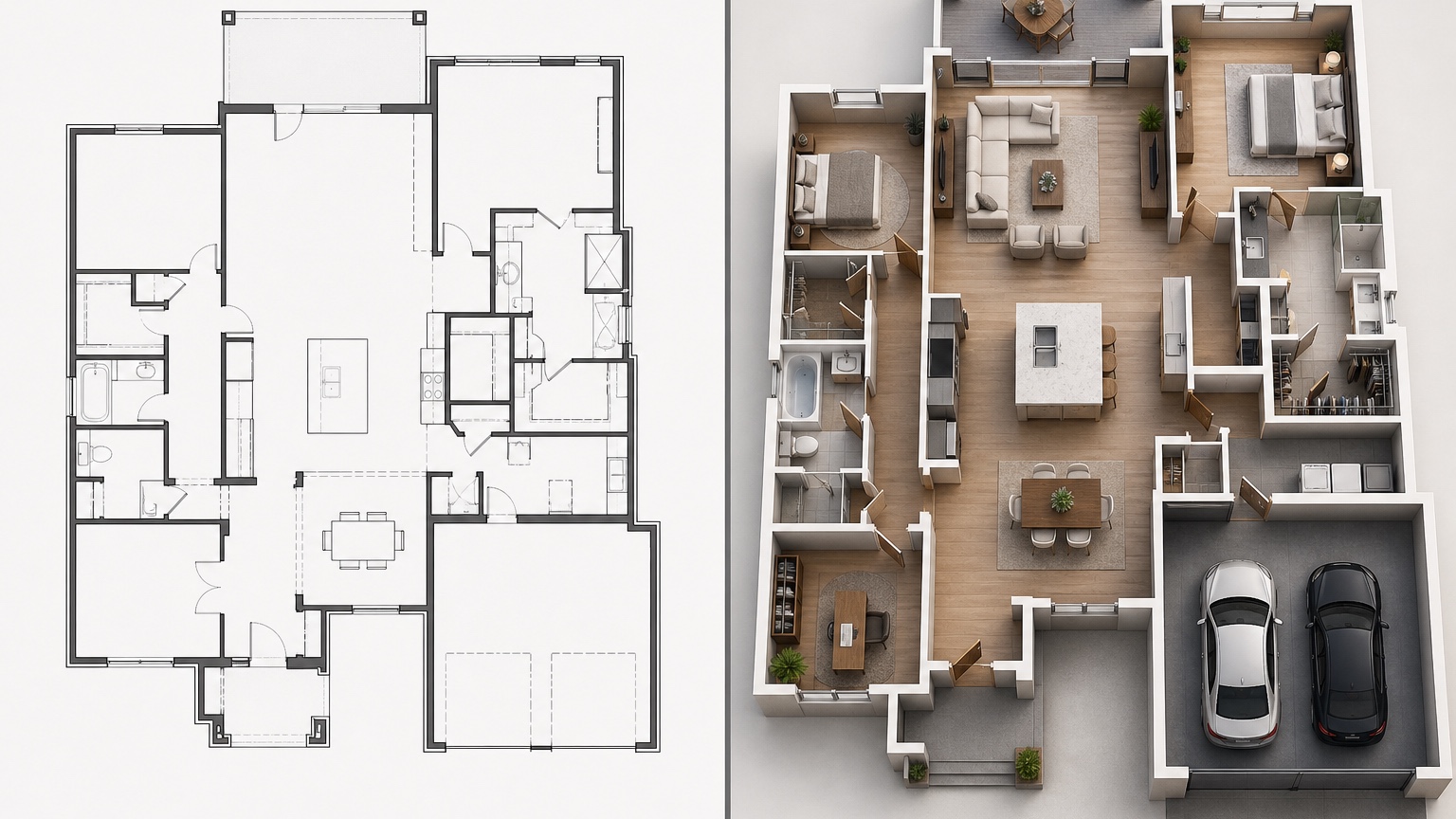
Architects and designers often need to compare options, but comparison can become messy if every version changes everything. Keep each 3D floor plan version tied to one planning move. Option A might show open kitchen and living. Option B might add a den near the entry. Option C might move storage to create a wider bedroom. If style, lighting, furniture, and camera angle change too, clients may choose the prettiest rendering rather than the best plan.
Use a consistent visual language: same view angle, same furniture level, same background, same label style, and similar material restraint. Then the differences are easier to discuss. A prompt can say: “Create three matching 3D floor plan versions with identical camera angle and neutral style. Vary only the kitchen island and dining relationship. Keep room count, window placement, doors, and circulation clear.”
After the first client reaction, avoid remixing all options equally. Choose the two strongest directions and refine the question. Is the den worth the smaller living room? Is the second bath layout better even if storage is reduced? Should the kitchen island face the view or the dining table? Small, named versions create a better decision trail than a long gallery of unrelated concepts.
Because RedesAIgn keeps saved history, you can return to the version that communicated best. That matters when a later remix looks more polished but quietly changes the layout. In early design presentations, continuity is more valuable than novelty.
Listing and development explainers need stricter guardrails
Real estate and development visuals have a different risk profile from private design studies. A buyer, renter, investor, or planning stakeholder may treat a polished 3D plan as a promise. That means the prompt and caption should avoid exaggeration. Do not imply a bedroom is legal if egress is uncertain. Do not show a king bed if only a full bed fits. Do not add a home office, laundry, island seating, or outdoor furniture unless the plan supports it.
For listings, use 3D plans to explain layout flow, not to hide limitations. If the hallway is narrow, keep it narrow. If the kitchen is compact, show compact furniture. If the second bedroom works best as an office, say so carefully: “shown as possible office use, subject to buyer measurement and needs.” That honesty builds trust and reduces disputes.
For developers, comparison boards can show unit mix, amenity flow, or renovation potential. Use labels for program areas and keep finishes generic unless selections are confirmed. If a visual is for pre-leasing, investor discussion, or municipal conversation, add a note that it is an illustrative concept based on current assumptions.
Commercial use can be relevant for architects, realtors, marketers, and developers using RedesAIgn outputs in presentations, but the user still needs to verify rights, claims, measurements, and local disclosure rules for the context. The AI image is a communication aid, not a substitute for professional documents.
Prompt patterns for clearer 3D floor plan visuals
Good prompts for 3D plans are direct and restrained. Begin with the role of the image: “early client presentation,” “property listing explainer,” “developer comparison board,” or “internal stakeholder review.” Then name the layout, what must not change, the level of furniture, and the tone.
For a pitch: “Generate a clean, presentation-ready 3D floor plan for an early residential design pitch. Show the plan from a clear top-down angled view with simple furniture, readable room zones, neutral materials, and realistic circulation. Emphasize public-to-private flow and daylight. Avoid photorealistic luxury styling.”
For a stakeholder board: “Create two comparable 3D floor plan visuals for a small mixed-use office concept. Keep camera angle, furniture density, and label style consistent. Version one shows open collaboration in the center; version two shows enclosed meeting rooms along one side. Do not change exterior walls, stairs, elevators, restrooms, or entry points.”
For a listing: “Create a conservative 3D floor plan visual for a real estate listing. Use the provided plan as the source. Show realistic furniture footprints and simple neutral finishes. Do not add windows, rooms, built-ins, appliances, outdoor views, or premium materials not supported by the source.”
Reference images can guide graphic style, not layout truth. If you upload a polished board for inspiration, specify: “Use this reference only for visual clarity, color restraint, and label style; preserve the provided plan relationships.”
Review the output before anyone else sees it
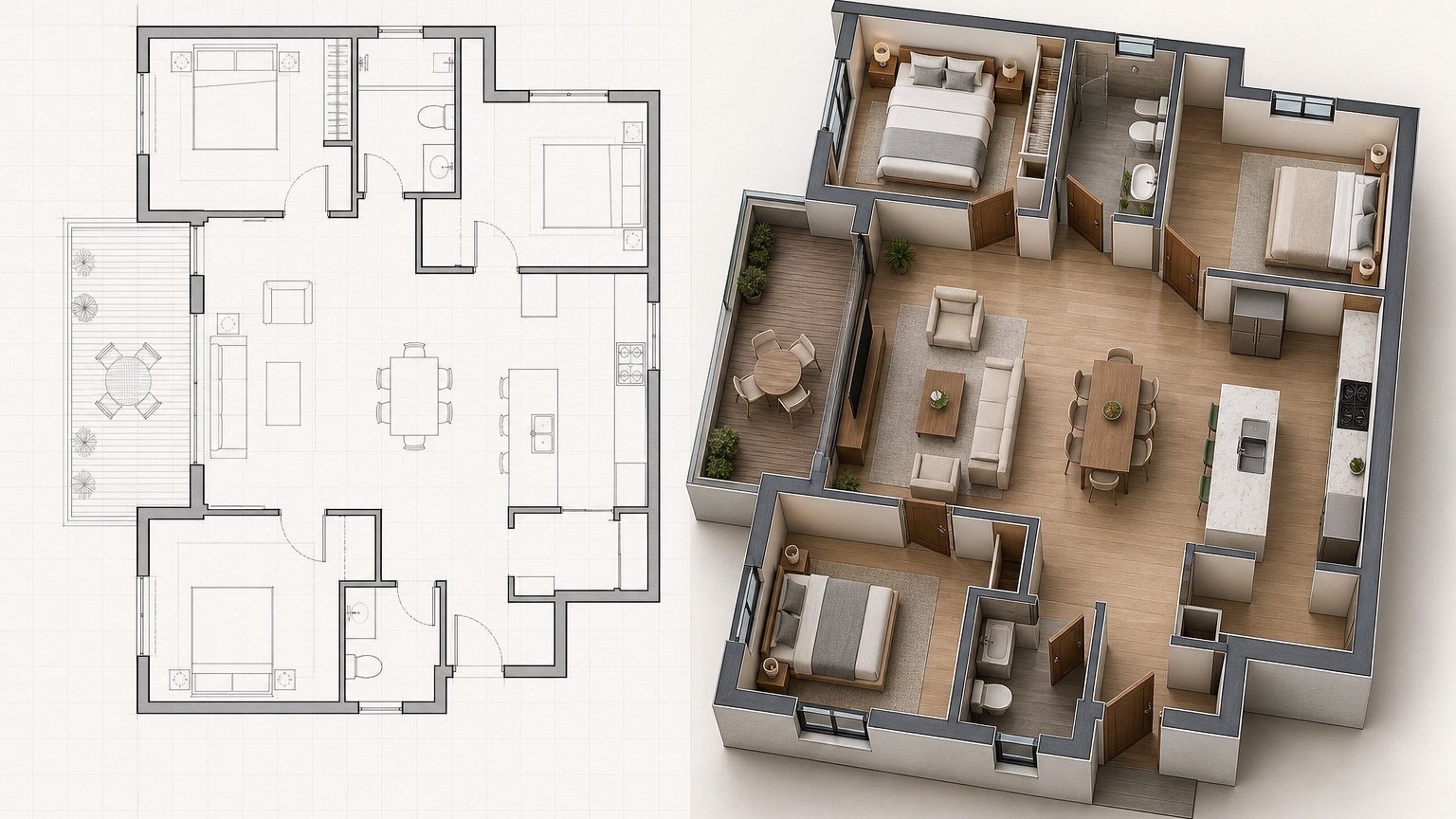
Before sharing a generated 3D plan, review it like a risk checklist. Did the room count stay correct? Are doors and windows in the right general locations? Did stairs, elevators, plumbing rooms, balconies, or closets move? Are furniture pieces believable for the room size? Did the image create a view, fireplace, island, walk-in closet, or extra storage that was not part of the plan?
Then check communication quality. Can a non-designer understand the entry point? Are public and private zones clear? Are labels readable if the image is placed in a slide deck? Does the plan look too finished for the project stage? Is there a caption explaining whether the image is conceptual, illustrative, or based on preliminary information?
If the answer is mixed, remix the visual before presenting. Ask for fewer decorative details, a more neutral palette, consistent camera angle, or clearer labels. It is better to show a plain accurate explainer than a dramatic image that creates false expectations.
For architects and designers, keep the measured plan nearby during review. For realtors and developers, keep the source plan, measurements, listing notes, or disclosure language nearby. The 3D plan should support those facts, not replace them.
A focused RedesAIgn workflow for early presentations
Use the first 5 free AI credits to test whether the generator can communicate your plan clearly: one baseline 3D plan, one simplified furniture version, one labeled version, one stakeholder-friendly remix, and one conservative final candidate. No credit card is required for that first check.
If the workflow is useful, buy one-time credit packs only when you have a presentation reason: compare two layouts, simplify a board, align camera angles, adjust labels, or create a separate version for a listing versus an investor deck. Do not spend rounds polishing furniture if the layout decision is still unresolved.
A good next step for this workflow is simple: create the plain version first. If it explains the plan without dramatic finishes, then a more polished version may be worth making. If the plain version cannot explain the layout, the problem is probably the brief, the source plan, or the design logic. Fix that before turning up the rendering quality.
For next steps, pair the 3D plan with more specific visuals only after the audience agrees on the layout. Use AI interior design ideas for style directions, AI virtual staging for listing-room presentation, and AI furniture visualizer when scale-sensitive pieces need closer review. The 3D plan should make early decisions easier, not promise a finished project before the work is ready.
FAQ: AI 3D floor plan generator
What is an AI 3D floor plan generator best used for?
It is best used for early presentation visuals that explain layout, room relationships, furniture potential, and option comparisons for clients, buyers, developers, or internal stakeholders.
Can architects use AI 3D floor plans in client presentations?
Yes. Architects can use them for early concept communication and comparison boards, while still relying on measured drawings, codes, specifications, and professional judgment for the actual project.
Are AI 3D floor plans safe for real estate listings?
They can be useful if they are conservative and clearly illustrative. Do not show features, room uses, views, furniture sizes, or legal claims that the property does not support.
How can I test RedesAIgn for 3D floor plan visuals?
Start a RedesAIgn test with the 5 free AI credits and no credit card required. Use those first rounds for a baseline, a simplified version, a labeled version, and a conservative presentation candidate before buying one-time credit packs for more iterations.
Try these prompts in redesAIgn
Convert this floor plan into a bright open-concept living area with a kitchen island and natural light.
Show furniture placement for a 2-bedroom layout with a dining nook and entry storage.
Visualize this blueprint as a modern ADU with compact kitchen, loft bed, and bathroom.
Related guides
- AI Floor Plan With Furniture: See How Rooms Could Work
Add furniture to floor plans with RedesAIgn so scale and circulation stay realistic before you buy pieces or rearrange a real room layout.
- AI Kitchen Floor Plan Visualizer for Remodel Layout Ideas
Visualize kitchen floor plans with AI before remodeling. Compare work triangles, islands, storage, and circulation with realistic furniture scale.
- AI Open Concept Floor Plan Ideas From Existing Layouts
Compare open-concept floor plans with AI before removing walls. Preview kitchen, living, and dining flow plus furniture zones and circulation.
- AI ADU Floor Plan Visualizer for Backyard Homes and Rentals
Preview ADU floor plans with AI for backyard homes and rentals. Compare compact layouts, baths, kitchens, and access before permitting talks.
- AI Basement Floor Plan Design: Visualize Finished Basement Layouts
Design finished basement layouts with AI floor plans. Compare recreation, guest, office, and bath options before construction estimates.