AI Basement Floor Plan Design: Visualize Finished Basement Layouts
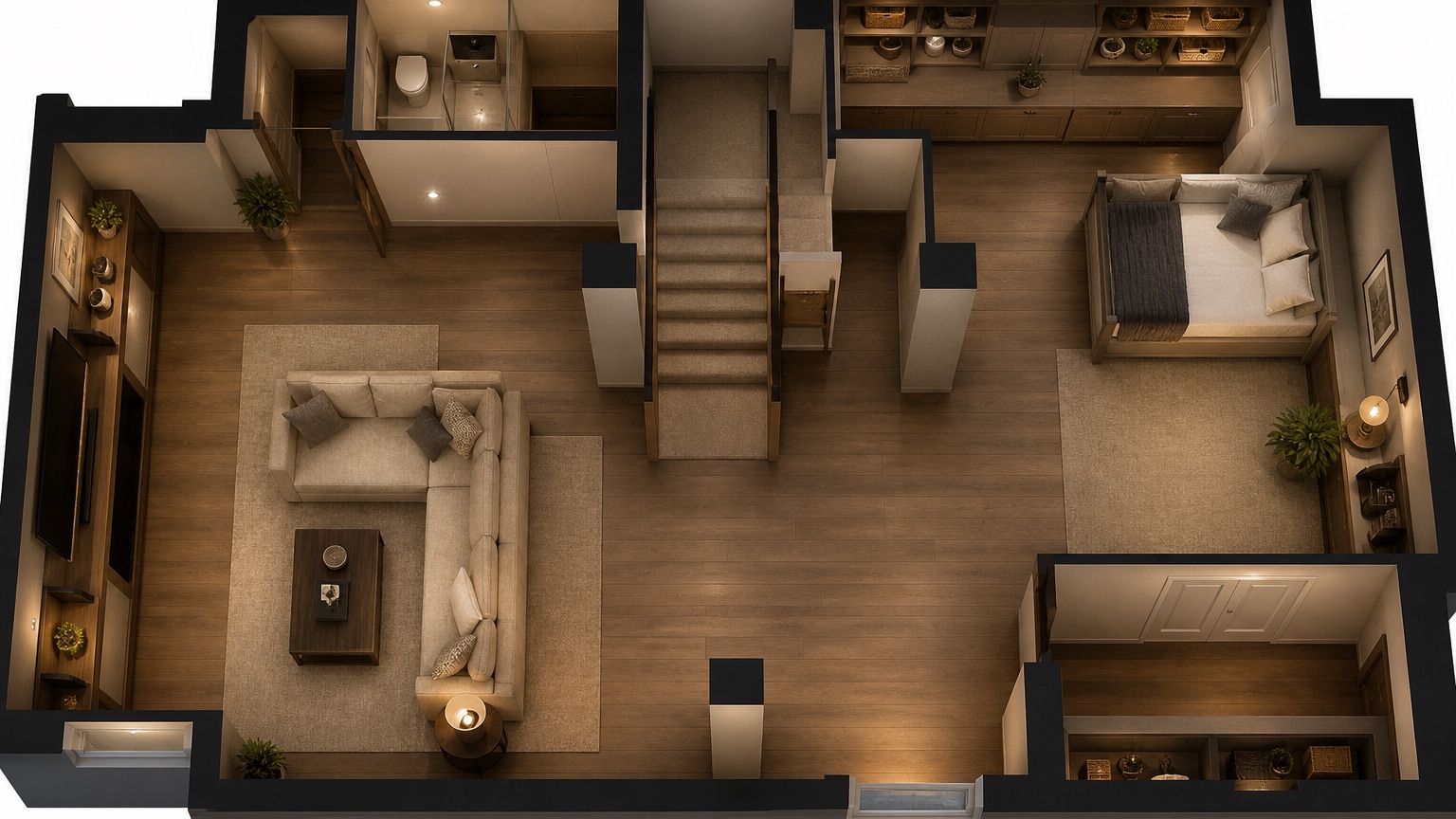
A basement visual should expose below-grade constraints instead of hiding them: stairs, posts, beams, moisture, egress, utilities, and ceiling height. It is a planning agenda for a site walk, not a construction promise.
Use a remodel risk checklist frame: document fixed obstacles, compare room mixes, then ask which comfort, code, and construction questions still require a professional visit.
RedesAIgn can create quick basement comparisons with prompts, reference images, saved prompts, history, and specialized editors. Start with 5 free AI credits and no card to decide whether visuals improve the remodel discussion.
Map the basement problems before style
Basement design starts with constraints that upstairs rooms rarely have.
List the stair landing, low beams, support posts, utility room, sump or drain locations, ceiling height changes, window wells, egress opportunities, and any damp zones. A visual that ignores those conditions can make a finished basement look easy while hiding the very issues that drive cost.
For basement review, mark ceiling conflicts, egress uncertainty, moisture risk, mechanical access, and the room mix that deserves a contractor walk-through. Attractive finishes matter after those items survive.
Choose the room mix deliberately
The best basement plan usually balances one primary use with two support functions.
A family lounge needs storage and bathroom access. A guest suite needs privacy and egress. A rental concept needs kitchenette, entry logic, and utility separation. A gym needs ceiling clearance and durable flooring. Give RedesAIgn the intended room hierarchy so the output does not turn every corner into generic seating.
For basement review, mark ceiling conflicts, egress uncertainty, moisture risk, mechanical access, and the room mix that deserves a contractor walk-through. Attractive finishes matter after those items survive.
When the basement option becomes part of a larger remodel, AI remodel floor plan visualizer and AI floor plan rendering can frame broader scope conversations.
Test circulation around fixed obstacles
Columns, stairs, and mechanical closets are the real layout governors.
Generate a version that keeps mechanical space generous, a version that hides columns in built-ins, and a version that separates noisy recreation from quiet work or sleep. Check whether paths pinch near stairs, whether doors collide, and whether furniture placement feels plausible around posts.
For basement review, mark ceiling conflicts, egress uncertainty, moisture risk, mechanical access, and the room mix that deserves a contractor walk-through. Attractive finishes matter after those items survive.
Review construction-readiness without pretending it is engineering
AI visuals make basement tradeoffs easier to discuss, but they cannot see hidden structure or moisture.
Use each output to write questions for the contractor: where does egress go, what walls need framing, what ceiling drops are likely, how is water managed, where are returns and supplies, and what permits apply. The image should create a better site walk, not replace one.
For basement review, mark ceiling conflicts, egress uncertainty, moisture risk, mechanical access, and the room mix that deserves a contractor walk-through. Attractive finishes matter after those items survive.
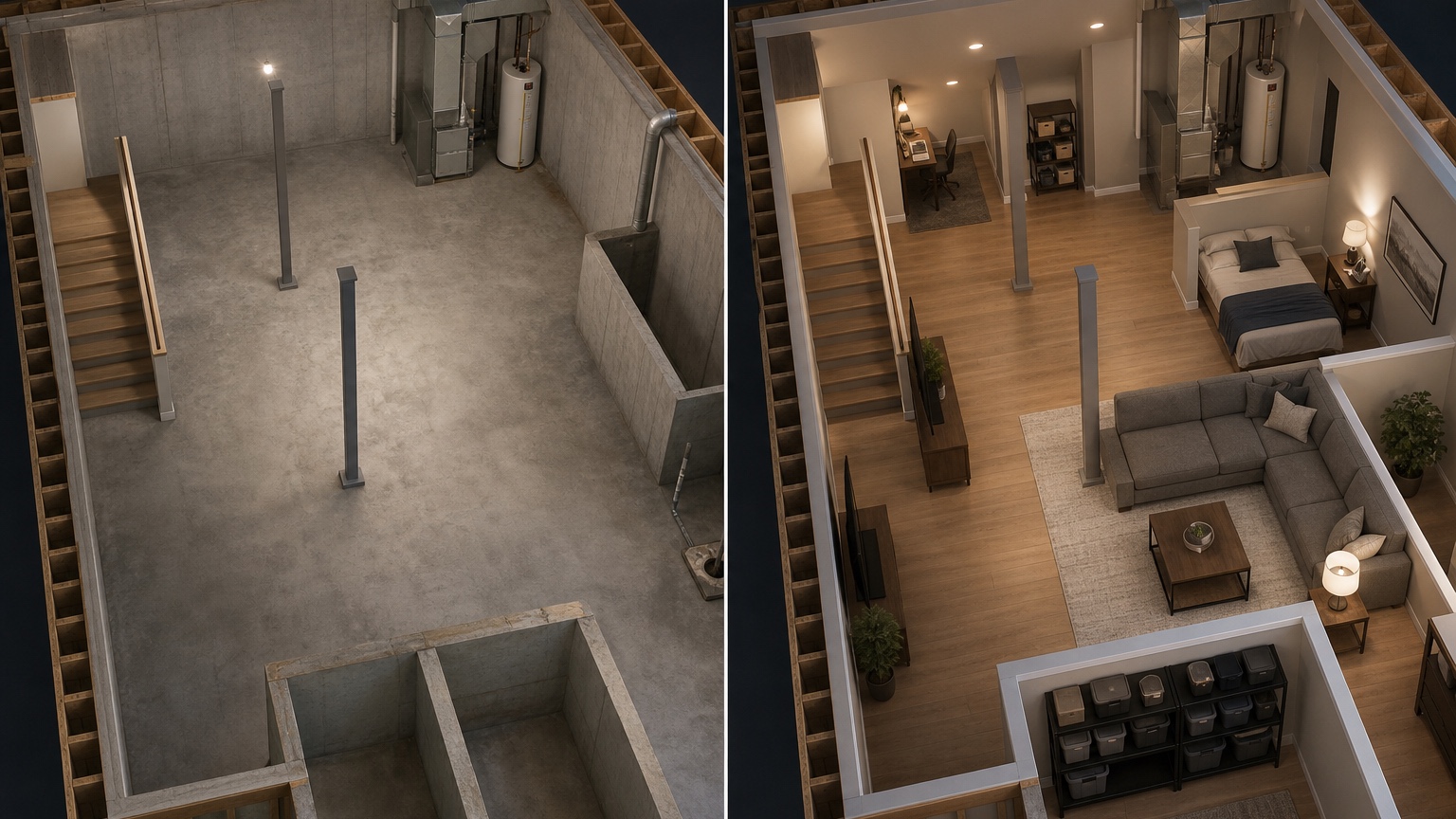
Turn the strongest concept into a scope board
A basement concept becomes useful when everyone can name the next inspection or drawing task.
Save the prompt, note what changed, and attach the image to a short scope: desired rooms, fixed mechanical areas, unknown code items, and finish mood. That keeps visual excitement connected to real renovation sequence.
For basement review, mark ceiling conflicts, egress uncertainty, moisture risk, mechanical access, and the room mix that deserves a contractor walk-through. Attractive finishes matter after those items survive.
A practical RedesAIgn workflow for this decision
For basement concepts, start with the stair, columns, mechanical access, and desired primary use visible. Then test guest-suite, lounge, and storage-first alternatives. Save prompts by room mix and constraint so a contractor can connect each image to egress, ceiling, utility, and moisture questions. Use the basement output as a walkthrough agenda while moisture, egress, electrical, HVAC, and framing questions move to qualified trades.
Review the concept before anyone acts
A basement concept also needs a comfort pass. Ask whether the finished rooms would feel dry, bright, safe, and intentional. Low ceilings may need simpler furniture and cleaner lighting. Support posts may become storage walls, banquette edges, desk dividers, or media built-ins instead of awkward obstacles. Mechanical rooms should remain accessible rather than being visually erased. If the image proposes a bedroom, guest suite, or rental use, mark egress and privacy as unresolved until a professional checks them. If it proposes a gym, workshop, or playroom, consider flooring, noise, ventilation, and durable storage. The best AI basement image is not the one that hides every constraint; it is the one that makes constraints easier to discuss during the next walkthrough.
What to save after the first generation
Archive the basement concept that respects the most fixed obstacles, and keep a failure that hid a post or blocked mechanical access. The handoff should list room priorities, egress uncertainty, ceiling issues, dampness concerns, and contractor inspection questions.
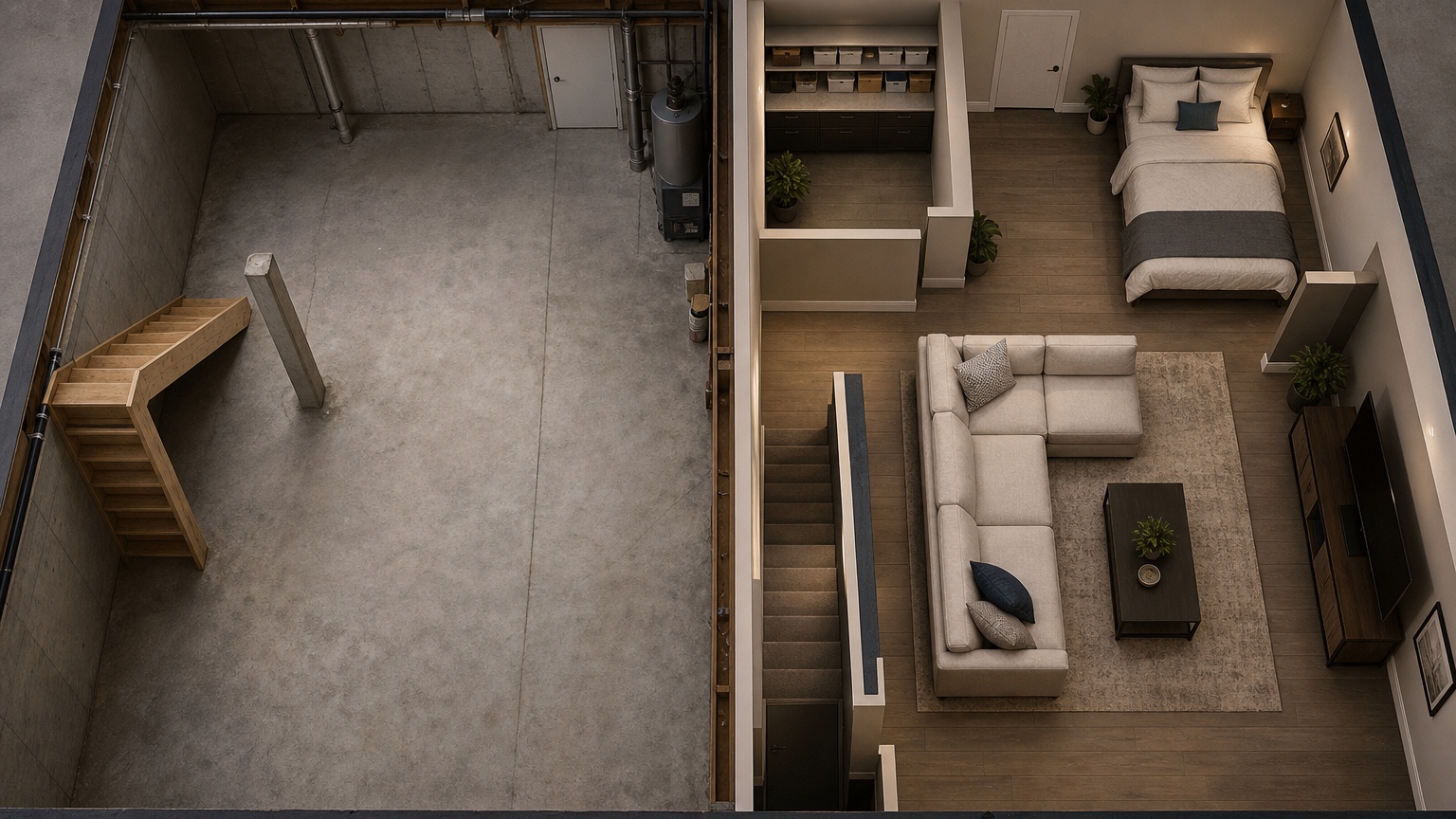
Basement remodel evaluation pass
After the first basement concepts appear, review them in the order a contractor might walk the space. Start at the stairs. Is the landing comfortable, and does traffic immediately collide with seating or storage? Move to structural posts and beams. Are they integrated into walls, cabinets, play zones, or seating edges, or did the image pretend they vanished? Check the mechanical area next. A finished lower level still needs access for service, filters, shutoffs, panels, sump equipment, and future repairs. Then review windows, window wells, and any possible bedroom claims. If sleep space is implied, egress and code questions become urgent.
Comfort deserves its own pass. Basements often need stronger lighting plans, durable flooring, moisture-aware materials, acoustic separation, and clear storage for seasonal items. Ask whether the visual creates a room the household would actually use in February, after rain, or when guests stay overnight. The best AI option may be the one that keeps the mechanical zone visible, uses columns as dividers, and leaves enough unfinished or storage space to make the finished rooms feel intentional.
Use RedesAIgn history to compare the room mix rather than only the style. Save one prompt for family lounge, one for guest suite, one for rental possibility, one for gym or hobby use, and one for storage-first finishing. The sequence can reveal whether the basement is trying to do too much. When a concept survives, attach it to a contractor note listing egress, moisture, ceiling, HVAC, electrical, plumbing, and permit questions. That note turns the image into a practical next step.
Common basement prompt mistakes to avoid
Do not prompt for a polished entertainment room before telling the AI about posts, beams, utilities, stairs, ceiling height, and windows. Those constraints are not visual clutter; they are the facts that determine whether the finished basement works. A concept that hides them may impress a homeowner for five minutes and then collapse during the first contractor walkthrough.
Avoid asking for too many rooms at once. Many basements are more successful when one primary purpose is supported by storage, bath access, and lighting rather than squeezed into a bedroom, gym, theater, bar, office, and playroom. If the output feels crowded, create a simpler option and compare comfort, cost, and code risk.
Final handoff note
Before sharing the basement concept, create a walkthrough note that starts at the stairs and ends at the mechanical room. Mention which rooms matter most, what storage must remain, where water has appeared before, and which windows or exits need investigation. This note keeps the finished image tied to the physical basement. It also gives a contractor a faster way to explain what is simple, what is risky, and what should not be priced until the space is inspected.
A final basement sanity check is maintenance access. Finished walls, ceilings, and built-ins should not trap shutoffs, panels, pumps, filters, or cleanouts. If the image hides those access points, ask for a service-aware version before the concept is shared.
FAQ: AI Basement Floor Plan Design
Is AI basement floor plan design enough for a remodel permit?
No. It is a planning visual. Permits, egress, moisture control, structure, electrical, plumbing, and HVAC require professional review.
What basement details should be in the prompt?
Mention stairs, posts, beams, utilities, windows, ceiling height concerns, moisture zones, room priorities, and what cannot move.
Why try RedesAIgn for a basement layout?
RedesAIgn can quickly compare visual directions with prompts, reference images, saved prompts, and history, starting with 5 free AI credits.
Try these prompts in redesAIgn
Convert this floor plan into a bright open-concept living area with a kitchen island and natural light.
Show furniture placement for a 2-bedroom layout with a dining nook and entry storage.
Visualize this blueprint as a modern ADU with compact kitchen, loft bed, and bathroom.
Related guides
- AI Floor Plan With Furniture: See How Rooms Could Work
Add furniture to floor plans with RedesAIgn so scale and circulation stay realistic before you buy pieces or rearrange a real room layout.
- AI Kitchen Floor Plan Visualizer for Remodel Layout Ideas
Visualize kitchen floor plans with AI before remodeling. Compare work triangles, islands, storage, and circulation with realistic furniture scale.
- AI Open Concept Floor Plan Ideas From Existing Layouts
Compare open-concept floor plans with AI before removing walls. Preview kitchen, living, and dining flow plus furniture zones and circulation.
- AI ADU Floor Plan Visualizer for Backyard Homes and Rentals
Preview ADU floor plans with AI for backyard homes and rentals. Compare compact layouts, baths, kitchens, and access before permitting talks.
- AI Remodel Floor Plan Visualizer for Additions and Layout Changes
Visualize remodel floor plans with RedesAIgn to clarify addition, circulation, and scope before hiring pros or building the next phase.