AI Garage Door Visualizer: Preview Styles on Your Home
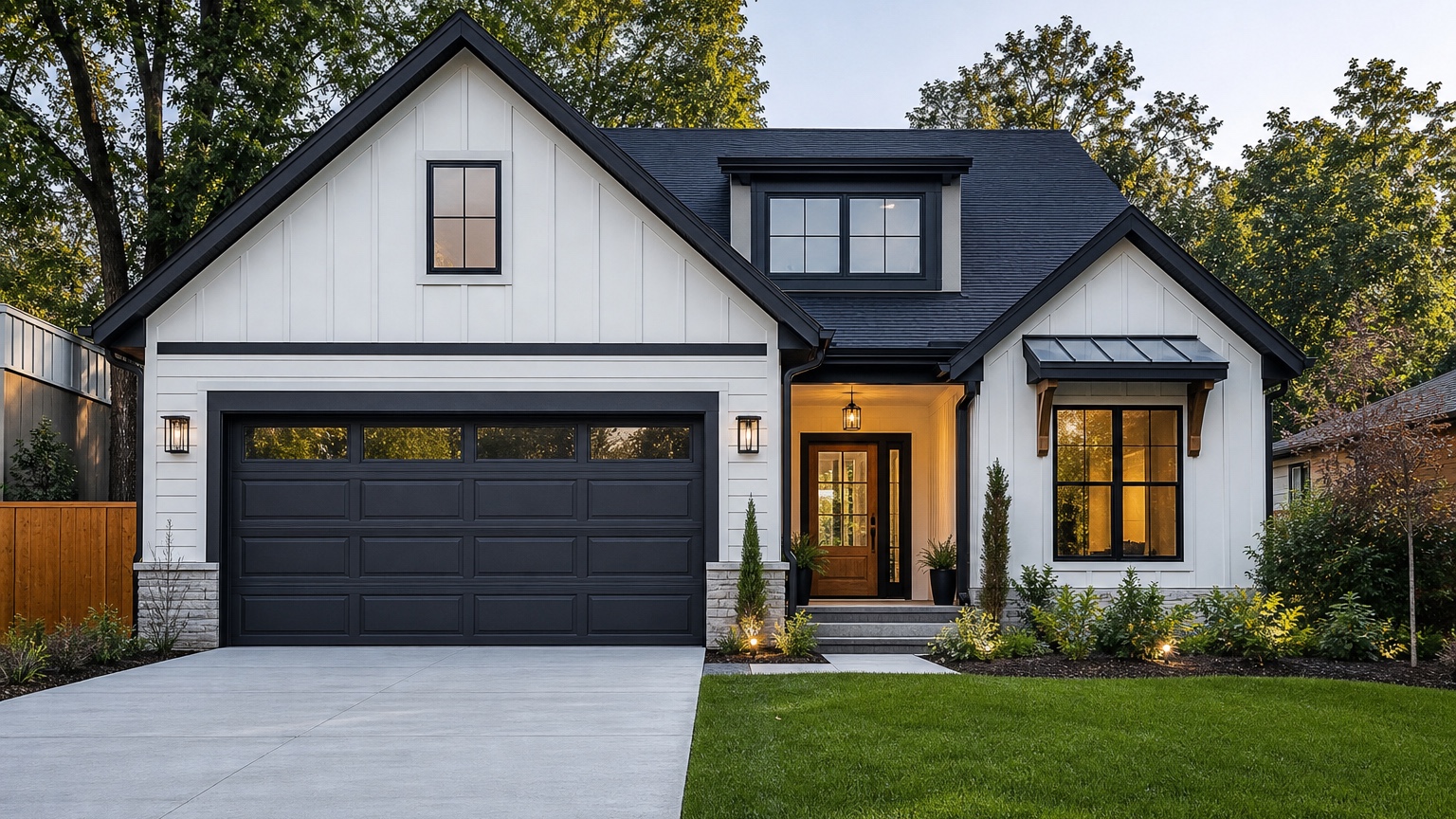
An AI garage door visualizer is most useful when it helps a homeowner or garage door company answer a specific curb-appeal question: which garage door style actually belongs on this house? The garage door is often one of the largest visible surfaces on a residential facade. Changing it can make the home feel newer, more balanced, and more intentional. Choosing the wrong style can make the front elevation look busy, heavy, or disconnected from the architecture.
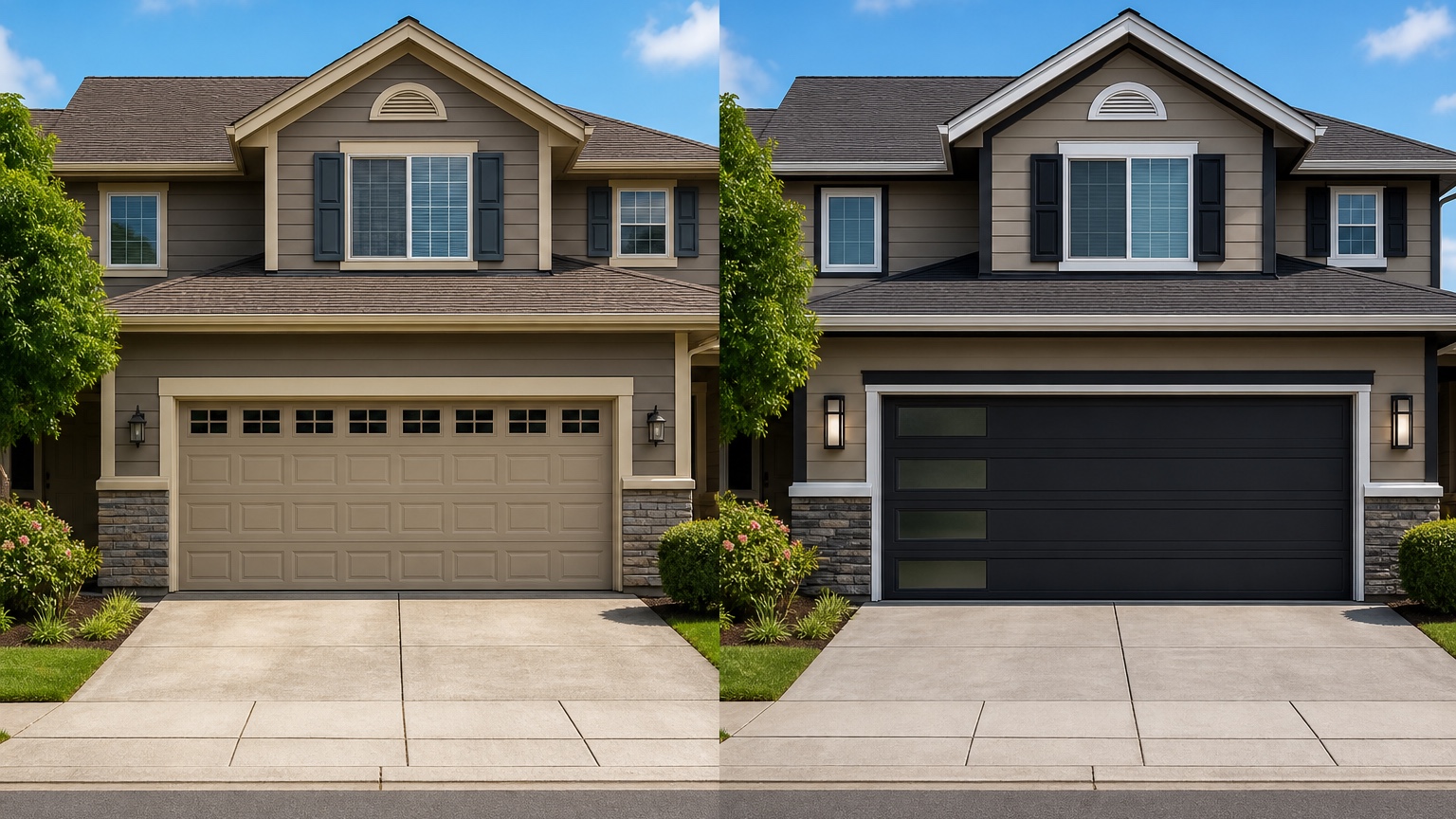
That is why a photo-based preview matters. Catalog images show doors in isolation. Showroom samples show materials up close. Neither tells you how a carriage-style door, flush modern panel, glass-and-aluminum design, raised-panel replacement, wood-look finish, window row, or darker color will affect the actual house from the street. A visualizer bridges that gap before anyone orders a door, schedules installation, or promises a customer that a style will work.
RedesAIgn can help with this early decision by letting you upload a home photo, prompt for realistic exterior changes, remix options, use reference images, save prompts, and review history. If you want to test garage door styles on your own home, start free with RedesAIgn and use your first 5 AI credits with no credit card required.
What an AI garage door visualizer should actually decide
The real decision is not “Which garage door looks best in a catalog?” It is “Which door supports this facade, this budget, this opening, and this curb-appeal goal?” A garage door must work with the roof, siding, trim, front door, driveway, windows, masonry, lighting, and overall proportions. On some houses, the best choice is a simple door that blends in. On others, a bolder door becomes the element that modernizes the entire exterior.
For homeowners, the visualizer reduces purchase anxiety. A garage door is expensive enough that guessing feels risky, especially if the current door dominates the front of the home. A preview can compare whether a white raised-panel door should stay white, whether a darker color helps, whether windows across the top add charm or clutter, or whether a wood-look finish warms up a plain facade.
For garage door companies, the visualizer supports better sales conversations. Customers often know they dislike the existing door but cannot describe the replacement. Showing controlled options on the customer’s actual home can move the conversation from vague preference to a specific proposal: panel style, color, window placement, and hardware level.
The output should lead to a practical next step. That might be “quote a flush panel door in dark bronze,” “avoid arched windows,” “match the front door with a warm wood-look finish,” or “keep the door quiet and spend more on entry lighting.” It should not be a generic exterior makeover that quietly changes the whole house.
Start with the opening and facade, not the door alone
A garage door visualizer works best when the prompt respects the existing opening. The AI should not casually enlarge the garage, change a single door into a double, remove structural trim, or invent a new driveway unless the project truly includes those changes. Most buying decisions are about replacing a door inside an existing opening, so the preview should preserve scale and edges.
Look at the facade before choosing a style. A small ranch with a low roofline may look better with a simple horizontal door than an ornate carriage design. A craftsman home may support divided windows and warmer materials. A contemporary exterior may benefit from a flush panel or narrow horizontal window band. A traditional home may need a door that feels classic without adding decorative hardware to every panel.
Also consider the front door. If the garage and entry are both visible, they should coordinate without becoming identical. A wood-look garage door and wood-look front door can add warmth, but on a smaller house that combination may feel heavy. A dark garage door can modernize the home, but if the front door and trim are also dark, the entry may lose hierarchy.
Materials and fixed exterior details
Garage door previews should focus on a few variables at a time: panel profile, color, material impression, window layout, decorative hardware, and surrounding trim. If every variable changes at once, it becomes hard to know why one option works.
Panel profile affects style more than many buyers expect. Raised panels can feel familiar and traditional. Recessed or shaker-style panels can feel cleaner. Flush panels can make the facade more contemporary. Plank or wood-look doors can add warmth, but the grain and tone need to coordinate with roof color, brick, stone, siding, and the front door.
Windows deserve a separate decision. A top-row window can lighten a large garage surface and make the door feel more custom. Vertical window stacks can suit modern designs. Arched or decorative grids can support some traditional homes, but they can look dated on others. In the preview, check whether the window shape repeats or clashes with the home’s existing windows.
Decorative hardware should be used carefully. Handles, hinges, and straps can complete a carriage-house look, but on a modern or transitional facade they may add unnecessary visual noise. If the garage already dominates the elevation, simpler is often better.
Prompt brief for stronger garage door results
A good prompt starts with the outcome: a realistic garage door preview. Name what should change and what must stay.
For a homeowner comparing common replacement options, try:
“Create a realistic garage door style preview for this home. Preserve the house, roofline, siding, windows, driveway, trim, landscaping, and garage opening size. Replace only the garage door with a clean modern panel door in a warm medium wood-look finish. Keep lighting, shadows, and proportions believable.”
For a garage door company preparing customer options, try:
“Show three realistic garage door options on the same house photo: one classic raised-panel door, one shaker-style door with top-row windows, and one flush modern door. Keep the garage opening, trim, driveway, roofline, siding, front door, and landscaping unchanged. Focus on door style, color, window placement, and curb appeal.”
If the project has constraints, include them. Mention HOA limits, existing trim color, desired insulation level only as a note for later quoting, manufacturer style families, color families the customer is considering, or a need to match the front door. The AI preview does not confirm product availability, but the prompt can keep the concept close to options that the company can actually discuss.
Generate controlled variations instead of one overloaded makeover
The easiest way to make a garage door preview useless is to ask for a full exterior renovation at the same time. If the AI changes siding, paint, landscaping, roof color, windows, and lighting, the garage door may look good only because the rest of the house changed. That does not help a buyer choose a door.
Use controlled rounds. Round one can compare door type: traditional raised panel, shaker, carriage-inspired, flush contemporary, or wood-look plank. Round two can compare color: match trim, match siding, contrast with siding, coordinate with front door, or use a warm wood tone. Round three can compare windows and hardware: no windows, top-row windows, narrow modern lites, subtle hardware, or no decorative hardware.
This process is especially helpful for garage door companies. A sales rep can show a customer that the door style, not just the color, changes the feel of the home. It also prevents the conversation from drifting into unrelated exterior work unless the customer wants a broader curb-appeal package.
Review the output before anyone trusts the image
AI garage door previews can look convincing even when small details are wrong. Start with scale. The door should fit the existing opening, align with the driveway, and keep the correct number of bays. If the image turns a single-car opening into a wider door or changes the header height, do not treat it as a buying reference.
Check edges next. The door panels should remain inside the frame. Trim should not melt into siding. Windows should align evenly. Hardware should sit in plausible locations. The driveway perspective should still point toward the same opening. If the AI warps these details, regenerate with a stricter prompt.
Lighting matters too. A dark bronze or black garage door can look sophisticated in a bright AI image but heavy in real shade. A wood-look door can appear warmer or more orange depending on sunlight. Use the preview to narrow direction, then confirm with physical samples, manufacturer colors, and real product photos.
Finally, compare the concept against practical constraints. The image cannot confirm door size, wind-load requirements, insulation value, opener compatibility, headroom, track condition, spring system, local code, HOA rules, lead time, or installation cost. It is a visual aid, not a technical inspection.
How garage door companies can use visual previews
For companies, the strongest use is consultative selling. Start by photographing the customer’s home from the driveway or street in clear daylight. Generate a small set of realistic options that match the customer’s budget and product families. Keep the first round simple: one safe replacement, one warmer upgrade, and one bolder option.
Then attach notes to each concept. A useful note might say: “Option A: classic white raised-panel replacement, lowest visual risk.” “Option B: shaker-style door with top-row windows, better alignment with front windows.” “Option C: medium wood-look flush door, strongest curb-appeal change, confirm HOA and product availability.” These notes keep the image tied to a real proposal.
Visual previews can also reduce back-and-forth. If a customer dislikes decorative hardware after seeing it on the house, remove it before quoting. If a wood-look door feels too heavy, test a lighter stain or a painted door. If windows make the garage feel busy, compare a no-window version.
What homeowners should decide before ordering
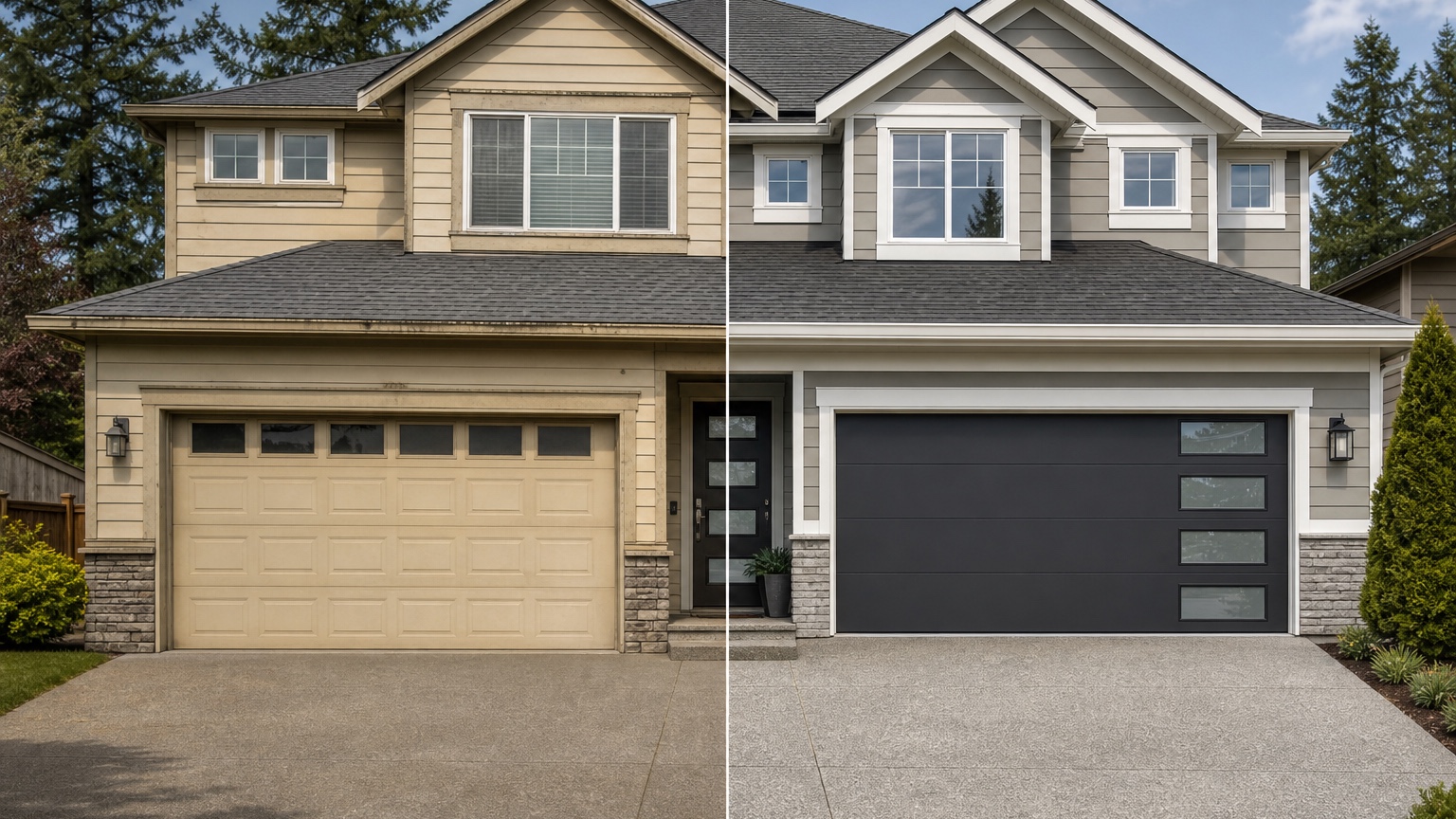
Before ordering, write down what the preferred image implies. Is the door color meant to match trim, contrast with siding, or coordinate with the front door? Are windows important for daylight, exterior style, or both? Does the preferred design require decorative hardware? Is the goal to make the garage recede or become a focal point?
Also decide whether surrounding elements need small updates. A new garage door may look better with repainted trim, updated lights, simplified house numbers, or a coordinated front door. If the door looks good only when the AI changes half the facade, ask for a door-only version before buying.
If you are planning a larger exterior refresh, compare the door workflow with AI exterior paint visualizer and AI siding visualizer.
Common mistakes that lead to the wrong garage door choice
The first mistake is choosing a door that fights the house. A heavy rustic carriage door can overwhelm a clean contemporary facade. A stark modern glass door can feel out of place on a modest traditional home. A bright white door can dominate dark siding when the goal was a calmer elevation.
The second mistake is ignoring window rhythm. Garage door windows should relate to the home’s windows. They do not have to match exactly, but the shape, grid pattern, and placement should feel intentional.
The third mistake is trusting screen color too much. AI images, monitors, product photos, and real finishes vary. Use the preview to choose a direction, then verify with manufacturer samples and your home’s actual daylight.
The fourth mistake is forgetting the installer’s review. A door that looks simple in a preview may still require measurement, hardware assessment, track review, opener compatibility checks, and code or wind-load confirmation. The visual decision comes before the technical confirmation, not instead of it.
How to use RedesAIgn for garage door previews
In RedesAIgn, upload a clear exterior photo and use the Exterior Editor for a garage-focused prompt. Ask it to preserve the home, opening size, driveway, roofline, siding, trim, windows, entry, and landscaping. Then specify the garage door variable you want to test: panel style, color, material impression, window row, or hardware.
Use remixing to refine one winning direction instead of restarting from scratch. If the wood tone is right but the windows are wrong, remix for windows only. If the panel style works but the color is too dark, revise the prompt for a lighter finish. Saved prompts and history are useful when comparing options with a spouse, HOA board, client, or sales team.
RedesAIgn includes 10 editors, and the garage decision may connect to a wider exterior plan. For whole-facade planning, read AI facade design generator or AI exterior design from photo. For resale-focused upgrades, the AI curb appeal generator workflow can help prioritize the garage door against paint and landscaping.
When you are ready to preview garage door styles on your own home, try RedesAIgn free with 5 free AI credits and no credit card required. For more options across multiple homes, one-time credit packs are available.
FAQ: AI garage door visualizer
What is an AI garage door visualizer?
An AI garage door visualizer uses a home photo to preview replacement garage door styles, colors, panel profiles, windows, hardware, and material looks on the actual facade.
Can it show the exact door I will buy?
It can show a realistic direction, but it should not be treated as an exact manufacturer rendering unless the product, color, size, and specs are confirmed separately by the garage door company.
What photo should I upload?
Use a clear daylight photo from the driveway or street that shows the full garage door, surrounding trim, roofline, siding, front entry, windows, driveway, and nearby landscaping.
Should the garage door match the front door?
Sometimes. Matching can create warmth and coordination, especially with wood-look finishes, but it can also make the facade feel heavy. Use previews to compare matching, coordinating, and quieter options.
Can garage door companies use AI previews with customers?
Yes. They can use previews as sales and consultation aids, as long as they explain that measurements, product availability, code requirements, wind-load needs, and installation details still require professional confirmation.
Try these prompts in redesAIgn
Refresh this house exterior with modern paint, black trim, and updated front door lighting.
Improve curb appeal with new siding color, shutters, and a clearer entry path.
Keep the roofline, but modernize windows, porch posts, and exterior finishes.
Related guides
- AI Exterior Design App for Homeowners and Remodelers
Use RedesAIgn as an exterior design app to preview paint, trim, roof, and curb appeal ideas from real house photos before you renovate.
- AI Exterior Before and After: Generate Home Makeover Concepts
Create AI exterior before and after previews from real home photos to compare curb appeal concepts, renovation scope, materials, and client options.
- AI Black Windows Exterior Ideas: See the Look on Your House
Use AI black windows exterior previews to see black frames, trim contrast, siding, roof color, and curb appeal on a real home photo before replacement.
- AI Exterior Remodel Visualizer for Siding, Paint, Doors, and Windows
Use an AI exterior remodel visualizer to compare siding, paint, doors, windows, trim, garage updates, and curb appeal ideas on a real house photo.
- AI House Color Visualizer: Test Exterior Color Palettes From a Photo
Use an AI house color visualizer to compare exterior paint palettes, trim contrast, undertones, and curb appeal from a real home photo before painting.