AI Kitchen Floor Plan Visualizer for Remodel Layout Ideas
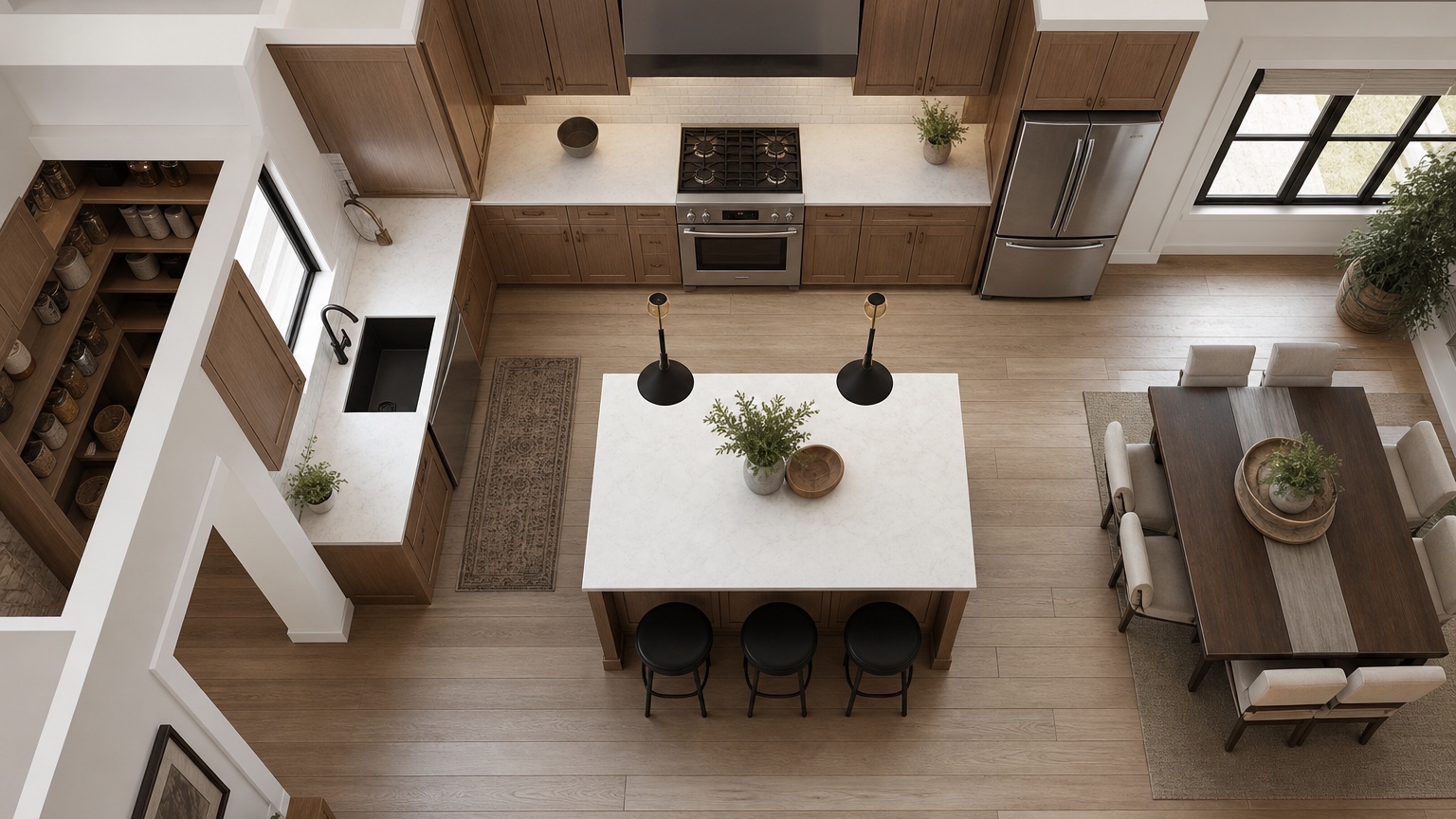
A kitchen floor plan image earns trust when it clarifies cooking, cleanup, storage, seating, and traffic. If a rendering casually moves plumbing or makes walkways impossible, it is attractive but not useful.
Use a circulation and work-zone frame: name the pain point, preserve expensive constraints, compare one layout variable at a time, and turn the chosen view into estimating questions.
RedesAIgn helps organize early kitchen iteration with prompts, remix/reference inputs, saved prompts, and generation history. Begin with 5 free AI credits and no card, then continue only if the first round sharpens the remodel brief.
Define the kitchen conflict first
Kitchen floor plan visuals should answer a layout question, not merely swap cabinet colors.
Name the pain: the island blocks traffic, the refrigerator is too far from prep, guests crowd the range, pantry storage is thin, the dining opening is awkward, or the sink view matters. If the prompt starts with the conflict, the image can become a decision aid rather than a mood board.
For kitchen review, trace groceries, prep, cooking, cleanup, seating, and guest traffic through the picture. Any unclear clearance becomes a measurement task for the designer or contractor.
Keep measurements and fixed services honest
A kitchen can look beautiful while quietly moving plumbing, structure, or appliances into impossible positions.
Upload the plan or photo with cabinet runs, doors, windows, appliance locations, and approximate dimensions. State what is expensive to move: sink wall, gas line, venting, load-bearing openings, exterior walls, or slab plumbing. Ask for realistic clearances around island seating, dishwasher doors, refrigerator swing, and walkways.
For kitchen review, trace groceries, prep, cooking, cleanup, seating, and guest traffic through the picture. Any unclear clearance becomes a measurement task for the designer or contractor.
Kitchen planning often overlaps with AI floor plan interior design for furniture zones and AI remodel floor plan visualizer for wall or scope changes.
Compare one variable at a time
The strongest remodel discussions come from controlled alternatives.
Create a baseline, then an island-size version, a pantry-storage version, a seating version, and an open-connection version. Do not change flooring, lighting, cabinet style, and wall openings all at once. A clean comparison helps the remodeler explain what drives cost and what improves daily use.
For kitchen review, trace groceries, prep, cooking, cleanup, seating, and guest traffic through the picture. Any unclear clearance becomes a measurement task for the designer or contractor.
Score the result like a cook and a host
A kitchen is both a workroom and a social room, so the image must satisfy both rhythms.
Check landing space near appliances, prep adjacency, traffic away from the range, stool clearance, sightlines to dining or family room, and storage for small appliances. If the rendering looks magazine-ready but forces people through the cook zone, it fails the actual brief.
For kitchen review, trace groceries, prep, cooking, cleanup, seating, and guest traffic through the picture. Any unclear clearance becomes a measurement task for the designer or contractor.
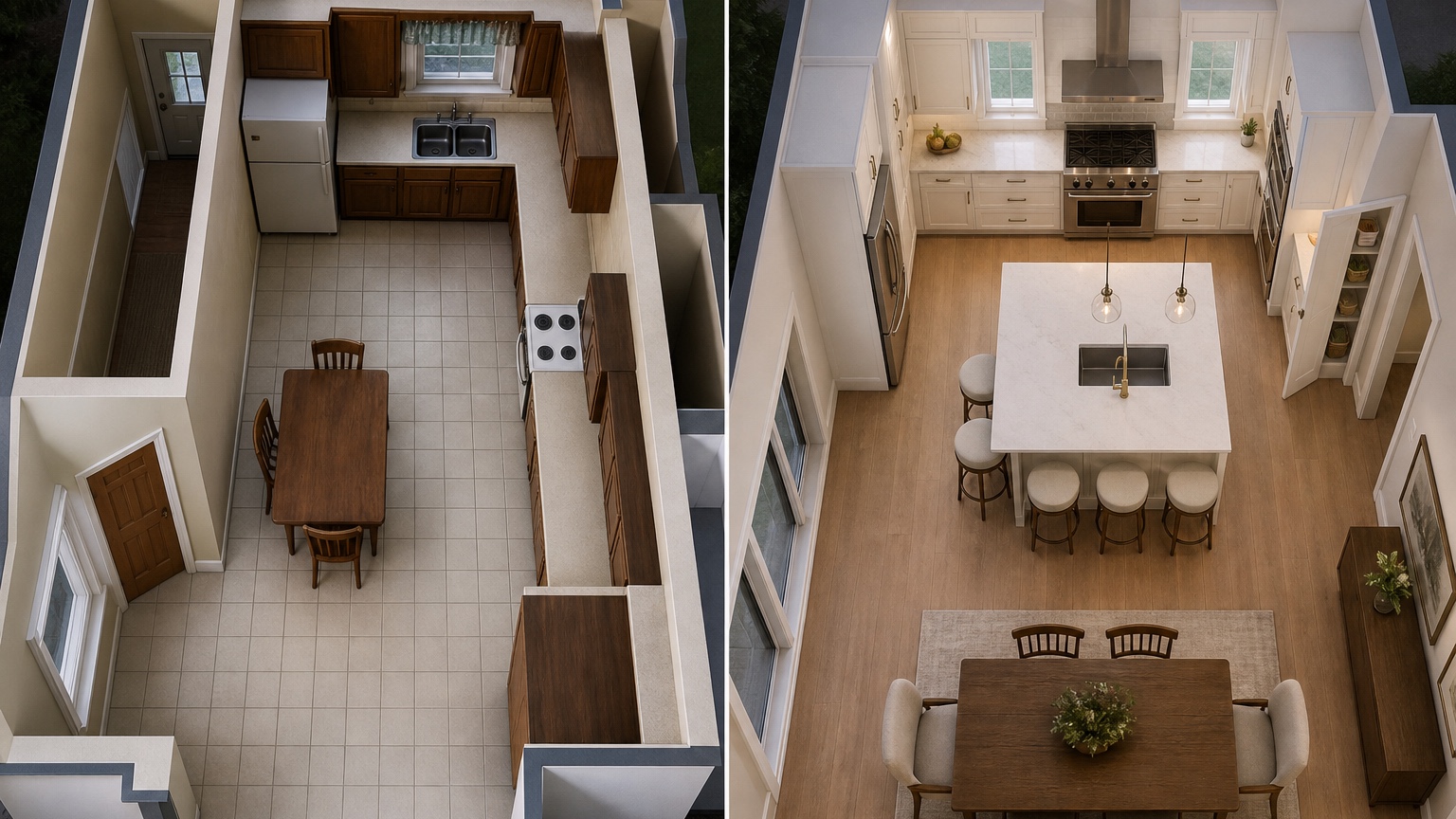
Translate the winning view into contractor notes
The visual should lead to precise estimating questions.
Save the prompt history, mark the assumptions, and ask the contractor or designer which moves require drawings, permits, custom cabinetry, electrical changes, or structural review. RedesAIgn is useful because it makes those questions visible earlier.
For kitchen review, trace groceries, prep, cooking, cleanup, seating, and guest traffic through the picture. Any unclear clearance becomes a measurement task for the designer or contractor.
A practical RedesAIgn workflow for this decision
For kitchens, keep the first image loyal to doors, windows, appliance walls, and current circulation. Then test island size, pantry storage, seating, and dining connection separately. Save the final prompt like a remodel note: what moved, what stayed expensive, and what needs field measurement. Use the kitchen output as a remodel discussion board while field measurements, cabinet specifications, utilities, and code shape the final plan.
Review the concept before anyone acts
For kitchen layouts, create a short “meal day” test. Imagine unloading groceries, making breakfast, packing lunches, cooking dinner while someone sets the table, cleaning pans, and hosting two guests near the island. Follow those paths through the image. The refrigerator, sink, range, trash, pantry, dishwasher, and serving zone should not fight each other. Seating should not trap the cook. A pantry wall should not steal the only landing space. If the rendering opens a wall, decide whether that change improves supervision and entertaining or simply exposes clutter. These small story tests reveal problems that a beautiful cabinet perspective can hide. They also help remodelers explain why a less dramatic version may work better.
What to save after the first generation
Keep the kitchen image that passes the meal-day test and one version that fails because the island, range, or pantry logic breaks. The handoff should cover measurements, utilities, cabinet specs, electrical changes, ventilation, and permits.
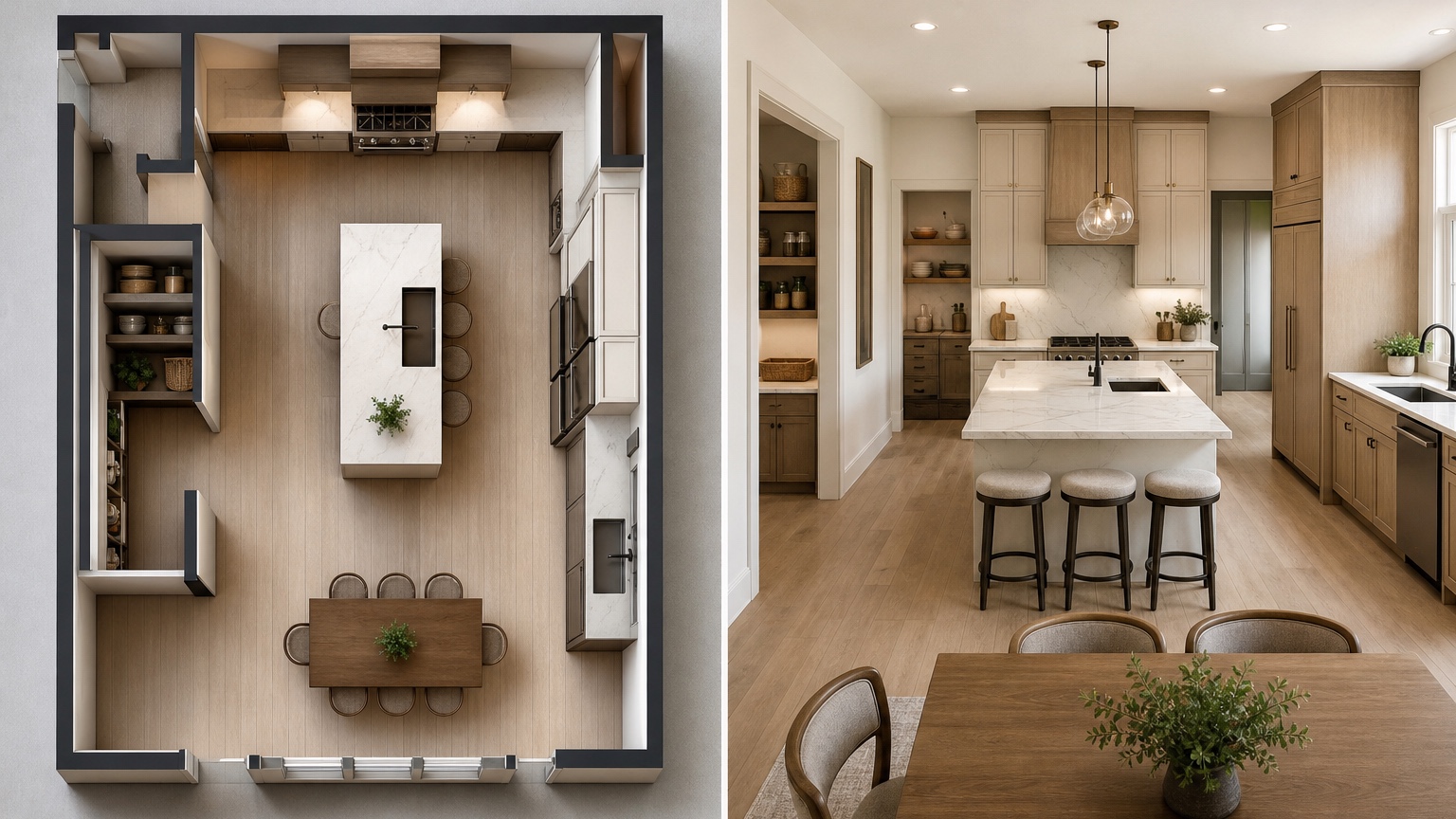
Kitchen layout stress test
Test the kitchen image with a normal day instead of a showroom mindset. Imagine unloading groceries, putting cold items away, washing vegetables, prepping near the sink, using the range, opening the dishwasher, setting plates on the island, and serving dinner. Then imagine a guest standing near the seating area while someone else walks to the refrigerator. If those paths overlap in a frustrating way, the concept needs another pass. A floor plan visualizer is useful because these conflicts become visible before cabinet orders, appliance purchases, or demolition assumptions harden.
Look carefully at the island. Many AI kitchen visuals make islands too large, too close to appliances, or too crowded with stools. Ask for realistic clearances and a version with a smaller island or peninsula. Review pantry location, trash pullout, microwave placement, landing zones near refrigerator and oven, and whether the sink wall or range wall has been moved without explanation. If the goal is an open connection to dining, decide whether the new opening improves hosting or simply removes useful storage.
RedesAIgn prompt history can become a remodel comparison board. Label prompts as baseline, smaller island, pantry wall, dining opening, seating alternative, or storage priority. Bring the strongest image to the designer or contractor with a list of exact uncertainties: measurements, cabinet line, appliance specs, electrical circuits, plumbing moves, ventilation, structural opening, and permit needs. That discipline keeps the image practical while still making the early design process more visual and collaborative.
Common kitchen prompt mistakes to avoid
Do not ask for a dream kitchen before naming what must stay fixed. A prompt that ignores windows, doors, appliance walls, plumbing, venting, and structural openings may produce a gorgeous concept that is useless for estimating. Start with the existing plan, then ask for one controlled change. That keeps the visual connected to real remodel choices.
Avoid letting style mask circulation. White cabinets, brass fixtures, and dramatic lighting can make almost any layout look appealing. Review the plan from above, then from the point of view of a cook carrying hot pans, a child opening the refrigerator, and a guest sitting at the island. The image should survive those routines.
Final handoff note
Before sharing the kitchen concept, make a decision note that identifies the pain point, the fixed appliance or plumbing assumptions, the desired seating count, and the storage problem being solved. Add a list of measurements to confirm: island clearance, door swings, refrigerator landing, pantry depth, and distance from sink to range. This turns a generated image into a remodel brief. It also helps a designer reject a pretty option that would become expensive or awkward.
A final kitchen sanity check is cleanup. Open the dishwasher in your mind, stand at the sink, reach for trash, put pans away, and imagine someone walking behind you. If the visual fails that ordinary sequence, the layout still needs work.
If the kitchen image is headed to a contractor, attach appliance model assumptions or mark them unknown. Cabinet depth, range ventilation, refrigerator width, and dishwasher clearance can change the entire plan.
FAQ: AI Kitchen Floor Plan Visualizer
Can an AI kitchen floor plan visualizer design my final kitchen?
No. It helps compare concepts. Final kitchen design needs field measurements, cabinet specifications, appliance specs, code review, and professional oversight.
What is the first kitchen prompt to try?
Ask for a realistic furnished baseline that preserves current doors, windows, appliance wall constraints, and circulation, then compare one targeted change at a time.
How does RedesAIgn support kitchen layout exploration?
Use prompts, remix/reference images, saved prompts, and generation history to compare options; the free start includes 5 AI credits and no credit card.
Try these prompts in redesAIgn
Convert this floor plan into a bright open-concept living area with a kitchen island and natural light.
Show furniture placement for a 2-bedroom layout with a dining nook and entry storage.
Visualize this blueprint as a modern ADU with compact kitchen, loft bed, and bathroom.
Related guides
- AI Floor Plan With Furniture: See How Rooms Could Work
Add furniture to floor plans with RedesAIgn so scale and circulation stay realistic before you buy pieces or rearrange a real room layout.
- AI Open Concept Floor Plan Ideas From Existing Layouts
Compare open-concept floor plans with AI before removing walls. Preview kitchen, living, and dining flow plus furniture zones and circulation.
- AI ADU Floor Plan Visualizer for Backyard Homes and Rentals
Preview ADU floor plans with AI for backyard homes and rentals. Compare compact layouts, baths, kitchens, and access before permitting talks.
- AI Basement Floor Plan Design: Visualize Finished Basement Layouts
Design finished basement layouts with AI floor plans. Compare recreation, guest, office, and bath options before construction estimates.
- AI Remodel Floor Plan Visualizer for Additions and Layout Changes
Visualize remodel floor plans with RedesAIgn to clarify addition, circulation, and scope before hiring pros or building the next phase.