AI Exterior Paint Visualizer: Test House Colors Before Painting
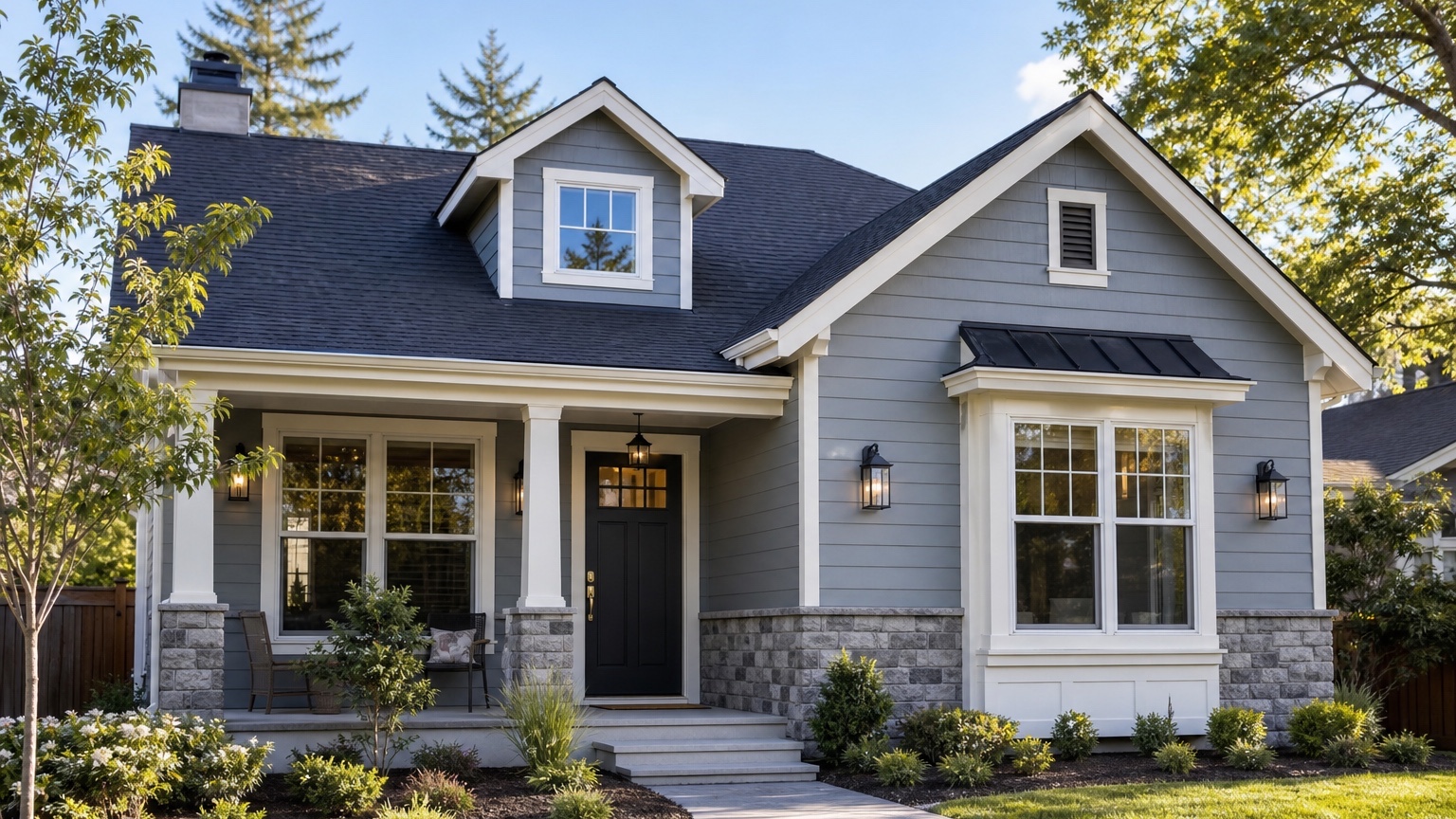
An AI exterior paint visualizer is most useful when it helps a homeowner, painter, or property manager avoid an expensive color mistake. Exterior paint covers a large surface, reacts strongly to sunlight, and has to work with roof color, brick, stone, landscaping, windows, doors, and neighboring homes. A small swatch can look perfect in isolation and wrong once it stretches across the whole facade.
That is the decision this article should help with: how do you test paint colors on the actual house before anyone buys gallons, schedules a crew, or sends a color board for approval? The answer is not to generate a fantasy exterior. The answer is to create controlled photo-based paint previews that keep the home recognizable while changing the body color, trim, shutters, door, garage, and accents in a way that can be discussed clearly.
RedesAIgn can help with that early visual step. Upload a clear exterior photo, use the Exterior Editor, and generate several paint directions before you commit. If you want to test your own house colors, start free with RedesAIgn and use your first 5 AI credits with no credit card required.
What an AI exterior paint visualizer should actually decide
For painters, the practical problem is approval. A client may say they want warm white, modern gray, earthy green, or black trim, but those phrases mean different things on different homes. A visual preview makes the conversation specific: creamy white versus cool white, charcoal trim versus soft bronze, sage siding versus olive, navy door versus stained wood.
For homeowners, the practical problem is regret. Exterior painting is public, costly, and difficult to undo. If the color feels too blue in shade, too yellow beside stone, or too harsh against the roof, the mistake is visible from the street. A visualizer lets you compare options on the real subject before paint samples, contractor scheduling, or HOA paperwork.
The useful output is a concrete next step. That might be “sample these two body colors,” “keep the roof and brick unchanged,” “quote a charcoal trim package,” or “send this restrained option to the HOA.” It is not a generic AI decoration exercise. The best image helps someone move from uncertainty to a clearer paint brief.
Use a visualizer workflow, not one overloaded prompt
A reliable exterior paint workflow starts with comparison. Instead of asking AI to “make the house beautiful,” create a few focused versions that test one paint direction at a time. Keep the roofline, window placement, siding layout, porch, garage, driveway, and landscaping close to the original unless the project includes more than paint.
Start with a safe version. This might be a body color that is close to the current home but cleaner, with improved trim contrast and a more intentional front door color. Then create a medium-change version, such as warm white siding with charcoal trim or a muted green with cream trim. Finally, create a bold version if the homeowner is considering high contrast, dark siding, black accents, or a dramatic door.
This matters because paint choices are relative. A color that looks stylish in one generated image may only look good because the AI also changed the roof, windows, landscape, or lighting. Controlled variations make the comparison fair. If the only intended work is paint, the image should not quietly add new siding, different windows, new stone, or a redesigned porch.
Before anyone acts on a result, review whether the home is still the same home. The roof, windows, garage, porch, trim lines, and permanent masonry should remain consistent. If the paint concept looks good only because the model changed permanent features, save it as inspiration, not as a paint plan.
Start with a photo that shows color honestly
A believable paint preview depends on a good source photo. Use a front elevation or three-quarter view that shows the full facade, including roof, siding, trim, doors, windows, garage, porch, foundation planting, and any brick or stone that will stay. Keep the camera level and avoid extreme wide-angle distortion.
Daylight matters. Bright sun can blow out light colors and create harsh shadows. Deep shade can make colors feel cooler or darker than they will look in person. Overcast daylight is often the easiest starting point because the AI can read surfaces, edges, and existing materials more evenly. If the home has very different sun exposure on the front and side, generate concepts from more than one angle before making a final decision.
Remove distractions when possible. Parked cars, trash bins, seasonal decorations, open garage doors, and heavy shadows can confuse the preview. You do not need a professional photo, but you do need a clear image that represents the facade the painter or homeowner will actually discuss.
If you need a broader guide to source photos and home exterior previews, the process overlaps with AI exterior design from photo. For paint specifically, the priority is color readability: surfaces, undertones, trim boundaries, and fixed materials.
Decide what must stay recognizable
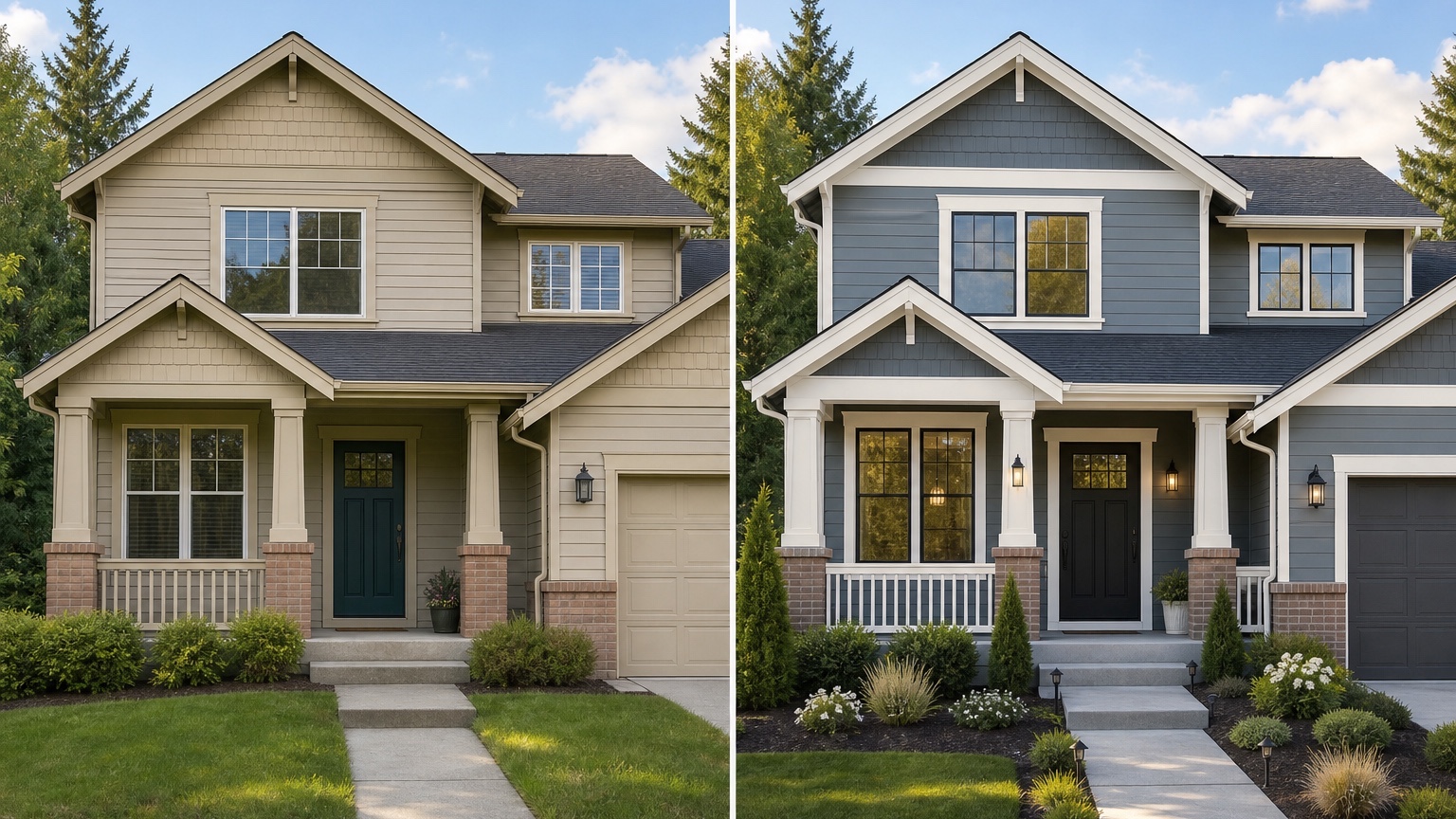
Paint can transform a house, but the preview should not erase the constraints that make the decision real. Before writing a prompt, list the elements that must stay: roof color, brick, stone, windows, garage door style, shutters, landscaping, HOA restrictions, or existing siding profile.
Roof color is especially important. A black roof can support very different palettes than a warm brown or weathered gray roof. Red brick, tan stone, concrete driveways, bronze windows, white vinyl windows, and mature landscaping also affect the way exterior paint reads. The AI preview should respond to these fixed materials instead of pretending the house is a blank canvas.
Painters can use this step to keep a client conversation grounded. If the estimate only includes body and trim paint, say that in the prompt. If the garage door will be painted but not replaced, say that. If brick will remain unpainted, say it clearly. Constraints reduce revisions and help the image become a useful reference for quoting.
Compare color, finish, undertone, and contrast
Exterior color is not just hue. Undertone, finish, contrast, and surface size all matter. A warm white can look soft beside stone but yellow beside a cool gray roof. A blue-gray can look calm in a swatch and icy on a shaded north-facing wall. Dark siding can look elegant in a concept and too heavy on a small ranch with low eaves.
Use the visualizer to compare families, not just individual paint names. Test warm whites, greiges, taupes, muted greens, charcoal, navy, and earth tones as broad directions. Then narrow the shortlist with real paint samples. An AI preview can help you decide which colors deserve sampling, but it cannot replace physical sample boards viewed in real light.
Trim contrast deserves its own pass. White trim can make a facade crisp, but it can also make windows feel busy. Charcoal trim can modernize a house, but too much dark trim may overpower a small entry. Low-contrast trim can feel calm, but it may flatten the facade. Generate one version with high contrast and one with softer contrast to see which supports the architecture.
Door and accent colors should come last. A red, navy, black, green, or natural wood-look door can be a strong focal point, but only if it works with the body and trim palette. For many homes, the front door color is the easiest place to be bold because it is smaller and simpler to repaint.
Prompt brief for stronger paint results
A good prompt starts with the outcome: a curb-appeal paint plan for this specific home. It names what should change, what should stay, and how realistic the result should be.
Try a restrained version like this:
“Create a realistic exterior paint preview for this home. Preserve the roofline, windows, siding profile, brick, stone, driveway, porch footprint, and landscaping structure. Test a warm white body color, soft charcoal trim, a medium wood-tone front door, and a slightly darker garage door. Keep the result believable for a homeowner paint project.”
For a painter preparing client options, try:
“Show three paint directions for the same house photo: one safe neutral refresh, one warmer modern palette, and one bolder high-contrast palette. Do not change windows, roof, masonry, siding layout, porch, or landscape design. Focus only on body color, trim, shutters, front door, and garage paint.”
If HOA review is part of the project, include that constraint. Ask for a conservative palette, natural undertones, and no structural changes. If weather exposure is a concern, avoid relying on very dark colors on surfaces where heat, fading, or product limitations may matter. The AI image can support the conversation, but product suitability still needs confirmation with the paint manufacturer and the professional doing the work.
Review the output before trusting it
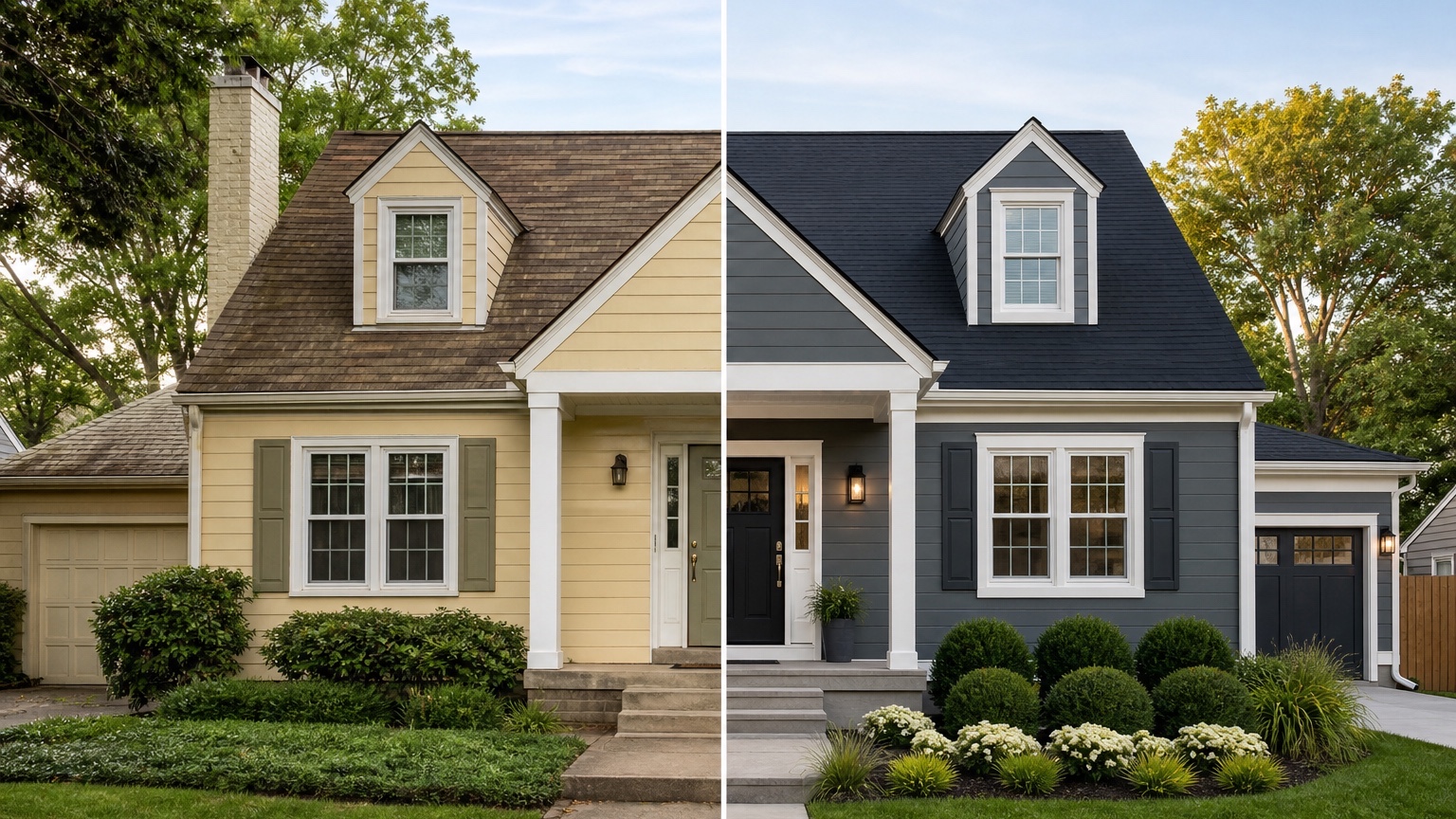
AI exterior paint previews can look convincing even when the details are wrong. Start by checking edges. Paint should follow siding, trim, shutters, garage panels, fascia, porch columns, and doors. If color bleeds into windows, roof shingles, stone, or landscaping, the image may still be useful as mood direction but not as a reference.
Check lighting consistency next. A color should not appear bright on one wall and muddy on another unless the original photo supports that lighting difference. Look at shadows under eaves, beside the garage, and around the entry. Exterior colors can shift dramatically in shade, so the best preview is the one that makes you ask better sample questions.
Then compare the concept against real constraints: HOA rules, local climate, surface condition, substrate, prep work, lead-safe practices for older homes, product availability, and quote accuracy. An image cannot inspect peeling paint, rot, moisture, chalking, or caulk failure. It can help you choose a direction, but the painter still needs to evaluate the surface before pricing and scheduling.
Save the strongest version as a facade reference, not a final specification. Include notes: body color family, trim contrast, door direction, garage color, what stays unchanged, and what needs real-world sampling. That reference is much easier for a painter, spouse, HOA board, or client to discuss than a pile of disconnected inspiration photos.
Common mistakes that make paint previews look generic
The first mistake is uploading a weak photo. If the house is cropped, shadowed, angled too sharply, or blocked by cars and shrubs, the preview may exaggerate or ignore important surfaces. Retake the image before judging the color direction.
The second mistake is asking for unrelated changes. “Modern farmhouse exterior with new siding, bigger windows, stone entry, black roof, landscape design, and paint” is not a paint visualizer prompt. It is a renovation concept. If the decision is paint, keep the prompt about paint.
The third mistake is skipping the safe option. Homeowners often want to see the bold color first, but the safe version provides a baseline. It shows whether a modest refresh solves the problem before the project becomes more expensive or controversial.
The fourth mistake is treating the AI image as a color match. Screens vary, lighting varies, and generated colors are not paint formulas. Use the image to narrow direction, then test actual samples on the home in morning, midday, and evening light.
How to use RedesAIgn for exterior paint planning
In RedesAIgn, upload a clear house photo and choose the Exterior Editor. Start with a restrained prompt that preserves architecture and changes only paintable surfaces. Generate a safe refresh first, then remix or revise the prompt for medium and bold options. Use saved prompts and history to keep track of the versions that worked.
Reference images can help when they clarify a palette or mood, but do not let them override the real house. A coastal white exterior, a dark modern facade, or a warm Craftsman palette may need adjustment for your roof, masonry, and neighborhood context. The goal is not to copy an inspiration image exactly. The goal is to see whether that direction belongs on this home.
For broader facade decisions beyond paint, read AI exterior home design. If the project includes siding replacement, the related AI siding visualizer workflow is a better fit because material profile, reveal, trim depth, and installation details become central.
When you are ready to compare colors on your own exterior, try RedesAIgn for free with 5 free AI credits and no credit card required. If you need more generations after that, one-time credit packs are available, and generated images can be used commercially where relevant.
FAQ: AI exterior paint visualizer
What is an AI exterior paint visualizer?
An AI exterior paint visualizer uses a photo of a home to create realistic paint color previews for siding, trim, shutters, doors, garage doors, and other visible paintable surfaces.
Can it replace real paint samples?
No. It helps narrow the direction before sampling, but final color decisions should be checked with physical samples on the actual house in real daylight.
How many color options should I generate?
Start with three: a safe refresh, a medium-change palette, and a bold option. Then refine the best direction with smaller changes to trim, door, or garage color.
Can painters use these previews with clients?
Yes. Painters can use AI paint previews as discussion references, approval aids, and quoting context, as long as they make clear that product selection, prep, and final color matching still require professional review.
What should my prompt include?
Name the surfaces to change, the fixed materials to preserve, the desired color family, and practical constraints such as HOA rules, roof color, masonry, weather exposure, and project scope.
Try these prompts in redesAIgn
Refresh this house exterior with modern paint, black trim, and updated front door lighting.
Improve curb appeal with new siding color, shutters, and a clearer entry path.
Keep the roofline, but modernize windows, porch posts, and exterior finishes.
Related guides
- AI Exterior Design App for Homeowners and Remodelers
Use RedesAIgn as an exterior design app to preview paint, trim, roof, and curb appeal ideas from real house photos before you renovate.
- AI Exterior Before and After: Generate Home Makeover Concepts
Create AI exterior before and after previews from real home photos to compare curb appeal concepts, renovation scope, materials, and client options.
- AI Black Windows Exterior Ideas: See the Look on Your House
Use AI black windows exterior previews to see black frames, trim contrast, siding, roof color, and curb appeal on a real home photo before replacement.
- AI Exterior Remodel Visualizer for Siding, Paint, Doors, and Windows
Use an AI exterior remodel visualizer to compare siding, paint, doors, windows, trim, garage updates, and curb appeal ideas on a real house photo.
- AI House Color Visualizer: Test Exterior Color Palettes From a Photo
Use an AI house color visualizer to compare exterior paint palettes, trim contrast, undertones, and curb appeal from a real home photo before painting.