AI Roof Color Visualizer: Match Roofing With Siding and Trim
Last updated March 2026
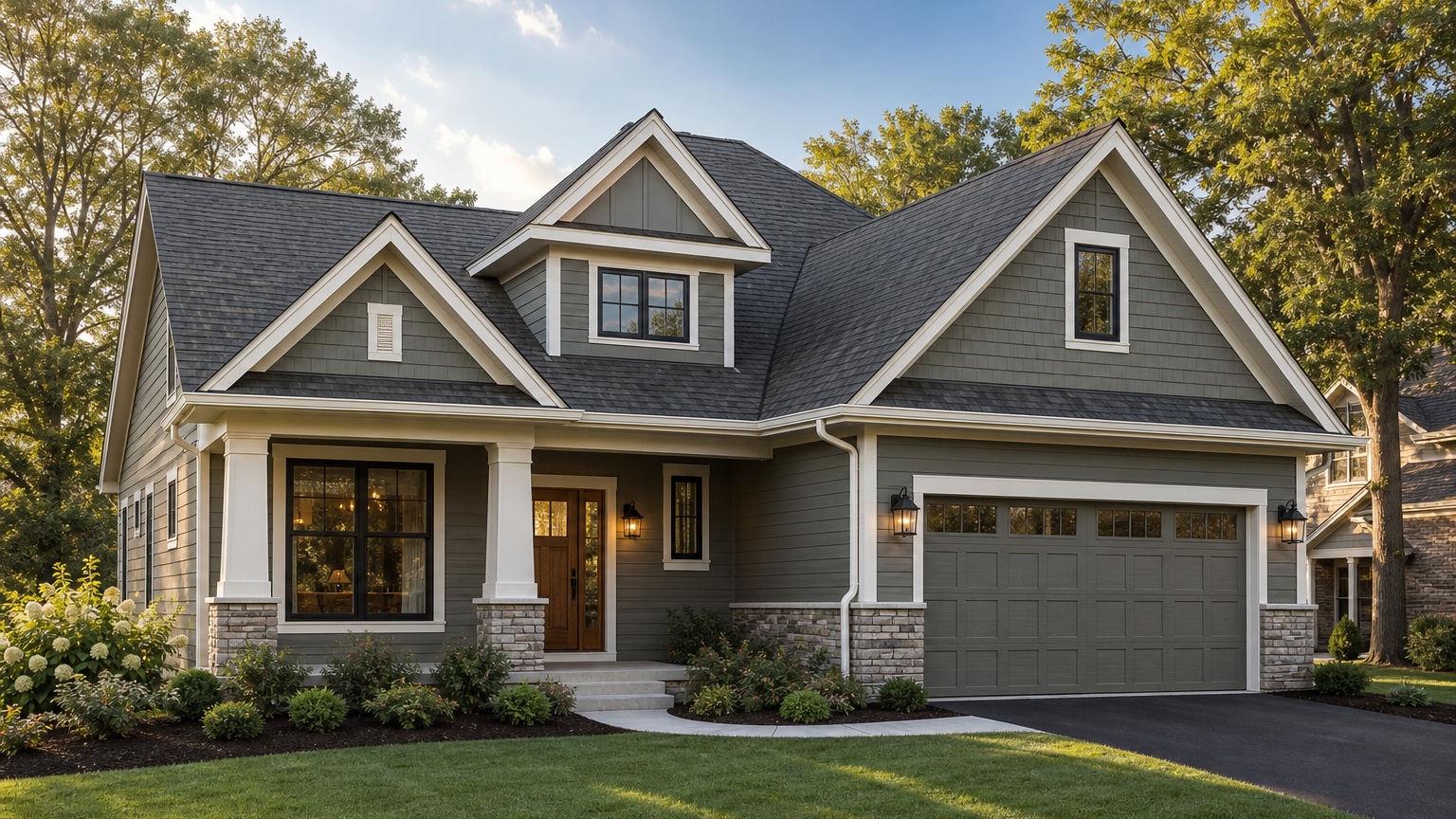
An AI roof color visualizer is useful because a roof is not just a weather barrier. From the street, it is one of the largest color fields on the home. The same shingle color can make siding look warmer, make white trim feel sharper, calm down red brick, or make a house look heavier than expected. A sample board helps with texture and product comparison, but it does not show how the roof color sits on the actual facade.
That is the real decision for roofers and homeowners: which roof color works with the siding, trim, masonry, windows, gutters, entry, and overall curb appeal of this specific house? The goal is not to generate a fantasy remodel with new walls, a different roof pitch, and perfect landscaping. The goal is to preview believable roof color directions on a real exterior photo before a homeowner signs off, a roofer orders materials, or a color choice becomes expensive to reverse.
RedesAIgn can help with that early visual step. Upload a clear home exterior photo, use the Exterior Editor, and generate controlled roof color concepts that keep the house recognizable. If you want to compare roof colors on your own house, start free with RedesAIgn and use 5 free AI credits with no credit card required.
What an AI roof color visualizer should help you decide
For roofers, the practical problem is alignment. A customer may point to charcoal, weathered wood, black, brown, slate gray, or a high-contrast architectural shingle, but those names do not settle how the color will look with the existing siding and trim. A roof color visualizer turns that conversation into a visual comparison: dark roof with light siding, warmer roof with tan stone, medium gray with white trim, or a softer brown against cream siding.
For homeowners, the problem is confidence. Roof replacement is visible, costly, and usually chosen under pressure from age, storm damage, leaks, or insurance timelines. If the roof color clashes with brick, makes the house feel too dark, or fights future siding plans, the regret lasts for years. A photo-based preview gives the homeowner a safer way to compare directions before narrowing the product list.
The useful output is a concrete next step. It might be “quote these two shingle color families,” “avoid the cool black option because the brick is warm,” “keep the current siding but paint the trim softer,” or “show the HOA a restrained roof-and-trim concept.” The image is not a roofing specification, but it can become a clear reference for color approval, sales consultation, and project planning.
When to test roof color visually first
Use a roof color visualizer before money moves into materials, samples, deposits, or scheduling. Roof samples are small, and many are judged in a showroom, driveway, or brochure instead of on the full elevation. A visual preview helps bridge the gap between a physical product sample and the entire home exterior.
It is especially helpful when the roof color is changing rather than being replaced like-for-like. Moving from brown to black, from light gray to charcoal, or from a blended warm shingle to a cooler slate direction can change how every other exterior material reads. If siding, paint, shutters, gutters, fascia, or windows may change later, the roof decision should be tested against that future direction too.
Roofing contractors can use the preview when several stakeholders need to compare the same option. One homeowner may care about resale, another about modern curb appeal, and a third about fitting the neighborhood. Realtors, painters, siding contractors, HOA boards, and insurance-related decision makers may also need a clearer visual reference. A controlled before-and-after image keeps the discussion about the same house instead of a pile of inspiration photos.
Start with a photo that shows the roof and fixed exterior details
A believable roof color preview starts with a strong source image. Use a front elevation or three-quarter view that shows the roof planes, ridge lines, eaves, gutters, siding, trim, garage, entry, masonry, windows, driveway, and landscaping structure. If the home has important side roof planes, dormers, or a large garage roof, take additional angles so the color choice is not judged from one partial view.
Keep the camera level and far enough back to avoid distorting the roofline. A steep upward phone angle can exaggerate eaves and make the roof feel larger than it is. A photo taken from too close to the garage can make one plane dominate the decision. Overcast daylight or soft sun is often easier to evaluate because roof texture, siding color, and trim edges are more evenly visible.
Before generating, decide what must stay recognizable. If the siding, brick, stone, windows, porch footprint, garage door, and landscape are not changing, say that. If the project is roof-only, keep the prompt focused on roof color, shingle appearance, fascia, gutters, and small trim relationships. If the homeowner is also considering paint or siding, make that a separate option so the roof-only comparison stays fair.
Reference images can help when they clarify a shingle color family or general exterior mood. Use them carefully. A black roof on a white modern farmhouse may not transfer cleanly to a tan brick ranch, a red-brick colonial, or a low-slope contemporary home. The real home photo should remain the anchor.
Compare color, undertone, contrast, and roof mass
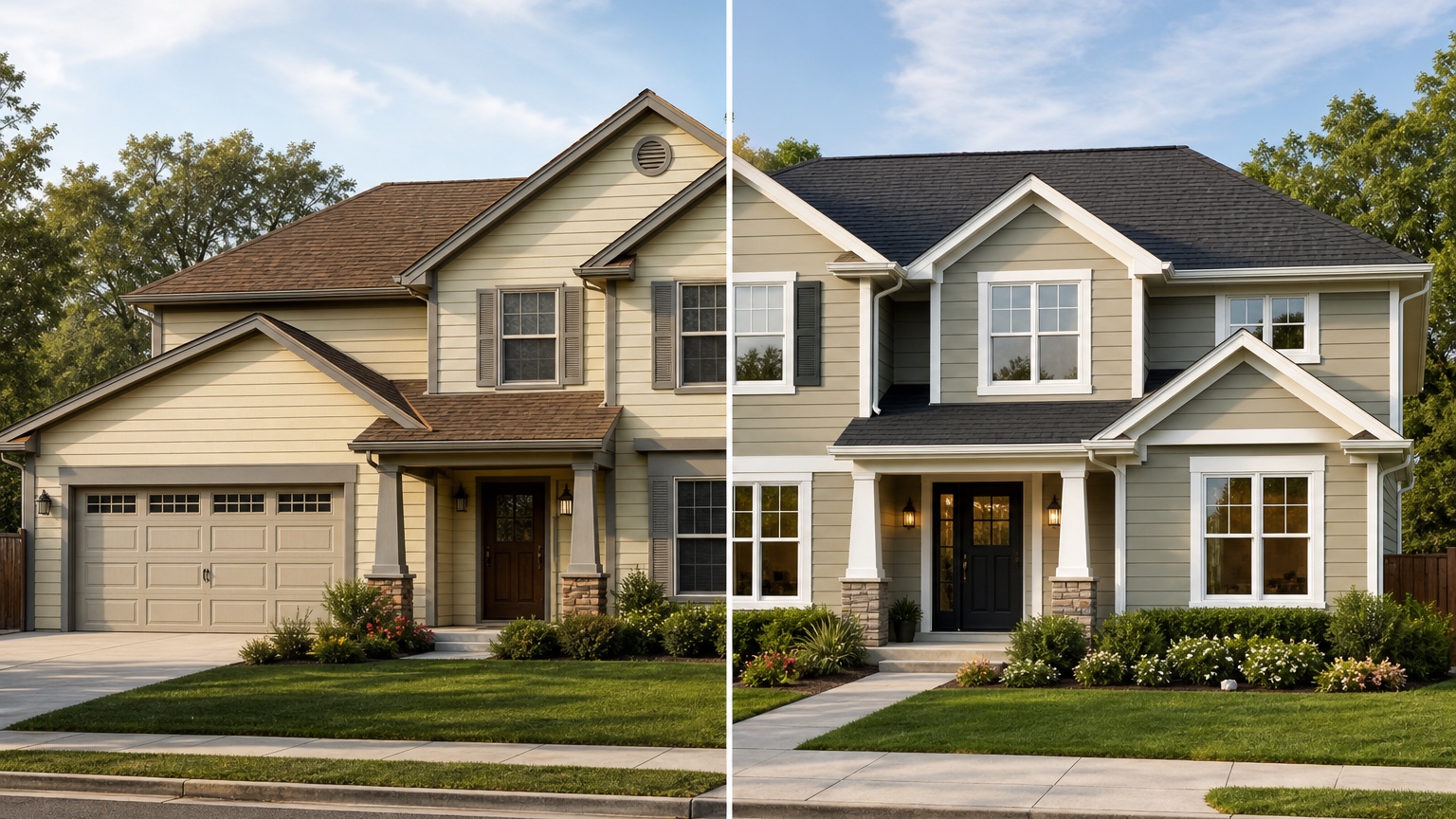
Roof color decisions are really decisions about relationship. A cool charcoal roof can sharpen a white exterior but look harsh beside warm stone. A brown blend can feel natural with beige siding but dated beside a cooler gray palette. A black roof can create a crisp modern look, but it may make a low, wide house feel heavier if the siding and trim do not balance it.
Start with undertone. Warm roofs usually sit more comfortably with cream siding, tan stone, warm brick, bronze windows, and earth-toned landscaping. Cool roofs often pair better with white, gray, blue, and black accents. Mixed shingles can bridge materials, but they can also look busy if the siding, brick, and trim already have a lot of color variation.
Then compare contrast. High contrast can make rooflines and trim look intentional, especially on homes with strong gables or clean white siding. Lower contrast can be calmer on a small ranch, split-level, or house with a large visible roof. The visualizer lets you test both a safe option and a bold option without pretending either is automatically best.
Finally, look at roof mass. Some homes show a large roof from the street; others show mostly facade. A dark color on a large roof plane has a different effect than the same color on a narrow upper gable. A useful AI preview should preserve roof size and pitch so the color comparison is honest.
What a roofer still needs to confirm in person
An AI roof color visualizer can clarify appearance, but it cannot inspect the roof. A roofer still needs to confirm deck condition, ventilation, flashing, underlayment, ice and water protection, drip edge, gutters, penetrations, valleys, code requirements, manufacturer specifications, access, tear-off needs, and disposal.
It also cannot guarantee product availability or exact color matching. Generated images and screens vary. Shingle colors vary by product line, blend, batch, lighting, roof pitch, and weathering. Use the preview to decide which color families deserve real samples, then view physical samples near the house in daylight.
This distinction protects both sides. Homeowners get a clearer visual target without assuming the image is a construction document. Roofers get a better sales and approval reference without being boxed into a generated detail that may not exist in the selected product line.
Prompt brief for stronger roof color results
A good roof color prompt names the outcome, the roof surfaces to change, and the exterior constraints that must remain. Avoid broad prompts like “make my house modern.” They often change siding, windows, landscaping, and roof shape at the same time.
Try a roof-only prompt:
“Create a realistic roof color preview for this home. Preserve the existing roofline, siding, trim, windows, brick, stone, driveway, porch footprint, garage door, and landscaping structure. Change only the roofing to a medium charcoal architectural shingle with realistic texture, shadows, and highlights. Keep the result believable for a roofing contractor consultation.”
For a contractor preparing options, try:
“Show three controlled roof color directions on the same house photo: warm weathered wood, medium gray, and darker charcoal. Do not change the roof pitch, windows, siding layout, masonry, porch, driveway, or landscape design. Focus on how the roof color works with siding, trim, gutters, fascia, and curb appeal.”
If HOA rules, neighborhood context, heat exposure, product warranty, or budget matters, include those constraints. Ask for a conservative version as well as a bolder version. The comparison is more useful when each option changes one main variable instead of blending roof color with a full exterior remodel.
Review the output before anyone trusts the image
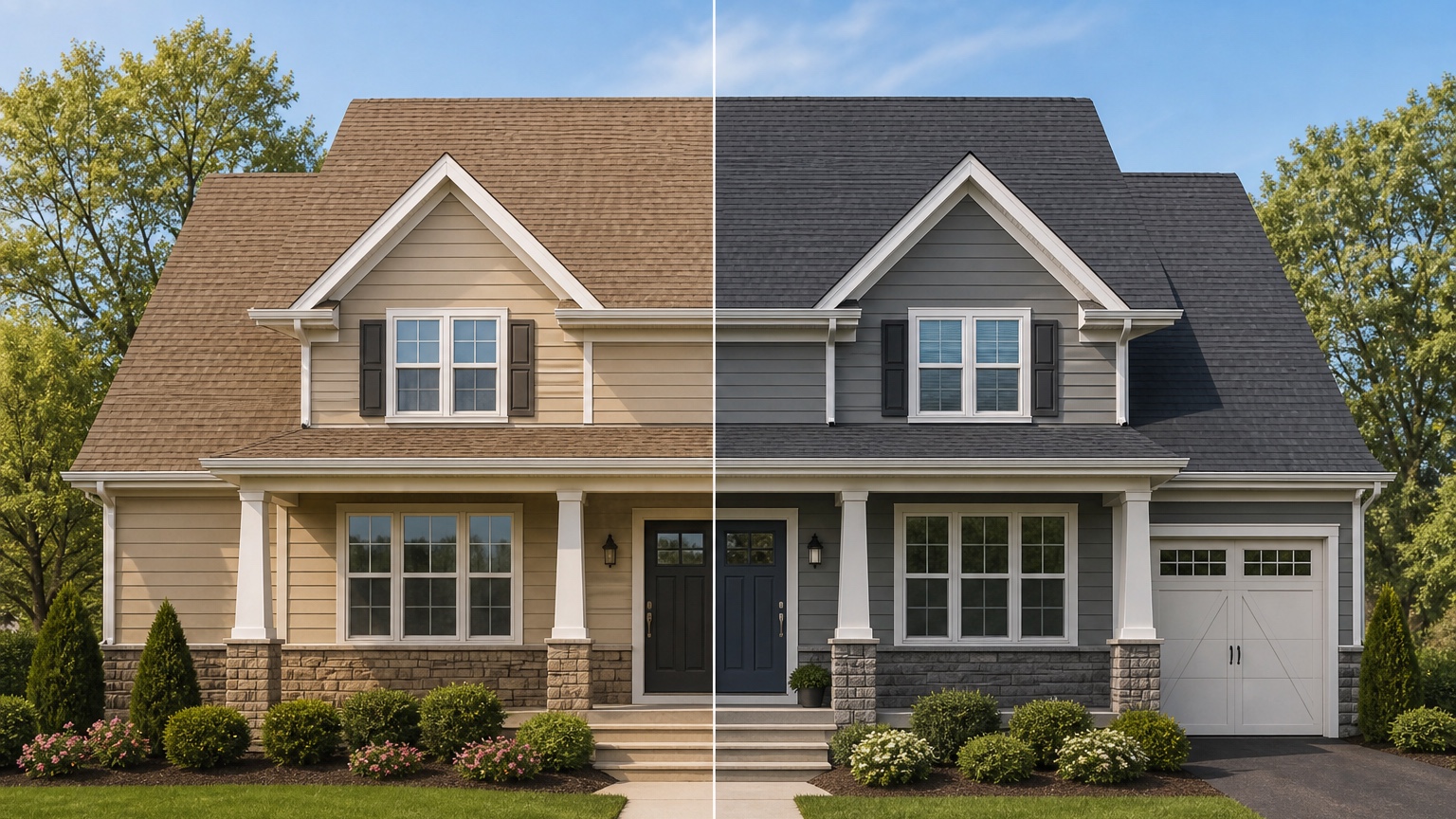
AI roof previews can look polished while making details unreliable. Start by checking roof geometry. The pitch, ridges, valleys, eaves, dormers, garage roof, and porch roof should match the original house. If the preview quietly changes roof shape, it may be attractive inspiration but not a roof color decision.
Check edges next. Shingle color should stop at fascia, gutters, chimneys, skylights, walls, and trim. Look for color bleeding onto siding, warped gutters, missing vents, strange valley lines, or shingles that ignore the actual roof planes. These issues do not always ruin the mood direction, but they matter if the image will be used in a contractor conversation.
Then compare lighting and undertone. The roof should respond to the same sun direction as the original photo. A dark shingle should still show realistic highlights. A blended roof should not look like flat paint. If the color appears too perfect or too uniform, treat the result as a general direction and verify with samples.
Save the strongest version as a facade before-and-after, material palette note, and contractor reference. Include what stayed unchanged, which roof color family looked best, which alternatives were rejected, and what still needs professional confirmation.
Common mistakes that make roof previews generic
The first mistake is uploading a weak photo. If the roof is cropped, hidden by trees, photographed in deep shade, or distorted by a close phone angle, the AI may invent roof planes or misread the size of the roof.
The second mistake is asking for unrelated renovation. “New black roof, new siding, new windows, stone entry, bigger porch, and luxury landscaping” may produce an exciting image, but it does not answer the roof color question. Keep roof-only and full-remodel concepts separate.
The third mistake is ignoring fixed materials. Brick, stone, siding, trim, garage doors, windows, and gutters all influence the roof color. If those are staying, the preview must work with them.
The fourth mistake is treating the AI image as a product match. A generated charcoal roof is not a specific manufacturer color. Use it to narrow the direction, then compare real samples and product details with the roofer.
How to use RedesAIgn as an AI roof color visualizer
In RedesAIgn, upload the clearest exterior photo and choose the Exterior Editor. Start with a restrained prompt that preserves architecture and changes only the roofing color and closely related trim details. Generate a safe option first, then revise the prompt for warmer, cooler, lighter, and darker roof color families.
Use saved prompts and history to keep track of what worked. If one result has the right shingle color but changes the siding too much, revise the prompt and restate what must stay unchanged. If a reference image captures the roof tone you like, add it only to clarify the color family or mood.
For projects where the roof color depends on siding replacement, read the AI siding visualizer workflow. If the roof decision is part of a broader facade refresh, compare it with AI exterior design from photo or AI exterior paint visualizer so paint, trim, and roofing are not judged in isolation.
When you are ready to preview roof colors on your own home photo, try RedesAIgn for free with 5 free AI credits and no credit card required. If you need more generations after the free credits, one-time credit packs are available.
FAQ: AI roof color visualizer
What is an AI roof color visualizer?
An AI roof color visualizer uses a home exterior photo to preview different roof color directions on the actual house so homeowners and roofers can compare curb appeal before selecting materials.
Can it show exact shingle products?
It can show visual color families such as charcoal, black, gray, brown, slate, or weathered wood. Final product selection still needs real samples, manufacturer details, availability, and contractor guidance.
Is it useful for roofing contractors?
Yes. Roofers can use visual previews to help clients compare color directions, clarify preferences, and discuss how roofing interacts with siding, trim, brick, stone, and gutters.
What should my roof color prompt include?
Include the roof color direction, what must stay unchanged, the fixed exterior materials, and practical constraints such as HOA rules, roof visibility, weather exposure, and project scope.
Can an AI preview replace a roofer inspection?
No. It can help choose a visual direction, but a roofer still needs to inspect the roof, measure, confirm materials, identify repairs, and prepare an accurate scope of work.
Try these prompts in redesAIgn
Refresh this house exterior with modern paint, black trim, and updated front door lighting.
Improve curb appeal with new siding color, shutters, and a clearer entry path.
Keep the roofline, but modernize windows, porch posts, and exterior finishes.
Related guides
- AI Exterior Design App for Homeowners and Remodelers
Use RedesAIgn as an exterior design app to preview paint, trim, roof, and curb appeal ideas from real house photos before you renovate.
- AI Exterior Before and After: Generate Home Makeover Concepts
Create AI exterior before and after previews from real home photos to compare curb appeal concepts, renovation scope, materials, and client options.
- AI Black Windows Exterior Ideas: See the Look on Your House
Use AI black windows exterior previews to see black frames, trim contrast, siding, roof color, and curb appeal on a real home photo before replacement.
- AI Exterior Remodel Visualizer for Siding, Paint, Doors, and Windows
Use an AI exterior remodel visualizer to compare siding, paint, doors, windows, trim, garage updates, and curb appeal ideas on a real house photo.
- AI House Color Visualizer: Test Exterior Color Palettes From a Photo
Use an AI house color visualizer to compare exterior paint palettes, trim contrast, undertones, and curb appeal from a real home photo before painting.