AI Facade Design Generator for Residential Exterior Concepts
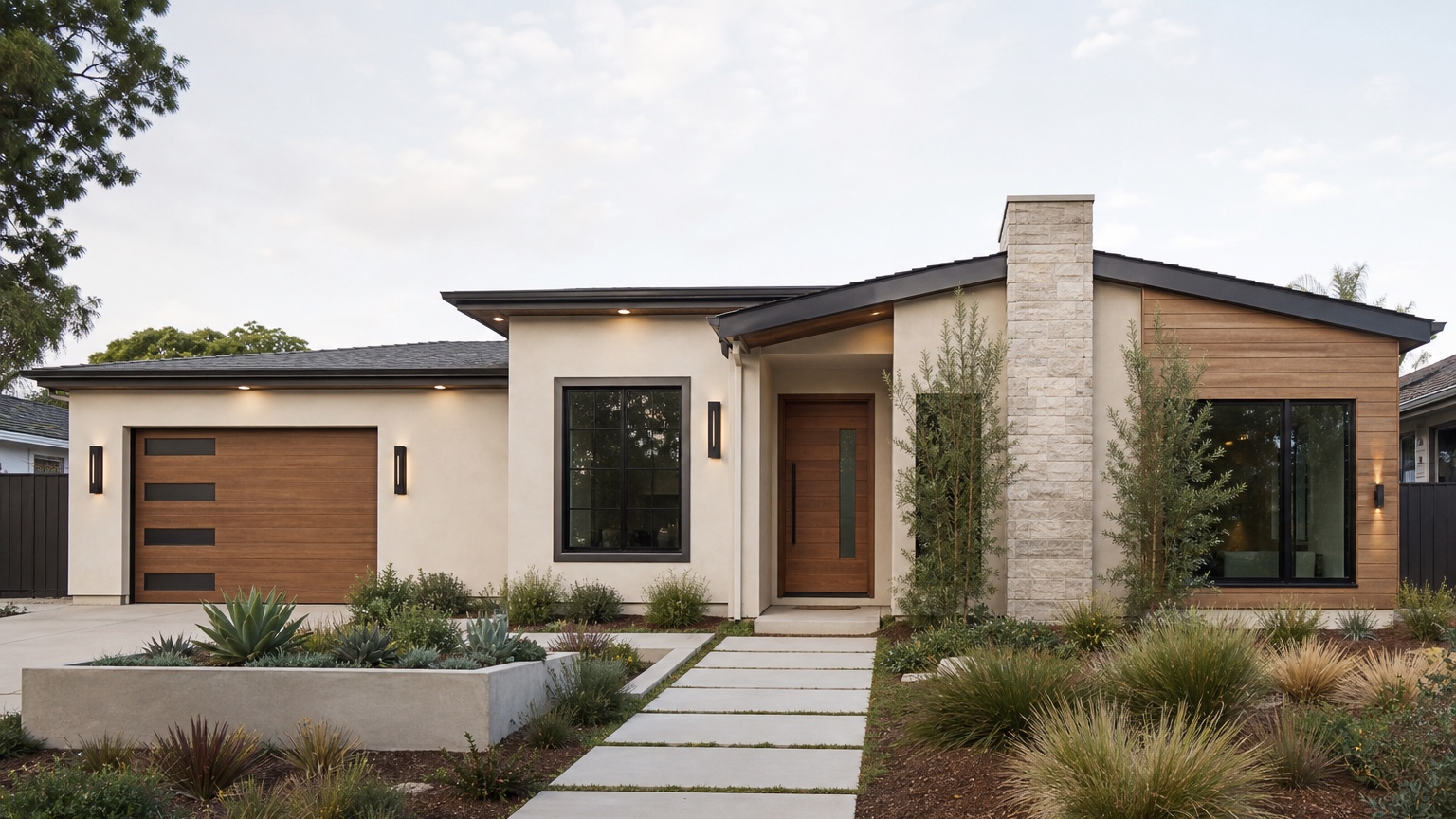
An AI facade design generator is useful when it helps architects, builders, and homeowners explore the face of a house before the project becomes a fixed drawing set, a sales promise, or a construction quote. The facade is where proportion, materials, openings, trim, roofline, entry focus, and curb appeal meet. A small change to siding direction, window rhythm, stone placement, or porch detail can make a home feel more intentional. The wrong change can make the same house feel expensive, unbalanced, or disconnected from the neighborhood.
The practical goal is not to produce a fantasy rendering. It is to create believable residential facade concepts from a real photo or elevation so the team can decide what deserves more design time. A homeowner may need to choose between updated traditional, modern farmhouse, warm contemporary, or craftsman-inspired directions. A builder may need a fast visual for a client conversation. An architect may want to test materials and massing cues before refining drawings. In all cases, the image should clarify the next decision.
RedesAIgn can support that early visual step with photo-based editing, prompts, remixing, reference images, saved prompts, and history across specialized editors. If you want to test a facade direction on an actual home photo, start free with RedesAIgn and use your first 5 AI credits with no credit card required.
What an AI facade design generator should actually decide
Facade design is not only about choosing a pretty style. It is about deciding how the front of the building should read from the street. Does the entry feel obvious? Do the windows look balanced? Does the roofline support the style, or fight it? Are the material transitions logical? Does the trim add definition without clutter? These are the questions a good AI facade design generator should help surface.
For architects, the value is rapid concept exploration. A photo-based preview can help test whether a proposed material palette supports the existing massing before a more formal rendering is created. It can also make client conversations more concrete. Instead of discussing “cleaner,” “warmer,” or “more modern” in the abstract, the team can compare specific facade directions.
For builders, the value is alignment. A client may approve a plan but still struggle to imagine the finished exterior. A realistic facade concept can show the difference between lap siding and board-and-batten, white trim and dark trim, a wood-look door and a painted door, or a simple gable bracket and a cleaner no-bracket detail. The image should reduce uncertainty before selections become change orders.
For homeowners, the value is confidence. A facade change often involves multiple trades and visible expense. The preview can help decide whether the project is mainly paint, siding, entry, garage, trim, lighting, or a larger architectural update. That distinction matters before anyone asks for pricing.
Start with a real facade brief, not a style label
The weakest prompt is usually a style label with no constraints: “Make this a modern house” or “Create a luxury facade.” Those prompts invite the AI to replace too much. It may enlarge windows, invent a new roof, add stone everywhere, redesign landscaping, and hide issues that still exist on the actual property. The result may look impressive, but it will not help a professional price or refine the project.
A stronger brief starts with the decision. For example: “Create three realistic facade concepts for this two-story suburban home while preserving the roofline, window locations, driveway, porch footprint, and main massing. Explore updated siding, trim, front door, exterior lighting, and restrained material accents.” That prompt gives the generator permission to explore, but not permission to erase the house.
If the project is early-stage architecture rather than a remodel photo, the same idea applies. State which elements are fixed: building width, roof pitch, garage placement, window count, porch depth, climate, budget level, HOA limits, or neighborhood character. The more explicit the constraints, the more useful the concept becomes.
Input checklist for believable facade concepts
Use a clear daylight image whenever possible. A front elevation or three-quarter exterior view works best because it shows the facade, roofline, windows, doors, garage, trim, siding, porch, steps, driveway edge, and landscape context. Keep the camera level. Avoid heavy shadows, cropped roof edges, blocked garage doors, parked cars, trash bins, and extreme wide-angle distortion.
Decide what must stay recognizable before generating. The list may include roof shape, window openings, garage size, porch structure, masonry, grade, driveway, mature trees, or a specific architectural style. If the concept is for a remodel, these fixed elements keep the image honest. If the concept is for new construction, they keep the image aligned with the plan.
Add reference images only when they clarify a specific direction. A reference can communicate warm limestone, vertical siding, black window frames, a softer craftsman entry, or a contemporary palette. It should not force the AI to copy another home onto a facade with different proportions. Use references as vocabulary, not as a substitute for the actual brief.
Materials and fixed exterior details
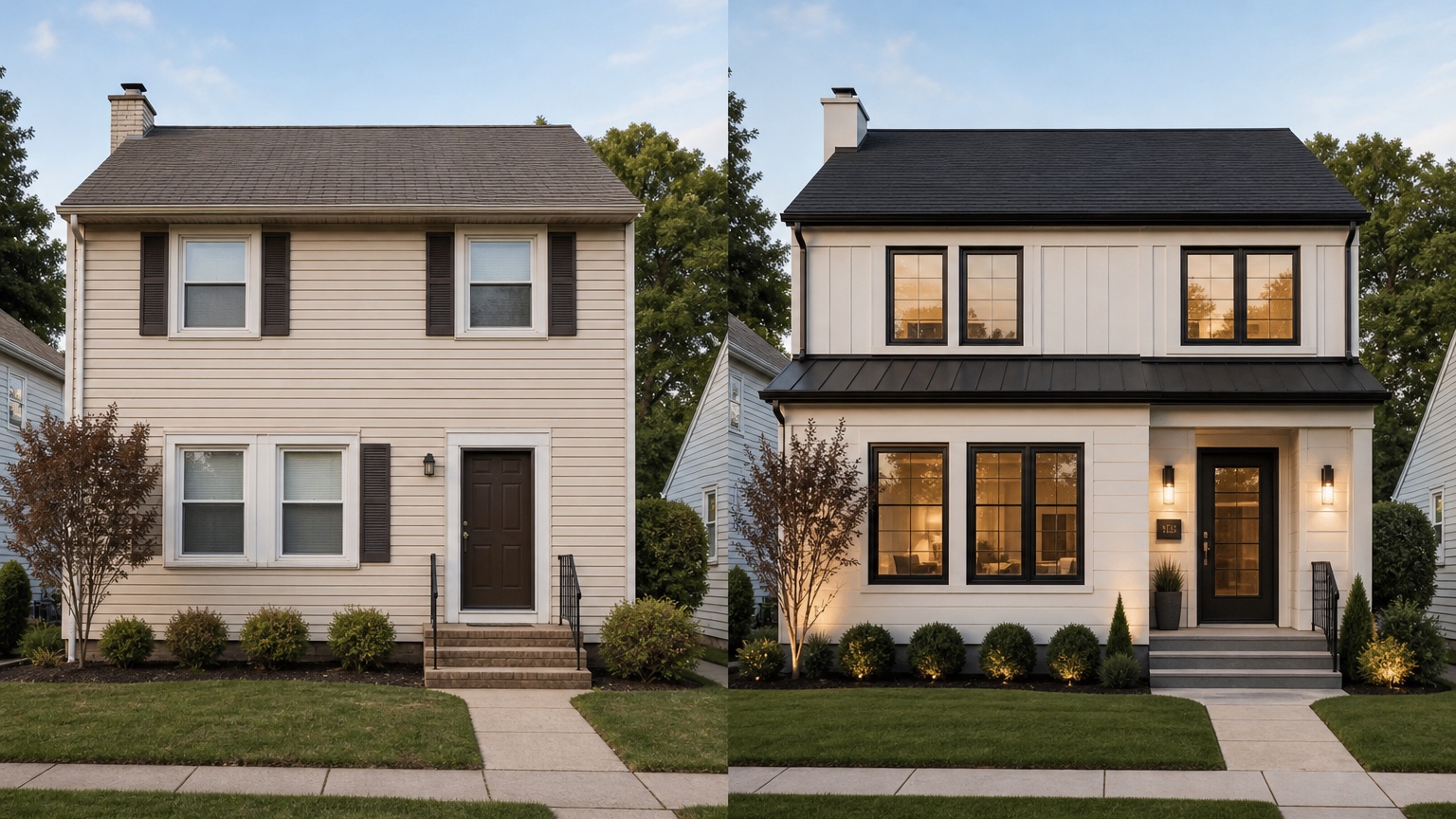
A facade concept becomes believable when the materials respect the structure beneath them. Start with the largest surfaces: siding, stucco, brick, stone, paint, or paneling. These surfaces determine the overall read of the house. Then refine trim, fascia, columns, railings, shutters, garage doors, and the front entry. Finally, add lighting, house numbers, walkway edges, and planting as supporting details.
Material transitions need logic. Stone veneer should not float randomly across the front wall. Vertical siding should have a reason, such as emphasizing a gable, entry bay, or upper story. Dark trim can sharpen a facade, but too much contrast can make every opening compete. Board-and-batten can add rhythm, but it may look wrong if the house has proportions that call for a quieter horizontal treatment.
Openings are especially important. Windows, doors, garage doors, and porch openings create the rhythm of the facade. If an AI result changes their scale or location without being asked, treat that output as inspiration rather than a real option. A contractor or architect still needs to confirm structural feasibility, waterproofing, code, product sizing, flashing, and cost.
Roofline is another constraint to watch. Many exterior styles depend on roof pitch and overhang. A low-slope ranch may not support the same facade moves as a steep-gabled farmhouse. A traditional home may look better with subtle trim correction than with an invented contemporary overhang. Ask the generator to preserve the roofline unless roof changes are part of the actual project.
Prompt brief for stronger AI facade design results
A useful prompt begins with the intended outcome: a curb-appeal facade concept for a specific residential project. Then it names what changes, what stays, and how the result should be judged.
For a homeowner remodeling an existing house, try:
“Create a realistic residential facade concept from this home photo. Preserve the roofline, window locations, garage size, driveway, porch footprint, and main structure. Improve curb appeal with updated siding, crisp trim, a more intentional front door, exterior lighting, and a restrained material accent. Keep the design believable for a contractor quote.”
For an architect or builder exploring client options, try:
“Generate three controlled facade directions for this residential exterior: updated traditional, warm contemporary, and modern farmhouse. Keep the same massing, roof pitch, window rhythm, garage placement, and entry location. Vary siding profile, trim contrast, door material, lighting, and accent materials only.”
If constraints matter, include them early. Mention HOA rules, climate, coastal exposure, snow load, wildfire risk, budget sensitivity, existing roof color, masonry that must remain, or materials the builder already plans to use. Controlled constraints usually produce more professional images than broad style prompts.
Review the output before trusting the image
AI facade concepts can look finished even when the architecture is inconsistent. Start by checking whether the house is still the same house. Compare roof edges, window rhythm, door placement, garage scale, porch columns, steps, and grade. If those elements shifted by accident, the concept may mislead the project team.
Next, review material realism. Siding lines should follow the geometry of the walls. Stone or brick should wrap logically or stop at believable corners. Trim should align with openings. Lighting should match the original sun direction. Reflections in windows should not imply impossible room layouts or missing mullions. These details matter because facade design is about proportion as much as decoration.
Then judge quoteability. Could a builder, siding contractor, painter, or architect identify the work shown? A good output might imply “replace siding with smooth lap siding, paint trim warm white, add wood-look front door, simplify shutters, add black sconces, and keep existing roof.” A weak output says only “make it nicer.”
Finally, separate visual direction from technical approval. The image cannot confirm structural loads, moisture management, flashing, local code, product availability, manufacturer warranty, drainage, or installation cost. Use the concept to choose a direction, then let professionals verify the construction path.
How professionals can use facade previews with clients
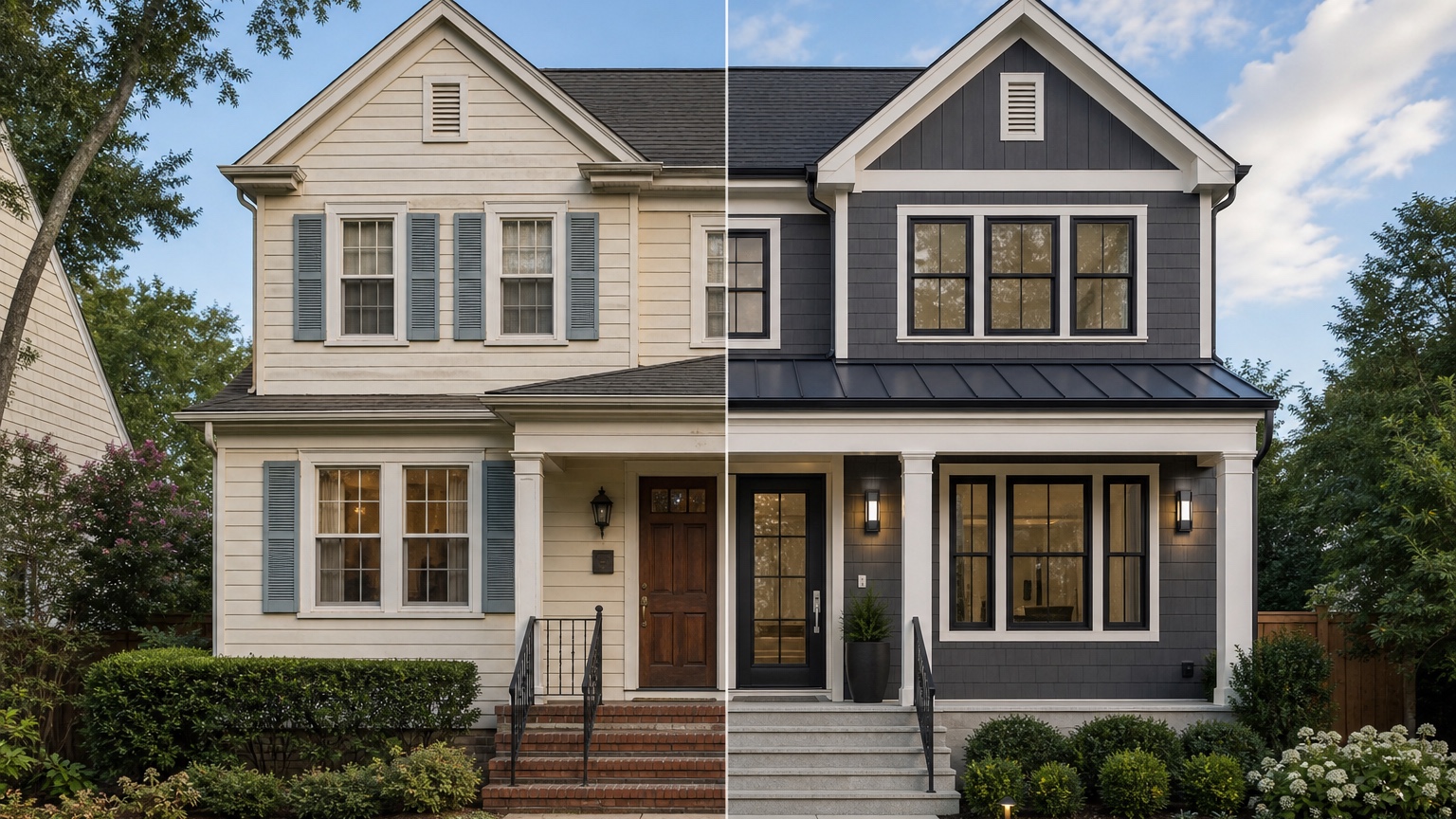
Architects can use AI facade previews as early conversation tools, especially before investing in polished renderings. The image can reveal whether a client is drawn to symmetry, contrast, natural materials, lighter palettes, darker palettes, or a more minimal trim package. It can also expose conflicts early: the client wants a modern facade, but the existing roofline and neighborhood may support a transitional approach better.
Builders can use the same workflow during selections. A client choosing exterior packages may understand options faster when they see them on a similar facade rather than in isolated product samples. The key is to label the image as a concept and avoid presenting it as an exact product rendering. Keep notes on which materials are real selections and which are mood direction.
Homeowners can use previews to communicate more clearly with professionals. Instead of sending ten unrelated inspiration images, send one or two AI facade concepts with notes: keep existing roof, explore lighter siding, remove shutters, consider wood-tone door, add black lighting, update garage door later. That kind of brief is easier to discuss and quote.
Common mistakes that make facade concepts less useful
The first mistake is changing too many categories at once. If the real project is paint and trim, do not ask for new windows, new roof, new stone, new porch, new driveway, and mature landscaping in the same run. Create a broader inspiration image if you want, but generate a separate quote-ready version.
The second mistake is ignoring the existing style. A facade can be modernized without forcing it into a style that the massing cannot support. Some houses need cleaner traditional details. Some need better entry hierarchy. Some need a new material balance. Not every home should become modern farmhouse, all-black contemporary, or white-and-wood transitional.
The third mistake is treating the generated image as construction documentation. It is a visual planning aid. It can support owner decisions, client conversations, and contractor briefing, but it does not replace drawings, specifications, engineering, permits, product data, or site inspection.
How to use RedesAIgn for facade concept exploration
In RedesAIgn, upload a clear exterior photo and choose the Exterior Editor. Start with a restrained prompt that preserves massing and fixed openings. Generate a safe refresh first, then remix the strongest version into more specific material directions. Use reference images when you need to communicate a material, mood, or architectural language, and use saved prompts and history to track what worked.
RedesAIgn includes 10 editors, so facade exploration can connect naturally to narrower workflows. If the main decision is house color, use the process in AI exterior paint visualizer. If the project is mostly cladding, compare it with AI siding visualizer. For broader whole-home planning, see AI exterior design from photo and AI exterior home design.
When you are ready to test a facade direction on your own home or client project, try RedesAIgn free with 5 free AI credits and no credit card required. If you need more generations for client comparisons or multiple properties, one-time credit packs are available.
FAQ: AI facade design generator
What is an AI facade design generator?
An AI facade design generator creates visual exterior concepts for the front or visible sides of a home, often from a real photo. It can help compare materials, trim, openings, entry focus, garage treatment, lighting, and curb appeal direction.
Can it replace an architect or builder?
No. It can speed up early visual exploration and client alignment, but architects, builders, engineers, and contractors still confirm feasibility, code, structure, materials, detailing, cost, and installation.
What should I include in a facade design prompt?
Include the project goal, fixed features to preserve, surfaces that may change, desired style direction, material preferences, and constraints such as HOA rules, climate, budget, roof color, and quote accuracy.
How many facade options should I generate?
Start with three controlled options: a restrained refresh, a moderate material update, and a bolder concept. Then refine the version that best matches budget, architecture, and approval needs.
Are AI facade images accurate enough for construction?
They are useful for concept discussion, not construction. Use them to narrow direction and communicate intent, then rely on professional drawings, specifications, product data, and site review before building.
Try these prompts in redesAIgn
Refresh this house exterior with modern paint, black trim, and updated front door lighting.
Improve curb appeal with new siding color, shutters, and a clearer entry path.
Keep the roofline, but modernize windows, porch posts, and exterior finishes.
Related guides
- AI Exterior Design App for Homeowners and Remodelers
Use RedesAIgn as an exterior design app to preview paint, trim, roof, and curb appeal ideas from real house photos before you renovate.
- AI Exterior Before and After: Generate Home Makeover Concepts
Create AI exterior before and after previews from real home photos to compare curb appeal concepts, renovation scope, materials, and client options.
- AI Black Windows Exterior Ideas: See the Look on Your House
Use AI black windows exterior previews to see black frames, trim contrast, siding, roof color, and curb appeal on a real home photo before replacement.
- AI Exterior Remodel Visualizer for Siding, Paint, Doors, and Windows
Use an AI exterior remodel visualizer to compare siding, paint, doors, windows, trim, garage updates, and curb appeal ideas on a real house photo.
- AI House Color Visualizer: Test Exterior Color Palettes From a Photo
Use an AI house color visualizer to compare exterior paint palettes, trim contrast, undertones, and curb appeal from a real home photo before painting.