AI Architectural Visualization for Fast Residential Concepts
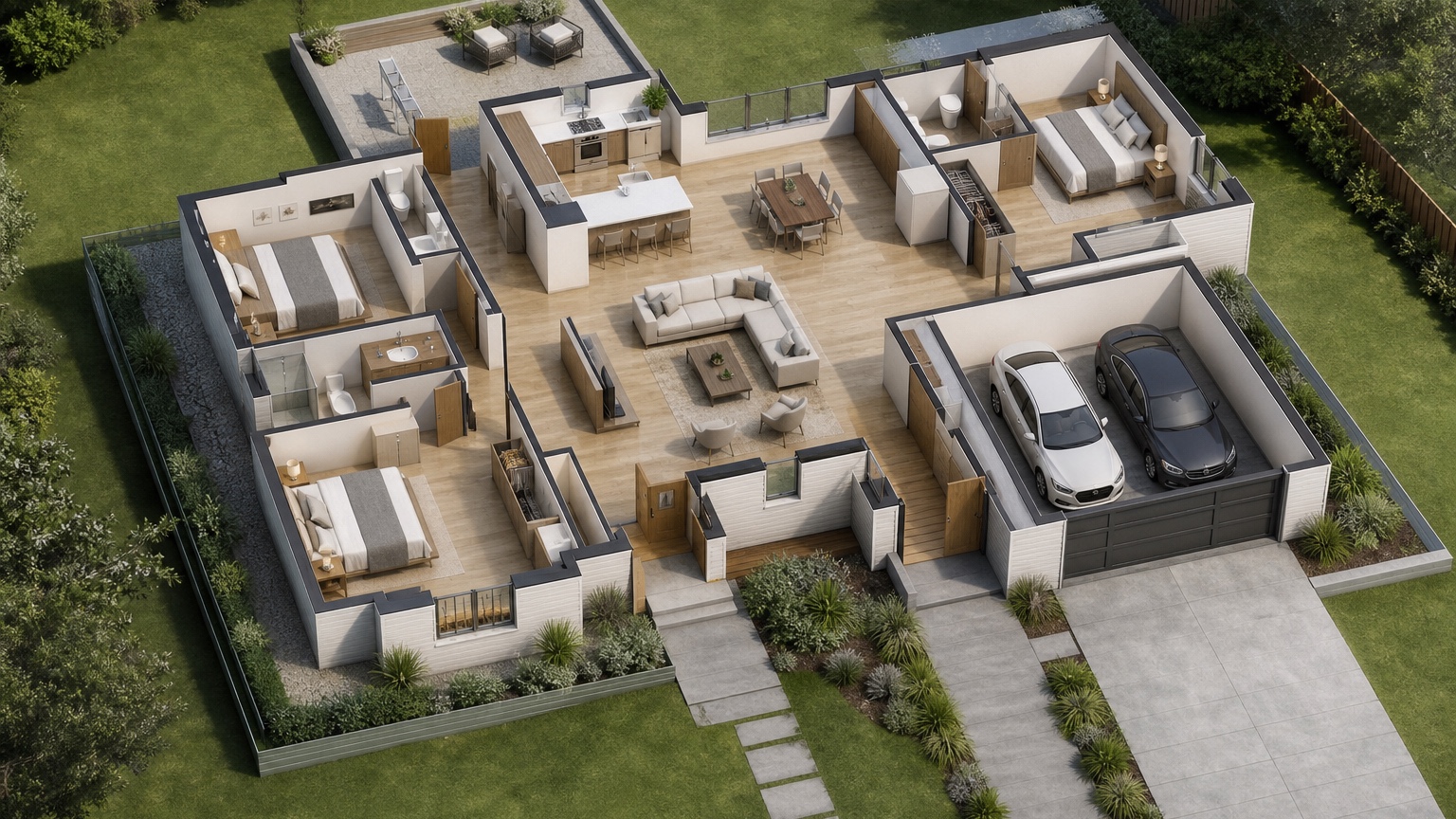
Ai Architectural Visualization is most useful when it helps architects and custom builders decide which residential concept is clear enough for the next paid design step. It belongs before construction documents: a concept view for owner alignment, not proof of code compliance or structural feasibility.
For this article, the working lens is an architect-builder concept board. The useful sequence is to choose the meeting question, gather plan and elevation clues, generate a restrained view, and annotate the result with assumptions before showing it to a client.
In RedesAIgn, architects and builders can experiment with prompts, remix/reference images, saved prompts, and generation history across the available AI editors. The first test can use 5 free credits without a credit card; later rounds can be handled with one-time credit packs if the concept board earns its place in the process.
Define the decision before making a rendering
Separate massing, material, circulation, and presentation questions so one image does not pretend to solve all of them.
A strong architectural visualization brief begins with the meeting you need to improve. Maybe the architect wants to show why a gable form feels friendlier than a flat parapet. Maybe the builder wants to explain why the rear addition changes the patio relationship. Maybe the client needs to see whether a modern material palette still respects the existing house. Each case deserves a different visual, because the acceptance criteria are different.
For architects and custom builders, the practical test is whether the visual changes the next meeting. If it only looks impressive, it is not enough.
Prepare plan information that AI can respect
Readable plans, elevation clues, site photos, and fixed constraints keep the concept tied to the real project.
Collect the plan scan, basic dimensions, exterior photos, roof notes, window locations, and any non-negotiable site conditions before opening RedesAIgn. Put fixed conditions in one list and creative options in another. Fixed might include the footprint, driveway, stair, existing masonry, mature trees, or neighborhood setback. Creative might include siding tone, porch depth, window rhythm, roof accent, or landscape context.
For architects and custom builders, the practical test is whether the visual changes the next meeting. If it only looks impressive, it is not enough. For related plan-to-view decisions, compare this process with AI blueprint to 3D model and AI house plan visualizer.
Use visualization to reduce client uncertainty
The best early image explains tradeoffs rather than acting like a finished rendering package.
Clients often struggle to read drawings, especially when plan, elevation, and material notes are split across pages. An AI visualization can create a common reference for the next conversation: more glass versus more privacy, taller entry versus calmer roofline, darker cladding versus warmer stone, or larger covered patio versus more backyard openness.
For architects and custom builders, the practical test is whether the visual changes the next meeting. If it only looks impressive, it is not enough.
Review realism before presenting the concept
Edges, scale, material continuity, and plan consistency matter more than dramatic lighting.
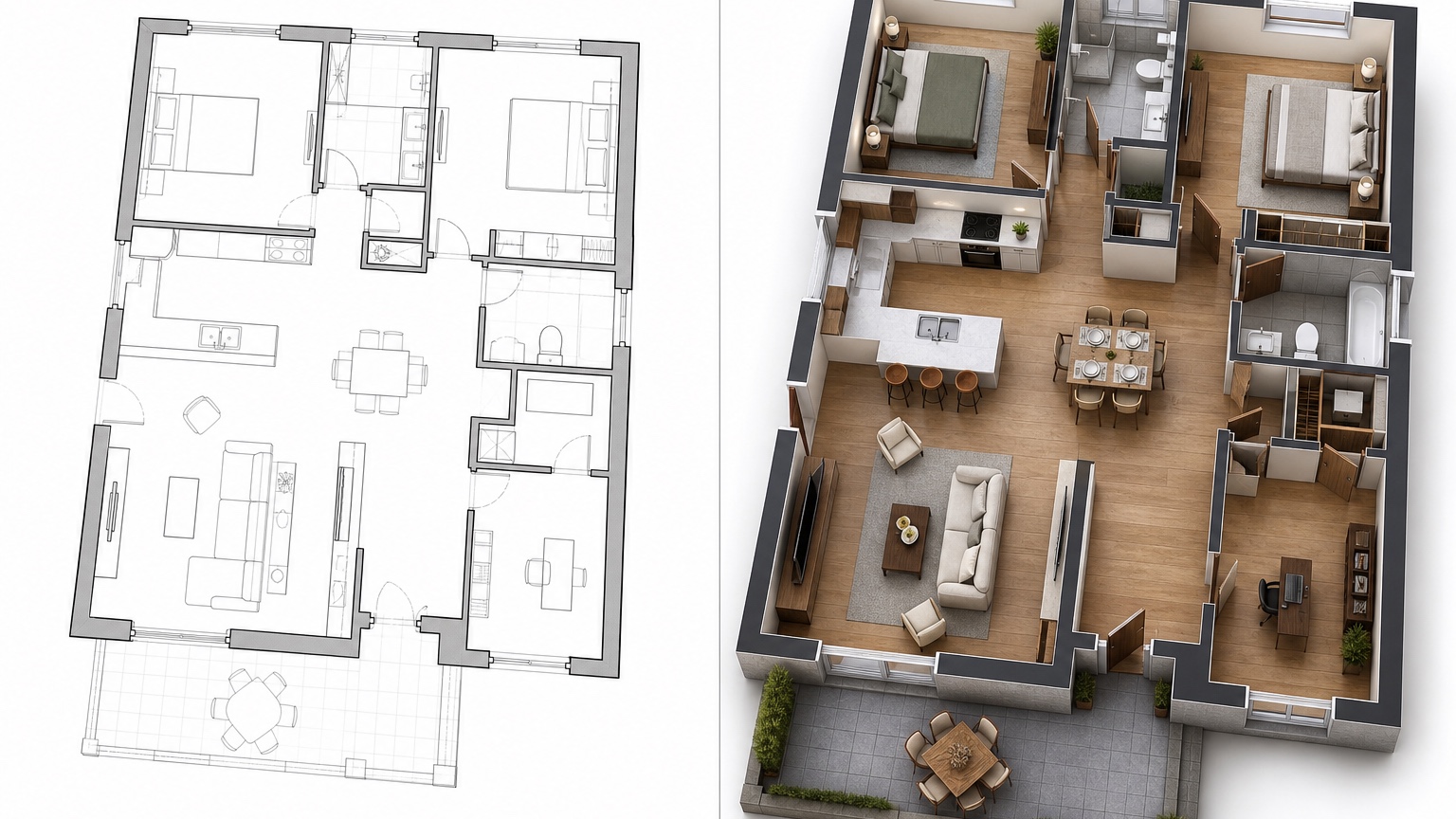
Before you show an image, inspect whether doors land where the plan says they should, window spacing feels plausible, the roof does not melt into walls, and the material story has not changed every surface for decoration. If the image is attractive but contradicts the plan, keep it as inspiration only and regenerate a cleaner version.
For architects and custom builders, the practical test is whether the visual changes the next meeting. If it only looks impressive, it is not enough.
Turn the chosen view into next-step notes
A useful visual ends with decisions, caveats, and a focused list for the professional team.
Save the prompt, export the best view, and write three short notes: what the image confirms, what it questions, and what must be checked by drawings, engineering, pricing, or code review. That keeps the AI concept from being mistaken for construction documentation.
For architects and custom builders, the practical test is whether the visual changes the next meeting. If it only looks impressive, it is not enough.
How to make the review more useful
In practice, the strongest architectural visualization sessions also include a small review ritual. Print or share three versions side by side and ask each stakeholder to write one sentence about what became clearer and one sentence about what still feels risky. The architect may notice massing questions, the builder may flag roof or foundation complexity, and the client may finally explain the emotional preference behind a style choice. That feedback is more valuable than another random render because it points to the next drawing, estimate, or design study. Keep any unresolved code, structure, drainage, setback, and product questions visible in the notes so the concept remains honest.
A practical RedesAIgn workflow
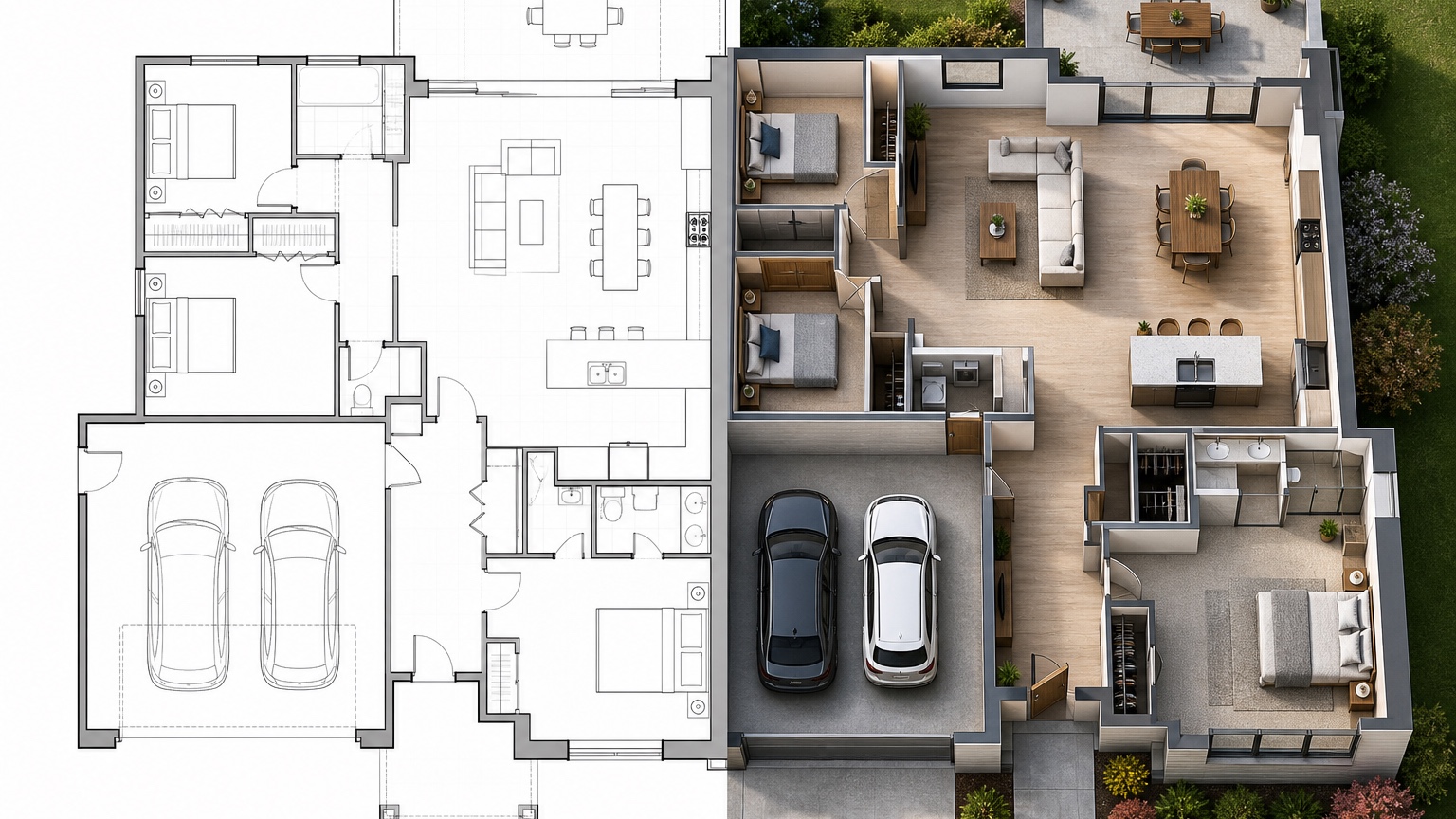
For architectural visualization, use the first pass to create a calm baseline view from the plan. Use the second pass to test massing or material direction, the third to clarify a client concern, and the fourth to simplify anything that looks overproduced. Save each prompt with a meeting-oriented name such as massing study, porch material option, or client alignment view.
Reference images should be treated as supporting evidence. They can suggest siding warmth, roof character, window rhythm, or presentation mood, but they should not cause the project to drift away from the plan. If a generated concept moves openings, invents a level, or changes the site relationship, rewrite the prompt around plan fidelity.
The next step is to bring the strongest view into the professional conversation. Ask the architect, builder, or owner to mark what the image confirms and what still requires drawings, engineering, code review, product choices, or pricing. That makes the AI visual a useful bridge rather than a final promise.
Architect-builder review notes
A strong review starts with the constraints that are most likely to change the design. For an architectural concept, that may include roof form, window rhythm, porch depth, massing, structural spans, drainage, setback, and how the addition meets the existing house. Put those notes beside the image so the team reads the visual as a working proposal rather than a finished answer.
During the meeting, ask the client to react to three categories: what feels right, what looks expensive, and what seems confusing. Ask the builder to flag anything that may affect framing, foundations, waterproofing, schedule, or trade coordination. Ask the architect or designer to mark which ideas deserve drawings and which are just mood references. This converts a single AI image into a more useful decision record.
RedesAIgn history helps because each concept can stay attached to its prompt. If the porch version fails, keep the note. If the material version works but the massing fails, remix only the material language. The project moves faster when every iteration has a reason and a clear owner for the next check.
Example scenario: custom home concept alignment
Imagine a custom home client who likes the plan but cannot picture the front elevation, entry sequence, and rear living connection. The architect has drawings, the builder has practical concerns, and the owner has saved inspiration images that do not match the site. A focused AI architectural visualization can bring those inputs into one discussion image. The prompt can preserve the plan footprint, show a restrained exterior massing, include daylight material cues, and keep the landscape simple enough that the architecture remains the subject.
The team should then review the image in layers. First, does the massing support the plan? Second, do the windows and doors appear in logical places? Third, do the materials communicate the desired character without implying products already selected? Fourth, does the image reveal a question about porch depth, roof transition, garage prominence, or indoor-outdoor flow?
That scenario shows why early visualization has value. The owner can react to a believable direction; the architect can see which idea deserves refinement; the builder can identify possible cost or constructability concerns. RedesAIgn is not replacing the design team. It is helping the team find the next useful question faster.
FAQ: AI Architectural Visualization
Can AI architectural visualization replace professional renderings?
No. It is useful for early concept exploration and client communication, but measured drawings, code review, engineering, and final rendering work still require professional judgment.
What should architects upload for a better result?
Use a readable plan, reference photos, elevation cues, material notes, and a short prompt that states fixed constraints and the decision the image should clarify.
How does RedesAIgn fit into architectural visualization?
RedesAIgn can help create fast concept visuals with prompts, remix/reference images, saved prompts, and history across its AI editors, starting with 5 free credits and no credit card.
Try these prompts in redesAIgn
Convert this floor plan into a bright open-concept living area with a kitchen island and natural light.
Show furniture placement for a 2-bedroom layout with a dining nook and entry storage.
Visualize this blueprint as a modern ADU with compact kitchen, loft bed, and bathroom.
Related guides
- AI Floor Plan With Furniture: See How Rooms Could Work
Add furniture to floor plans with RedesAIgn so scale and circulation stay realistic before you buy pieces or rearrange a real room layout.
- AI Kitchen Floor Plan Visualizer for Remodel Layout Ideas
Visualize kitchen floor plans with AI before remodeling. Compare work triangles, islands, storage, and circulation with realistic furniture scale.
- AI Open Concept Floor Plan Ideas From Existing Layouts
Compare open-concept floor plans with AI before removing walls. Preview kitchen, living, and dining flow plus furniture zones and circulation.
- AI ADU Floor Plan Visualizer for Backyard Homes and Rentals
Preview ADU floor plans with AI for backyard homes and rentals. Compare compact layouts, baths, kitchens, and access before permitting talks.
- AI Basement Floor Plan Design: Visualize Finished Basement Layouts
Design finished basement layouts with AI floor plans. Compare recreation, guest, office, and bath options before construction estimates.