AI Virtual Staging for Real Estate Listings and Empty Rooms
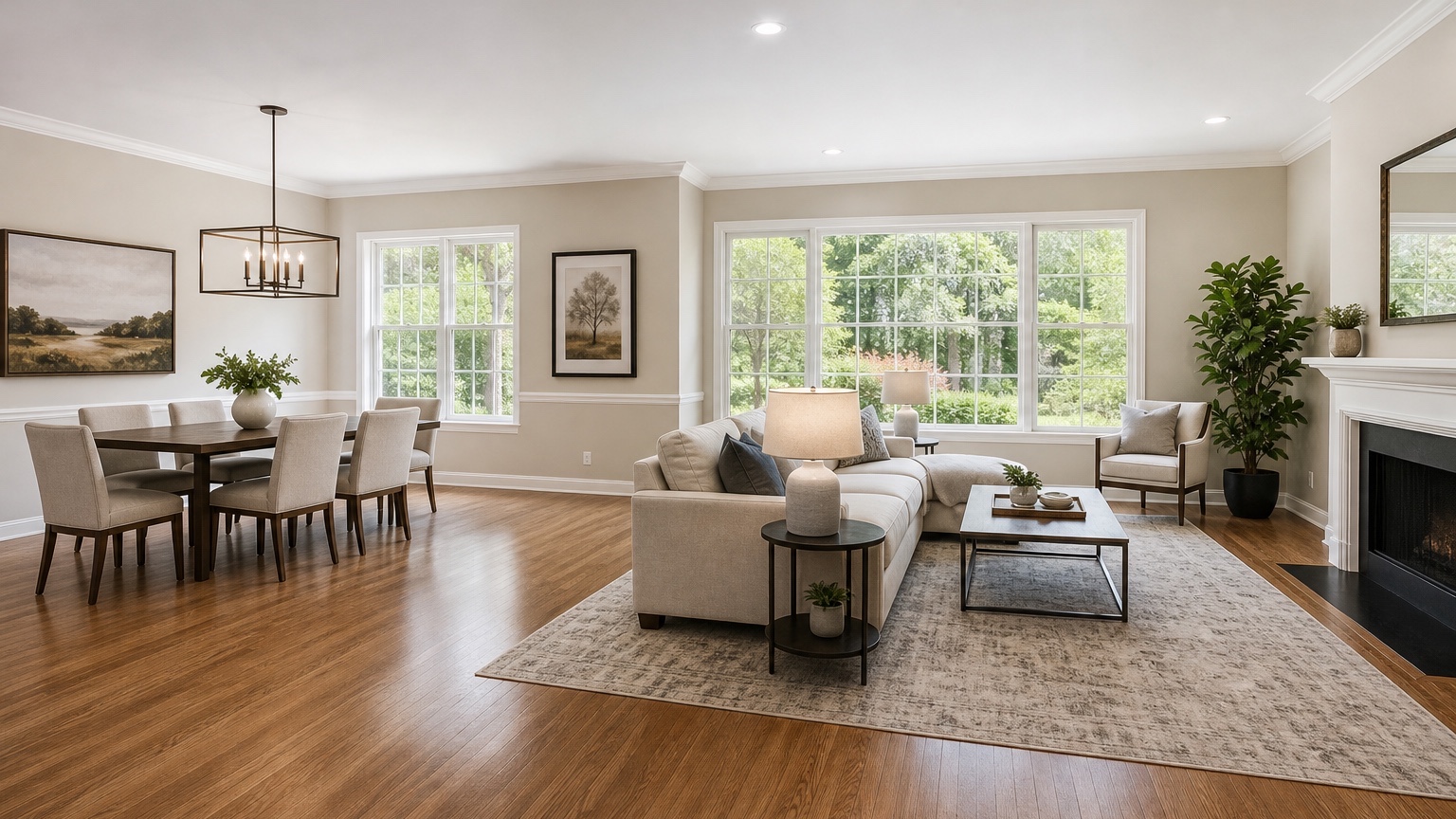
AI virtual staging helps realtors, stagers, property managers, and sellers show the potential of an empty room without moving a truckload of furniture into the property. A vacant living room can look smaller than it is. An empty bedroom may leave buyers unsure whether a queen bed fits. A bare dining area can feel like leftover space instead of a useful zone. Staging images give the buyer a readable version of the room before the showing.
The goal is not to disguise the property. The goal is to communicate scale, use, and atmosphere. A truthful staged image should preserve the walls, windows, floors, ceiling, doors, built-ins, fixtures, and visible condition of the listing photo. It can add furniture, rugs, lighting mood, art, plants, and accessories, but it should not invent square footage, hide damage, remove permanent features, or make a difficult layout look like a different home.
RedesAIgn can support this workflow with 10 AI editors, prompt control, remix images, reference images, saved prompts, and history. You can begin with 5 free credits and no credit card. If a listing package needs more options, one-time credit packs are available. Commercial use matters here: agents and listing teams can use generated visuals in marketing workflows, provided they still follow platform rules, brokerage policy, MLS guidance, and local disclosure expectations.
Where AI virtual staging is most useful
Virtual staging is strongest when the room is clean, vacant, and structurally clear. Empty living rooms, bedrooms, dining rooms, offices, bonus rooms, basements, lofts, and short-term rental units are good candidates. The image can show likely furniture placement, rug size, circulation, and lifestyle cues without physically staging every room.
It is also useful for awkward spaces. A narrow den may become understandable as a home office. A landing may become a reading corner. A small bedroom may show that it works as a nursery or guest room. A long open-plan room may need a staged seating zone and dining zone so buyers understand how to live in it.
For occupied listings, the task is different. AI can help visualize alternative styling, but removing existing belongings, changing finishes, or hiding defects can become misleading quickly. If the current room is cluttered, it is usually better to photograph a clean version first or disclose edited images clearly according to the listing rules you operate under.
If your project sits closer to homeowner planning than listing marketing, related guides such as AI interior design from photo, AI room design generator, and AI furniture visualizer can help with decor and product decisions. For room-specific sales visuals, AI living room design and AI bedroom design generator are useful companions.
Start with listing photos that can carry staging
The staging result depends heavily on the base photo. Use a level, well-lit image that shows the whole room, not a tilted corner crop. Keep vertical lines straight, avoid excessive wide-angle distortion, and include fixed features buyers will see in person: windows, doors, flooring, trim, fireplaces, ceiling lights, radiators, outlets when visible, built-ins, and room openings.
Shoot the room clean and empty if possible. Remove loose trash, tools, boxes, and temporary items. Do not remove permanent flaws from the source photo if they affect the property condition. If a carpet stain, wall damage, missing trim, or dated fixture is visible, staging should not pretend it vanished unless there is a documented repair before listing publication.
Take multiple angles for important rooms. One staged hero image may attract attention, but secondary photos help buyers understand flow. For an open-plan living and dining area, shoot from each end. For a bedroom, show the bed wall and closet wall. For a basement, show ceiling height, support posts, windows, and stairs honestly.
Before generating, decide the role of the room. A spare room can be shown as a bedroom, office, nursery, or gym, but the choice should match likely buyer needs and room dimensions. If a legal bedroom requires specific egress or closet conditions in your market, do not stage a nonconforming room in a way that implies something the listing cannot claim.
Prompt for buyer comprehension
A strong virtual staging prompt is direct about preservation. Name what cannot change, then describe the furniture plan and style. The staging should help a buyer understand the room quickly in a listing carousel, not admire an unrelated design fantasy.
For a living room, try: “Virtually stage this empty living room for a real estate listing. Preserve the exact walls, windows, floors, ceiling, fireplace, trim, doorways, room size, and lighting locations. Add a realistic sofa, two accent chairs, rug, coffee table, side tables, lamps, simple art, and minimal plants. Keep furniture scale believable and leave walking paths clear.”
For a bedroom, try: “Stage this empty bedroom photo with a queen bed, two small nightstands, a rug, bedding, lamps, and modest wall art. Preserve the room dimensions, window location, closet doors, flooring, ceiling, baseboards, and all fixed elements. Use realistic furniture sizes and avoid luxury exaggeration.”
For an office or flex room, try: “Show this vacant small room as a practical home office. Keep the actual architecture, door, window, floor, ceiling, and wall color. Add a compact desk, ergonomic chair, bookcase or storage cabinet, rug, task lamp, and restrained decor. Make it clear the room is small but functional.”
Reference images can be helpful when a brokerage wants a consistent brand feel. Use them for style discipline: warm contemporary, coastal neutral, transitional, modern organic, or urban minimal. The prompt should say that the reference guides furniture mood and color only, while the listing photo controls the room shape and fixed features. RedesAIgn’s saved prompts and history can help maintain that consistency across several rooms in the same property.
Keep scale honest
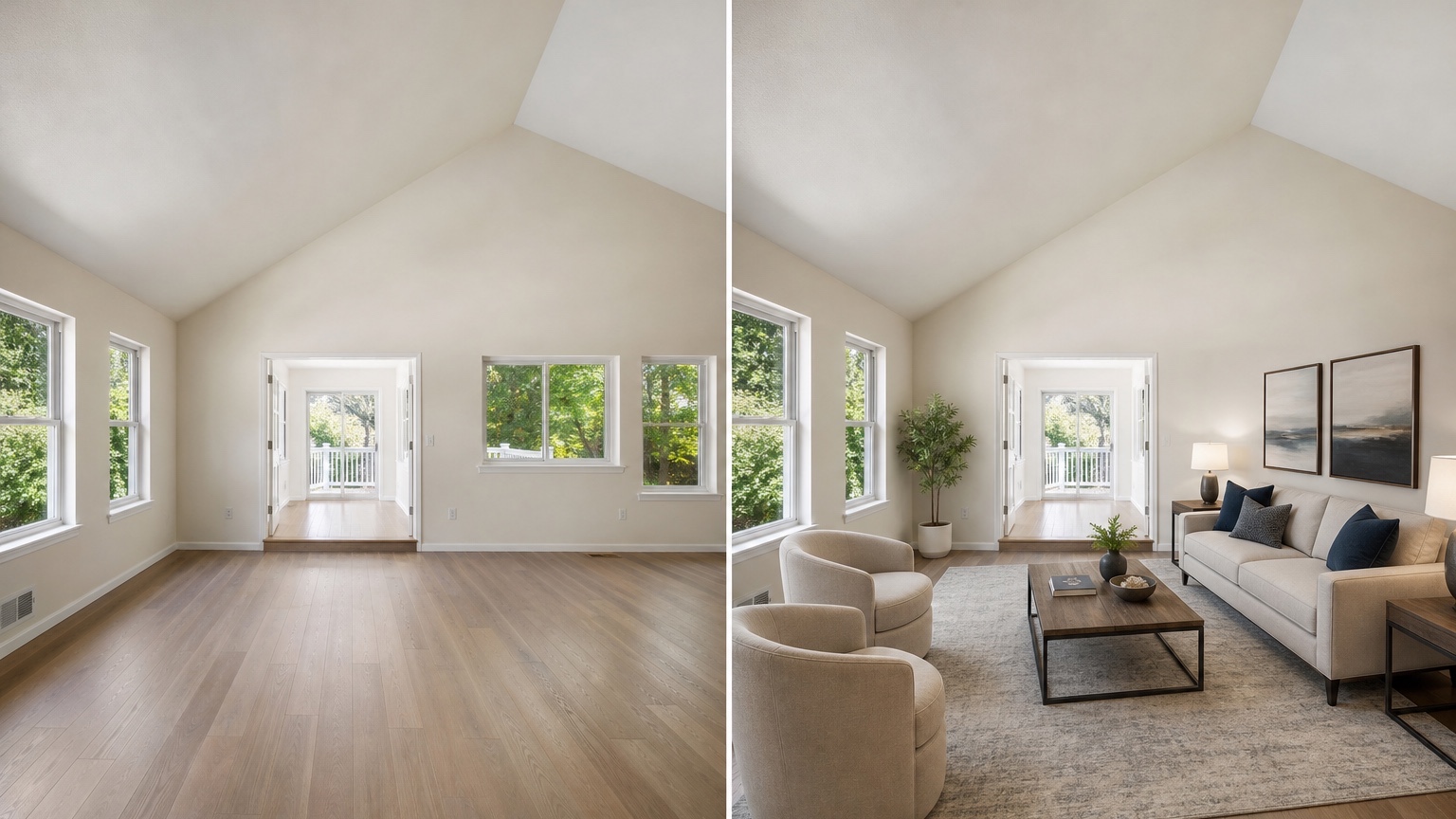
Scale is the first thing buyers test when they tour the home. If the image shows a sectional that could not fit through the door or a king bed where only a full bed belongs, the staging may create distrust. Prompt for specific sizes when possible: queen bed, apartment-scale sofa, round four-seat dining table, compact desk, narrow console, or twin beds.
Leave realistic clearance. Dining chairs need room to pull out. Sofas need walking paths. Beds need side access unless the room is genuinely tight and the staging shows that honestly. Office chairs need space to move. A rug should anchor furniture without covering every inch of floor in a way that hides dimensions.
Do not let the tool enlarge the room. Watch for stretched floors, changed ceiling height, wider windows, removed posts, softened corners, or altered doorway locations. These changes may look subtle online, but they can become obvious at a showing. If the architecture shifts, regenerate with firmer preservation language.
Furniture style should match the property and price point. A modest condo staged with oversized luxury furniture may feel false. A high-end listing staged with tiny generic pieces may undersell the home. The best staging makes the property easier to understand while staying believable for the buyer who will walk through the front door.
Photo realism and listing trust
Real estate images have a different burden than private design concepts. Buyers use them to decide whether to schedule a showing, make an offer, or skip a property. That means the image needs to be visually appealing and accurate enough not to damage trust.
Check lighting direction. If the room has daylight from the left, staged furniture shadows should not look as if the sun is coming from three directions. Check contact points: chair legs should meet the floor, rugs should lie flat, tables should not float, and art should sit on a plausible wall plane. Check material quality too. Overly glossy fabrics, warped lamps, impossible plant shapes, or melted table edges make the listing feel careless.
Keep styling restrained. Listing photos need to communicate the room, not compete with it. Use simple bedding, neutral art, clean surfaces, modest plants, and furniture that clarifies function. Over-styled shelves, busy pillows, and dramatic statement pieces can distract from square footage, windows, and layout.
If the room has important features, stage around them instead of covering them. A fireplace should remain visible. A view should not be blocked by an invented curtain wall. A built-in cabinet should not disappear behind a fake sofa. A low ceiling should not be hidden by unrealistic lighting. Trust comes from showing the property well, not from editing away its identity.
Ethical staging and disclosure
Virtual staging should be handled with the same care as any listing edit. Rules vary by market, MLS, brokerage, portal, and jurisdiction, so treat this as a workflow reminder rather than legal advice. Many teams label virtually staged images, include the original empty image nearby, or add captions such as “virtually staged” where required. Follow the rules that apply to your listing.
The safest approach is simple: do not change permanent facts. Do not remove damage that will still exist at showing. Do not add windows, views, fireplaces, built-ins, appliances, finished flooring, or outdoor features that are not present. Do not stage a room as a legal bedroom if it cannot be marketed that way under your local standards. Do not make exterior or neighborhood conditions look different from reality.
If planned repairs are underway, document the status. A virtually staged image can show how a room may look after new paint or flooring only if the marketing language is clear and the work is actually scheduled or completed according to listing rules. Otherwise, keep staging to movable furnishings and decor.
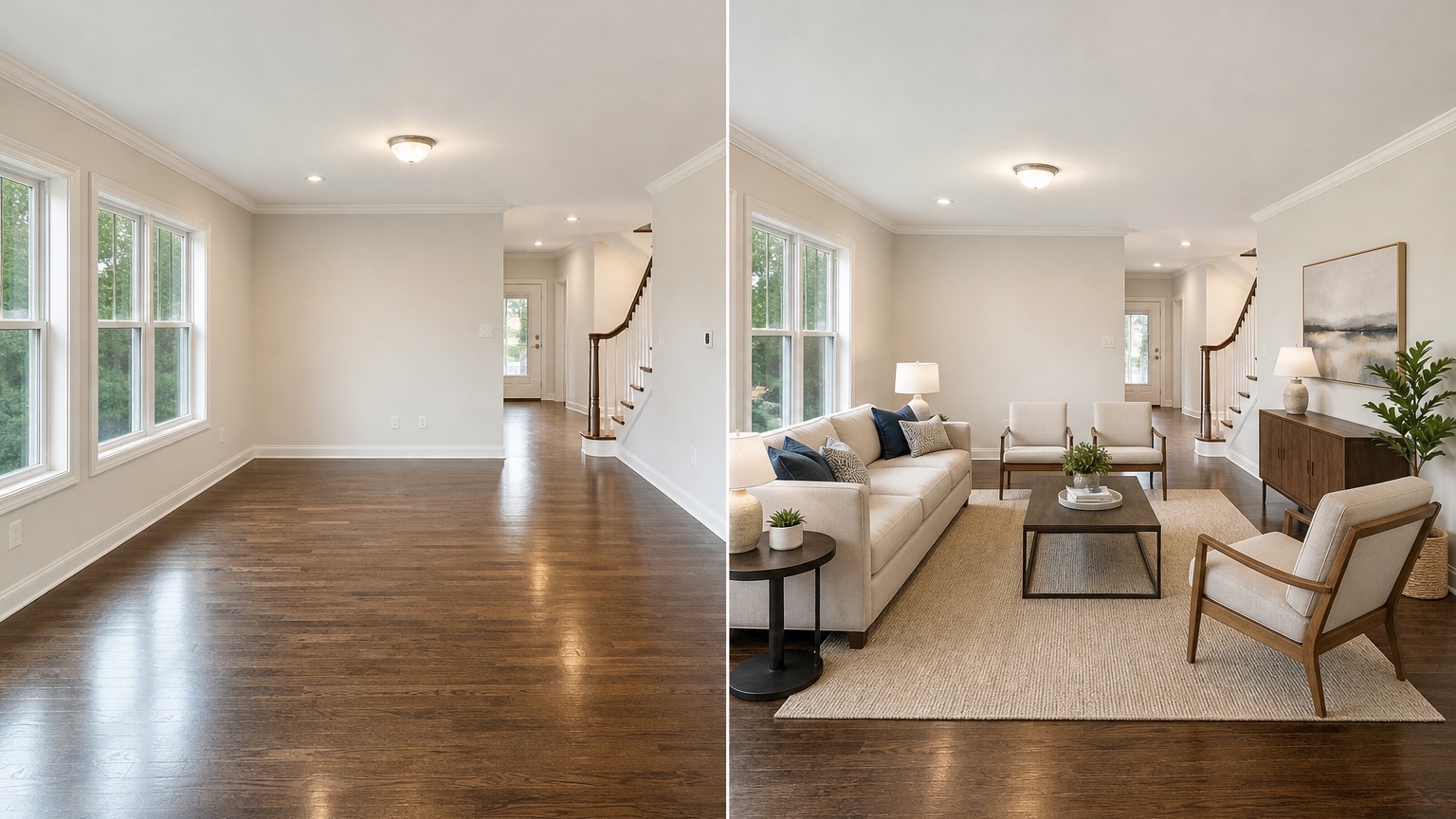
Some agents include both versions in the listing sequence: empty room first, staged version second, or staged first with an empty comparison later. The order depends on local norms and platform policy. The important part is that buyers can distinguish visualization from the property’s current physical state.
Build a repeatable listing workflow
For a single property, start with the most important rooms. Usually that means living room, primary bedroom, dining area, and one flex space. Kitchens and bathrooms often need less virtual staging because cabinetry and fixtures already define the room, though small decor touches may help. Avoid staging every room if the listing becomes confusing or repetitive.
Create one base prompt for the property style. For example: “warm neutral contemporary staging, realistic mid-market furniture, minimal accessories, no architectural changes, preserve all fixed elements.” Save it in RedesAIgn once it produces a believable result. Then adapt the room-specific furniture while keeping the same tone across the listing.
Use remixing for layout alternatives, not endless decoration. In a living room, test sofa facing the fireplace versus sofa facing the media wall. In a dining area, compare round table versus rectangular table. In a flex room, compare office versus guest room only if both uses are truthful. Choose the version that explains the space fastest.
Keep a review checklist before publishing: fixed features preserved, scale believable, no hidden defects, no invented renovations, image labeled as required, original photo retained, file names organized, brokerage approval complete, and MLS rules checked. This checklist protects both marketing quality and buyer trust.
Working with sellers and staging teams
AI staging can reduce friction with sellers because it shows why certain rooms need clarity. Instead of saying “buyers will not understand this empty room,” you can show a staged office or bedroom concept and discuss whether that use matches the listing strategy. It also helps sellers decide whether physical staging is worth the cost for key spaces.
Professional stagers can use the same images as early direction. A generated layout can suggest what size sofa, bed, dining table, rug, or art scale to bring. It does not replace a stager’s eye, inventory knowledge, or on-site adjustment, but it can speed the conversation before installation day.
For developers, property managers, or short-term rental hosts, saved prompts can keep multiple units consistent. A repeatable prompt can stage similar floor plans with the same general tone while still preserving each room’s actual windows, doors, flooring, and proportions.
FAQ: AI virtual staging
What is AI virtual staging?
AI virtual staging uses a property photo and prompt to add realistic furniture and decor digitally. It helps buyers understand room function, scale, and layout without physically staging the space.
Is AI virtual staging acceptable for real estate listings?
It can be, but rules vary. Follow your MLS, brokerage, portal, and local requirements. Many listing teams label virtually staged images and keep original photos available for comparison.
What should not be changed in a virtually staged photo?
Do not change permanent property facts such as room size, windows, flooring condition, fixtures, damage, views, fireplaces, built-ins, appliances, or legal room status unless the listing rules and disclosures clearly allow the edit.
How do I keep furniture scale realistic?
Prompt for actual furniture types and sizes, such as queen bed, apartment sofa, four-seat dining table, or compact desk. Review clearance, door swings, ceiling height, and whether the room still matches the source photo.
How can RedesAIgn help with listing staging?
RedesAIgn offers 10 AI editors, prompts, remix images, reference images, saved prompts, and history. You can start with 5 free credits and no credit card, then use one-time credit packs for additional listing variations.
Try these prompts in redesAIgn
Virtually stage this empty living room for listing photos with neutral furniture.
Add light staging to this bedroom that feels move-in ready without clutter.
Stage this open room for real estate marketing with a dining set and soft lighting.
Related guides
- AI Floor Plan With Furniture: See How Rooms Could Work
Add furniture to floor plans with RedesAIgn so scale and circulation stay realistic before you buy pieces or rearrange a real room layout.
- AI Kitchen Floor Plan Visualizer for Remodel Layout Ideas
Visualize kitchen floor plans with AI before remodeling. Compare work triangles, islands, storage, and circulation with realistic furniture scale.
- AI Open Concept Floor Plan Ideas From Existing Layouts
Compare open-concept floor plans with AI before removing walls. Preview kitchen, living, and dining flow plus furniture zones and circulation.
- AI ADU Floor Plan Visualizer for Backyard Homes and Rentals
Preview ADU floor plans with AI for backyard homes and rentals. Compare compact layouts, baths, kitchens, and access before permitting talks.
- AI Basement Floor Plan Design: Visualize Finished Basement Layouts
Design finished basement layouts with AI floor plans. Compare recreation, guest, office, and bath options before construction estimates.