AI Yard Design App for Fast Landscaping Concepts
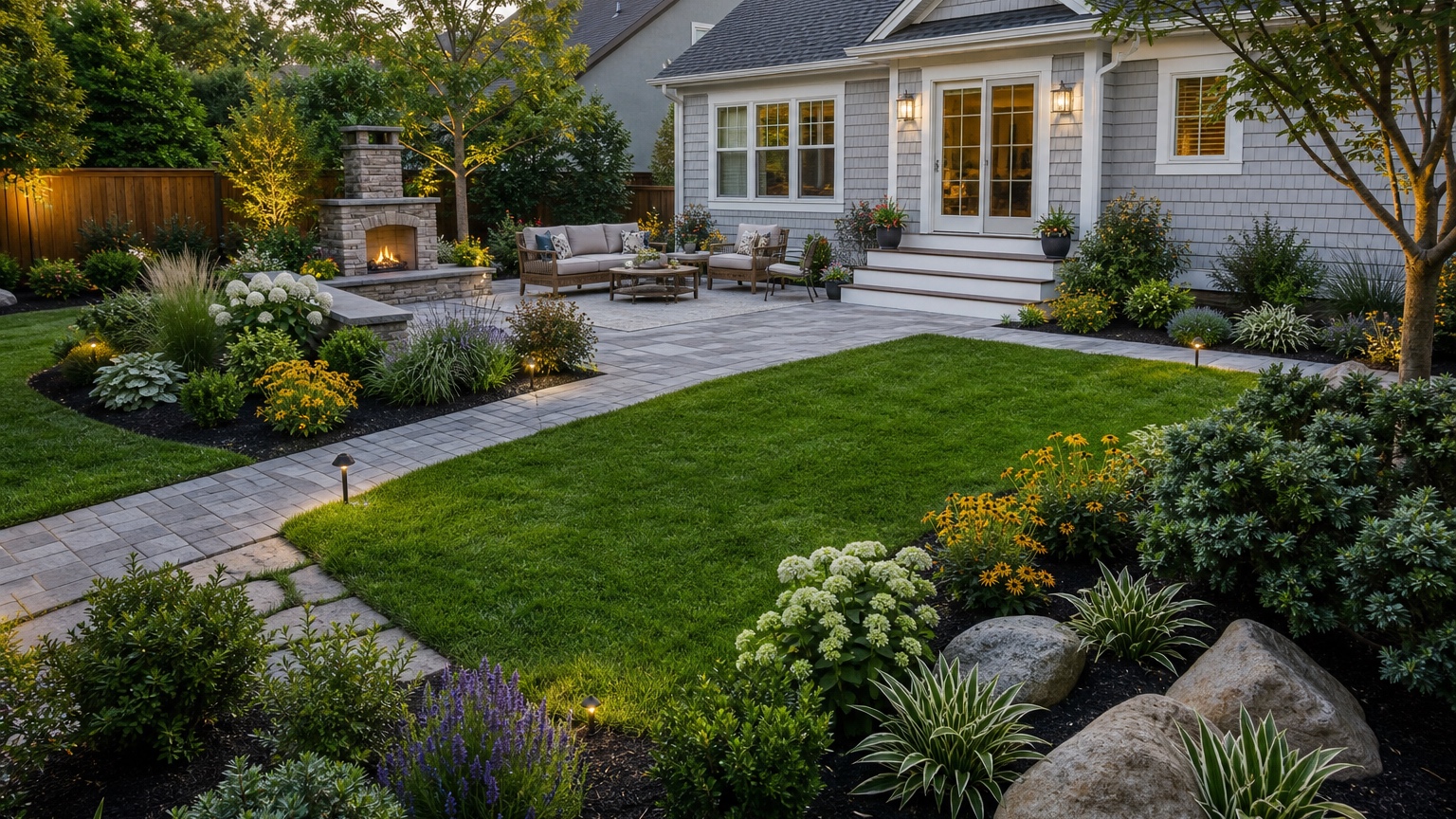
An AI yard design app is most useful when it helps you make one real outdoor decision from a real yard photo. Homeowners and landscapers rarely need a fantasy garden with perfect plants, impossible lighting, and a patio that ignores the property line. They need a visual concept that shows how the yard could function: where people walk, where they sit, how shade and privacy work, what plants frame the space, and which hardscape changes are worth pricing.
That is why the best AI yard design app workflow starts with a practical question. Should the side yard become a usable path? Should a bare lawn become zones for dining, fire pit seating, and planting? Should you keep the existing patio and improve the edges, or replace it with a larger outdoor room? A good image does not answer every construction detail, but it can reduce uncertainty before you buy materials, remove plants, or ask a contractor for an estimate.
RedesAIgn supports this planning step by letting you upload a real yard photo and create controlled visual revisions with prompts, remix images, reference images, saved prompts, and history. If you want to test your own yard, start free with RedesAIgn and use 5 free AI credits with no credit card required.
What an AI yard design app should help you decide
A yard design app should not simply make a yard look more expensive. It should help you decide what kind of outdoor upgrade plan makes sense for the property. For a small backyard, the decision may be whether to prioritize one comfortable seating area or several compact zones. For a wide suburban yard, the question may be how to connect the patio, lawn, garden beds, and side gate without making the space feel scattered. For a rental, listing, or client presentation, the goal may be to show potential without promising construction that has not been reviewed.
Homeowners often describe the problem as “the yard feels unfinished,” but that can mean many different things. The walkway may be unclear. The patio may be too exposed. The lawn may dominate the space without offering a reason to use it. The fence line may need planting for privacy. A planting bed may look busy because it has no repeated structure. AI is useful because it turns those vague frustrations into images you can compare.
For landscapers, the value is communication. A client who says “modern and low-maintenance” may be imagining concrete pavers and gravel, while another person means simple turf, clean mulch, evergreen structure, and a few flowering accents. A photo-based concept gives both sides a reference before measurements, drainage checks, plant lists, and quotes begin.
If your project is closer to a whole landscape concept, compare this workflow with AI landscape design generator or AI landscape design from photo. If the decision is specifically about the front of the home, AI front yard landscaping may be a better fit.
Start with the outdoor layout and maintenance tradeoffs
Yard design is a layout problem before it is a style problem. The first layer is circulation. People need to move from the house to the patio, from the driveway or side gate to the backyard, and from one activity zone to another without cutting through planting beds or stepping over furniture. If the AI result looks beautiful but places shrubs across the natural path from the door to the grill, it is not a useful plan.
The second layer is use. Decide whether the yard needs dining, lounging, kids’ play, pets, gardening, entertaining, a fire feature, storage, or a quiet reading corner. A small yard can still feel generous when the zones are clear. A large yard can feel awkward when every element floats in the middle. Ask the app to create zones with purpose: a dining pad near the kitchen, a lounge area where shade makes sense, a planting buffer along the fence, and a direct path where people already walk.
The third layer is shade and privacy. Before you request a pergola, tree, hedge, or screen, look at where the sun actually lands. A shaded seating concept should not depend on a tree that would block a window, damage a foundation, or take years to mature. Privacy planting should soften views without creating a maintenance wall that overwhelms a narrow yard.
Maintenance is the filter that keeps the concept realistic. Large planting beds, gravel fields, lawns, hedges, and paver joints all require different upkeep. In dry climates, water use may be the most important constraint. In wet climates, drainage and moss may matter more. If you want low maintenance, say that in the prompt and reject results that rely on constant pruning, fragile plants, or perfect seasonal color.
Prepare a photo that shows the yard honestly
The input photo should show the real site, not just the prettiest corner. Use a daylight image that captures the house wall or patio edge, fence lines, gates, existing trees, lawn, slope, drainage problem areas, side paths, fixed utilities, and any hardscape that is staying. For a backyard, take at least one wide view from the house looking out and one view looking back toward the house if possible. For a side yard, show the full length of the path and the points where people enter and exit.
Avoid photos taken at night, in deep shadow, after heavy rain glare, or with temporary clutter blocking the main decision areas. Move hoses, bins, loose toys, folding chairs, and bags of soil unless those objects define a real constraint. If a mature tree, retaining wall, drainage swale, septic area, pool equipment, or utility box must stay, make sure it is visible and mention it in the prompt.
Decide what must remain recognizable. Most practical yard previews should preserve the house footprint, patio door, fence location, grade, major trees, existing patio if it is not changing, and the main access route. If the AI flattens a slope, moves a fence, erases a drainage channel, or invents a second patio door, treat the image as inspiration rather than a plan.
Prompt for an outdoor upgrade plan, not generic landscaping
A strong prompt starts with the outcome. Instead of “make my yard beautiful,” write a short brief that says what the yard needs to do, what must stay, and what constraints matter.
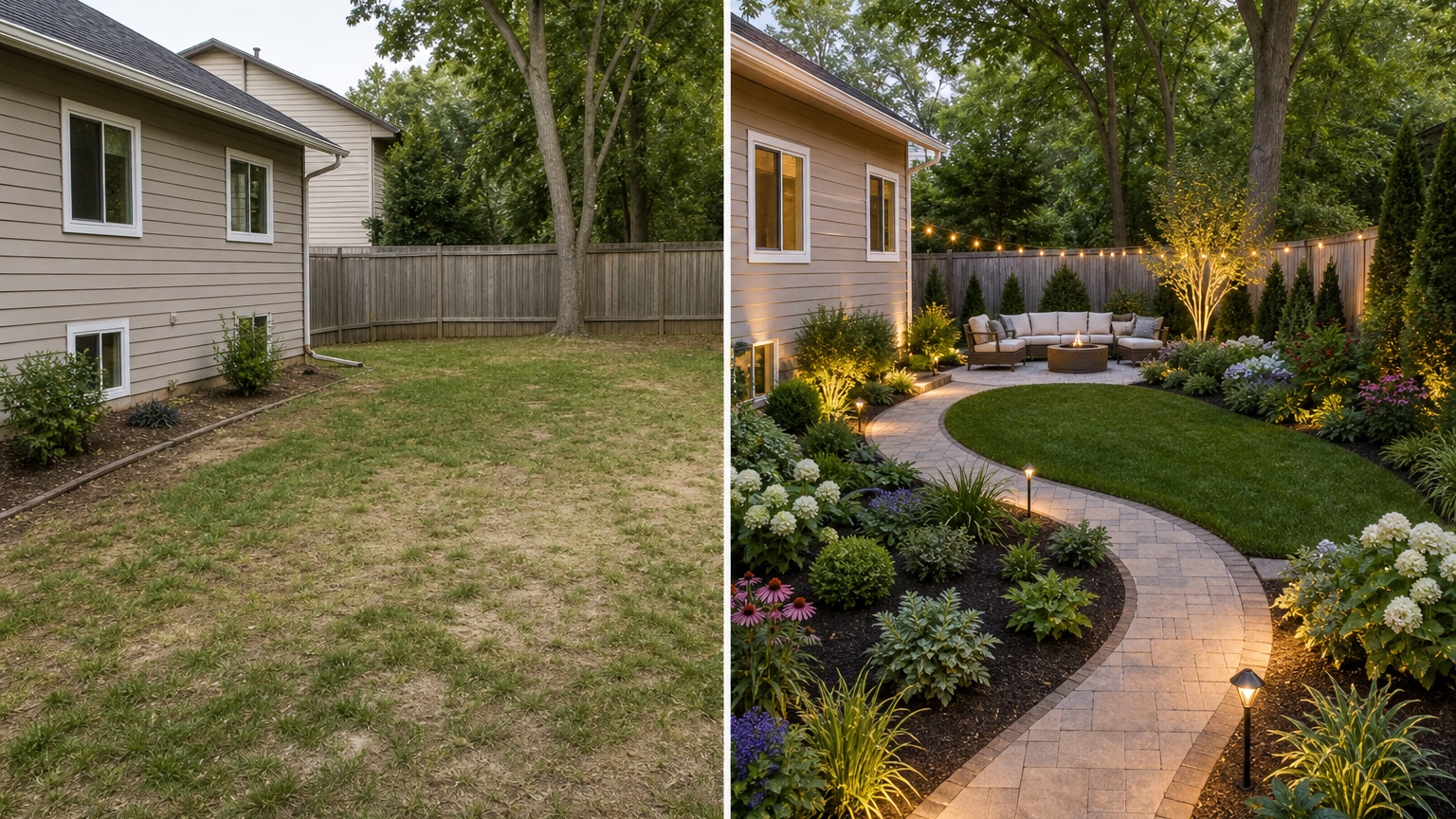
For a homeowner planning a usable backyard, try: “Create a realistic yard design concept from this photo. Preserve the house, fence, patio door, existing grade, and mature trees. Add a clear path from the door to a dining area, a comfortable seating zone, low-maintenance planting along the fence, simple warm lighting, and durable materials suitable for a practical outdoor upgrade plan.”
For a lower-cost refresh, narrow the scope: “Improve this yard without major construction. Keep the existing patio, lawn shape, fence, trees, and side access. Add cleaner bed edges, refreshed mulch, a small seating arrangement, container plants near the door, simple path lighting, and a more intentional transition between patio and lawn.”
For a landscaper or contractor reference, be more explicit: “Generate three controlled yard design concepts: one planting-focused refresh, one hardscape-and-path version, and one outdoor living layout with dining and lounge zones. Keep the original house, fence lines, grade, mature trees, and access paths recognizable. Prioritize contractor feasibility, drainage awareness, water use, maintenance, and clear zone planning.”
Reference images can help when they clarify one material, mood, or planting structure. Use them for a paver color, gravel texture, pergola style, fence-screen detail, or drought-tolerant palette. Do not overload the app with unrelated inspiration. Too many references can produce a polished image that forgets the real yard.
Generate controlled variations before choosing a direction
One overloaded prompt can hide the best idea. If you ask for a pergola, outdoor kitchen, fire pit, deck, path, new trees, new lawn, water feature, privacy wall, and full planting plan in one image, the result may look dramatic but it will be difficult to evaluate. The better workflow is to test variables separately.
Start with a circulation version. Ask for a clearer path system, better access from the door, and a simple connection between existing zones. Judge whether the yard becomes easier to understand.
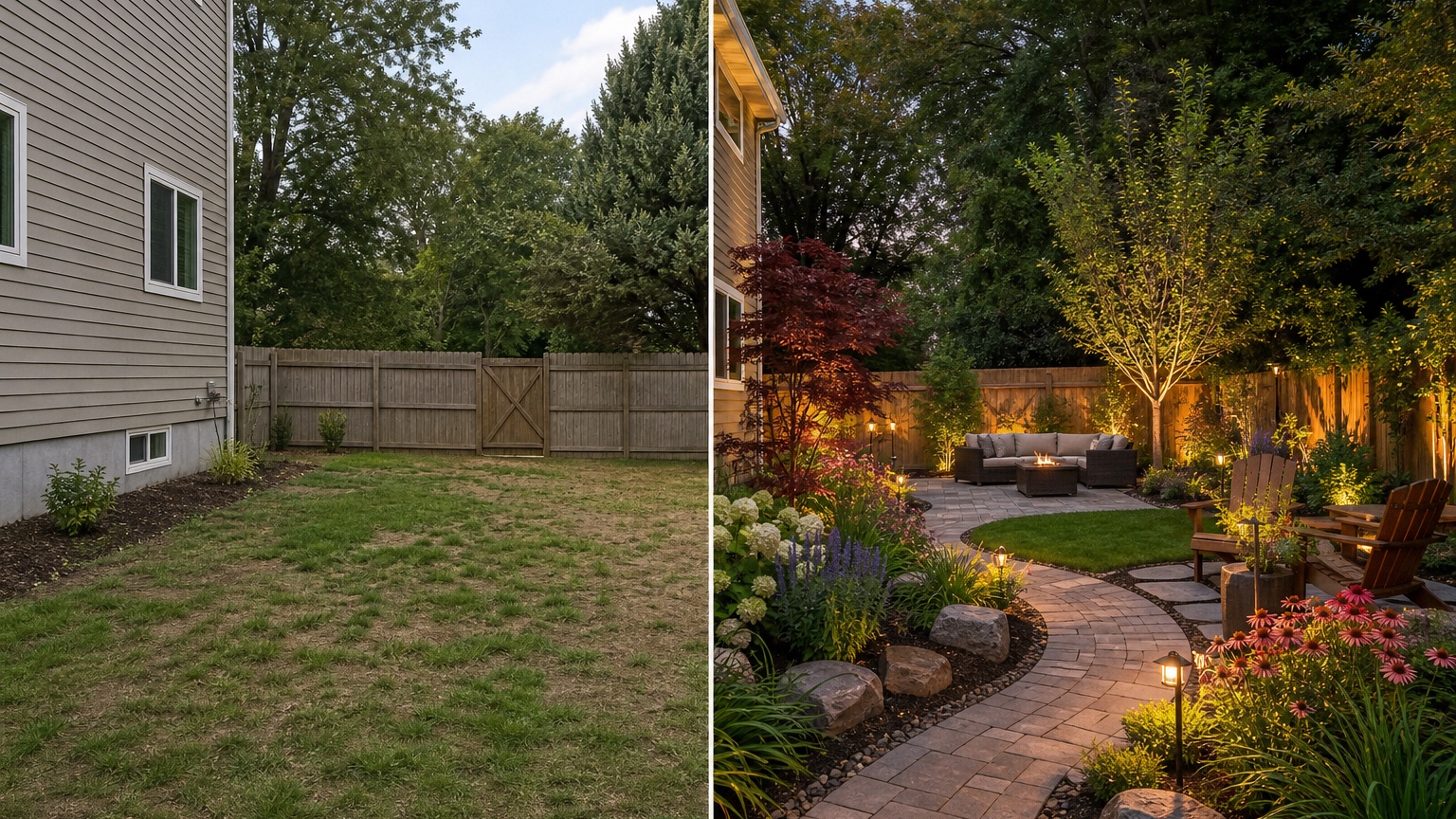
Next, generate a planting and privacy version. Keep hardscape mostly unchanged while testing fence-line planting, low shrubs, ornamental grasses, small trees, raised beds, or screening. Judge whether the space feels more comfortable without becoming crowded.
Then create a hardscape and seating version. Explore patio expansion, stepping stones, gravel, pavers, a compact deck, fire pit seating, or dining placement. Judge whether the added surfaces support real use and whether the scale fits the yard.
In RedesAIgn, saved prompts and history help keep those versions organized. Remix the strongest direction instead of starting over with unrelated styles. A saved prompt named “low-maintenance side yard path” is much easier to refine than a gallery of disconnected images.
Review the AI result before anyone trusts the image
AI yard concepts can be convincing even when details are not buildable. Review the output like a site checklist. First, check scale. Are chairs, dining tables, planters, trees, and paths sized realistically? Does the patio allow room to pull out chairs? Is the path wide enough to walk with tools, trash bins, or a stroller? Are plants placed too close to siding, fence posts, utilities, or steps?
Second, check consistency with the original image. The house, fence, grade, mature trees, patio door, and access points should still make sense. Shadows and lighting should not disguise impossible transitions. Pavers should follow the perspective of the yard. Planting beds should meet lawn, gravel, patio, and fence lines in believable ways.
Third, compare the idea against climate, water, drainage, maintenance, and contractor feasibility. A lush lawn may not make sense in a drought-prone region. Gravel may migrate on a slope. A sun-loving planting palette may fail in a shaded side yard. A sunken fire pit may be a drainage problem. Use the image to choose a direction, then confirm the real-world details before installation.
Finally, turn the best image into notes: zones to keep, materials to sample, planting areas to discuss, drainage questions, lighting locations, and work that needs a professional quote. The concept becomes useful when it produces a smaller next step.
Common mistakes that make yard app results look generic
The first mistake is uploading a weak photo. If the camera crops out the fence, hides the patio door, or shows only the center of the lawn, the app may design a scene instead of the actual yard.
The second mistake is asking for unrelated changes. If the decision is landscape layout, do not also request new siding, a new roof, different windows, and a full facade remodel. Save those for a separate exterior workflow such as AI exterior design from photo.
The third mistake is ignoring drainage and maintenance. AI can show attractive paving and planting, but it cannot verify slope, soil, irrigation, local plant performance, utilities, or code. If those factors matter, put them in the prompt and use the output as a planning reference.
The fourth mistake is choosing the most dramatic image instead of the most useful one. A restrained concept with a clear path, better seating, and manageable planting may create more value than a luxury render that has no budget path.
How to use RedesAIgn as an AI yard design app
Choose the RedesAIgn editor that best matches the yard or garden task, upload a clear photo, and write a prompt around the decision you need to make. Generate a few focused versions, remix the strongest one, and use history to compare what changed between prompts.
RedesAIgn includes 10 AI editors, so the same account can support related planning work beyond one yard image. Prompts, remix images, reference images, saved prompts, and history make it easier to test options without losing track of the best direction. If you need more generations after the free start, one-time credit packs are available. Commercial use is relevant for landscapers, contractors, realtors, hosts, and hospitality marketers who use concepts as planning references for client or stakeholder conversations.
When you are ready to compare yard ideas from your own photo, try RedesAIgn for free. You get 5 free credits, no credit card required, and a practical way to turn a vague outdoor upgrade plan into visual options before you buy plants, order materials, or request quotes.
FAQ: AI yard design app
Can an AI yard design app create ideas from my yard photo?
Yes. It can use a real yard photo to preview paths, patios, seating zones, planting beds, privacy, shade, lighting, and low-maintenance landscape concepts.
What should stay the same in a realistic yard preview?
Preserve fixed elements such as the house, patio door, fence, grade, mature trees, utilities, and access paths unless you are intentionally exploring major construction.
Can landscapers use AI yard concepts with clients?
Yes, as visual planning references. The image can clarify direction, but measurements, drainage, plant suitability, materials, codes, and pricing still need professional review.
How many yard concepts should I generate?
Start with three controlled versions: circulation, planting and privacy, and hardscape with seating. Then refine the strongest option instead of jumping between unrelated styles.
Try these prompts in redesAIgn
Redesign this front yard with a stone walkway, low-water plants, and clean planting beds.
Create a backyard seating patio with string lights, shrubs, and a simple lawn edge.
Add curb-appeal landscaping with layered greenery while keeping the driveway clear.
Related guides
- AI Landscape Architecture Generator for Early Outdoor Concepts
Use an AI landscape architecture generator for early outdoor concept exploration, studio reviews, feasibility checks, and photo-based design iteration.
- AI Landscape Visualizer: Preview Yard Changes Before You Commit
Use an AI landscape visualizer to preview realistic yard changes from a photo, compare landscaping options, and reduce decision risk before outdoor work.
- AI Lawn Makeover Ideas: Turn a Plain Yard Into a Plan
Use an AI lawn makeover to preview lawn shape, planting borders, paths, edging, seating, and practical yard upgrades before hiring or starting work.
- AI Xeriscape Design Ideas for Low-Water Yards
Use AI xeriscape design to preview low-water planting, gravel, paths, shade, irrigation zones, and maintenance tradeoffs before changing your yard.
- AI Backyard Makeover: Generate Outdoor Design Before and Afters
Use an AI backyard makeover workflow to preview layout zones, maintenance tradeoffs, before-and-after options, and practical next steps from a real yard.