AI Landscape Design Generator: Yard Ideas From Your Photo
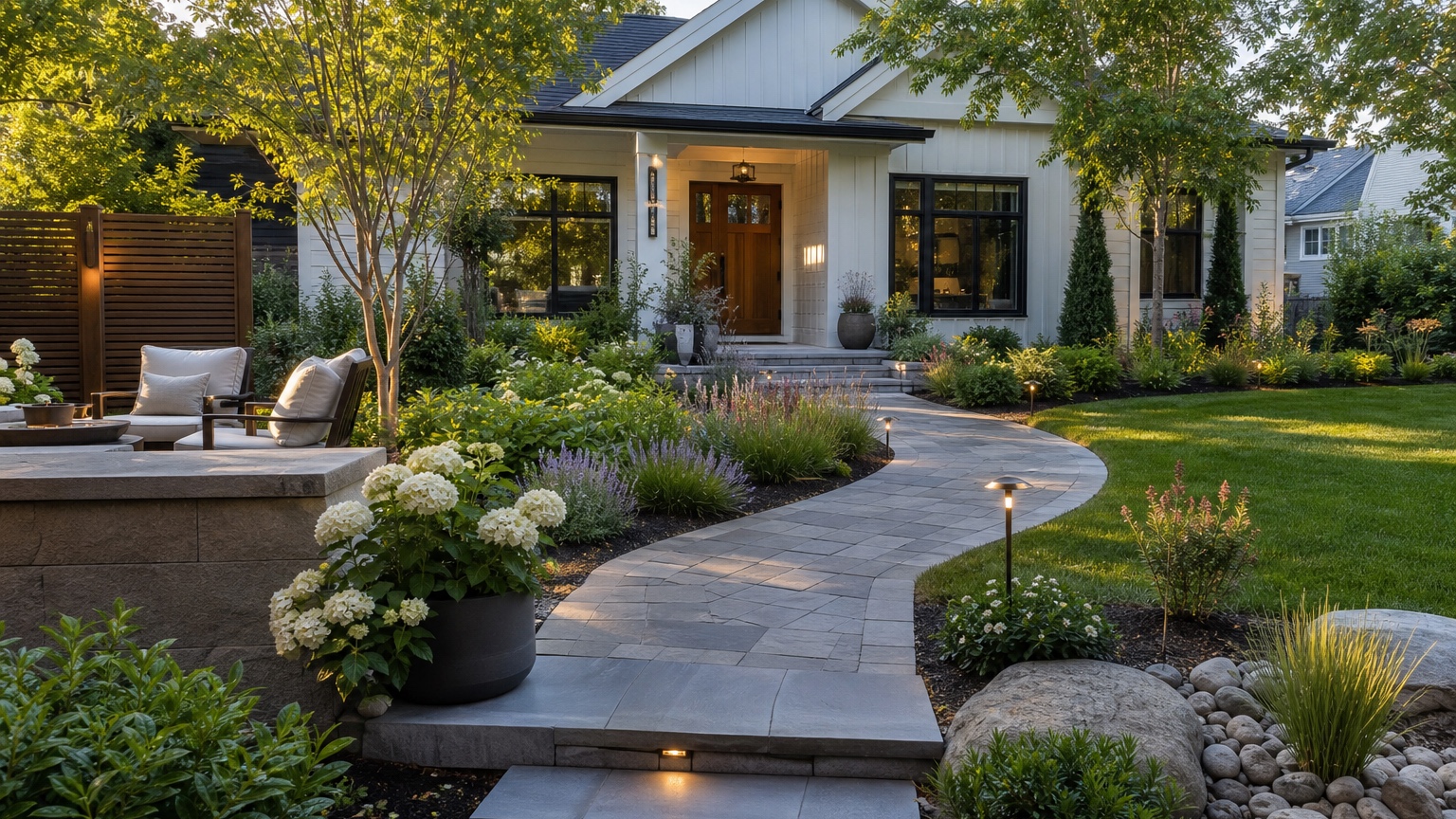
An AI landscape design generator is useful when it turns a vague yard goal into a visual decision you can discuss. Most homeowners do not lack inspiration; they face too many possible futures for a plain lawn, tired planting bed, awkward patio, empty side yard, or underused rental garden. Should the budget go toward a patio, a path, privacy planting, lighting, lawn repair, gravel, trees, or a cleaner seating zone? A polished concept image can make those tradeoffs easier before anyone starts digging.
For homeowners and landscapers, the goal is not to generate a fantasy resort garden. The goal is to preview practical landscape directions on a real yard photo before spending on materials, labor, plants, irrigation changes, or hardscape work. A good workflow keeps the yard recognizable while testing circulation, shade, planting layers, lawn shape, privacy, seating, drainage-aware surfaces, and maintenance level.
RedesAIgn helps with this early visual step. Upload a yard photo, use the Landscape Editor, and generate controlled concepts from prompts, remix options, reference images, saved prompts, and history. If you want to test ideas, start free with RedesAIgn and use 5 free AI credits with no credit card required.
AI Landscape Design Generator: the real decision this article should help with
Homeowners need to visualize yards before landscaping spend
Landscaping money disappears quickly because the work is physical. Soil prep, grading, edging, pavers, irrigation, mulch, lighting, plant material, delivery fees, disposal, and labor all add up before the yard looks finished. A generator preview helps you decide whether the biggest improvement is a new layout or a smaller correction, such as a defined seating area, deeper bed line, short path, or better edge control.
The AI landscape design generator preview should reduce uncertainty around an outdoor upgrade plan
The strongest preview answers specific questions. Does the patio belong closer to the house or under the tree? Should the path be straight, curved, stepping stone, gravel, or paver? Is privacy better handled with hedges, layered shrubs, a trellis, or a fence extension? Should the planting style be drought-tolerant, cottage, modern, native, tropical, woodland, or low-maintenance evergreen?
Ask the generator to compare options that could become a real next step. If the project is a rental listing, the useful output may be a low-maintenance refresh that photographs well. If the project is a family backyard, the useful output may be zones for seating, play, shade, and planting. If the project is for a hospitality property, the useful output may clarify paths, lighting, seating rhythm, and maintenance expectations.
The useful answer for landscape design is a concrete next step, not generic AI decoration
A pretty landscape image is only valuable if it leads to action. The next step might be “ask for a quote on a 12-by-16-foot paver patio,” “keep the lawn but reshape the beds,” “compare gravel versus pavers,” “request a planting plan for this sunny border,” or “do not invest in a deck until drainage is checked.” Treat the image as a decision reference, not as a construction drawing.
If you also plan facade work, connect the yard concept with exterior decisions. A refreshed entry landscape may pair with AI front porch design, while a larger curb appeal plan may sit beside an AI curb appeal generator workflow.
When to test AI landscape design generator ideas visually first
Use AI landscape design generator before spending money on yard or garden changes
Test visually before buying plants, pavers, furniture, fire pits, edging, lighting, or mulch in volume. The generator can reveal that the expensive element is not the missing piece. Many yards feel unfinished because they lack structure: a clear path, a defined bed edge, repeated plant masses, a focal tree, or a seating zone that fits the house. Buying scattered plants before deciding the layout often creates a busy yard that still lacks direction.
Use the preview before scheduling major work too. A retaining wall, drainage swale, patio extension, pool surround, pergola, or fence line affects how the rest of the yard works. Seeing several concepts first can help you brief a contractor more clearly and avoid asking for estimates on a design you may not want after seeing it.
Use the preview when a landscaper, hardscape contractor, realtor, host, or hospitality marketer needs a clearer reference
Professionals can use AI previews to make conversations less abstract. A landscaper can show three planting directions without pretending they are final plans. A hardscape contractor can clarify whether the homeowner wants a formal paver grid, relaxed gravel terrace, or path-and-patio combination. A realtor can communicate potential while keeping the concept separate from current condition. A host or hospitality marketer can test whether seating, lighting, or planting would make photos more inviting.
For commercial use cases, confirm the image is presented honestly as a proposed design. RedesAIgn supports commercial use when relevant, but concept images should not be described as completed work.
Use the outline when several stakeholders need to compare the same landscape design option
Yard projects often involve more than one decision-maker. A homeowner, spouse, contractor, HOA reviewer, property manager, or investor may all read the same idea differently. A visual concept gives everyone a shared reference. Instead of debating “cleaner,” “lush,” “modern,” or “lower maintenance,” you can discuss actual features: bed depth, patio size, number of trees, lighting placement, path material, privacy height, and how much lawn remains.
AI Landscape Design Generator as a generator workflow
How to produce several usable directions
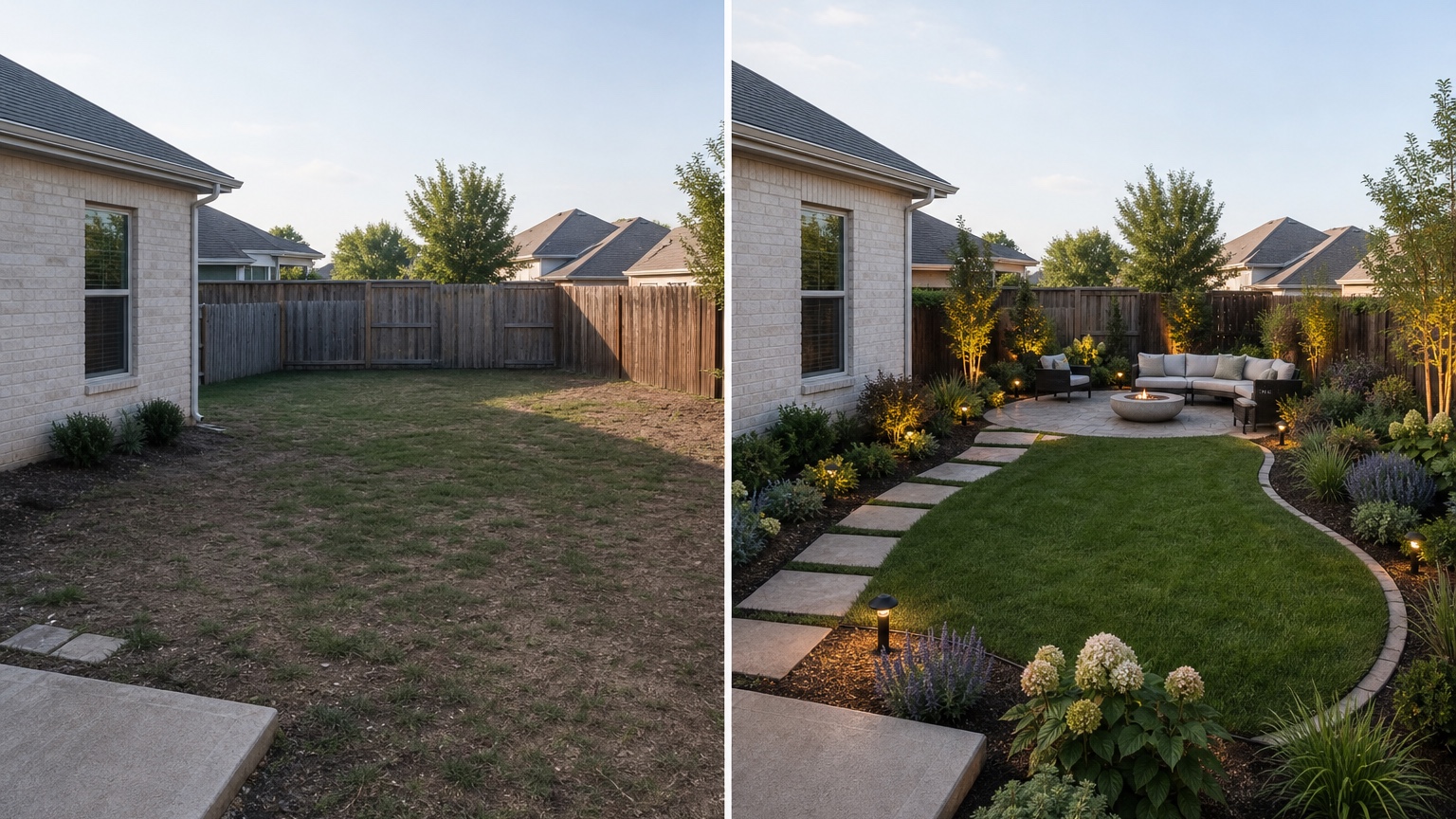
Do not ask for one perfect landscape. Generate a short set of controlled directions. Start with a conservative refresh that preserves the existing lawn shape, patio footprint, fence, trees, and main paths. Then create a practical upgrade that changes the bed lines, adds a defined seating area, improves planting layers, and includes lighting. Finally, create a bolder concept that tests a stronger hardscape pattern, more privacy, a pergola, or a lawn reduction.
Keep prompts narrow enough to compare. If one option changes the patio, planting, fence, lighting, furniture, slope, and house color at the same time, you will not know which change created the improvement. A better workflow tests one major variable per round.
Why this matters for yard or garden planning
Outdoor design has site realities that inspiration boards do not show. Sun, shade, slope, soil, pets, water restrictions, and maintenance tolerance all shape what is practical. A generator image cannot verify those factors, but it can help you notice which questions to ask before committing.
For example, if the AI concept puts lush shade plants in full afternoon sun, you can revise toward drought-tolerant grasses, shrubs, gravel, and mulched beds. If it fills a low spot with a patio, you can flag drainage before requesting quotes. If the design shows dense planting against a fence, you can ask about mature plant width and maintenance access.
How to judge the result before anyone acts on it
Judge the image by usefulness, not glamour. Does the yard still match the original angle? Are the house, fence, trees, driveway, patio, slope, and fixed paths in the right place? Is the seating scaled to real furniture? Do paths connect logically to doors and gates? Are planting beds deep enough to hold layered shrubs instead of a thin decorative strip? Does the concept still allow mowing, drainage, irrigation access, trash movement, pets, or entertaining?
AI Landscape Design Generator input checklist for a believable result
Prepare wide yard angles, sun and shade, slope, drainage, fences, patios, and fixed paths
Start with photos that show the yard as a place, not just a corner. A wide daytime image should include the house edge, doors, patio, fence, trees, lawn, beds, paths, grade changes, and any areas that must remain. Avoid heavy shadows, clutter, and close-up plant photos as the primary input because the first pass should help the AI understand structure.
Decide what must stay recognizable in the original yard or garden for this landscape design edit
Before prompting, list non-negotiables. Mature trees may stay. A fence line may be fixed. The patio might be too expensive to replace. A drainage channel may need to remain open. A landlord may require low-maintenance materials. A pool, shed, driveway, septic field, easement, or property line may limit where planting and hardscape can go.
Include those constraints in the prompt. “Preserve the existing fence, large maple tree, back door location, patio footprint, and side gate” is much stronger than “make the backyard beautiful.” The generator can still improve the scene, but it has boundaries.
Add references only when they clarify the landscape design style, material, color, or mood
Reference images are helpful when they communicate a specific direction: decomposed granite paths, modern concrete pavers, native meadow planting, layered evergreen privacy, warm patio lighting, or a simple fire pit zone. They are less helpful when they mix unrelated climates, budgets, and property types.
AI Landscape Design Generator prompt brief for stronger landscape design results
Start the prompt with the outcome: outdoor upgrade plan
A strong prompt begins with the decision you want the image to support:
“Create a realistic outdoor upgrade plan for this backyard. Preserve the house, fence, mature tree, patio location, slope, and side gate. Add a defined seating zone, layered low-maintenance planting, a simple path from the door, tidy edging, warm landscape lighting, and practical hardscape. Keep the design believable for a homeowner planning quotes.”
That prompt tells the generator what to change and protect.
Name landscape design constraints such as climate, water, drainage, maintenance, and contractor feasibility
Landscape prompts should include site constraints even if the AI cannot verify them. Say “drought-tolerant,” “shade garden,” “low-water front yard,” “kid-friendly lawn area,” “pet-safe planting,” “easy maintenance,” or “contractor-feasible hardscape.” These phrases steer the image away from random luxury concepts, while drainage, retaining walls, irrigation, grading, and local plant suitability still need site knowledge.
Generate controlled landscape design variations instead of one overloaded prompt
Create versions around one question at a time: lawn preserved versus reduced; gravel path versus pavers; privacy hedge versus trellis; patio expansion versus planting-first refresh; modern minimal planting versus softer layered planting. Save prompts that work in RedesAIgn so you can remix a strong version instead of starting over.
AI Landscape Design Generator output review before anyone trusts the image
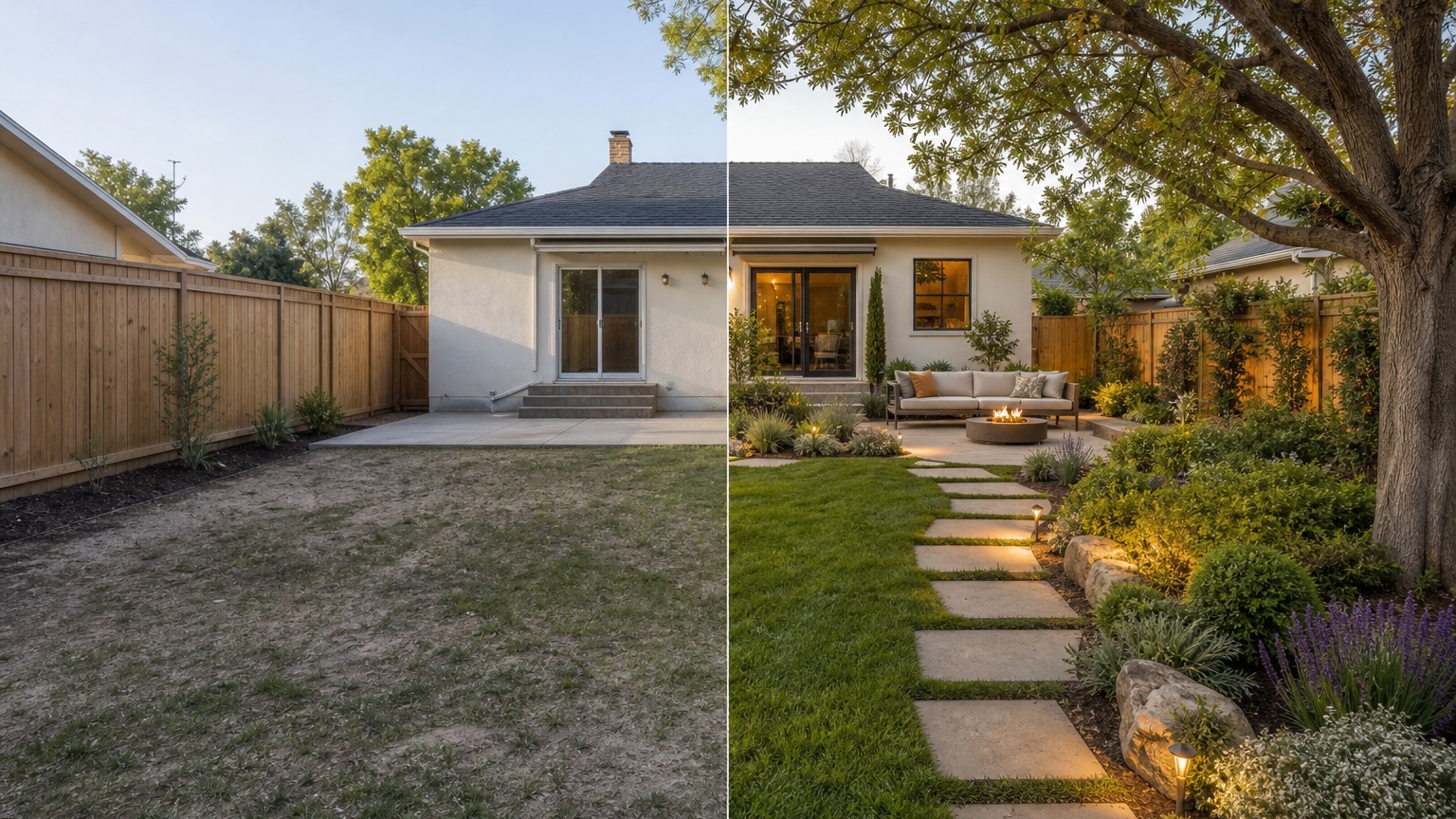
Check landscape design scale, edges, lighting, and consistency with the original image
Look for warped paving, floating steps, impossible shadows, plants growing through furniture, paths that lead nowhere, furniture too large for the patio, lighting fixtures without power logic, and bed edges that ignore slope. If the image hides a problem behind dense planting, generate a clearer version.
Compare the AI landscape design generator concept against climate, water, drainage, maintenance, and contractor feasibility
Ask practical questions. Will these plants survive the sun exposure? Is there room for mature growth? Does water flow away from the house? Can the patio be built without major grading? Will gravel migrate onto the lawn? Does the lighting plan need wiring? Can a contractor estimate from this reference after measuring?
Save the strongest landscape design version as a zone plan, planting and hardscape comparison, and maintenance notes
The most useful output is a small decision package. Save the image, the prompt, and a note that separates zones: seating, path, lawn, privacy, planting, lighting, and hardscape. If your yard concept also changes the house facade or paint, compare it with AI exterior design from photo or an AI exterior paint visualizer before treating the outdoor plan as final.
AI Landscape Design Generator mistakes that make results look generic
Uploading a weak photo of the yard or garden
A cropped, dark, cluttered, or distorted photo gives the generator too little context. Retake the image from a level position with the main yard zones visible. If the project includes both front and back yards, treat them as separate workflows.
Asking for unrelated landscape design changes that blur the decision
Do not ask for a patio, pool, pergola, outdoor kitchen, new fence, new plants, changed house color, expanded deck, and complete lighting plan in one pass unless you only want broad inspiration. For actionable planning, isolate the decision. One round can test planting structure; another can test hardscape; another can test furniture and lighting.
Ignoring how to avoid random concepts that cannot be acted on
AI can make any yard look impressive by inventing budget, climate, mature plants, perfect lighting, and flawless materials. Keep the prompt anchored to your actual property and use the result to prepare better questions. The image should help you move toward estimates, samples, measurements, plant lists, or a professional design review.
AI Landscape Design Generator workflow in RedesAIgn from first image to action
Choose the RedesAIgn editor built for the yard or garden
Open RedesAIgn, choose the Landscape Editor, and upload the clearest outdoor photo. Use the editor that matches the project instead of forcing a general exterior workflow when the decision is primarily about the yard, garden, patio, paths, planting, or outdoor living area.
Use prompts, remix images, saved prompts, and history to compare landscape design revisions
Generate a first set of options, then remix the strongest version. Use saved prompts to keep the same direction across angles or seasons. Use history to compare whether a new version actually improved the plan or simply made the image more dramatic. RedesAIgn includes 10 editors, prompt-based editing, remix, reference images, saved prompts, and history, so the workflow can stay organized as you narrow choices.
Share the final AI landscape design generator reference when execution matters
When you have a strong concept, share it with a landscaper, hardscape contractor, realtor, host, or hospitality marketer as a reference. Include what should stay, what changed, and what needs verification. If you need more generations after the free start, RedesAIgn offers one-time credit packs rather than requiring a subscription. Use the image to reduce uncertainty, then let measurements, materials, climate, and professional review turn the concept into a real yard plan.
Try these prompts in redesAIgn
Redesign this front yard with a stone walkway, low-water plants, and clean planting beds.
Create a backyard seating patio with string lights, shrubs, and a simple lawn edge.
Add curb-appeal landscaping with layered greenery while keeping the driveway clear.
Related guides
- AI Landscape Architecture Generator for Early Outdoor Concepts
Use an AI landscape architecture generator for early outdoor concept exploration, studio reviews, feasibility checks, and photo-based design iteration.
- AI Landscape Visualizer: Preview Yard Changes Before You Commit
Use an AI landscape visualizer to preview realistic yard changes from a photo, compare landscaping options, and reduce decision risk before outdoor work.
- AI Lawn Makeover Ideas: Turn a Plain Yard Into a Plan
Use an AI lawn makeover to preview lawn shape, planting borders, paths, edging, seating, and practical yard upgrades before hiring or starting work.
- AI Xeriscape Design Ideas for Low-Water Yards
Use AI xeriscape design to preview low-water planting, gravel, paths, shade, irrigation zones, and maintenance tradeoffs before changing your yard.
- AI Backyard Makeover: Generate Outdoor Design Before and Afters
Use an AI backyard makeover workflow to preview layout zones, maintenance tradeoffs, before-and-after options, and practical next steps from a real yard.