AI Landscape Architecture Generator for Early Outdoor Concepts
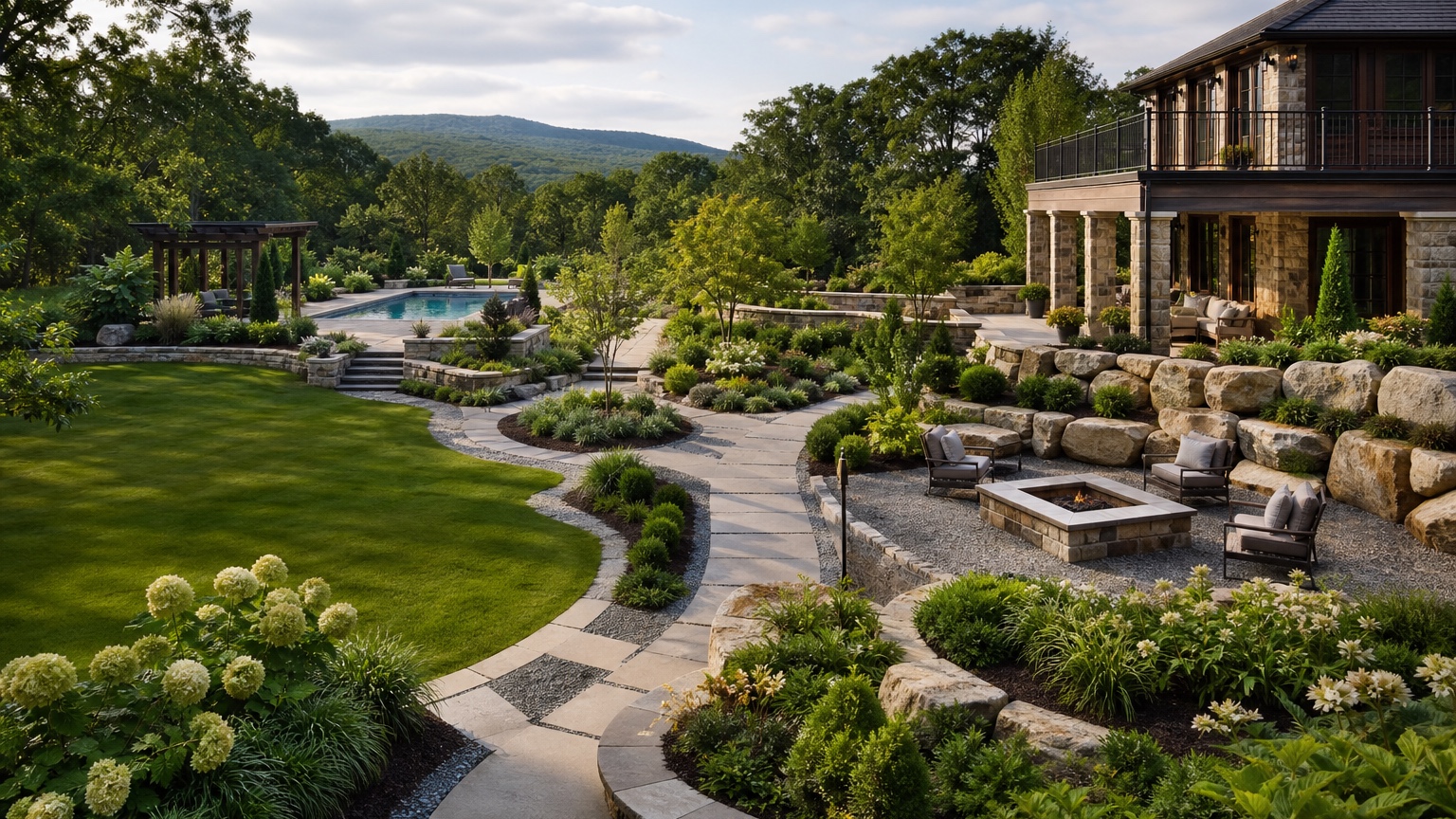
An AI landscape architecture generator is most useful at the beginning of a project, when the team needs to explore outdoor concepts quickly without pretending the first image is a finished plan. Designers, students, landscape professionals, builders, and property owners often need to compare spatial directions before producing drawings, planting schedules, technical details, or cost estimates. A photo-based generator can help test what a site might become while the design question is still flexible.
The strongest early concepts are not just attractive. They reveal relationships: how people arrive, where outdoor rooms could sit, how planting can shape space, where shade matters, how circulation connects to buildings, and which ideas may become expensive or impractical. A polished image that ignores slope, utilities, access, drainage, or maintenance is not a helpful concept. A rougher image that exposes a better site organization can move the work forward.
RedesAIgn can support this visual exploration stage with 10 AI editors, prompts, remix images, reference images, saved prompts, and history. A designer can upload a site photo, run controlled concept directions, save prompt language that works, and return to earlier versions during review. RedesAIgn starts with 5 free AI credits and no credit card requirement, with one-time credit packs available when a studio, client, or professional workflow needs more iterations.
What an AI landscape architecture generator is good for
Use an AI landscape architecture generator for early outdoor concept ideation, visual option testing, and feasibility conversation. It can help show a courtyard as intimate or open, a backyard as active or quiet, a campus edge as formal or naturalized, or a residential entry as minimal or layered. It can also make abstract site goals visible enough for discussion: more shade, clearer arrival, better privacy, stronger pedestrian flow, or lower maintenance.
This is different from asking for a finished landscape architecture package. A generated image does not replace survey information, grading plans, drainage engineering, planting design, construction documents, accessibility review, local approvals, or professional liability. It belongs before those steps, when the cost of testing alternatives is low and the project still benefits from broad visual comparison.
For students, it can help turn a site photo and concept phrase into visual directions worth critiquing. For professionals, it can support pre-design conversations, internal charrettes, mood studies, and client alignment before deeper billable work. For contractors or design-build teams, it can clarify whether a client wants a modest refresh, a structured outdoor room, a circulation overhaul, or a larger landscape scope.
When the design question is specific, connect the generated concept to related planning references such as AI backyard design generator, AI walkway design generator, or AI xeriscape design. Those narrower topics can help break a broad landscape architecture concept into buildable decisions.
Choose the right photo and project scale
A useful concept begins with a useful source image. For a residential project, provide a wide daylight photo that shows the house, yard edges, doors, windows, existing paving, fences, trees, slope, drainage clues, neighboring exposure, and any fixed structures. For a studio or professional site study, include the most informative views rather than only the most dramatic view. A concept image needs spatial context.
If the site is large, split the work into zones. One image might cover the arrival sequence, another the central courtyard, another the outdoor living edge, and another the service or side-yard condition. Asking one image to solve an entire site can flatten the thinking. Zone-based exploration makes it easier to judge circulation, planting mass, shade, and transitions.
Photograph constraints that may affect feasibility. Show grade changes, retaining walls, tree canopies, root zones, drainage swales, utility covers, steps, ramps, gates, property edges, and service access. If a design student is working from a campus or public site image, include circulation desire lines, building entries, existing paving, lighting, benches, trees, and areas of conflict. A generator cannot weigh conditions it cannot see or that the prompt fails to mention.
Before prompting, list what should stay unchanged. Preserve buildings, primary entries, mature trees, grade, walls, major utilities, legal boundaries, and important circulation paths unless the concept exercise intentionally challenges them. Even in speculative work, it is helpful to distinguish “fixed for this exercise” from “open to change.” That keeps critique focused.
Prompt for concept structure before style
Begin with the design role of the image: “Create an early landscape architecture concept from this site photo.” Then define the site, intended users, fixed constraints, and concept goals. A prompt that starts with style alone often produces surface decoration. A prompt that starts with structure produces more useful design conversation.
For a professional early concept, try: “Use this site photo to create a realistic early landscape architecture concept. Preserve the building, main entries, existing grade, mature trees, property edges, and service access. Improve pedestrian circulation, add shaded seating zones, organize planting into clear masses, and create a practical transition between hardscape and lawn. Keep the result suitable for feasibility review, not a final construction drawing.”
For a design studio exercise, try: “Generate three conceptual outdoor design directions from this site photo: one formal axial layout, one flexible social landscape with loose seating zones, and one ecological planting-forward concept. Keep the building, slope, major trees, and primary access points recognizable. Emphasize spatial organization, circulation hierarchy, shade, and planting massing.”
For a residential design-build discussion, try: “Preview an early landscape architecture concept for this backyard. Preserve the house, doors, deck, fence, large tree, grade, and utility access. Explore a clear outdoor room, practical circulation from the kitchen to seating, layered privacy planting, and a manageable planting palette. Avoid pools, major walls, or structures unless they are shown as optional ideas.”
If a reference image is used, assign it a narrow job. It might guide the planting texture, paving tone, courtyard mood, or modern simplicity. It should not force the actual site to become a different place. Reference images are strongest when paired with explicit constraints: “Use this reference for planting mood, but preserve the site layout and keep paths buildable.”
Evaluate feasibility without killing creativity
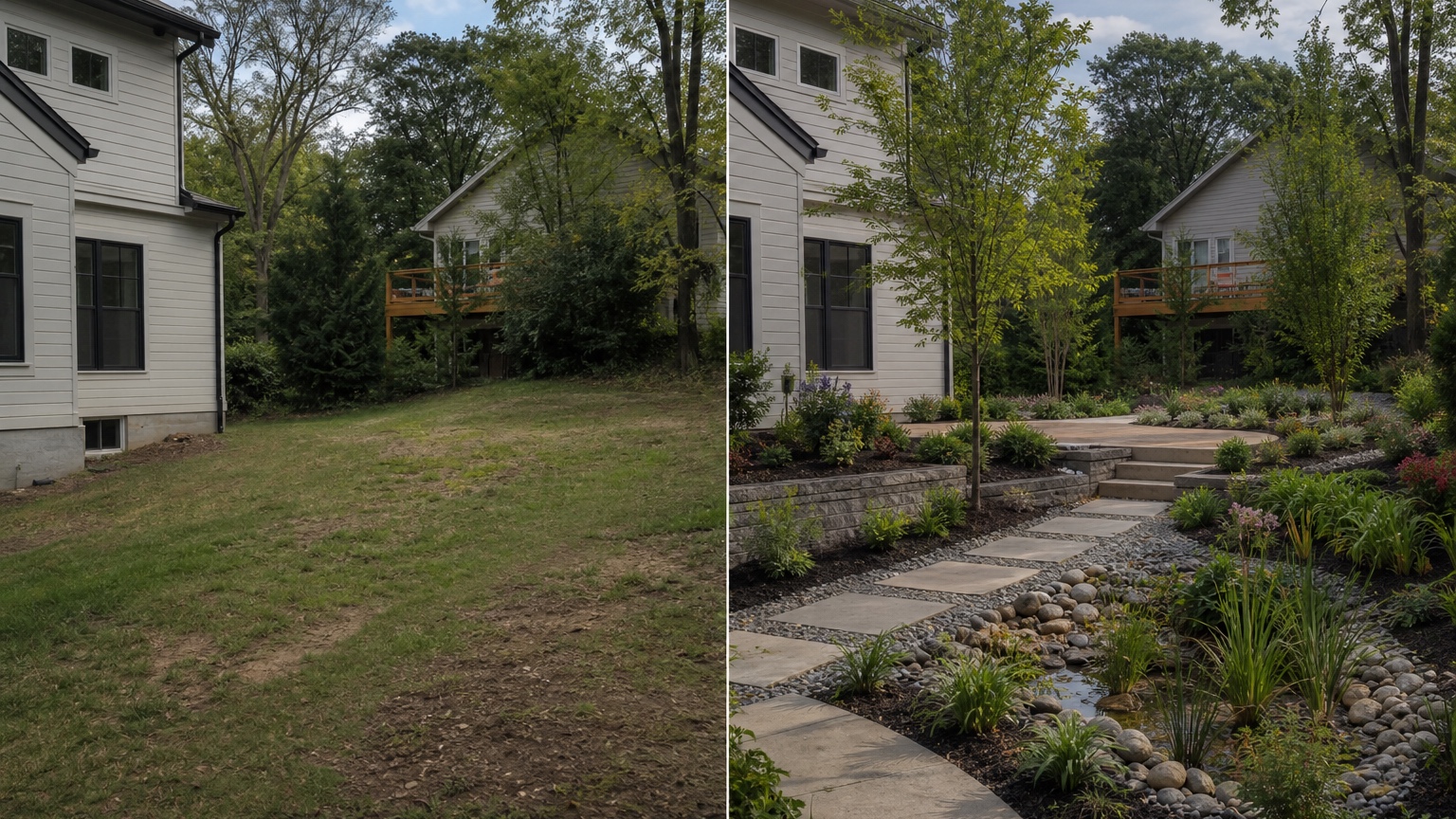
Early visual exploration should be open enough for discovery and disciplined enough to catch obvious problems. Review each generated concept at three levels: spatial idea, site fit, and next-step feasibility. A concept can be visually promising even if it needs revision. It becomes unhelpful when the exciting parts depend on impossible changes that no one intends to make.
Start with spatial hierarchy. Can you read the main path, secondary paths, gathering areas, planting masses, open space, and edges? Does the concept clarify arrival? Does it create outdoor rooms that relate to doors, windows, views, and shade? Are service routes still possible? If the image fills every open area with plants and furniture, it may lack hierarchy.
Then check site fit. The grade should remain believable. Trees should not appear where roots, canopy, or foundations make them unlikely. Seating should not float on slopes without terraces or landings. Planting should not hide utilities that need access. Lighting should appear where wiring and maintenance are plausible. If water naturally moves through a low point, the concept should address that rather than conceal it.
Finally, identify what would need professional development. A promising terrace may need grading, walls, drainage, railing, and permits. A planting concept may need climate-appropriate species, irrigation strategy, soil preparation, and mature spacing. A public-facing walkway may need accessibility and code review. A student board may need diagrams and sections to explain what the image suggests. The generator helps create a visual hypothesis; design work tests it.
Use remixing as a charrette tool
Remixing is especially valuable for landscape architecture because early ideas improve through comparison. Save a base result that respects the site, then create variations around one design question at a time. Test circulation first, then planting mass, then seating, then material character. This order prevents style from covering up weak organization.
A professional team might run a fast internal charrette: one person tests a strong geometric layout, another tests a softer ecological layout, and another tests a budget-conscious refresh. The images can be reviewed together to identify the best circulation, the most believable planting structure, and the clearest phasing strategy. The final concept may combine pieces, but the comparison sharpens the brief.
Students can use remixing to prepare for critique. Instead of presenting one precious image, show three controlled alternatives and explain what changed: path hierarchy, threshold, canopy, planting density, or social space. The discussion becomes about design reasoning rather than whether the image looks finished. Saved prompts help document process, which is often as important as the final board.
Professionals should also use history deliberately. When a later version becomes too decorative or drifts from the site, return to the earlier prompt that held scale correctly. In RedesAIgn, saved prompts and history make it easier to preserve useful design language while remixing around specific variables. That matters when a client asks to see “the same idea, but less formal” or “the path from the second version with the planting from the third.”
Professional workflow: from image to review package
For a professional or design-build workflow, do not present the generated concept as a finished deliverable without context. Present it as an early visual study with assumptions. Label what the image is testing: circulation, outdoor room placement, planting character, shade strategy, material direction, or client preference. Also label what it does not confirm: dimensions, grading, drainage, cost, permits, construction details, or plant specifications.
A practical review package can include the original photo, two or three generated options, a short concept note for each, and a feasibility checklist. The checklist might ask: What stays? What changes? What must be measured? What needs engineering or contractor review? What is optional? What can be phased? Which parts affect maintenance? Which parts affect budget most?
During client review, avoid asking, “Which image do you like?” That invites vague feedback. Ask whether the client prefers open lawn or planted enclosure, straight or informal circulation, more shade or more sun, simple materials or stronger hardscape, low water or lush planting, quiet seating or flexible entertaining. The image should clarify decisions that guide the next stage of work.
For student work, attach diagrammatic thinking to the visual. Sketch circulation arrows, thresholds, planting masses, gathering zones, and sun or shade logic over the generated image. Use it as a prompt for sections, plans, and precedent research. A strong studio workflow treats the generator as a fast visual partner, not as the source of final design judgment.
Common mistakes in AI landscape architecture concepts
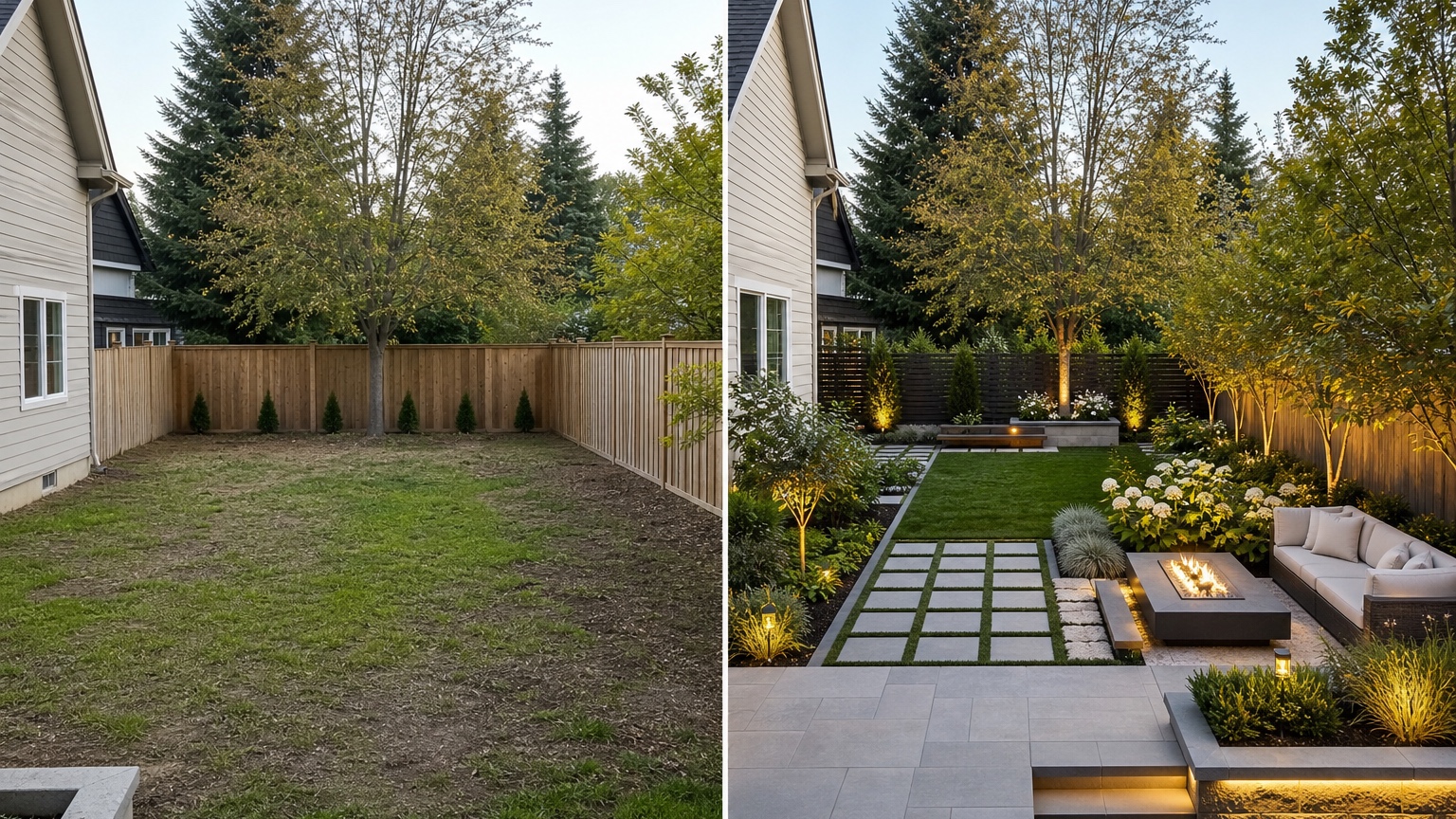
The first mistake is mistaking style for concept. “Modern,” “luxury,” “biophilic,” or “Mediterranean” may describe appearance, but it does not explain circulation, spatial structure, maintenance, or feasibility. Lead with the design problem and let style support the answer.
The second mistake is allowing scale drift. AI may add wide plazas, mature groves, water features, or terraces that do not fit the site. Check the relationship between paths, doors, windows, furniture, trees, and open space. If the scale feels cinematic but not buildable, revise.
The third mistake is hiding constraints. Early concepts can be imaginative, but the prompt should still name grade, utilities, access, tree preservation, budget level, climate, water use, and maintenance expectations when they matter. Constraints are not creativity killers. They are what make the comparison useful.
The fourth mistake is generating too many unrelated options without a review method. Ten images can create more confusion than three controlled alternatives. Decide what each option is testing, then document what you learned. If none of the options works, that is still useful: the brief may need to be narrower, the photo better, or the constraints clearer.
Turning early concepts into next-step design work
After selecting the strongest direction, translate the image into tasks. Mark the primary circulation route, secondary connections, gathering zones, planting masses, open areas, privacy edges, lighting zones, drainage concerns, and fixed elements. Then decide what needs a plan view, section, measurement, precedent reference, contractor estimate, or site visit.
For a professional project, the next step may be a measured base plan, concept diagram, material palette, preliminary budget, or client-approved scope. For a student, it may be plan abstraction, section studies, planting strategy, or model development. For a design-build team, it may be deciding which work can be priced immediately and which requires additional design.
RedesAIgn fits this stage when the team needs fast visual exploration from real site photos. Upload the clearest image, write a concept-focused prompt, remix carefully, use reference images only for targeted guidance, and save prompts that maintain the site. Begin with the included free credits if you are testing a small set of directions, then add one-time credits only when extra rounds will improve the decision. The value is not speed alone. The value is making early outdoor concepts specific enough to critique before expensive work begins.
FAQ: AI landscape architecture generator
What is an AI landscape architecture generator?
An AI landscape architecture generator creates early visual concepts for outdoor spaces from a photo and prompt. It can help explore circulation, planting massing, outdoor rooms, shade, materials, and overall site character before detailed design work begins.
Is it suitable for professional landscape architecture work?
It can support early ideation, client alignment, studio review, and feasibility discussion, but it does not replace professional plans, grading, drainage, code review, construction documentation, planting specifications, or licensed judgment where required.
How should students use it in a design studio?
Students should use it to compare controlled concept directions, then translate the visual results into diagrams, plans, sections, critique notes, and precedent research. The image should support design reasoning, not stand in for it.
Try these prompts in redesAIgn
Redesign this front yard with a stone walkway, low-water plants, and clean planting beds.
Create a backyard seating patio with string lights, shrubs, and a simple lawn edge.
Add curb-appeal landscaping with layered greenery while keeping the driveway clear.
Related guides
- AI Landscape Visualizer: Preview Yard Changes Before You Commit
Use an AI landscape visualizer to preview realistic yard changes from a photo, compare landscaping options, and reduce decision risk before outdoor work.
- AI Lawn Makeover Ideas: Turn a Plain Yard Into a Plan
Use an AI lawn makeover to preview lawn shape, planting borders, paths, edging, seating, and practical yard upgrades before hiring or starting work.
- AI Xeriscape Design Ideas for Low-Water Yards
Use AI xeriscape design to preview low-water planting, gravel, paths, shade, irrigation zones, and maintenance tradeoffs before changing your yard.
- AI Backyard Makeover: Generate Outdoor Design Before and Afters
Use an AI backyard makeover workflow to preview layout zones, maintenance tradeoffs, before-and-after options, and practical next steps from a real yard.
- AI Walkway Design Generator for Paths, Pavers, and Garden Entries
Generate walkway design ideas from a yard photo with RedesAIgn. Compare edges, materials, and planting before any hardscape work begins.