AI Backyard Makeover: Generate Outdoor Design Before and Afters
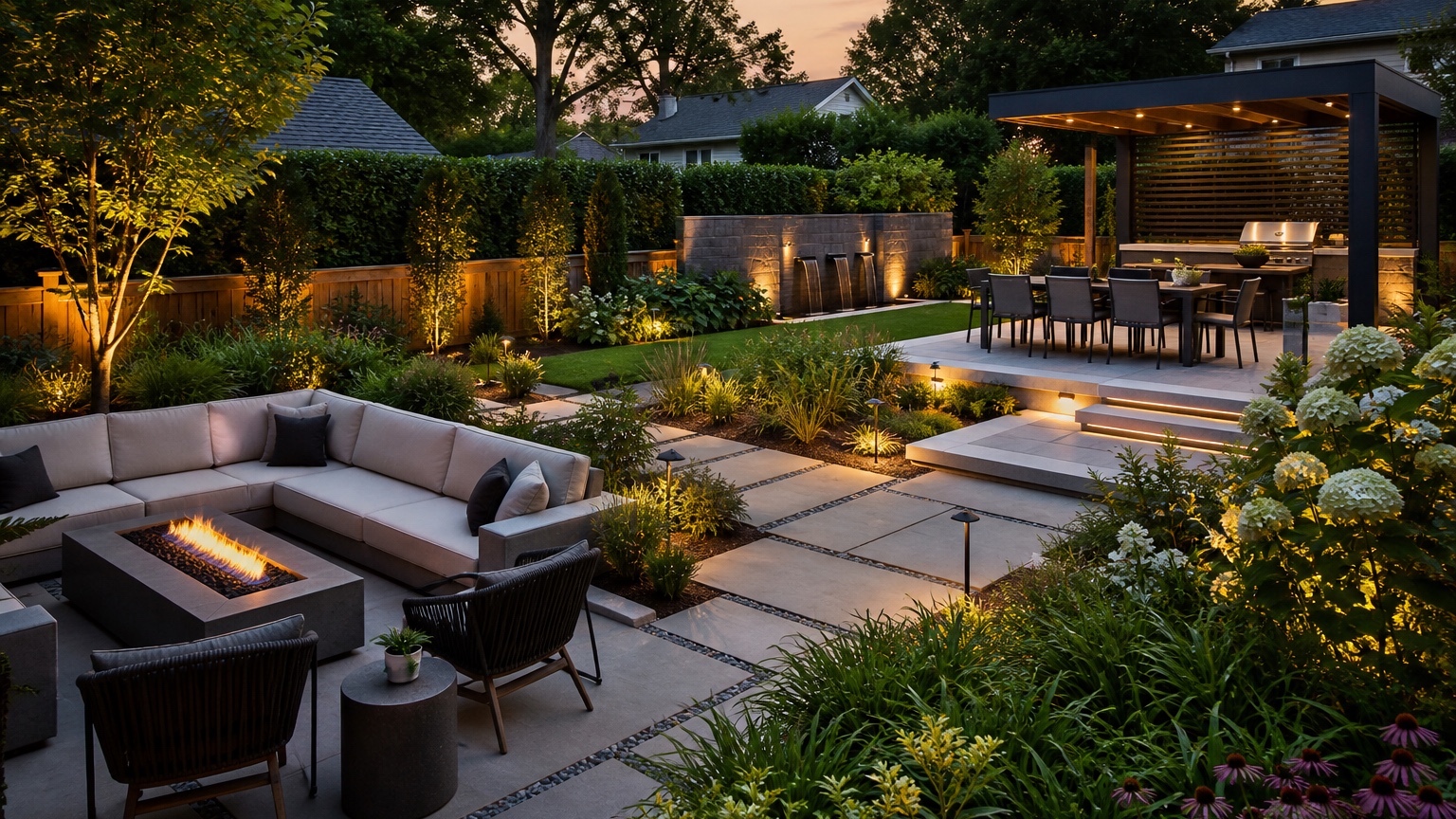
An AI backyard makeover is most useful when it turns a vague wish for a better yard into visible choices: where people sit, how they move from the house to the lawn, what needs shade, and what the finished space might look like in a before-and-after comparison. The goal is not a fantasy resort image. The goal is to make the next decision easier before money goes into pavers, plants, furniture, lighting, fencing, drainage, or contractor drawings.
For homeowners, the difficult part is often sequencing. You may want a dining patio, lounge corner, fire pit, play area, grill station, privacy planting, and neater lawn edge, but not all of those changes need to happen at once. For hosts, the question is sharper: which upgrades photograph well and remain easy to reset between stays?
A photo-based workflow helps because the makeover is tested on the yard you already have. Upload a wide backyard photo, preserve fixed elements, and use controlled prompts to compare practical outdoor zones. RedesAIgn can support that early planning stage with 10 AI editors, prompts, remix images, reference images, saved prompts, and history. You can start a free RedesAIgn concept round with 5 free AI credits and no credit card required; one-time credit packs are available for more iterations.
AI backyard makeover: the real decision this article should help with
The real decision is not whether a backyard can look better. Almost every yard can look better in a generated image. The useful decision is which layout improves daily life, hosting, and maintenance without creating a project that is too expensive or complicated to build.
Start by naming the primary use. A family yard may need open lawn, shade near the house, toy storage, a safe path, and durable surfaces. A short-term rental may need a clear hero-photo zone, outdoor dining, sturdy furniture, simple lighting, and low-maintenance planting.
Before generating anything, write one sentence that defines success. For example: “Turn the underused rear lawn into a low-maintenance entertaining yard with dining near the kitchen, a small lounge zone, privacy along the fence, and enough open lawn for pets.” That sentence gives the AI a job. It also keeps you from accepting a dramatic image that removes the lawn, blocks the gate, invents a pool, or changes the house.
A good before-and-after concept should answer a practical question. Should dining stay against the house or move under a tree? Does the yard need one large patio or two smaller zones? Is the best upgrade a fire pit lounge, a pergola, a planting edge, a walkway, or better furniture and lighting? If you are comparing broader inspiration, the pending AI backyard design generator can sit beside this makeover workflow.
Outdoor layout and maintenance tradeoffs for a backyard makeover
Backyard makeovers succeed when the layout respects movement. The path from the back door to the grill, seating, lawn, gate, pool, shed, or garden bed should be clear. Furniture should not block doors or create narrow routes behind chairs. A dining table needs room for people to pull seats back, and a lounge zone needs space around the coffee table or fire feature. If the image ignores clearances, it is not ready for planning.
Think in zones instead of objects. One zone might be cooking and dining near the house. Another might be a lounge area oriented toward a view, fire feature, or garden. A third might stay open for pets, children, games, or flexible use. A fourth might be a planting or privacy edge. The AI preview should make those zones readable from the main photo angle, especially if the image will later inform a rental listing, a contractor conversation, or a family budget meeting.
Surfaces carry most of the maintenance burden. Lawn is flexible but may become muddy or patchy in heavy-use areas. Gravel can define a seating zone without the cost of a full patio, but it needs edging. Pavers look polished and work well for furniture, but base preparation and drainage matter. Decking can solve grade changes but introduces structural, railing, staining, and slip considerations.
Planting has a similar tradeoff. Dense beds soften fences and make the after image feel finished, yet every plant choice affects watering, pruning, leaf drop, pests, allergies, winter appearance, and replacement cost. For a host property, avoid concepts that rely on delicate pots, cushions left in weather, fragile annuals, or loose decor that must be restaged constantly.
Climate, grade, drainage, utilities, and local rules still need separate review. An AI backyard makeover cannot verify slope stability, soil compaction, gas line routing, electrical code, tree roots, fence setbacks, HOA rules, pool barriers, or whether a low corner floods after a storm. Treat the image as a planning sketch, not as a construction document.
Prompt brief for stronger AI backyard makeover results
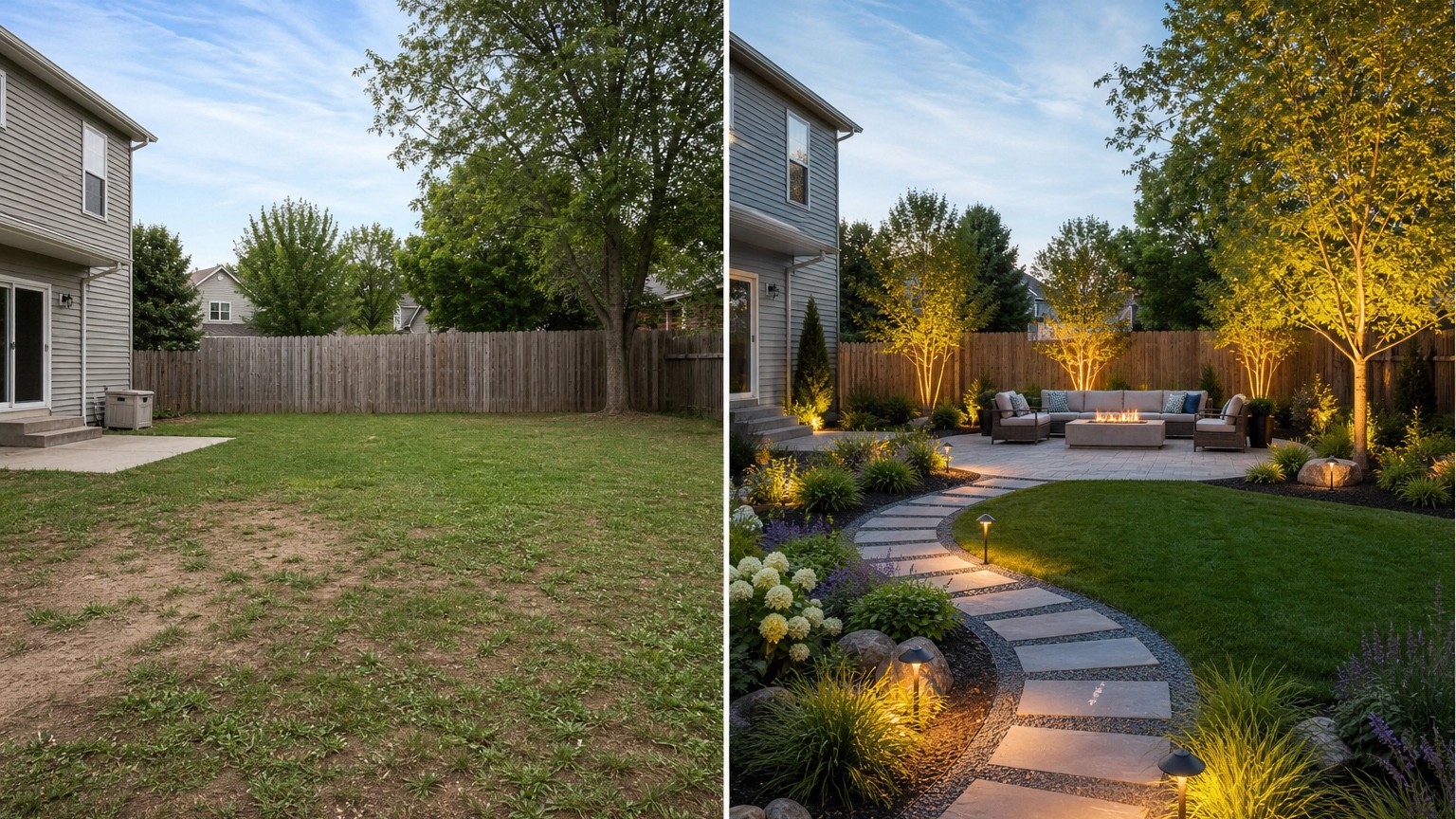
A strong prompt begins with the outcome, then lists fixed elements and constraints. Do not ask for every outdoor feature at once. Start with a focused makeover brief: “Create a realistic AI backyard makeover from this photo. Preserve the house, back door, fence, mature trees, lawn boundary, side gate, patio edge, and yard size. Add practical outdoor living zones with dining near the house, a lounge area, low-maintenance planting, a clear path, tidy edging, and warm but realistic lighting.”
For a host-focused version, try: “Use this backyard photo to create a guest-ready outdoor makeover for a short-term rental. Keep the existing house, deck, fence, trees, gate, and yard shape unchanged. Improve the space with durable furniture, a simple dining area, a defined lounge zone, low-maintenance plants, clear walking routes, subtle lighting, and a clean before-and-after look that would photograph honestly for a listing.”
For a homeowner comparison, try: “Generate three controlled backyard makeover options on the same photo: one budget refresh using furniture, gravel, edging, and lighting; one mid-range design with a paver patio and planting beds; and one more complete outdoor living layout with dining, lounge seating, privacy planting, and improved paths. Keep all fixed site elements unchanged and avoid adding a pool or changing the house.”
Use reference images when they clarify material, mood, or style: modern concrete pavers, cottage planting, drought-tolerant beds, black metal furniture, natural gravel, cedar screens, or a clean rental-ready patio. References should guide the look, while the uploaded yard photo controls the layout.
Generate in rounds. First test the layout. Then remix the best layout to compare surface materials. Then test furniture scale, lighting, shade, privacy, and planting density. This sequence creates useful before-and-afters because each round answers one question. If you want a patio-specific branch, compare it with the pending AI patio design generator after the backyard zones are clear.
Output review before anyone trusts the before and after
Review the result as if you had to price it. Does the patio align with the door? Are steps, slopes, gates, and fences still in the right place? Do chairs have space behind them? Does the lawn keep the open area you asked for? Are pavers, gravel, decking, or beds following the original perspective? If the yard becomes wider, flatter, or more luxurious than the source image, regenerate with stricter preservation instructions.
Next, review the image as a maintenance plan. List every visible material and ask who will care for it. Cushions need storage. Gravel needs edging. Plants need water and pruning. Lights need power or batteries. Mulch needs refreshing. Furniture needs covers or weather resistance. A host should also ask how quickly a cleaner can reset the space after guests leave. A homeowner should ask what the yard will look like in the least flattering season, not only in a summer evening rendering.
Then check whether the makeover creates a sensible sequence. Some images imply several projects at once: patio expansion, drainage correction, new fence, full planting, lighting, furniture, irrigation, and shade. Break the preferred result into phase one, phase two, and later upgrades. Phase one might be decluttering, furniture layout, path lighting, and a gravel seating zone. Later upgrades might include a pergola, outdoor kitchen, or built-in fire feature.
Finally, compare the image against the original problem. If the yard feels empty, the answer may be defined zones and edges. If guests do not use the backyard, the answer may be an obvious seating destination, lighting, and a photo-ready dining area. If the yard is too much work, the answer may be fewer beds, tougher surfaces, better storage, and simpler plant choices. The best AI backyard makeover makes the real next step clearer.
Mistakes that make an AI backyard makeover less useful
The first mistake is uploading a weak photo. A close-up of a chair, a shadowy corner, or a cropped fence line does not show how the yard works. Take wide daylight photos from the back door, the far corner looking toward the house, and the angle that would matter most for guests or daily use. Include the gate, existing patio, deck stairs, trees, slope, utilities, and problem areas.
The second mistake is letting the AI redesign fixed conditions. If the house wall changes, the fence moves, the slope disappears, the tree canopy shifts, or the patio doubles in size without being requested, the image may be attractive but misleading. Name what must stay unchanged in every prompt, then reject outputs that ignore those constraints.
The third mistake is confusing lifestyle staging with a buildable plan. Lanterns, pillows, rugs, planters, string lights, outdoor sofas, and perfect planting can make an after image feel complete, but they are not the same as drainage, level surfaces, clearances, storage, and durable materials. Use styling to judge mood; use measurements and professional review to judge execution.
The fourth mistake is producing only one option. Generate at least three controlled directions: a light refresh, a moderate layout change, and a more complete transformation. The comparison often reveals that the most useful makeover is not the most expensive one.
Workflow in RedesAIgn from first image to action
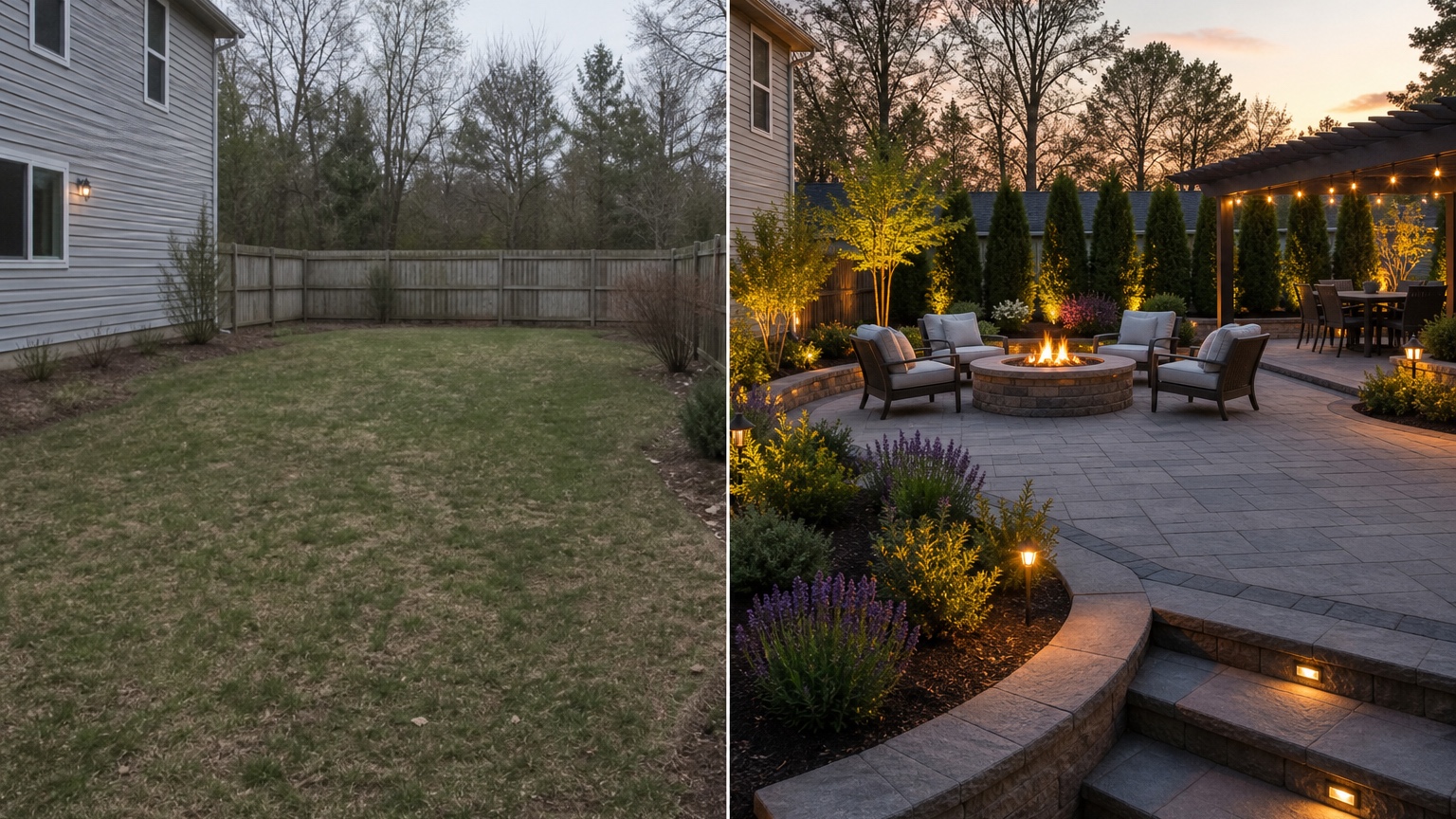
In RedesAIgn, choose the editor that fits yard or landscape work, upload the clearest wide photo, and begin with a preservation-heavy prompt. RedesAIgn includes 10 AI editors, so outdoor makeover planning can stay separate from interior, exterior facade, or listing-style edits. Use prompts to define the layout decision, remix images to refine the strongest result, and reference images to guide materials without replacing the real yard.
Saved prompts and history are especially useful for backyard makeovers because small wording changes matter. Keep the version that preserves the yard accurately, then create variations for dining placement, lounge orientation, privacy, plant density, hardscape surface, lighting level, and open-lawn size. If a later result becomes unrealistic, return to the saved prompt that respected the property and revise from there.
Turn the final image into a short action brief. Mark what stays, what changes, what needs measurement, and what needs a quote. Share the concept with a landscaper, hardscape contractor, realtor, property manager, co-host, or family decision-maker. RedesAIgn-generated images can be used commercially where relevant, but execution still depends on dimensions, samples, products, local rules, drainage, utilities, and professional judgment.
If the makeover includes a clear gathering point, compare that portion with the pending AI fire pit backyard design before committing to seating, surface, and clearance decisions. A focused fire pit pass can prevent the main makeover from hiding smoke, chair spacing, or safety questions behind a polished overall scene.
Questions to answer before you commit
Ask these questions before turning the image into purchases or contractor instructions: Which zones are essential, and which are just styling? What must stay open? Where will people walk with food, trash, towels, tools, or luggage? Which surfaces handle rain and heavy use? What needs storage? What can be done now without blocking a later phase?
For a host, add operations questions. Can the area be cleaned quickly? Are cushions, fire features, lights, and planters easy to inspect? Does the layout photograph honestly from the listing angle? Does the design create guest expectations that the property can reliably meet? For a homeowner, ask whether the design supports ordinary use: morning coffee, family meals, pets, garden chores, quiet evenings, and the amount of upkeep you actually want.
The strongest AI backyard makeover does not end with a pretty after image. It ends with a measured next step: stake the proposed patio outline, move temporary chairs into the lounge position, price gravel versus pavers, ask about drainage, test lighting locations, choose plants for the real climate, or remove an idea that looked better in imagination than it does on the actual yard. Use the before-and-after as a decision tool, then let real measurements and professional checks turn the concept into a backyard that works.
FAQ
Can an AI backyard makeover replace a landscape designer or contractor?
No. It can help you compare layout directions, surfaces, planting density, privacy, lighting, and before-and-after potential from a real photo. A designer, landscaper, or contractor is still needed for measurements, drainage, grading, code, utilities, structural details, product choices, and installation.
What photos work best for an AI backyard makeover?
Use wide daylight photos that show the house connection, existing patio or deck, lawn, fence, gates, trees, slope, paths, utilities, and problem areas. Take one photo from the back door and another from the far corner looking back so the layout can be judged from more than one angle.
How many makeover options should I generate?
Generate at least three controlled options: a simple refresh, a mid-range layout improvement, and a more complete outdoor living concept. Comparing those versions usually reveals which changes matter and which ones only add cost or maintenance.
What should I do after choosing a favorite before-and-after?
Convert the image into a checklist. Mark the zones, measure the footprints, test furniture clearances, price surfaces, review drainage and utilities, choose climate-appropriate plants, and ask qualified professionals about anything structural, electrical, gas-related, or code-sensitive.
Try these prompts in redesAIgn
Redesign this front yard with a stone walkway, low-water plants, and clean planting beds.
Create a backyard seating patio with string lights, shrubs, and a simple lawn edge.
Add curb-appeal landscaping with layered greenery while keeping the driveway clear.
Related guides
- AI Landscape Architecture Generator for Early Outdoor Concepts
Use an AI landscape architecture generator for early outdoor concept exploration, studio reviews, feasibility checks, and photo-based design iteration.
- AI Landscape Visualizer: Preview Yard Changes Before You Commit
Use an AI landscape visualizer to preview realistic yard changes from a photo, compare landscaping options, and reduce decision risk before outdoor work.
- AI Lawn Makeover Ideas: Turn a Plain Yard Into a Plan
Use an AI lawn makeover to preview lawn shape, planting borders, paths, edging, seating, and practical yard upgrades before hiring or starting work.
- AI Xeriscape Design Ideas for Low-Water Yards
Use AI xeriscape design to preview low-water planting, gravel, paths, shade, irrigation zones, and maintenance tradeoffs before changing your yard.
- AI Walkway Design Generator for Paths, Pavers, and Garden Entries
Generate walkway design ideas from a yard photo with RedesAIgn. Compare edges, materials, and planting before any hardscape work begins.