AI Landscape Design From Photo: Redesign Your Yard Visually
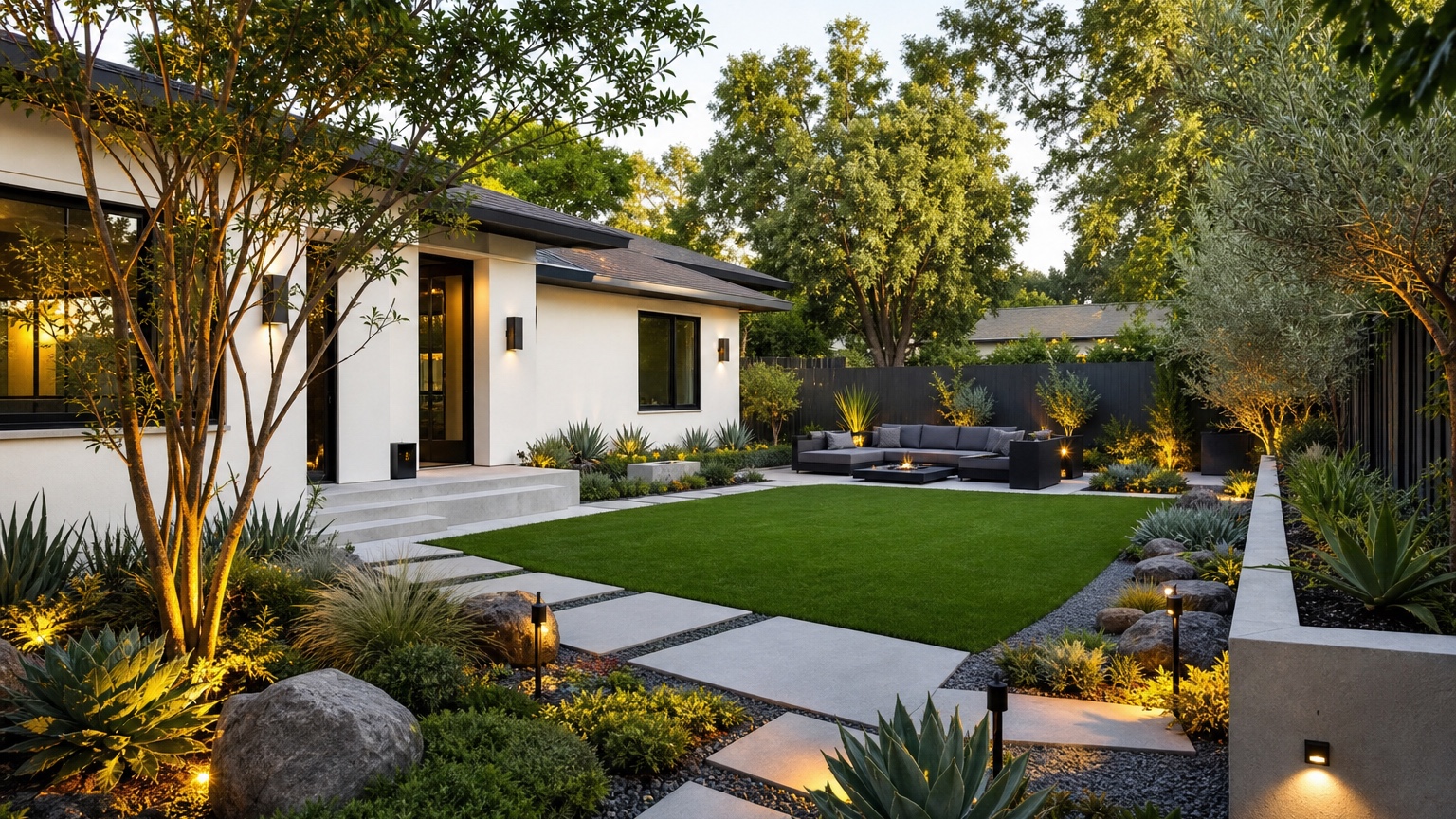
AI landscape design from photo is strongest when it begins with the yard you actually have. A real photo carries information a mood board cannot: fence height, house style, patio location, lawn size, shade, side paths, slope, blank beds, and fixed features that are too expensive to move. When the AI concept respects those facts, the result can become a useful planning image instead of generic garden inspiration.
The practical problem for homeowners and garden designers is turning a real outdoor photo into design concepts that support a next step. That might mean choosing between a low-maintenance planting refresh and a larger patio plan, showing how a narrow side yard could become a gravel path, or testing whether a front garden needs more structure, privacy, edging, or a different lawn-to-bed relationship.
RedesAIgn helps explore those possibilities. Upload a yard image, choose the Landscape Editor, write a prompt, and refine options with remix, reference images, saved prompts, and history. Try RedesAIgn for free with 5 AI credits and no credit card required.
AI Landscape Design from Photo: the real decision this article should help with
Homeowners need to turn real yard photos into design concepts
A yard photo can feel discouraging because it shows all the unfinished parts at once: patchy grass, a bare fence, an oversized lawn, scattered pots, a disconnected patio, or thin planting beds. The job of an AI landscape design from photo workflow is to separate those problems into visible options, such as preserving the lawn, reducing it for a path, or keeping the hardscape while changing planting and lighting.
The AI landscape design from photo preview should reduce uncertainty around an outdoor upgrade plan
Outdoor upgrades involve cost, disruption, and time. Even a modest project can require plant removal, soil amendments, edging, irrigation adjustments, mulch, gravel, lighting, or contractor coordination. A photo-based preview shows how a change might feel in context.
If the concept adds a dining area, does it crowd the walkway? If it creates a privacy hedge, does the yard feel smaller or more comfortable? If it replaces lawn with gravel and drought-tolerant planting, does the design still suit the house? If it adds lighting, does it support paths and seating or simply decorate the image?
The useful answer for landscape design is a concrete next step, not generic AI decoration
A finished-looking AI image can be misleading if it does not point toward action. Before you generate, decide what you need to learn: planting direction, hardscape direction, maintenance strategy, realtor-friendly refresh, or client presentation reference.
For broad idea generation, use a wider prompt and compare directions. For a more structured exploration, the companion guide on an AI landscape design generator is useful. For this photo-based workflow, the priority is preserving the real yard while testing changes you can evaluate.
AI Landscape Design from Photo as a photo-based workflow
What the original image must preserve
A realistic photo-based landscape preview should keep the major site relationships intact unless you intentionally ask for a more speculative redesign. The house, doors, windows, deck, patio, fence, gates, driveway, mature trees, slope, retaining walls, pool, shed, and main paths should remain recognizable. Those fixed elements are what make the image useful for planning.
If the AI moves the patio to a different side of the house, deletes a large tree, levels a sloped yard, changes the fence line, or creates a pool where there is no room, treat the result as mood inspiration. It may still reveal a style preference, but it is not ready for a contractor conversation.
Why this matters for yard or garden planning
Landscape design is tied to conditions that are not always visible in a photo. Drainage, soil, irrigation, local climate, deer pressure, wind exposure, root zones, utilities, easements, code, and plant availability all affect the final plan. A shaded side yard may need ferns and sedges rather than sun-loving grasses; a hot front yard may need native shrubs, mulch, boulders, and drip irrigation instead of lush water-heavy planting. The preview is a conversation starter, not a substitute for site analysis.
How to judge the result before anyone acts on it
After each generation, ask whether the concept could be explained in plain language. “Keep the patio, add a gravel path to the gate, deepen the left bed, plant layered evergreens along the fence, add two small trees, and use warm path lighting” is actionable. Paths should connect doors, gates, patios, driveways, and seating areas; beds should have room for mature plants; hardscape should fit the grade.
AI Landscape Design from Photo input checklist for a believable result
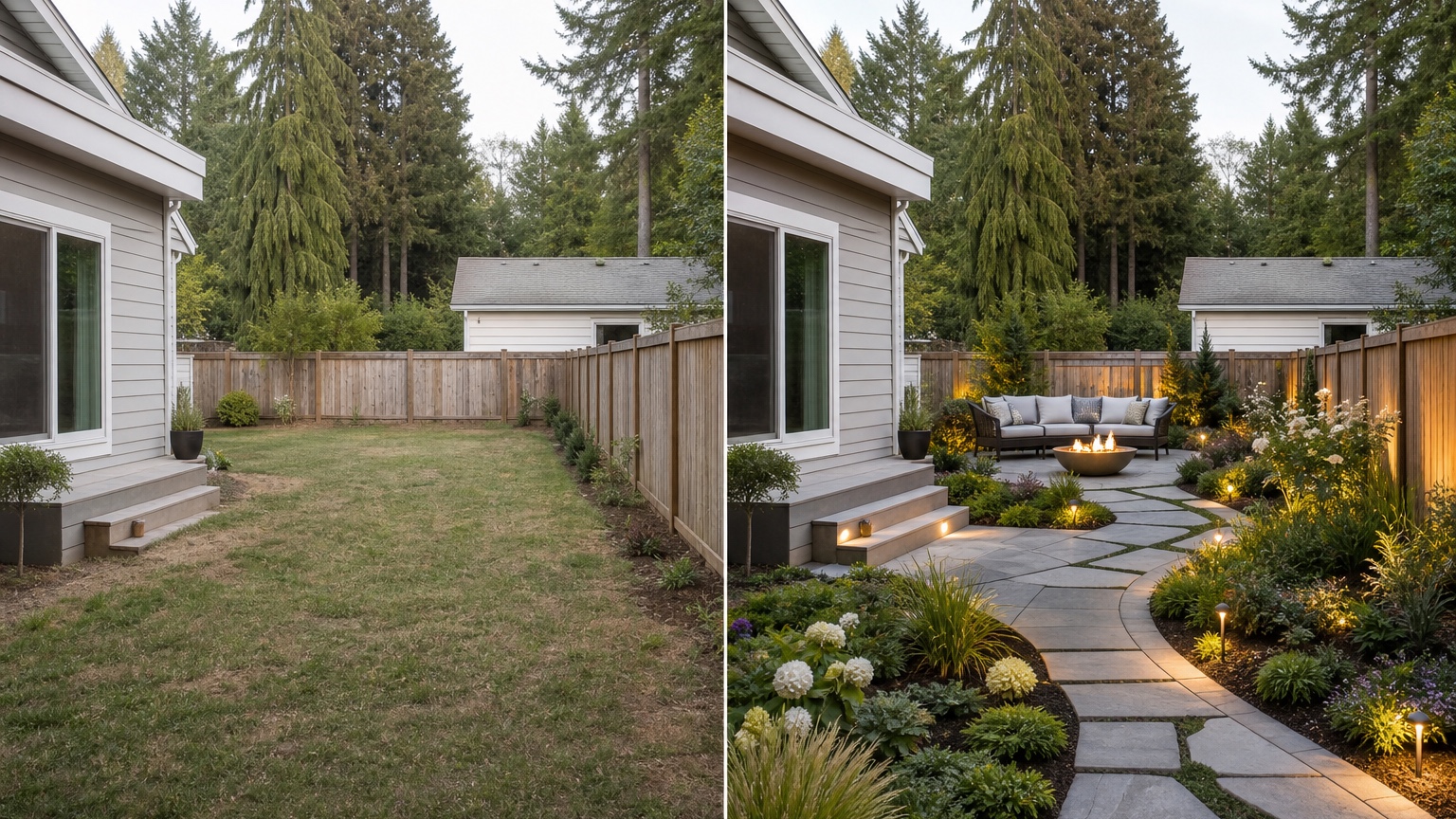
Prepare wide yard angles, sun and shade, slope, drainage, fences, patios, and fixed paths
Take a clear daylight photo from a position that shows the whole design problem. For a backyard, include the back of the house, door, patio or deck, lawn, fence, trees, planting beds, and any side gate or path. For a front yard, include the facade, walkway, driveway edge, porch, lawn, beds, and street-facing trees. If there is slope, drainage, or meaningful sun and shade variation, photograph it from an angle that shows the condition.
Decide what must stay recognizable in the original yard or garden for this landscape design edit
Write down the practical constraints before opening the editor. Fixed items might include mature trees, a children’s play zone, a dog run, a pool fence, an existing patio, a budget limit, a rental restriction, a walkway that must stay accessible, or a drainage path that cannot be blocked. Those details should appear in the prompt.
A useful phrase is: “Preserve…” followed by the important items. For example: “Preserve the existing patio, fence, back door, mature tree, side gate, and lawn area for pets.” Then describe the desired change. The AI has permission to redesign, but not to erase the reality of the yard.
Add references only when they clarify the landscape design style, material, color, or mood
Reference images can improve consistency when they are specific. Use one for a modern paver-and-gravel look, a native meadow palette, a Mediterranean courtyard mood, a woodland shade garden, a low-water front yard, or a simple built-in bench. Avoid a large batch of unrelated inspiration photos from different climates and budgets.
AI Landscape Design from Photo prompt brief for stronger landscape design results
Start the AI landscape design from photo prompt with the outcome: outdoor upgrade plan
Begin with the role of the image. A prompt for a homeowner planning a quote should sound different from a prompt for a realtor, a garden designer, or a short-term rental host.
Try this homeowner version: “Create a realistic landscape design concept from this yard photo. Preserve the house, patio, fence, mature tree, grade, and side gate. Turn the plain lawn and sparse beds into a practical outdoor upgrade plan with layered low-maintenance planting, a defined path, tidy edging, a comfortable seating area, and warm but subtle garden lighting. Keep the result believable for contractor discussion.”
Name landscape design constraints such as climate, water, drainage, maintenance, and contractor feasibility
Constraints make the result more useful. Add terms such as low-water, wet climate, shade-tolerant, full-sun, pet-friendly, kid-friendly, low-maintenance, HOA-conscious, budget-aware, or contractor-feasible. The AI may not know your local plant list, but these constraints still shape the visual direction for later professional review.
Generate controlled landscape design variations instead of one overloaded prompt
Create a set of focused alternatives. Version one can keep the lawn and improve beds. Version two can reduce lawn and add a path. Version three can emphasize outdoor seating and lighting. Version four can test privacy planting. If every version changes everything, the best-looking image may win even when it is not feasible.
AI Landscape Design from Photo output review before anyone trusts the image
Check landscape design scale, edges, lighting, and consistency with the original image
Look closely at the generated image. Are pavers aligned with the perspective? Do steps meet the door naturally? Does the path have a realistic width? Are shrubs scaled for the bed? Does lighting appear attached to posts, walls, or the ground in plausible locations? Does furniture fit the patio with room to move around it?
Edges matter in landscape previews. Bed lines should follow the grade. Gravel should not spill randomly through the lawn. Pavers should not bend in impossible ways. Fences, walls, trees, and house edges should remain stable. If the image looks attractive but unstable, generate a cleaner version before sharing it.
Compare the AI landscape design from photo concept against climate, water, drainage, maintenance, and contractor feasibility
A concept that ignores water or maintenance can become expensive quickly. Ask whether the yard needs irrigation changes, whether the planting density is realistic, whether the hardscape affects runoff, whether mulch or gravel will stay in place, and whether the design leaves access for mowing, bins, pets, utilities, or gates. The AI image can show intent; it cannot provide measurements, drainage engineering, product specifications, permits, or final plant spacing.
Save the strongest landscape design version as zone plan, planting and hardscape comparison, and maintenance notes
When a version works, do not only save the image. Save the prompt, a short zone list, and the unresolved questions. For example: seating zone near the patio, stepping-stone path to gate, privacy planting along back fence, shade bed under tree, lawn retained for pets, low-voltage lighting to review, drainage at left corner to inspect.
This turns a visual preview into a useful brief. It also makes it easier to compare the yard direction with related exterior changes such as AI exterior home design, AI front porch design, or AI exterior renovation ideas.
AI Landscape Design from Photo mistakes that make results look generic
Uploading a weak photo of the yard or garden
A poor input photo usually produces a poor planning result. Dark corners, harsh shadows, cropped fences, blocked patios, piles of clutter, and extreme wide-angle distortion all make the yard harder to understand. Before spending time on variations, retake the photo from a wider, steadier position.
If the project depends on a hidden area, do not expect the AI to infer it accurately. Use separate photos for the front yard, backyard, side yard, pool area, or patio corner. Keep each workflow focused.
Asking for unrelated landscape design changes that blur the decision
The fastest way to get a generic concept is to ask for everything at once: new patio, new deck, pool, pergola, outdoor kitchen, fire pit, fence, trees, lighting, vegetable garden, modern facade, and luxury furniture. The image may look impressive, but it will not tell you what to do first.
Instead, choose the decision. If privacy is the issue, test privacy planting and screens. If circulation is the issue, test paths. If maintenance is the issue, test lawn reduction and simplified beds. If entertaining is the issue, test seating, lighting, and surface size.
Ignoring how before/after comparisons should be judged
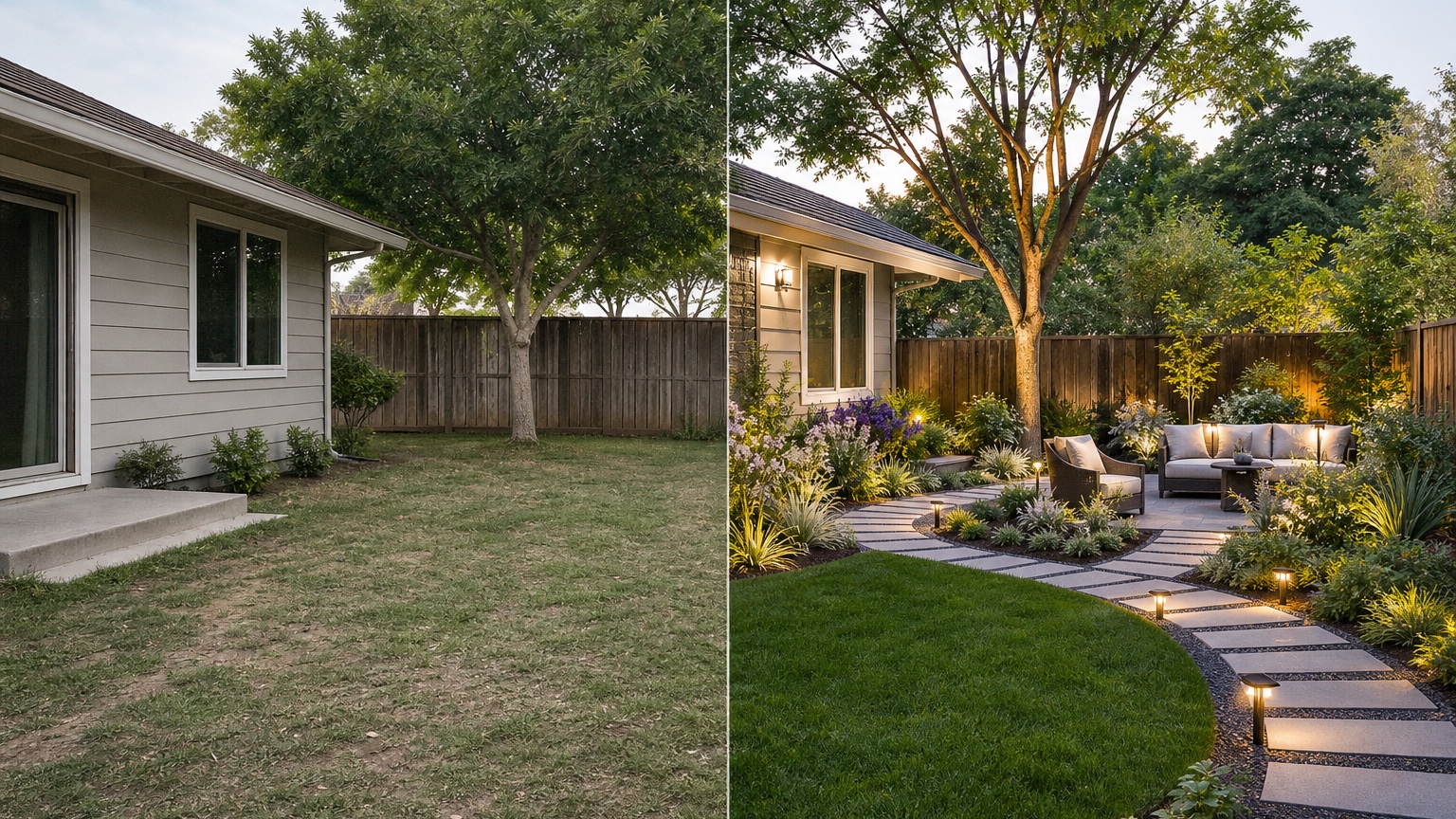
Before/after images can create false confidence because the after side is usually cleaner, brighter, and more finished. Judge the concept by whether it preserves the same property and answers the same problem. If the after image quietly changes the grade, removes a tree, widens the yard, invents a huge budget, or replaces fixed architecture, it is not a fair comparison.
AI Landscape Design from Photo workflow in RedesAIgn from first image to action
Choose the RedesAIgn editor built for the yard or garden
In RedesAIgn, start with the Landscape Editor for yard, garden, patio, planting, path, and outdoor living decisions. The platform includes 10 editors, so choose the one aligned with the subject instead of using a broad editor for a specific landscape problem.
Use prompts, remix images, saved prompts, and history to compare landscape design revisions
Upload the clearest photo, write the first prompt, generate a few options, and pick the one that best respects the site. Use remix to refine bed shape, path material, planting density, or seating placement. Use saved prompts to keep successful language available for another angle. Use history to compare revisions without losing the earlier concept that may have been more realistic.
Reference images are best used sparingly: one material palette, one planting mood, or one hardscape style. If you need more generations beyond the free credits, RedesAIgn offers one-time credit packs.
Share the final AI landscape design from photo reference when execution matters
A final AI concept can help a landscaper, garden designer, hardscape contractor, realtor, host, or hospitality marketer understand the intended direction. Share it with notes about what must stay, what is proposed, what is uncertain, and what needs professional review. If the image will be used commercially, keep the presentation honest: it is a concept or visualization, not proof of completed work.
AI Landscape Design from Photo questions to answer before you commit
What can this landscape design preview show accurately for homeowners?
It can show layout direction, visual style, relative planting density, path ideas, patio mood, lighting atmosphere, privacy concepts, and how the yard could feel after a coordinated upgrade. It is especially useful for comparing options on the same photo.
What still needs samples, measurements, products, quotes, or professional review for AI landscape design from photo?
You still need measurements, plant selection for your climate, material samples, drainage review, grading decisions, irrigation planning, electrical planning for lighting, product choices, permits where required, and contractor quotes. AI helps narrow the question; it does not complete the build documentation.
How should the selected landscape design concept guide the next real-world step?
Turn the concept into a checklist. Identify the zones, materials, planting direction, and open questions. Then decide whether the next move is a nursery visit, contractor quote, garden designer consultation, HOA submission, material sample order, or another RedesAIgn round with a more specific prompt. The best photo-based landscape preview is the one that makes the next real-world conversation clearer.
Try these prompts in redesAIgn
Redesign this front yard with a stone walkway, low-water plants, and clean planting beds.
Create a backyard seating patio with string lights, shrubs, and a simple lawn edge.
Add curb-appeal landscaping with layered greenery while keeping the driveway clear.
Related guides
- AI Landscape Architecture Generator for Early Outdoor Concepts
Use an AI landscape architecture generator for early outdoor concept exploration, studio reviews, feasibility checks, and photo-based design iteration.
- AI Landscape Visualizer: Preview Yard Changes Before You Commit
Use an AI landscape visualizer to preview realistic yard changes from a photo, compare landscaping options, and reduce decision risk before outdoor work.
- AI Lawn Makeover Ideas: Turn a Plain Yard Into a Plan
Use an AI lawn makeover to preview lawn shape, planting borders, paths, edging, seating, and practical yard upgrades before hiring or starting work.
- AI Xeriscape Design Ideas for Low-Water Yards
Use AI xeriscape design to preview low-water planting, gravel, paths, shade, irrigation zones, and maintenance tradeoffs before changing your yard.
- AI Backyard Makeover: Generate Outdoor Design Before and Afters
Use an AI backyard makeover workflow to preview layout zones, maintenance tradeoffs, before-and-after options, and practical next steps from a real yard.