AI Lawn Makeover Ideas: Turn a Plain Yard Into a Plan
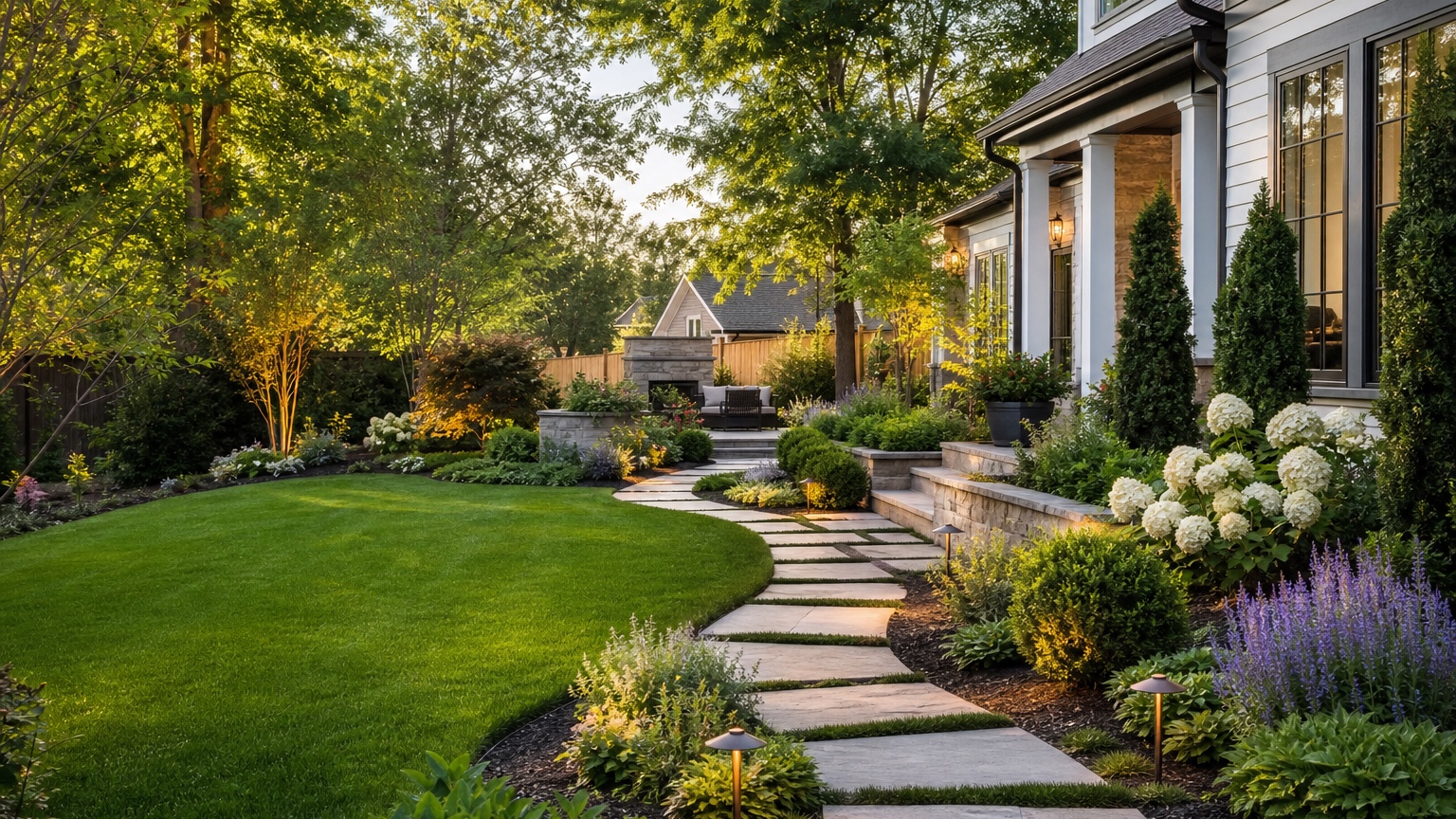
An AI lawn makeover is useful when a yard is not failing dramatically but still feels plain, patchy, or unfinished. The grass may be serviceable, yet the borders are vague, the path is unclear, the fence line looks empty, and the patio or front entry does not feel connected to the rest of the space. Homeowners want to know what to improve first. Lawn businesses and landscapers need a visual way to discuss upgrades before quoting sod, edging, planting, irrigation, or hardscape.
The benefit of a photo-based lawn makeover is context. A lawn does not exist by itself. It touches the driveway, walkway, patio, fence, planting beds, trees, irrigation, slopes, pet routes, play areas, shade, and maintenance routines. A generic inspiration image can show a beautiful yard, but it cannot show whether curved beds belong beside your house or whether a new border will block a mower. A useful AI lawn makeover keeps the real property recognizable while testing lawn shape, bed lines, path connections, and upgrade priorities.
RedesAIgn can help at that early visual stage. Upload a clear yard photo and compare prompts, remix images, reference images, saved prompts, and history across the landscape workflow. RedesAIgn includes 10 AI editors, 5 free AI credits, and no credit card requirement to begin testing. If a homeowner, lawn company, or landscaper needs more variations for a client, one-time credit packs are available.
AI Lawn Makeover: the real decision this article should help with
The real decision is not “make the lawn look nicer.” It is what role the lawn should play in the yard. In a front yard, the lawn may frame the entry, improve curb appeal, and create breathing room between the house and planting. In a backyard, it may need to support kids, dogs, games, entertaining, garden access, or a simple open view. For a lawn business, the decision may be whether the client needs turf repair, reshaping, edging, irrigation changes, border planting, or a larger landscape redesign.
A good AI lawn makeover should make those choices visible. It can show whether the existing lawn should stay mostly intact with sharper edges, shrink to make room for planting beds, become a smaller central green, connect to a walkway, or be replaced in difficult shade. It can also clarify whether the plain feeling comes from poor grass, weak borders, missing vertical elements, lack of seating, or a mismatch between the lawn and house style.
The useful answer is a next action, not a dramatic render. After reviewing the preview, you should know whether to measure a bed, mark a new edge with a hose, price sod, adjust irrigation, add border shrubs, create a path, or compare the lawn change with an AI backyard makeover plan. The image should reduce uncertainty before money is spent.
When to test an AI lawn makeover visually first
Test visually before starting when the yard has several possible directions and no obvious single fix. A thin lawn under trees may need shade planting rather than another round of seed. A wide rectangle of grass may need shaped borders to look intentional. A backyard with a lonely patio may need a path, planting, and seating edge more than a new lawn variety. A front yard with a plain approach may need the lawn to frame a clearer entry rather than cover every open square foot.
Visual testing is especially helpful before hiring because lawn work can create follow-on costs. Reshaping grass may require new edging, irrigation head relocation, soil repair, drainage correction, tree-root protection, or a different mowing routine. Adding border beds may reduce turf area but increase pruning and mulch. Installing new sod without solving shade, compaction, or water coverage can lead to the same patchy result later.
Lawn businesses can use previews to sort client requests. If a customer says, “Make it look better,” show controlled options: repair and sharpen the existing lawn, reduce lawn with planting borders, add a walkway edge, or create a small seating connection. The best option is often the one that matches the client’s maintenance level and budget, not the most elaborate transformation.
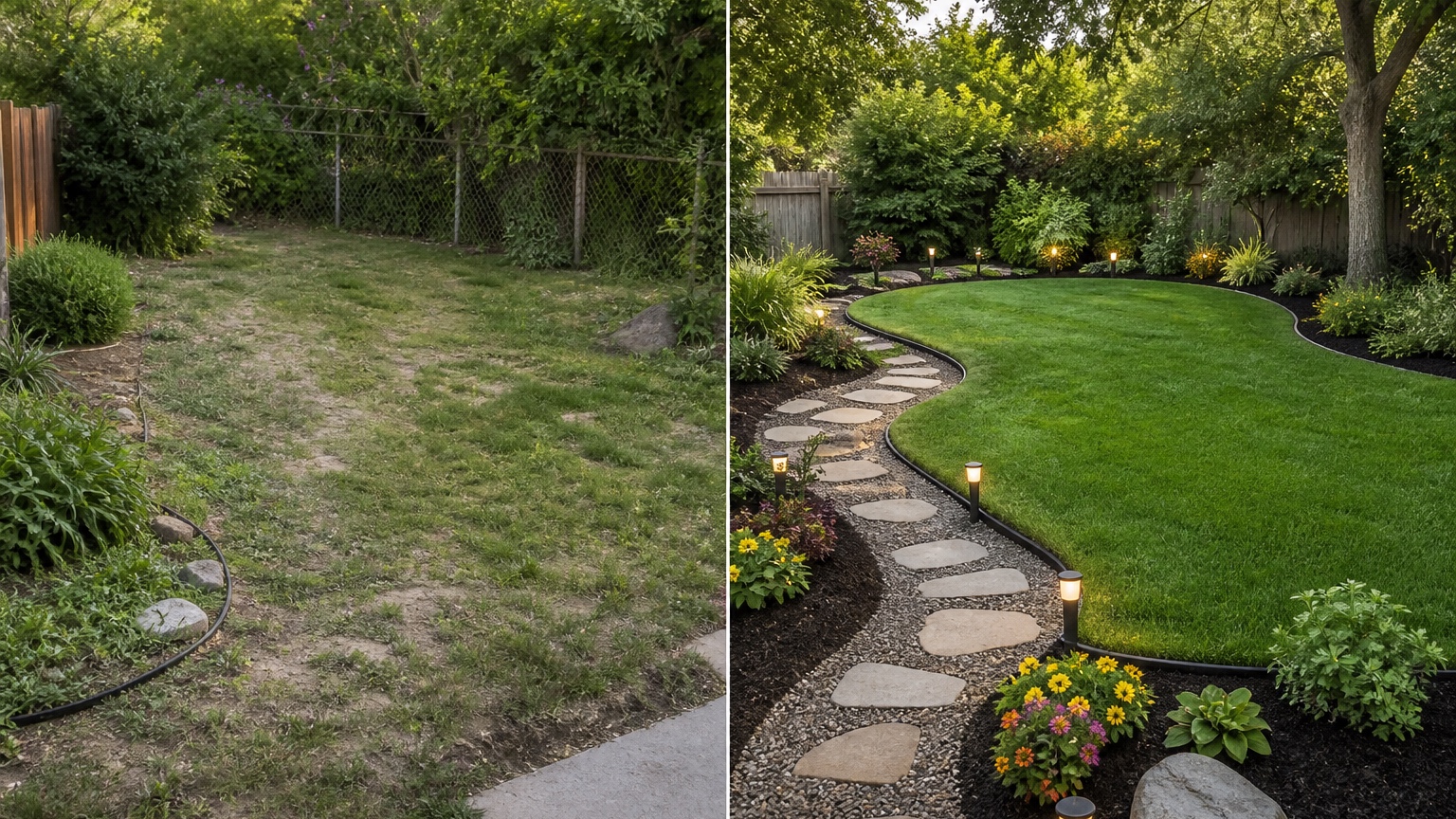
Decision workflow for lawn and border upgrades
Start by deciding what must stay. The house, fence, patio, driveway, walkway, major trees, slope, irrigation valves, utilities, drainage routes, and property boundaries may be fixed. If the AI changes those without permission, the result may look polished but fail as a planning tool. Say what should remain unchanged in the prompt.
Next choose the lawn strategy. One option is repair: keep the lawn shape, improve edges, add topdressing, reseed or resod, and clean up borders. Another option is reshaping: turn a plain rectangle into a more deliberate lawn panel with curved or straight planting beds. A third option is reduction: keep useful lawn where people actually use it and convert awkward strips to planting, mulch, gravel, or paths. A fourth option is replacement in problem zones where shade, slope, pets, or drainage make grass unrealistic.
Then decide how the border supports the lawn. Edging can be subtle or formal. Planting can be low and easy to mow beside, or taller where privacy is needed. Beds can soften fences, connect patios, frame entries, or hide bare foundations. Paths can protect high-traffic routes from becoming muddy shortcuts. Lighting can help define the route, but it should not be added just to make the preview look expensive.
Finally, turn the chosen direction into phases. Phase one might be edge cleanup and soil repair. Phase two might be border planting. Phase three might be a path or patio connection. A phased plan is easier to price and easier to maintain. It also helps homeowners and lawn companies avoid overbuilding a yard before solving the basics.
Input checklist for a believable lawn makeover preview
Use wide daylight photos that show the whole lawn and the features around it. For a front yard, include the street or driveway, walkway, porch, foundation beds, trees, downspouts, slope, and neighboring context. For a backyard, include the patio, doors, fence, side gates, play areas, trees, planting beds, and any worn paths. If the lawn has problem areas, take close supporting photos but use a wide photo for the main design.
Keep the camera level and show edges clearly. Lawn makeovers depend on shape. A tilted or cropped image can make the lawn seem larger, flatter, or easier to change than it is. If the yard slopes, photograph from both directions. If shade is the problem, take photos that show tree canopy and shadow patterns. If pets or kids use the yard, show gates, runs, and worn zones.
List what cannot move. Irrigation boxes, cleanouts, tree roots, drains, steps, retaining walls, fence posts, door swings, and property lines matter. A generated border that covers a utility box or blocks a gate is not useful. If mowing access is important, mention that bed edges should be easy to maintain with normal equipment.
Use reference images carefully. A crisp modern lawn panel can guide straight edges and simple planting. A cottage border can guide softness and density. A low-water reference can guide turf reduction. But the source photo should control the actual lawn geometry, not the reference from another property.
Prompt brief for stronger AI lawn makeover results
Start with the outcome: “Create a realistic AI lawn makeover from this yard photo.” Then describe the lawn role, fixed features, and upgrade scope. Avoid asking for every possible outdoor feature in one prompt.
For a front yard, try: “Use this photo to preview a practical lawn makeover. Preserve the house, driveway, walkway, porch, mature tree, property slope, and utility areas. Keep a healthy central lawn, sharpen the lawn edges, add low-maintenance planting borders near the house and walkway, improve the path-to-door feeling, and keep the design feasible for a homeowner or lawn business to price.”
For a backyard, try: “Create three controlled lawn makeover variations on the same backyard photo: one with repaired lawn and clean edging, one with reduced lawn and larger planting borders, and one with a lawn panel connected to the patio by a simple path. Do not change the fence, patio, doors, large trees, grade, or property shape.”
For a lawn company estimate, try: “Show a buildable lawn and border upgrade that clarifies turf area, bed lines, edging, planting density, access, and maintenance. Keep irrigation and mowing realistic. Avoid adding a pool, outdoor kitchen, pergola, or unrelated luxury features.”
Add constraints such as shade, pets, drought, drainage, snow, mowing equipment, budget, HOA style, and how much maintenance the owner will accept. If the goal is low-water, say whether the lawn should be reduced or only improved. If the goal is resale, ask for broad appeal and clear curb appeal rather than unusual features.
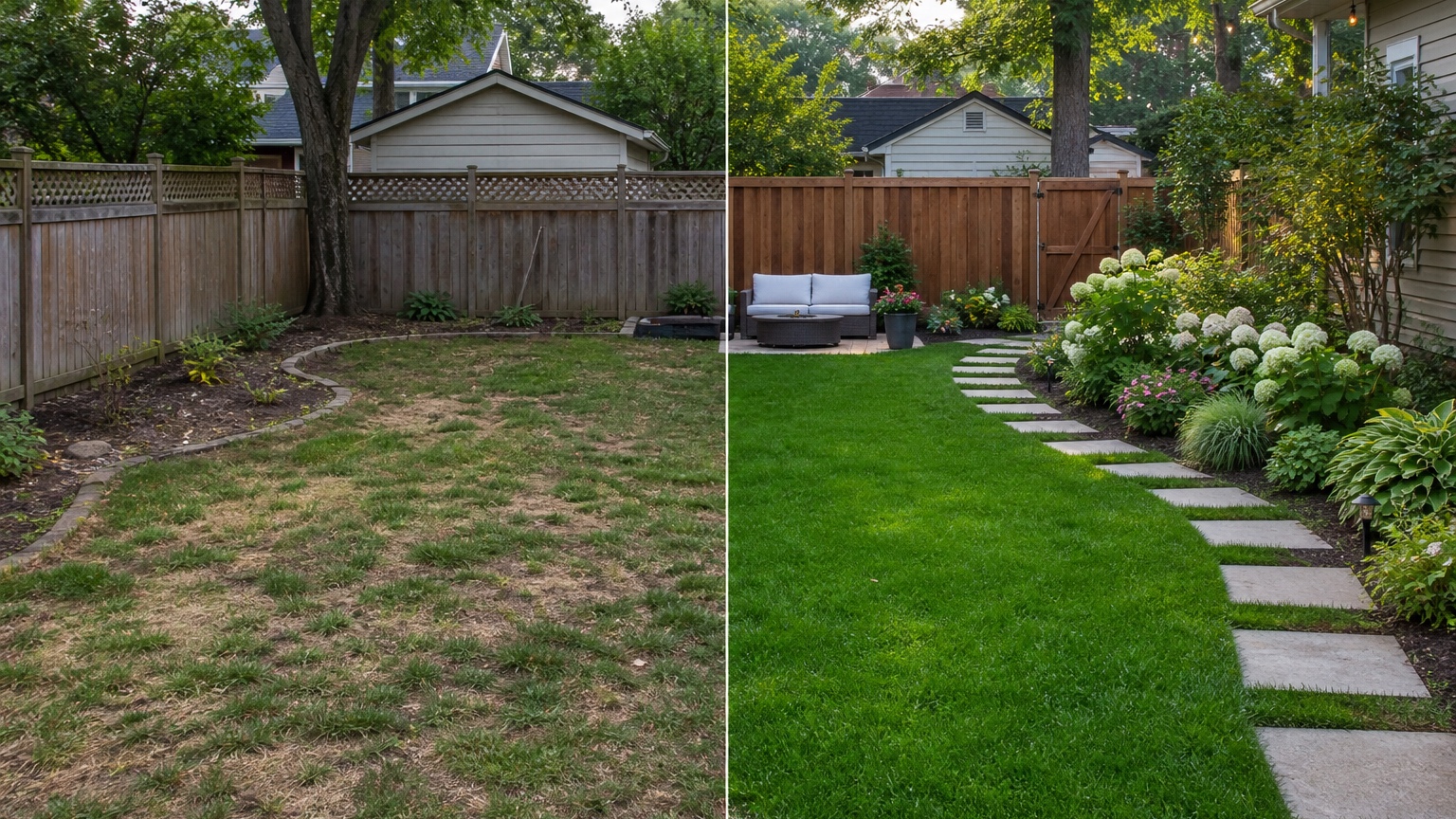
Output review before anyone trusts the lawn image
Check the lawn shape first. Does it still connect logically to the patio, path, driveway, or play zone? Can a mower turn around? Are bed curves smooth enough to install, or do they wiggle because the AI made decorative shapes? Does the border leave enough distance from fences, trunks, and structures for maintenance? If the concept creates tiny turf islands that are hard to mow, revise it.
Check grass health logic. If the original lawn is thin under dense trees, a perfect green preview may be misleading unless shade, soil, irrigation, and traffic are addressed. If there are drainage stains or low spots, a new lawn surface alone may not solve them. If pets are the issue, turf type, soil repair, traffic routes, and cleanup matter. The image should guide questions, not hide site problems.
Check planting and edging. Shrubs should have mature spacing. Beds should not block gates, windows, steps, downspouts, or utility access. Edging should follow the ground plane and meet hardscape cleanly. Mulch or gravel should not bleed into lawn. Lighting, if included, should be placed where wiring and maintenance are plausible.
Check consistency with the original photo. The AI should not move the house, fence, patio, mature trees, slope, or neighbor structures unless that was requested. Shadows and materials should feel consistent enough that a homeowner can judge the real yard. Save the strongest image with notes about what is design intent, what must be measured, and what needs professional review.
Mistakes that make AI lawn makeover results generic
The first mistake is asking for a “beautiful yard” without naming the lawn problem. The tool may add random flowers, a patio, or oversized features while leaving the actual decision unclear. Say whether the problem is patchy grass, boring edges, weak curb appeal, muddy routes, shade, pets, drought, or a patio that feels disconnected.
The second mistake is making the makeover too big. If you request a pool, pergola, outdoor kitchen, fire pit, new fence, full planting plan, new exterior paint, and lawn replacement all at once, the result may look impressive but will not help a lawn business quote the first step. Keep lawn repair, border layout, path connection, and major backyard features in separate rounds.
The third mistake is ignoring maintenance. A dramatic border can make the yard look finished, but it may add pruning, mulch, leaf cleanup, irrigation checks, and mower trimming. A smaller lawn can reduce mowing, but only if the replacement beds are designed for realistic upkeep. Ask for the maintenance level directly.
The fourth mistake is trusting perfect green grass in a problem location. AI can show the desired finish, but it cannot test soil compaction, irrigation coverage, drainage, disease pressure, traffic, or local turf performance from a single image. Use the preview to decide what to investigate next.
Workflow and questions in RedesAIgn
In RedesAIgn, choose a clear wide yard photo and start with a focused lawn makeover prompt. Keep the first round simple: preserve fixed site features, define the lawn role, and request realistic borders, edging, paths, or planting where needed. Use remix to compare repair, reshaping, reduction, and replacement options. Saved prompts and history make it easier to return to a strong base version after testing a different bed shape or planting density.
Reference images are most useful for style and material direction. Use them to show clean modern edging, soft cottage borders, drought-tolerant turf reduction, or a traditional front lawn frame. Do not let a reference image force a layout that ignores your driveway, patio, fence, slope, shade, or maintenance access. If the yard links to a larger entry sequence, compare the result with AI front yard landscaping or an AI walkway design generator pass so lawn, borders, and hardscape stay consistent.
Before acting, answer a few practical questions. What portion of lawn is truly useful? Which areas are only being mowed because they exist? Where do people and pets actually walk? What areas stay wet, shaded, compacted, or worn? What can the owner maintain every month? What should a lawn business price first: turf repair, edging, irrigation, planting, path work, or soil correction?
A strong AI lawn makeover turns a plain yard into a visible plan. It gives the homeowner a shortlist, gives the contractor better questions, and helps everyone separate cosmetic ideas from work that will actually improve the yard.
Try these prompts in redesAIgn
Redesign this front yard with a stone walkway, low-water plants, and clean planting beds.
Create a backyard seating patio with string lights, shrubs, and a simple lawn edge.
Add curb-appeal landscaping with layered greenery while keeping the driveway clear.
Related guides
- AI Landscape Architecture Generator for Early Outdoor Concepts
Use an AI landscape architecture generator for early outdoor concept exploration, studio reviews, feasibility checks, and photo-based design iteration.
- AI Landscape Visualizer: Preview Yard Changes Before You Commit
Use an AI landscape visualizer to preview realistic yard changes from a photo, compare landscaping options, and reduce decision risk before outdoor work.
- AI Xeriscape Design Ideas for Low-Water Yards
Use AI xeriscape design to preview low-water planting, gravel, paths, shade, irrigation zones, and maintenance tradeoffs before changing your yard.
- AI Backyard Makeover: Generate Outdoor Design Before and Afters
Use an AI backyard makeover workflow to preview layout zones, maintenance tradeoffs, before-and-after options, and practical next steps from a real yard.
- AI Walkway Design Generator for Paths, Pavers, and Garden Entries
Generate walkway design ideas from a yard photo with RedesAIgn. Compare edges, materials, and planting before any hardscape work begins.