AI Walkway Design Generator for Paths, Pavers, and Garden Entries
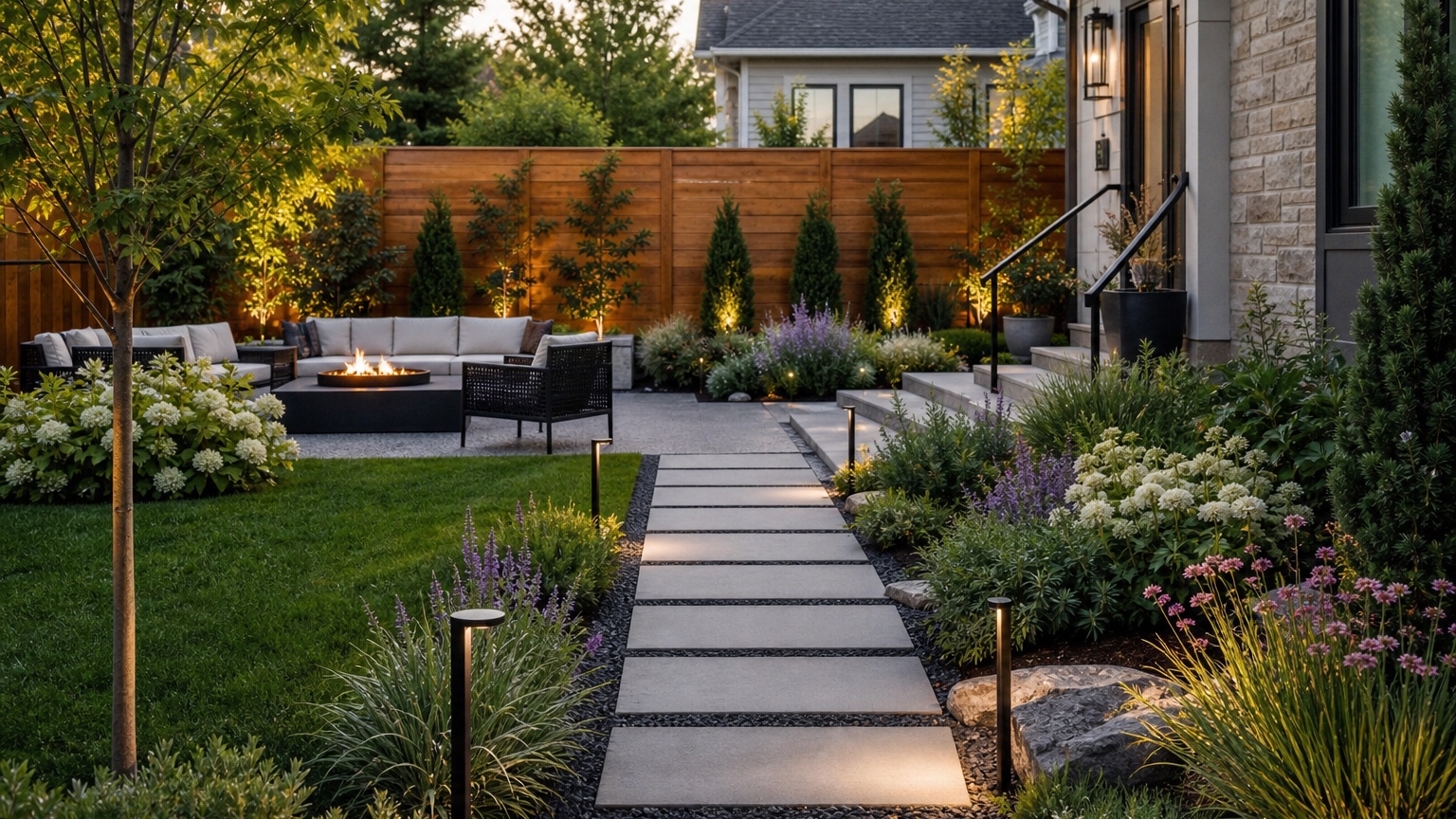
An AI walkway design generator is most useful before a path is installed, relocated, widened, or resurfaced. Walkways look simple in photos, but a real path has to connect people to the right places, survive weather, drain correctly, fit the house style, and work with planting beds. Hardscape contractors and homeowners need a way to preview those choices before ordering pavers, excavating soil, changing grade, or committing to a layout.
The value of a photo-based walkway preview is context. A product page can show a beautiful paver, but it cannot show whether that paver belongs beside your brick, stucco, siding, gravel, lawn, porch steps, retaining wall, or garden bed. A generic garden path inspiration image cannot know where guests naturally walk, where water pools, or where a gate swings. A useful AI walkway design generator keeps the original yard recognizable while testing path direction, width, material, edging, lighting, and planting support.
RedesAIgn can help during that early comparison stage. Upload a clear yard or entry photo, choose the landscape-focused editor, and use prompts, remix images, reference images, saved prompts, and history to compare walkway revisions. A first walkway test can begin with the 5 free AI credits in RedesAIgn, and you can start without a credit card before paying for more revisions. If you need more options for a client presentation or larger site, one-time credit packs are available.
AI Walkway Design Generator: the real decision this article should help with
The real decision is where the path should go, what it should be made of, and how it should meet the rest of the yard. For hardscape contractors, the challenge is helping a client see the layout before installation. A homeowner may think they want flagstone, concrete pavers, gravel, stepping stones, brick, or poured concrete, but the better question is how the path changes arrival, maintenance, drainage, and planting.
The preview should make the path decision easier before you buy pavers, plants, edging, or lights. It can show whether a straight path feels too rigid, whether a curved path wastes space, whether the entry needs a wider landing, or whether planting beds should frame the route. It can also clarify whether the path is a front entry walkway, side-yard connector, garden path, patio link, pool route, or service access.
For walkway planning, the useful answer is a clearer route, material shortlist, or measurement task rather than decoration for its own sake. After reviewing the image, you should know whether to mark the proposed route with flags, measure width, request a paver quote, test a gravel option, adjust planting beds, or compare the walkway with the broader AI landscape design from photo plan.
AI Walkway Design Generator: outdoor layout and maintenance tradeoffs
Walkway design starts with traffic. A front entry path should be obvious from the street or driveway. A side-yard path may need to be narrow but durable. A garden path can be softer, but it still needs comfortable footing. A path to a patio or outdoor living zone should handle furniture, guests, grilling routes, and nighttime use. If the generated concept looks beautiful but sends people through wet grass or around an awkward corner, revise it.
Traffic paths, seating zones, shade, privacy, and upkeep all affect the design. A walkway near a seating area may need extra width or a small landing so chairs do not block circulation. A shaded path under trees may become slippery if the material stays damp. A path near a fence may need planting that softens the edge without narrowing the route. A path beside a driveway may need a clear transition so guests do not step into planting beds.
Plants and hardscape choices affect budget and seasons. Concrete pavers can create a crisp modern path, but base preparation and edge restraints matter. Natural stone can look timeless, but irregular joints affect walking comfort. Gravel can be affordable and permeable, but it needs containment and may not suit every mobility need. Stepping stones can work in a garden, but spacing must match a natural stride. Dense planting makes a path feel established, but mature growth can quickly swallow a narrow route.
Where a visual concept touches drainage, slope, or accessibility, it needs review. Water should not run toward the house, sit on the path, or undermine the base. Steps, ramps, landings, railings, and local code may matter at entries. An AI walkway design generator can show the desired look and route, but a contractor still needs grades, dimensions, base depth, compaction, materials, and site conditions.
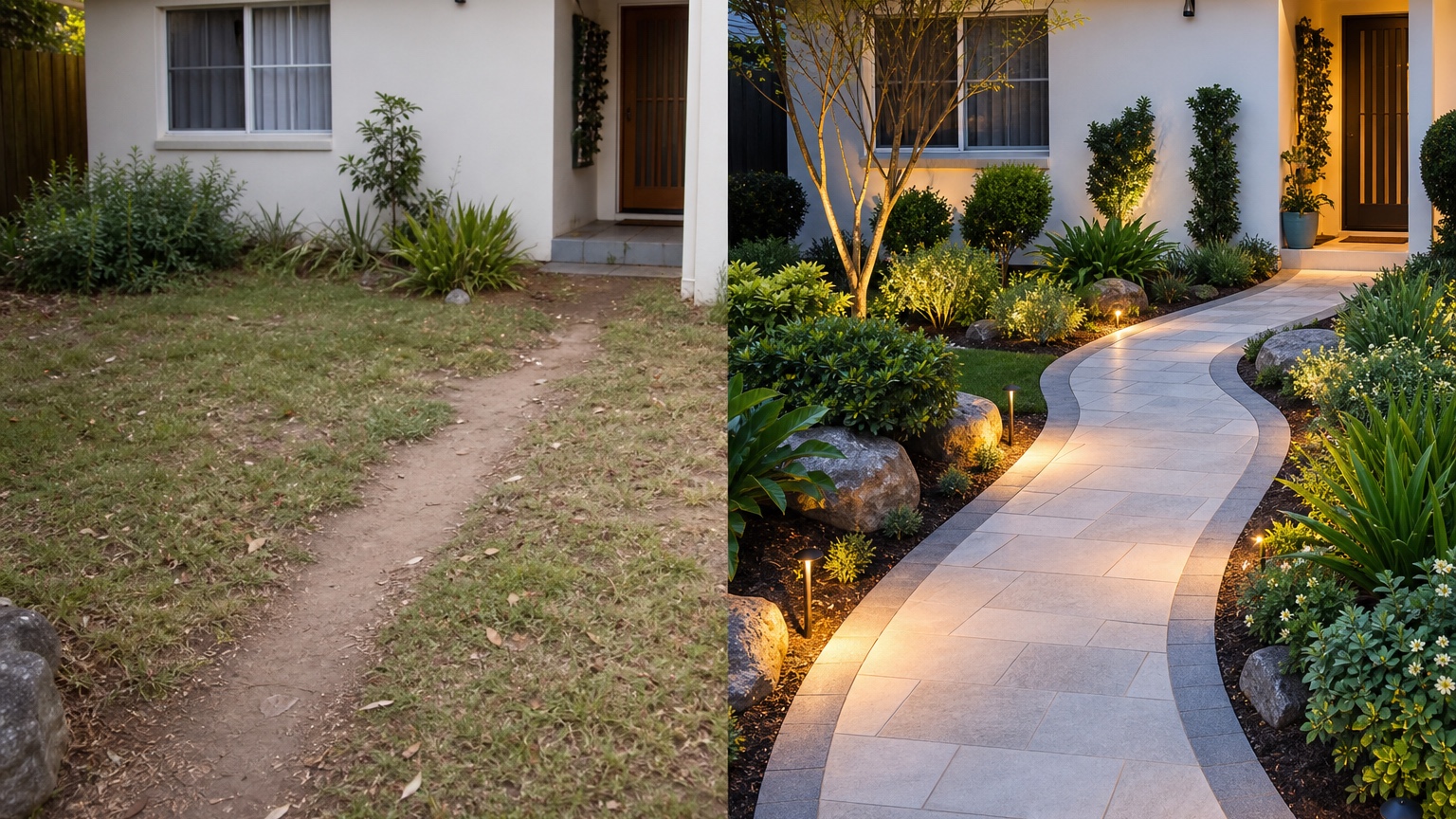
AI Walkway Design Generator prompt brief for stronger walkway design results
Start the prompt with the outcome: “Create a realistic walkway design concept from this yard photo.” Then name the route, what stays, and what decisions the image should clarify. A focused prompt keeps the AI from inventing a luxury garden that cannot be installed.
For a front entry walkway, try: “Use this photo to preview a realistic front walkway design. Preserve the house, porch, driveway, lawn shape, major trees, fence, and existing grade. Add a clear path from driveway and street approach to the front door using concrete pavers, a modest landing, tidy edging, low planting, and subtle path lighting. Keep the route practical for guests and feasible for a hardscape contractor to price.”
For a garden path, try: “Create three controlled walkway design variations on the same yard photo: one modern paver path with clean edging, one natural stepping-stone path through planting, and one compact gravel path with low-maintenance borders. Do not change the house, fence, patio, driveway, large trees, or yard shape.”
For a contractor discussion, try: “Show a buildable walkway concept that clarifies path route, width, material, edge restraint, planting border, and entry landing. Keep drainage, access, and maintenance realistic. Avoid changing the home exterior or adding unrelated features.”
Name walkway design constraints such as climate, water, drainage, maintenance, accessibility, snow removal, budget, and contractor feasibility. If the path must fit a wheelbarrow, stroller, mobility aid, or trash-bin route, include that. Generate controlled walkway design variations instead of one overloaded prompt that adds a patio, pergola, fountain, outdoor kitchen, new facade, and full planting plan at the same time.
AI Walkway Design Generator input checklist for a believable path preview
Use a wide daylight photo that shows both ends of the path. For a front walk, include the street or driveway connection, porch steps, door, lawn, planting beds, grade changes, retaining walls, downspouts, and any existing concrete. For a side or garden path, include gates, fences, patios, utilities, tree roots, slopes, and the destination.
Keep the camera level and avoid severe distortion. A path design depends on perspective. If the photo is tilted, the AI may make the walkway too narrow, too steep, or disconnected from the entry. Take one photo from the approach and one from the destination when possible. If the route crosses a slope or wet area, photograph that condition clearly.
Decide what must remain recognizable. The porch footprint, door location, driveway edge, patio, fence, mature trees, drainage swale, utility covers, irrigation, and property boundary may be fixed. Say so in the prompt. If the AI moves the door, flattens a slope, covers a cleanout, or changes the driveway, the result is not ready for contractor conversation.
Add references only when they clarify material, color, scale, or mood. A porcelain paver reference can guide a contemporary look. A bluestone path reference can guide traditional character. A decomposed granite reference can guide a soft garden route. References should influence the path without replacing the actual yard.
AI Walkway Design Generator output review before anyone trusts the image
Check scale first. A front walkway should feel comfortable for guests walking side by side or carrying bags if space allows. A side path should be wide enough for its purpose. Stepping stones should match a natural stride. Landings should be large enough at doors, gates, and turns. If the concept pinches near steps or narrows beside shrubs, revise it.
Check edges, lighting, and consistency with the original image. Pavers should align with the ground plane. Joints should not warp strangely. Edging should contain gravel or planting. Path lighting should be spaced logically and not block movement. Shadows and materials should match the source photo. If the AI changes the house, porch, fence, driveway, or patio without permission, treat the result as a style sketch rather than a plan.
Review the walkway concept against slope, runoff, freeze-thaw risk, plant spread, lighting needs, and whether a hardscape contractor could price it cleanly. Freeze-thaw conditions, clay soil, roots, irrigation, snow shoveling, leaf drop, slope, and local code can all change the right material. Save the strongest walkway design version as a zone plan, planting and hardscape comparison, and maintenance note set. A good image should help the contractor ask better questions, not pretend those questions are already solved.
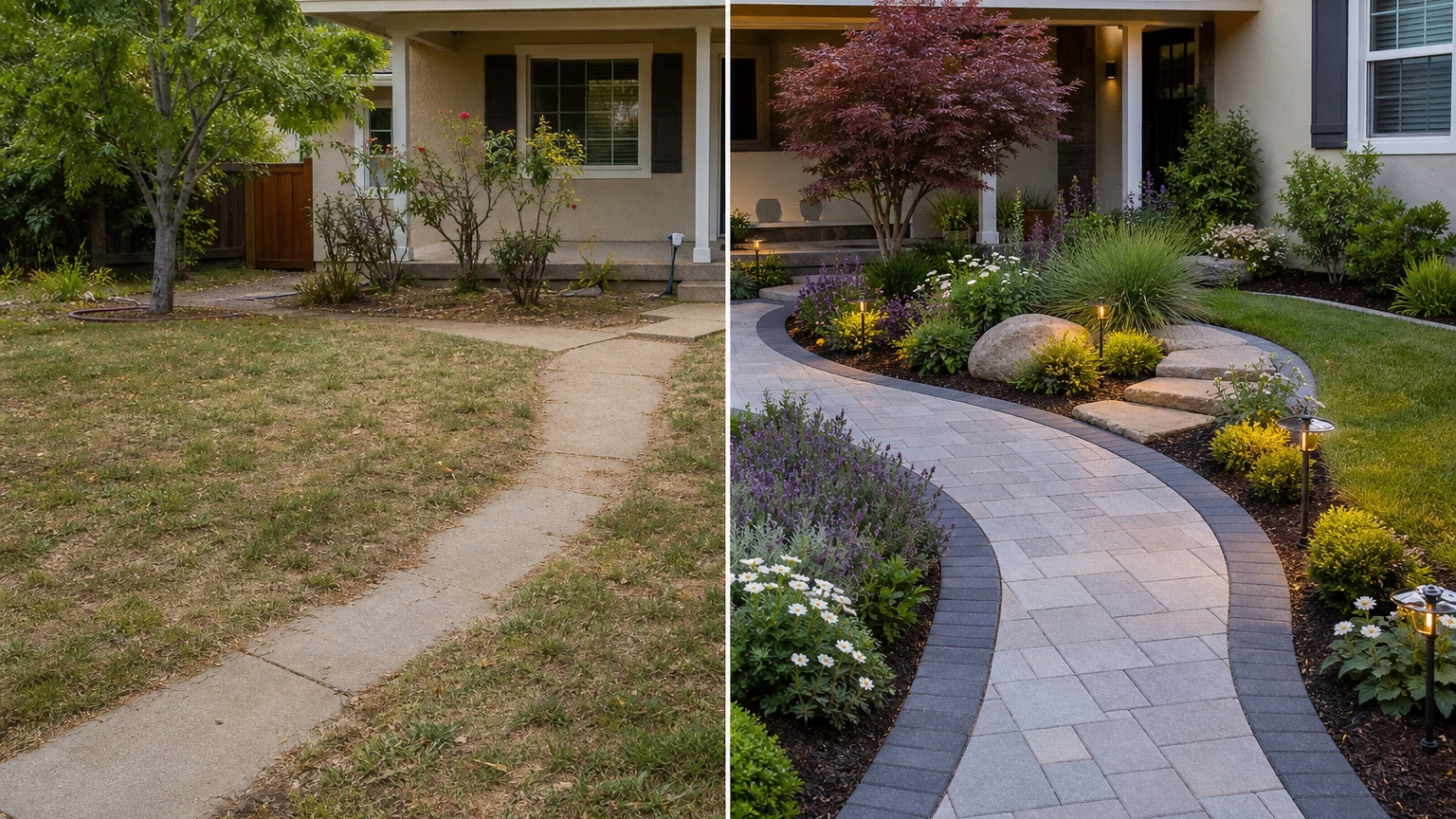
AI Walkway Design Generator mistakes that make results look generic
The first mistake is uploading a weak photo of the yard or garden. A close-up of pavers cannot show whether the path connects correctly. A cropped porch photo cannot show the driveway or street approach. A shadowy side yard may hide slope, roots, and drainage. Retake wide photos before trusting the preview.
The second mistake is asking for unrelated walkway design changes that blur the decision. If the question is path layout, do not also request a new roof, pool, pergola, complete patio, full garden, and facade remodel. Those may be future projects, but the walkway needs its own controlled comparison.
The third mistake is ignoring random concepts that cannot be acted on. AI may generate a path with perfect plants, glowing lights, and dramatic stone, but if the route does not match how people move, it will fail. Judge each result by connection, width, drainage, material realism, maintenance, and cost. The best image is not always the most decorative one.
AI Walkway Design Generator workflow in RedesAIgn from first image to action
In RedesAIgn, choose the editor built for yard or garden scenes and upload the clearest photo. RedesAIgn includes 10 AI editors, so you can keep walkway planning separate from interiors, product images, and facade-only work. Begin with a simple prompt that preserves the site, then remix the best result to compare straight, curved, formal, informal, paver, gravel, stone, or stepping-stone versions.
Saved prompts and history are especially helpful for walkway design because small changes can completely alter the path. Keep the prompt that produced the most believable route, then adjust one variable at a time: path width, material, edge treatment, planting density, lighting, landing size, or relationship to the driveway. Reference images can guide style, while the original photo controls scale and constraints.
Share the final walkway design reference with a landscaper, hardscape contractor, realtor, client, or homeowner when execution matters. RedesAIgn-generated images can be used commercially where relevant, but installation still requires measurements, layout marking, excavation depth, base preparation, drainage review, material samples, quotes, and professional judgment. For related planning, compare the walkway with AI patio design generator, AI garden planner from photo, AI backyard design generator, and AI driveway landscaping.
Practical layout checklist after the preview
Use the selected image to mark the route physically. Place flags, cones, rope, or a garden hose where the walkway appears in the preview. Walk it from both directions. Carry groceries, open the gate, step out of the car, approach the porch, and check whether the route feels natural. If people still cut across the lawn, the image did not solve the circulation problem.
Then measure the important points: path width, landing size, turn radius, slope, step height, distance from shrubs, drainage direction, and connection to existing hardscape. Ask a contractor which materials fit the soil, climate, budget, and maintenance expectations. If the project is expensive, phase it carefully: drainage and base first, path installation second, planting and lighting after the hardscape is stable. The best AI walkway design generator result turns a vague path idea into a layout you can test, price, and refine before installation begins.
Try these prompts in redesAIgn
Redesign this front yard with a stone walkway, low-water plants, and clean planting beds.
Create a backyard seating patio with string lights, shrubs, and a simple lawn edge.
Add curb-appeal landscaping with layered greenery while keeping the driveway clear.
Related guides
- AI Landscape Architecture Generator for Early Outdoor Concepts
Use an AI landscape architecture generator for early outdoor concept exploration, studio reviews, feasibility checks, and photo-based design iteration.
- AI Landscape Visualizer: Preview Yard Changes Before You Commit
Use an AI landscape visualizer to preview realistic yard changes from a photo, compare landscaping options, and reduce decision risk before outdoor work.
- AI Lawn Makeover Ideas: Turn a Plain Yard Into a Plan
Use an AI lawn makeover to preview lawn shape, planting borders, paths, edging, seating, and practical yard upgrades before hiring or starting work.
- AI Xeriscape Design Ideas for Low-Water Yards
Use AI xeriscape design to preview low-water planting, gravel, paths, shade, irrigation zones, and maintenance tradeoffs before changing your yard.
- AI Backyard Makeover: Generate Outdoor Design Before and Afters
Use an AI backyard makeover workflow to preview layout zones, maintenance tradeoffs, before-and-after options, and practical next steps from a real yard.