AI Garden Planner From Photo: See Planting Ideas Before You Buy
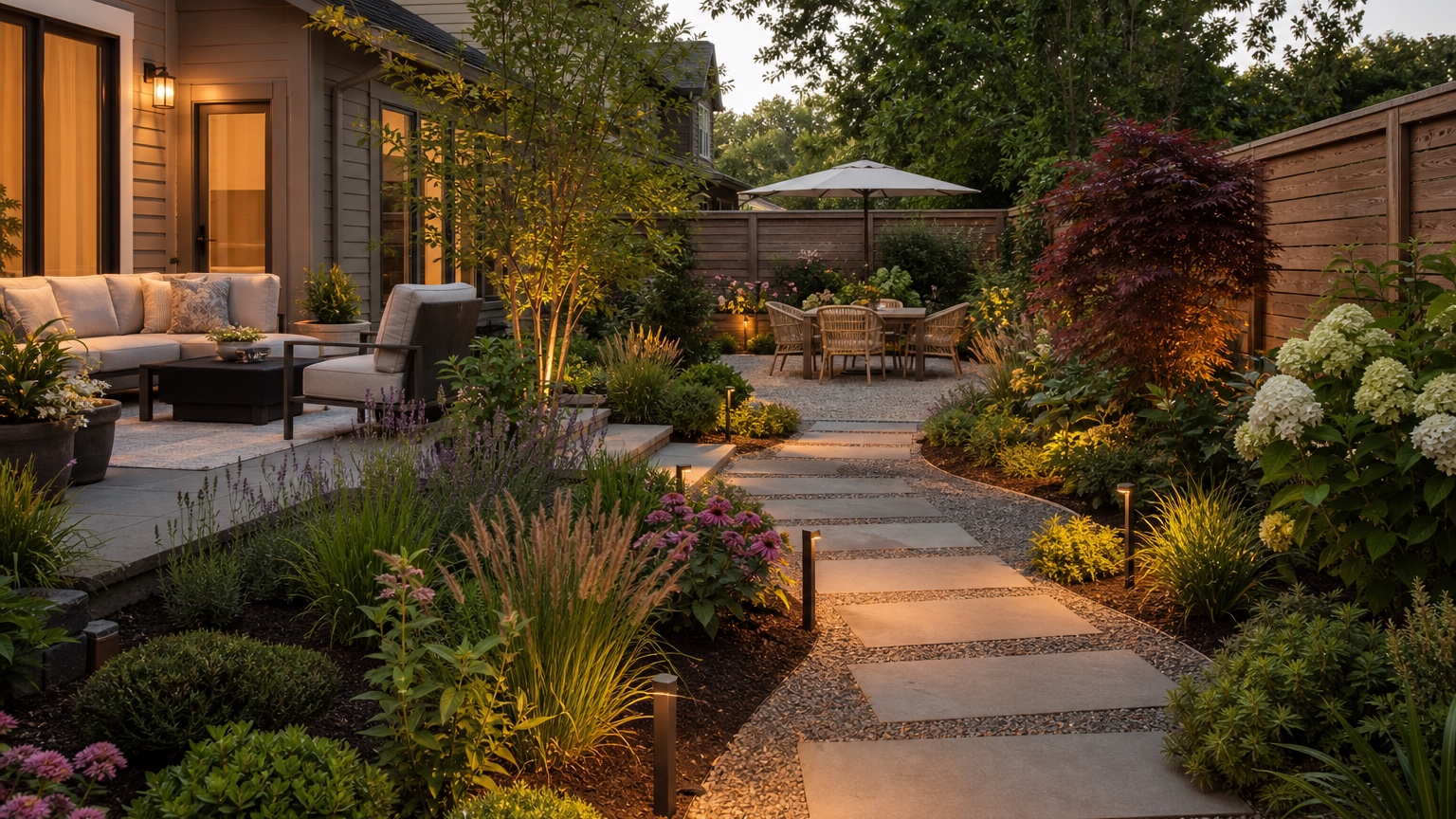
An AI garden planner from photo is most useful before you buy plants, soil, edging, gravel, or hardscape. Garden uncertainty usually starts with a real yard: one bed is too narrow, a fence looks bare, the sunny corner feels wasted, the shaded area keeps failing, and the path between spaces is unclear. A generic inspiration image cannot solve those problems because it does not know your slope, sunlight, drainage, fixed paths, patio edges, existing trees, or maintenance tolerance.
A photo-based planner changes the conversation. Instead of asking whether you like cottage gardens, modern grasses, pollinator borders, or low-maintenance shrubs in the abstract, you can preview how those ideas might fit the yard you already have. The goal is not a final plant list. The goal is to reduce uncertainty on plants and beds so the next real-world step is clearer.
RedesAIgn can help with that planning stage. Upload a clear yard or garden photo, choose the landscape-focused editor, and use prompts, remixing, reference images, saved prompts, and history to compare planting and layout versions. You can start free with RedesAIgn with 5 free AI credits and no credit card required. If you need more explorations later, one-time credit packs are available.
AI Garden Planner from Photo: the real decision this article should help with
The real decision is what to plant where, and why. Homeowners and gardeners need to know whether to widen a bed, keep lawn open, add a path, screen a fence, create a small seating edge, simplify an overgrown border, or replace struggling turf with a more suitable planting zone. An AI garden planner should make those decisions visible on the original photo.
The preview should reduce uncertainty around the outdoor upgrade plan. If the yard has afternoon sun, the concept should not assume deep shade plants everywhere. If a bed sits beside a downspout, the image should raise drainage questions instead of hiding the area behind lush foliage. If a mature tree controls the space, the plan should work with shade and roots rather than pretending the tree is removable.
For garden planning, the useful answer is a shopping and layout decision you can act on. A strong preview might help you buy fewer plants but choose better locations, ask a landscaper to price edging, test a gravel path, move the vegetable bed, add evergreen structure near the fence, or collect local nursery options for one planting zone at a time.
AI Garden Planner from Photo input checklist for a believable result
Start with photos that show the whole garden context. Take wide daylight angles from the house, from the far corner, and from the main approach if the area is visible from the street. Include sun and shade, slope, drainage clues, fences, patios, gates, downspouts, retaining walls, utilities, existing trees, fixed paths, and any plants that must stay.
Decide what must remain recognizable. Maybe the patio, fence, lawn area, deck stairs, vegetable boxes, large maple, side gate, driveway, irrigation heads, or children’s play zone cannot move. Say that directly in the prompt. If the AI replaces the fence, invents a new patio, removes the only shade tree, or shifts the house wall, the result may be attractive but poor for planning.
Add references only when they clarify garden planner style, material, color, or mood. A meadow reference can guide loose planting. A modern courtyard reference can guide gravel and structured masses. A cottage reference can guide layered flowers and informal edges. A low-water reference can guide restrained plant density. Use references as direction, not as a demand to copy a different climate into your yard.
AI Garden Planner from Photo: outdoor layout and maintenance tradeoffs
Garden planning is a layout problem before it is a plant shopping problem. Traffic paths, seating zones, shade, privacy, and upkeep decide whether the garden will be used and maintained. A narrow side yard may need a clear walkway more than extra shrubs. A backyard patio may need planting that frames a view without blocking chairs. A front yard may need a welcoming path and low planting near the entry so the door remains visible.
Think in zones. One zone might be a sunny pollinator bed. Another might be a shaded groundcover area under trees. Another might be a utility strip that needs durable gravel and simple screening. Another might be a small seating nook framed by shrubs. Ask the AI to show zones clearly so you can decide whether the garden needs more planting, less lawn, better circulation, or simpler edges.
Plants and hardscape choices affect budget and seasons. A generated image may show mature shrubs, flowering perennials, ornamental grasses, stone edging, boulders, mulch, lighting, and a perfect path all at once. In reality, young plants need time, spacing, soil preparation, and irrigation. Hardscape can cost more than the plants. A garden that looks full in May may need evergreens, seed heads, bark texture, or grasses to carry winter.
Climate and drainage still need review. A lush border may be unrealistic in a dry, exposed yard without irrigation. Lavender may fail in wet clay. Ferns may burn in afternoon sun. Hydrangeas may struggle in the wrong exposure. An AI preview can suggest the look of planting masses, but local hardiness, deer pressure, soil pH, water use, root competition, and drainage determine what belongs.
AI Garden Planner from Photo prompt brief for stronger garden planner results
Start the prompt with the outcome: “Create a realistic garden planning concept from this yard photo.” Then name the decision, what stays, and what constraints matter. A focused prompt keeps the result from becoming a fantasy landscape.
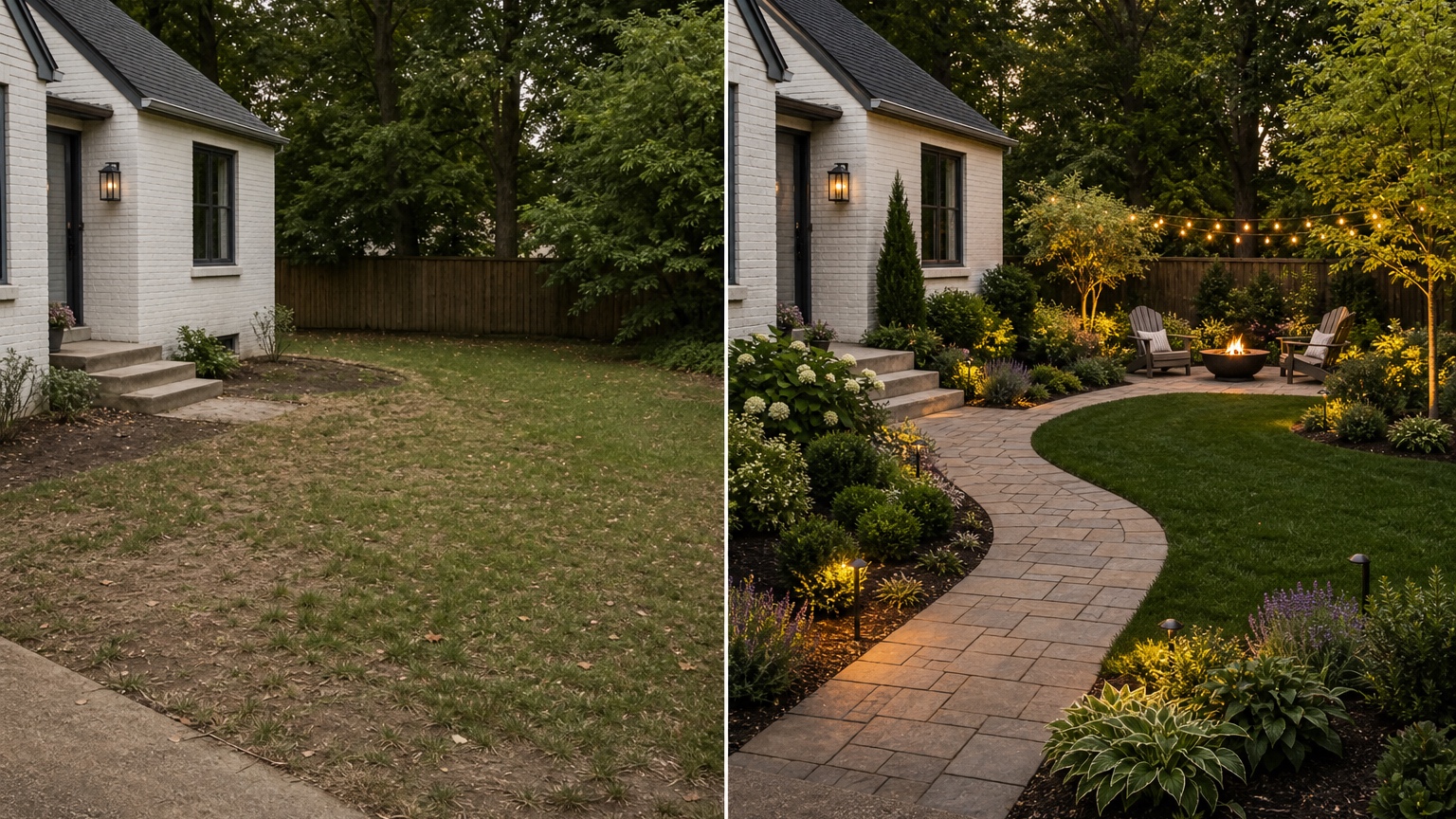
For a planting-bed prompt, try: “Use this yard photo to preview a realistic garden plan. Preserve the fence, patio, existing tree, lawn boundary, gate, and house wall. Add layered planting beds along the fence and patio, tidy edging, a simple stepping-stone path, and low-maintenance plants suited to mixed sun and shade. Keep the concept feasible for a homeowner to phase over time.”
For a comparison prompt, try: “Show three controlled garden planner directions on the same photo: one low-maintenance version with shrubs, grasses, mulch, and simple edging; one softer pollinator-inspired version with layered flowers and paths; and one practical family-friendly version with open lawn and planting around the edges. Do not change the house, fence, patio, large trees, or yard shape.”
Name garden planner constraints such as climate, water, drainage, maintenance, and contractor feasibility. If you do not want weekly pruning, say so. If the bed must work without irrigation, say so. If you need dog-friendly open space, say so. Generate controlled garden planner variations instead of one overloaded prompt so each image answers a separate question.
AI Garden Planner from Photo output review before anyone trusts the image
Check scale first. Beds should have enough depth for layered planting. Paths should look walkable. Shrubs should not be crammed against foundations, fences, or each other. Trees should not appear where roots, utilities, overhead wires, or property lines make them impossible. If the image shows an instantly full border in a narrow strip, revise for realistic spacing.
Check edges, lighting, and consistency with the original photo. Planting should follow the yard perspective. Bed lines should connect logically to fences, patios, walks, and lawn. Shadows should make sense. If the AI hides a slope, deletes a downspout, covers a drainage problem with plants, or changes the patio shape without permission, do another pass.
Review the garden concept through the real constraints of climate, water, drainage, maintenance, and contractor feasibility. A landscaper or experienced gardener still needs measurements, soil conditions, irrigation decisions, plant availability, and local suitability. Save the strongest garden planner version as a zone plan, planting and hardscape comparison, and maintenance note set. Label what stays unchanged and what needs real-world confirmation before buying.
AI Garden Planner from Photo mistakes that make results look generic
The first mistake is uploading a weak photo of the yard or garden. Close-ups of flowers, night photos, cluttered angles, harsh shadows, and cropped fence lines make it harder to judge layout. Retake wide daylight photos that show the relationship between house, lawn, beds, paths, fences, and trees.
The second mistake is asking for unrelated garden planner changes that blur the decision. “Add a patio, pergola, pond, outdoor kitchen, fire pit, vegetable garden, full landscape lighting, and cottage garden” may look impressive, but it will not help you choose plants and beds. Separate planting, hardscape, shade, and seating questions into different rounds.
The third mistake is ignoring before-and-after judgment. A garden image can look lush while removing the lawn you needed, blocking the gate, crowding the patio, or creating a maintenance burden. Compare each result to the original photo and ask whether it actually solves the problem you started with.
AI Garden Planner from Photo workflow in RedesAIgn from first image to action
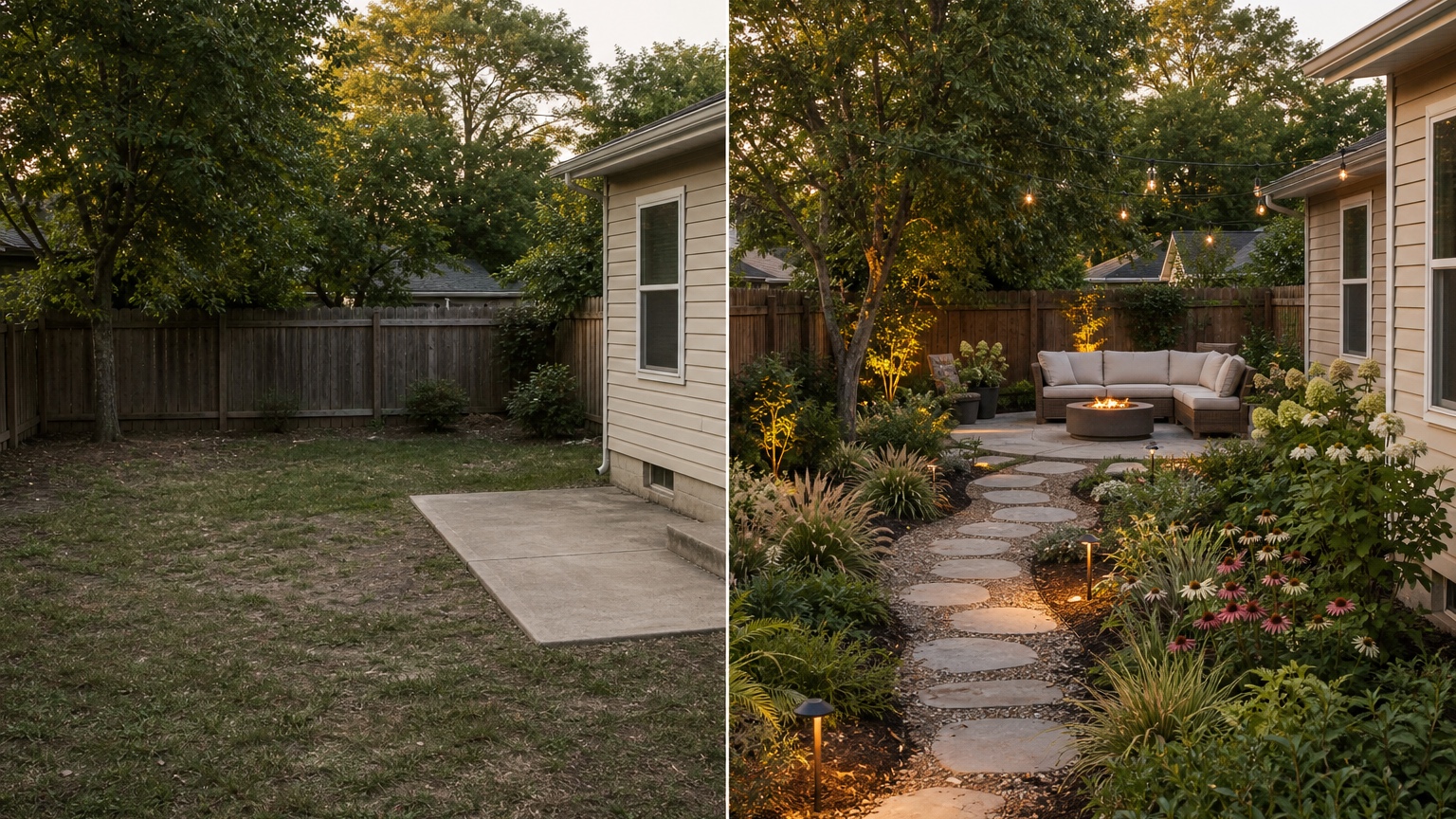
In RedesAIgn, choose the editor built for yard or garden scenes and upload the clearest wide photo. RedesAIgn includes 10 AI editors, so you can keep landscape planning separate from interior, exterior, and product-style edits. Start with a restrained prompt that preserves the existing structure, then remix the best version to test bed shape, path material, planting density, privacy, shade, or maintenance level.
Saved prompts and history are especially useful for garden planning because small changes matter. Keep the prompt that produced the most believable layout, then create versions for low-maintenance planting, pollinator interest, evergreen structure, more privacy, or a phased budget. Reference images can guide style, but the original yard should control scale and constraints.
Send the selected garden-plan image to the person who will price, plant, maintain, sell, or approve the space. RedesAIgn-generated images can be used commercially where relevant, but the actual site still needs measurements, plant selection, drainage review, soil preparation, samples, quotes, and professional judgment. If the garden connects to a larger yard plan, compare this workflow with the pending AI garden design generator, AI backyard design generator, and AI front yard landscaping. For house-and-landscape coordination, AI exterior design from photo can help align facade and planting direction.
AI Garden Planner from Photo questions to answer before you commit
Ask what the preview can show accurately for homeowners: bed shapes, planting mass, path direction, lawn balance, privacy intent, hardscape mood, and style direction. Then ask what still needs samples, measurements, products, quotes, or professional review: plant species performance, soil, irrigation, drainage, root conflicts, utilities, deer pressure, hardiness, mature spacing, and local rules.
The selected garden planner concept should guide the next real-world step. That might be measuring bed depth, marking a path with flags, visiting a nursery with photos, getting a quote for edging, asking about drainage, or phasing one border before redesigning the whole yard. The best AI garden planner from photo result is not the lushest image. It is the version that prevents random plant buying and turns a confusing yard into a practical plan.
Practical plant-buying checklist after the preview
Use the image to create a short shopping brief, not a one-click plant list. Identify the zones first: sunny border, shade bed, privacy screen, path edge, foundation bed, patio planter area, or low wet spot. For each zone, write the purpose, approximate size, light level, water condition, and maintenance expectation.
Then choose plants locally. Ask a nursery or landscaper for species that match the role shown in the preview: evergreen backbone, flowering layer, groundcover, ornamental grass, small tree, hedge, or seasonal accent. Buy fewer categories at first and repeat them for cohesion. A garden usually looks more intentional when plant masses repeat than when every empty spot gets a different impulse purchase.
Finally, phase the work. Install drainage corrections, soil preparation, edging, and paths before delicate planting. Start with one bed if the budget is limited. Photograph the result as it grows, then return to RedesAIgn with updated images when you are ready to plan the next area. A good AI garden planner helps you make one confident garden decision at a time.
Try these prompts in redesAIgn
Redesign this front yard with a stone walkway, low-water plants, and clean planting beds.
Create a backyard seating patio with string lights, shrubs, and a simple lawn edge.
Add curb-appeal landscaping with layered greenery while keeping the driveway clear.
Related guides
- AI Landscape Architecture Generator for Early Outdoor Concepts
Use an AI landscape architecture generator for early outdoor concept exploration, studio reviews, feasibility checks, and photo-based design iteration.
- AI Landscape Visualizer: Preview Yard Changes Before You Commit
Use an AI landscape visualizer to preview realistic yard changes from a photo, compare landscaping options, and reduce decision risk before outdoor work.
- AI Lawn Makeover Ideas: Turn a Plain Yard Into a Plan
Use an AI lawn makeover to preview lawn shape, planting borders, paths, edging, seating, and practical yard upgrades before hiring or starting work.
- AI Xeriscape Design Ideas for Low-Water Yards
Use AI xeriscape design to preview low-water planting, gravel, paths, shade, irrigation zones, and maintenance tradeoffs before changing your yard.
- AI Backyard Makeover: Generate Outdoor Design Before and Afters
Use an AI backyard makeover workflow to preview layout zones, maintenance tradeoffs, before-and-after options, and practical next steps from a real yard.