AI House Plan Visualizer: Understand a Home Layout Before Construction
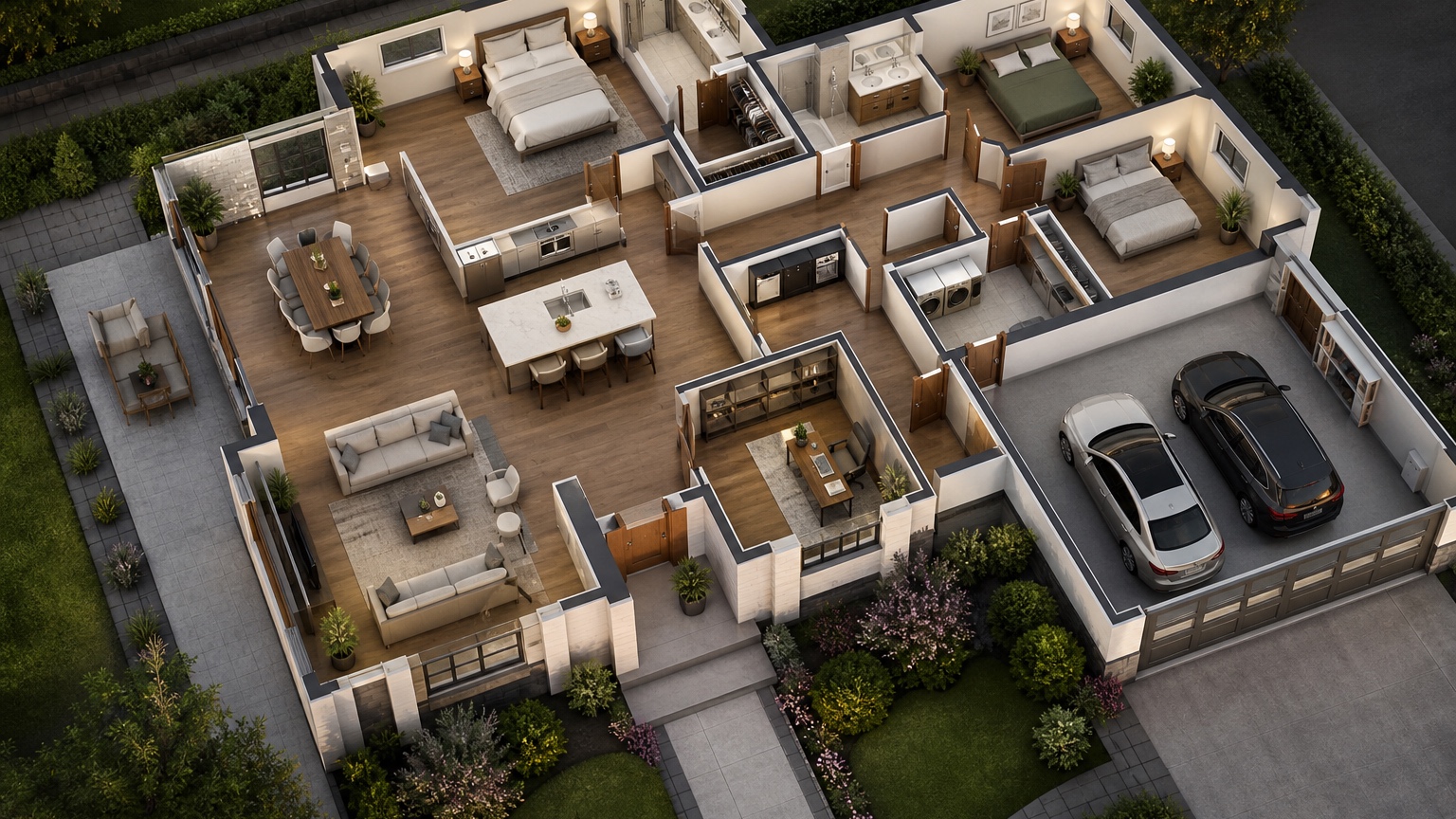
An AI house plan visualizer is most valuable before construction, when a floor plan still looks logical on paper but has not yet been tested against real life. A drawing can show square footage, room names, door swings, windows, and furniture symbols. It does not always reveal what happens when someone arrives with groceries, two people cook at once, guests walk past bedroom doors, or muddy shoes come in from the garage.
That gap is where many layout surprises begin. Home builders and homeowners may approve a plan because the rooms are present, the elevations look attractive, and the numbers seem right. Months later, the lived-in pattern exposes friction: the entry has no landing place, the pantry is too far from the garage, the kitchen island blocks movement, the laundry path crosses a public area, or the primary bedroom opens onto a noisy family zone.
A visualizer does not replace an architect, builder, engineer, code review, construction drawings, or measured specifications. It helps create a clearer conversation before those decisions become expensive to change. RedesAIgn can support that early review with 10 AI editors, prompts, remix images, reference images, saved prompts, and history. You can begin with 5 free AI credits and no credit card, then use one-time credit packs if a builder meeting needs more variations.
Use visualization to rehearse a normal day
The best way to use an AI house plan visualizer is not to ask for a beautiful dream home first. Ask whether the plan can survive an ordinary Tuesday. Walk from wake-up to bedtime and note every repeated transition: bedroom to bathroom, bathroom to closet, closet to laundry, kitchen to pantry, garage to mudroom, dining to patio, family room to powder bath, and guest room to shared areas.
A practical prompt can start like this: “Create a realistic 3D interior visualization from this house plan for daily routine review. Keep the room relationships, main openings, stairs, garage connection, kitchen location, bedroom wing, and window rhythm consistent. Show how a family enters, cooks, stores items, moves between rooms, and uses privacy zones. Do not invent major walls, extra rooms, or luxury features not shown in the plan.”
Then review the output as a route map. Does the path from garage to kitchen make sense with grocery bags? Can someone reach a bathroom without crossing the main living area? Is the laundry close to bedrooms, or will baskets travel through the public part of the house? Does the plan have a calm morning path, or will everyone collide at one narrow hallway? These are small questions with daily consequences.
If you are also studying individual rooms, connect the plan review to narrower visual checks. A kitchen-heavy plan can be compared with an AI kitchen remodel visualizer workflow, while furniture clearance questions can be tested later with an AI furniture visualizer. The house plan view should answer movement and adjacency first; room-level images can refine finishes, furniture, and atmosphere after the layout earns confidence.
Check the entry and drop zone before it becomes clutter
The entry is often where a neat plan fails first. A front door may open into a pretty foyer, but the household may actually enter through the garage. A side door may look secondary on the drawing, yet become the daily route for shoes, coats, sports gear, pet supplies, packages, and school bags. If the plan does not give that route a place to absorb mess, the kitchen island, dining table, or hallway floor will inherit the problem.
Use a visualizer to inspect both formal arrival and daily arrival. Ask for the front entry with sightlines into the living area, then ask for the garage or side entry as it will be used on a rainy day. Prompt for realistic storage rather than decorative perfection: “Visualize the garage-to-house entry and drop zone from this plan. Preserve door locations, hallway width, kitchen connection, stairs, closet positions, and mudroom footprint. Show coats, shoes, bags, a bench, hooks, closed storage, and circulation clearance without widening the plan.”
Look for three things. First, is there a landing surface for keys, mail, and small packages? Second, can more than one person enter without blocking the door? Third, is the mess contained before it reaches the kitchen or living room? If the visualized route feels tight, ask the builder whether a closet door can swing differently, a bench can recess into a niche, or cabinetry can be simplified to preserve walkway space.
Be careful with images that make the entry look larger than the plan allows. AI can quietly stretch hallways, widen doors, add windows, or turn a narrow pass-through into a magazine-ready mudroom. If that happens, remix from the version that kept the proportions closest and add: “Keep the corridor narrow as drawn, keep the same door swings, and show only storage that would fit within the existing wall lengths.” Saved prompts and history are useful here because you can return to the most accurate base before testing storage options.
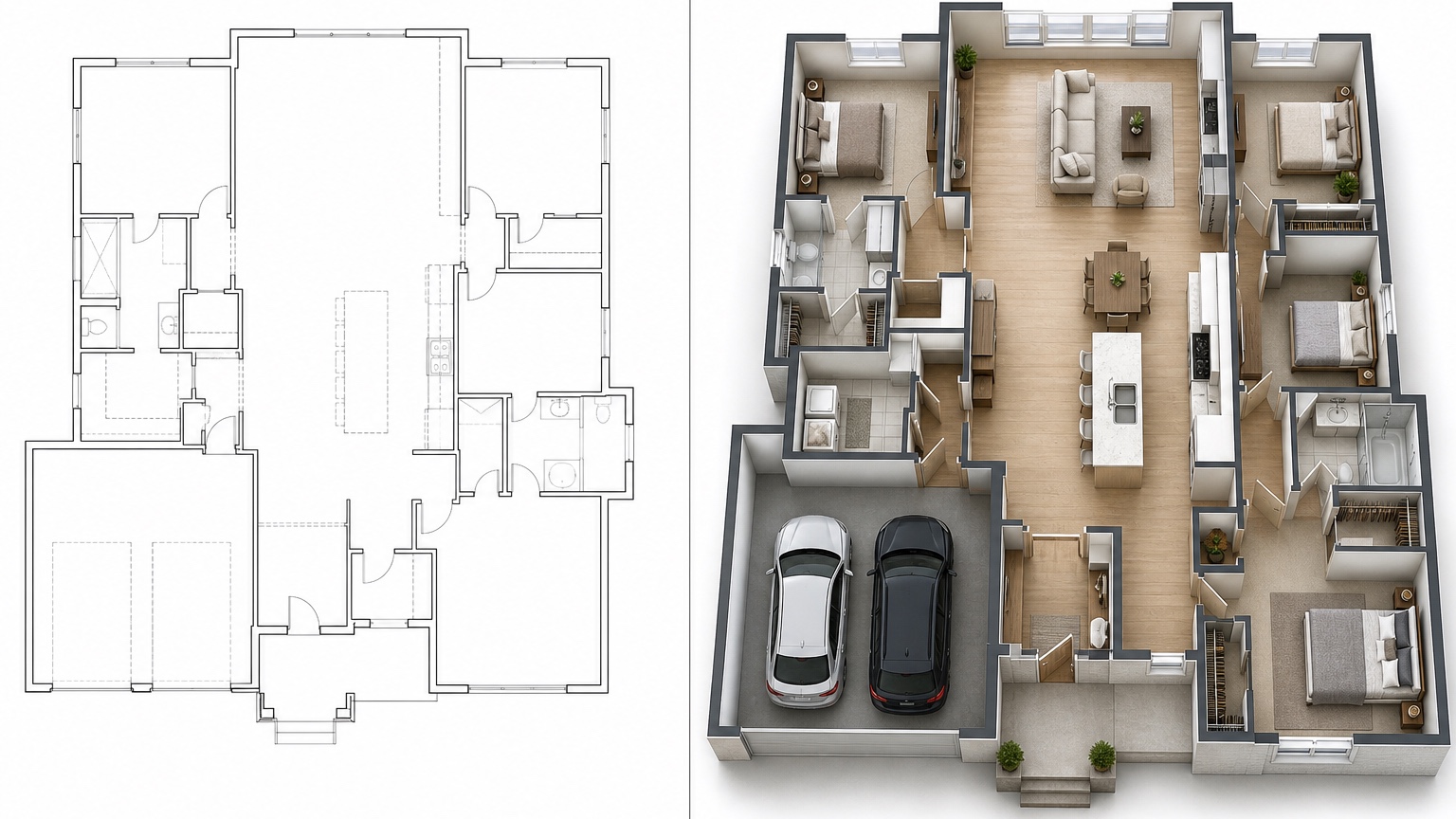
Test the kitchen work triangle against real traffic
Kitchen layouts can appear efficient in plan view and still feel frustrating when circulation is added. The classic work triangle between sink, range, and refrigerator is only part of the story. A construction-ready home also needs to account for pantry access, island seating, dishwasher clearance, trash location, breakfast traffic, guests moving to the patio, and children passing through while someone is cooking.
Ask the visualizer to show the kitchen as a working space, not only a styled room. A useful prompt is: “Create a realistic kitchen flow visualization from this house plan. Preserve the kitchen footprint, island size, appliance wall, pantry door, dining connection, patio door, and adjacent living area. Show practical movement between refrigerator, sink, range, pantry, dishwasher, trash, and seating. Keep aisles believable and do not enlarge the room.”
Review the image with specific questions. Can the refrigerator open without trapping someone at the island? Is the dishwasher door in the cleanup path or in the middle of the main walkway? Does the pantry sit near the grocery entry and the cooking zone, or does it require crossing the kitchen every time? If island seating faces the cooktop, will people constantly lean into the prep zone? If the kitchen opens to a great room, can guests reach drinks or the patio without walking through the busiest cooking lane?
For home builders, this is a good place to prepare targeted questions. Ask whether the island can shift, whether appliance panels affect clearances, whether a pocket door is possible at the pantry, and whether lighting or outlets support the real prep zones. The goal is to identify layout pressure before cabinetry, plumbing, and electrical choices lock in.
Reference images can help if you already like a kitchen mood, but assign them a narrow task. Say, “Use the reference image for cabinet tone and lighting mood only; preserve the uploaded house plan layout, kitchen footprint, appliance positions, and circulation.” This keeps a beautiful reference from overwriting the plan you are actually building.
Review bedrooms, privacy, and noise paths
Bedroom placement is one of the hardest things to judge from a flat plan because privacy depends on movement, door orientation, wall adjacency, sound, and sightlines. A bedroom can be large enough and still feel exposed if it opens directly to the living room. A guest suite can be comfortable but awkward if visitors must cross a family hallway at night. A nursery can look close to the primary suite but sit on the other side of a noisy stair or media room wall.
Use visualization to separate public, semi-private, and private zones. Ask for a view that shows how someone moves from the living area to bedroom doors, baths, stairs, and laundry. Then prompt for the view from each bedroom doorway back toward common spaces. If the result shows direct sightlines from the sofa to a bed, a hallway that funnels noise, or a bathroom door visible from the dining area, you have a conversation worth bringing to the design team.
A privacy-focused prompt might be: “Visualize the bedroom wing and nearby common spaces from this house plan. Preserve bedroom sizes, hallway length, door locations, bathroom placement, windows, stair location, and living room connection. Show privacy and noise relationships clearly, including sightlines from public areas to bedroom doors. Do not add extra walls unless shown as a labeled possible revision.”
Pay attention to flexible rooms too. A den marked “study” may later become a guest room, nursery, aging-parent bedroom, hobby room, or remote-work office. If that room lacks acoustic separation, closet potential, or bathroom access, the plan may be less adaptable than it seems. For room-by-room exploration after the plan check, an AI bedroom design generator or AI room design generator can help. Confirm the room belongs in the right place before styling it.
Make the garage and mudroom route earn its square footage
Garage access deserves more attention than it usually gets. In many homes, the garage door is the real front door. It handles groceries, tools, strollers, luggage, sports equipment, pet supplies, recycling, and sometimes workshop or freezer access. A plan may show a mudroom, but the visual question is whether that mudroom works while doors are open and people are carrying things.
Ask the visualizer for the route from parked car to pantry, kitchen, powder bath, laundry, and stairs. Include real behavior in the prompt: “Show a family entering from the garage with groceries, backpacks, shoes, and a dog leash. Preserve the garage door location, mudroom footprint, closet, bench, laundry connection, powder bath, pantry, and kitchen doorway. Keep clearances realistic and show where clutter would collect.”
Then inspect conflicts. Does the garage door swing into the bench? Does the laundry door block the same route? Is the powder bath too visible from the kitchen? Can someone reach the pantry without walking around an island? If a narrow mudroom looks great in elevation but fails as a queue, it may be better to simplify cabinetry, change a door type, or borrow inches from an adjacent closet.
Builders can also use this review to clarify scope. Built-in lockers, bench drawers, utility cabinets, charging shelves, and durable flooring may live in different allowance categories. A visual concept helps homeowners ask what is included and what is only inspirational.
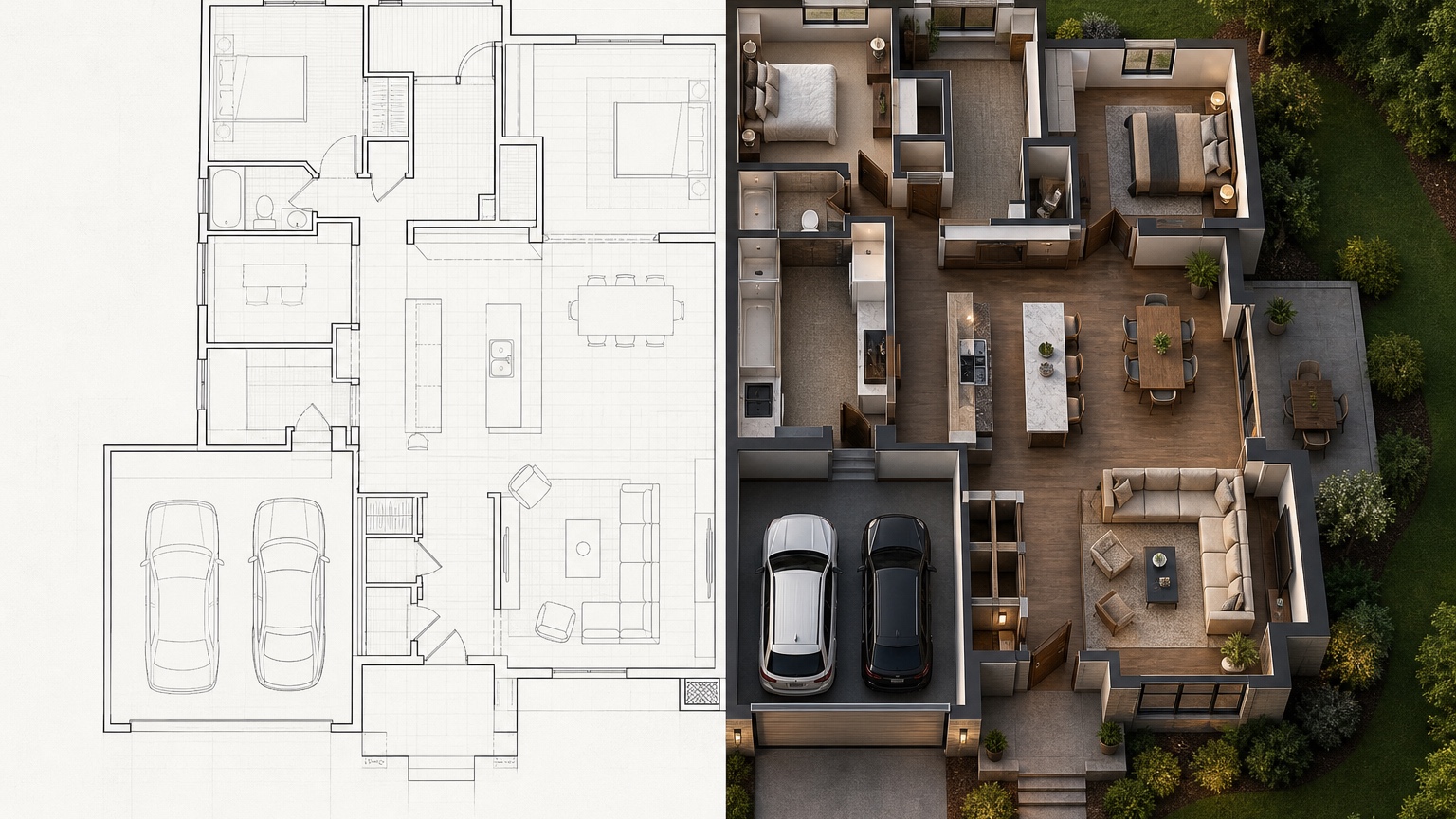
Bring a sharper checklist to the builder meeting
The most useful outcome of an AI house plan visualizer is not a single polished image. It is a better builder meeting. Bring the original plan, the generated views, and a short checklist organized by daily routines. Mark which items are concerns, which are preferences, and which require professional confirmation. This keeps the discussion practical and avoids treating the visualization as proof of dimensions.
For entry and drop zone, ask: Which door will we use most? Where do shoes, coats, bags, keys, packages, pet items, and returns land? Are closet depths and door swings confirmed? What storage is included in the price? For kitchen flow, ask: What are the exact aisle widths? How do appliance doors open? Where are trash, pantry, outlets, prep lighting, and landing zones? Can the island shift if needed?
For bedrooms and privacy, ask: What can be seen from public rooms? Which walls need sound attention? How close are baths, laundry, stairs, and mechanical areas? Can the flexible room serve future uses? For garage and mudroom flow, ask: What happens when car doors, house doors, laundry doors, and cabinet doors are open? Is there room for seasonal storage? Are durable surfaces specified where daily entry happens?
Also ask what the AI image cannot answer. Confirm structural changes, code requirements, HVAC paths, plumbing runs, window egress, stair geometry, accessibility, grading, and cost with qualified professionals. If the visualizer suggests moving a wall, changing a door, or shifting plumbing, treat it as a discussion prompt, not a construction instruction.
A practical RedesAIgn workflow for plan confidence
Start with the clearest plan image or plan-based reference available. If you have elevations, interior inspiration, or finish references, keep them separate at first. Run one prompt focused only on layout comprehension. Save the best accurate result. Then remix around one routine at a time: morning traffic, grocery entry, cooking, hosting, bedtime privacy, laundry, and garage flow.
Use reference images after the plan relationships are stable. A reference image can guide a light oak kitchen, a calm transitional entry, a compact mudroom, or a quiet bedroom mood, but it should not change the room locations. In RedesAIgn, saved prompts and history make it easier to keep the reliable plan language while testing a new concern. If a result starts inventing architecture, go back to the prior accurate version and tighten the prompt.
For commercial or professional use, keep the output framed correctly: early visualization for communication, not sealed documentation. RedesAIgn-generated concepts can support client conversations and design review when used within the platform terms and with appropriate professional judgment. The benefit is reducing preventable surprise. Before framing walls, ordering cabinets, and finalizing selections, a home builder or homeowner can see whether the plan supports the life that will actually happen inside it.
FAQ: AI house plan visualizer
What is an AI house plan visualizer?
An AI house plan visualizer helps turn a home plan or plan-based reference into realistic visual concepts so homeowners and builders can review layout relationships, circulation, privacy, and daily routines before construction decisions become harder to change.
Can it replace an architect or builder?
No. It can support early understanding and discussion, but it does not replace architectural services, engineering, code review, construction drawings, site conditions, pricing, permits, or builder judgment.
What should I check first in a house plan visualization?
Start with repeated daily routes: garage to kitchen, entry to drop zone, kitchen work areas, bedrooms to baths, laundry paths, guest bathroom access, and privacy between public and private spaces.
Try these prompts in redesAIgn
Convert this floor plan into a bright open-concept living area with a kitchen island and natural light.
Show furniture placement for a 2-bedroom layout with a dining nook and entry storage.
Visualize this blueprint as a modern ADU with compact kitchen, loft bed, and bathroom.
Related guides
- AI Floor Plan With Furniture: See How Rooms Could Work
Add furniture to floor plans with RedesAIgn so scale and circulation stay realistic before you buy pieces or rearrange a real room layout.
- AI Kitchen Floor Plan Visualizer for Remodel Layout Ideas
Visualize kitchen floor plans with AI before remodeling. Compare work triangles, islands, storage, and circulation with realistic furniture scale.
- AI Open Concept Floor Plan Ideas From Existing Layouts
Compare open-concept floor plans with AI before removing walls. Preview kitchen, living, and dining flow plus furniture zones and circulation.
- AI ADU Floor Plan Visualizer for Backyard Homes and Rentals
Preview ADU floor plans with AI for backyard homes and rentals. Compare compact layouts, baths, kitchens, and access before permitting talks.
- AI Basement Floor Plan Design: Visualize Finished Basement Layouts
Design finished basement layouts with AI floor plans. Compare recreation, guest, office, and bath options before construction estimates.