AI Nursery Design Generator: Preview Baby Room Ideas
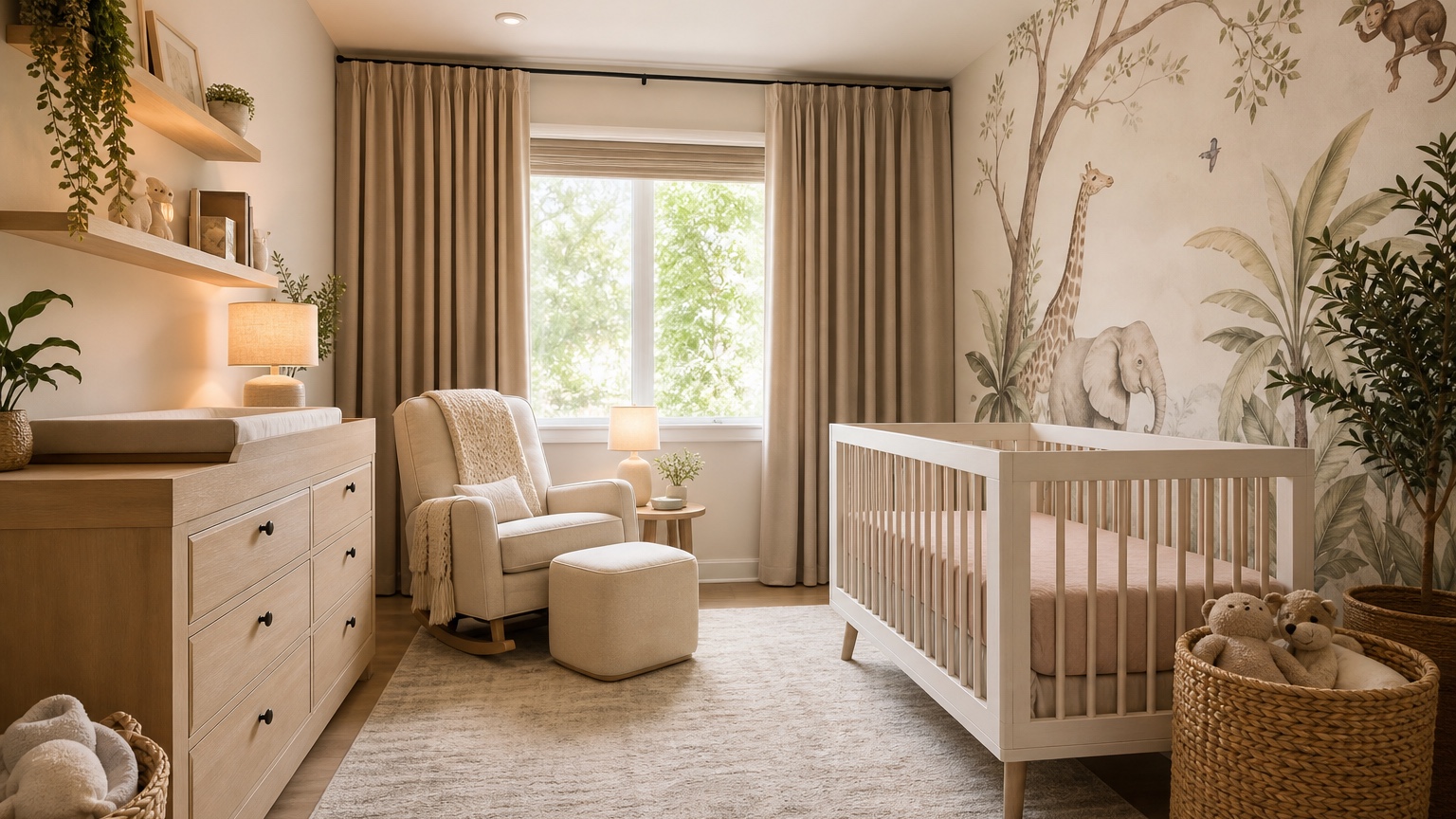
An AI nursery design generator can help parents and decorators preview baby room themes before committing to paint, wallpaper, a crib finish, a glider, dresser, rug, curtains, shelves, or storage baskets. Nursery planning can feel emotional because the room has to become cozy, practical, and ready for a changing routine. A visual preview gives you a calmer way to compare ideas before furniture orders start.
There is one important caveat: an AI image is not a safety authority. It can help you picture a soft palette, furniture zones, storage, and lighting, but you must verify crib safety, product specifications, anchoring requirements, recall status, cord placement, sleep guidelines, paint and material details, and installation rules outside the image. Treat the design as a visual planning aid, then check every real item with current manufacturer guidance and trusted safety sources.
RedesAIgn is useful at the concept stage because it combines 10 AI editors with prompts, remix, reference images, saved prompts, and history. You can begin with 5 free AI credits and no credit card, then use one-time credit packs only if extra theme or layout rounds are worthwhile. The goal is not endless baby room images; it is a clearer direction for a nursery that feels peaceful and works during late-night care.
Begin with nursery routines, not a theme board
Themes are fun, but the room has to support repeated tasks: placing the baby in the crib, feeding or soothing in the glider, changing diapers, grabbing clean clothes, storing blankets, dimming lights, and moving safely in the dark. Before asking for woodland, celestial, vintage floral, coastal, safari, minimalist, or modern nursery ideas, describe the routine.
List the fixed elements first. Mention windows, doors, closet, flooring, radiators, baseboard heaters, ceiling fan, outlets, existing wall color, and any furniture already chosen. If you are in a rental, include no paint, removable wallpaper only, no hardwired lighting, and no permanent shelving unless allowed. If the nursery must share space with a home office, guest bed, or sibling storage, say so from the start.
A helpful first prompt could be: “Use this photo to create a calm nursery design. Preserve the window, door, closet, floor, ceiling, and room size. Include a crib zone, glider corner, dresser-changing area, closed storage, soft lighting, and a gentle neutral palette. Keep the layout realistic and leave safe walking paths. Do not place cords, shelves, art, or heavy items over the crib.”
For parents still deciding whether the nursery belongs in a small bedroom, primary bedroom corner, or flex room, AI room design generator can help compare room options. If you want broader help using an existing photo as the starting point, AI interior design from photo covers the photo-based workflow in more detail.
Take photos that reveal the crib, glider, and dresser choices
A nursery photo should show wall lengths and circulation, not just a pretty corner. Stand in the doorway or a far corner so the image includes the main window, closet, door swing, floor area, ceiling light, and any furniture that will remain. If the room is small, step back as far as possible without distorting the scale. If there are awkward features such as sloped ceilings, vents, radiators, built-ins, or a narrow closet wall, include them.
Use natural light when possible, then note how the room feels at night. Nurseries are often used in low light, so the plan should work in daylight and during a 3 a.m. feeding. Add notes such as “outlets are on the dresser wall,” “window has strong afternoon sun,” or “no floor lamp near the crib.”
Keep the room honest. If you already own a crib, glider, dresser, rug, or bookshelf, include it in the photo or mention that it must stay. If dimensions are tight, tell the prompt not to enlarge the room. AI images can make furniture appear slimmer than real products, so any layout that looks promising should be checked with measurements and product dimensions before purchase.
Plan three zones before decorating
Most nurseries work best when they are planned around three zones: sleep, soothing, and care. The crib zone should feel calm and uncluttered. The glider or chair zone should support feeding, reading, and settling. The dresser or changing zone should keep diapers, clothes, wipes, burp cloths, and laundry within reach without spreading supplies across the room.
Ask the AI nursery design generator to show these zones clearly. Instead of “make a beautiful nursery,” try: “Create a nursery layout with the crib on the solid interior wall, a glider near but not blocking the window, and a dresser-changing station near the closet. Keep storage closed and accessible, leave a clear walking path from the door to the crib, and keep the crib area free of shelves, cords, heavy art, pillows, and loose decor.”
The exact placement depends on the room. A crib under a window may look charming in an image but may not be ideal because of window treatments, drafts, cords, heat, and light. A glider beside a window can be lovely if curtains and glare are controlled. A dresser near the closet can make clothing changes easier. A hamper near the changing area can prevent piles from moving around the room.
Use the visual result as a conversation starter. Does the chair have room to recline or rock? Can the closet open? Can a caregiver walk through the room while carrying the baby? Is there space for a small side table near the glider? These questions matter more than whether the theme looks perfect.
Compare palettes and themes gently
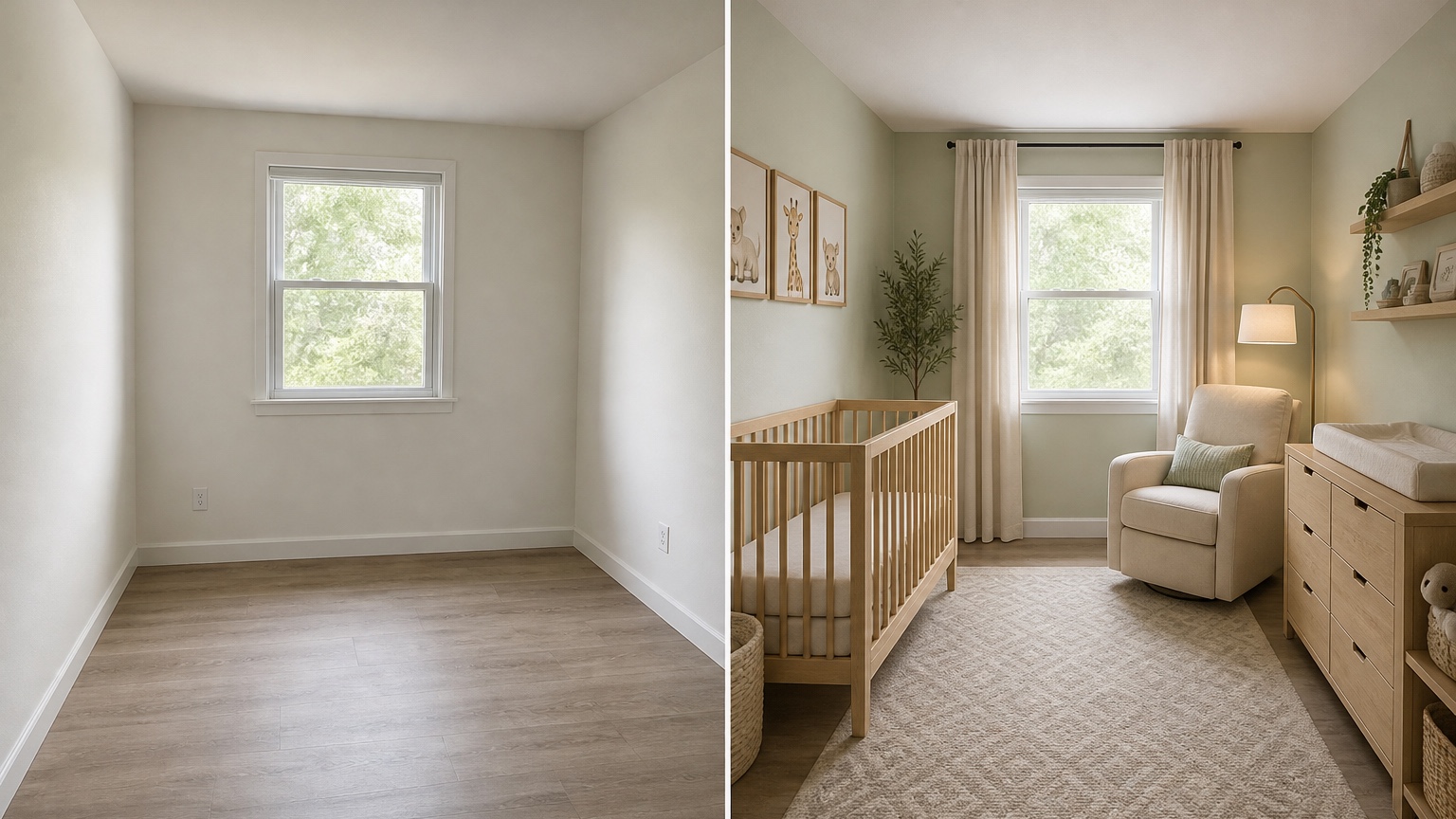
Nursery themes can become overwhelming because every idea looks sweet in isolation. Use controlled comparisons. Keep the same furniture layout and test soft sage, warm cream, blush and oat, sky blue and white, muted terracotta, pale yellow, or calm gray-green. Then keep the palette and test theme details such as stars, woodland animals, botanical prints, simple stripes, or vintage illustrations.
A soft palette often ages better than a highly specific theme. A room can feel like a nursery through textiles, art, baskets, curtains, and a mobile rather than painted murals on every wall. If you are unsure, ask for “theme accents that can be changed as the child grows.” That may produce a room with neutral furniture, a washable rug, simple curtains, and art that can be swapped later.
Reference images are valuable when they have a narrow role. Upload an inspiration nursery and say, “Use the reference for color palette and textile mood only; preserve my room layout, crib position, window, closet, and storage needs.” This helps avoid results that copy a large staged nursery when your room is a compact bedroom with one short wall.
If wall color is the main decision, AI wall color visualizer interior can help isolate paint options. For decor accents after the main plan is chosen, AI home decor generator can support art, rugs, baskets, curtains, lamps, and shelf styling.
Build storage for growth and daily mess
A newborn may not own much at first, but baby items multiply quickly: diapers, wipes, swaddles, sleep sacks, extra sheets, tiny clothes in multiple sizes, toys, books, feeding supplies, medicines, keepsakes, and laundry. A nursery that looks empty and serene in the first preview may become frustrating if there is no closed storage.
Prompt for the type of storage you need. “Add storage” can create decorative shelves that look cute but do not hold daily supplies. Ask for dresser drawers, closet baskets, a lidded hamper, a low book ledge, a compact cabinet, or a storage bench placed away from the crib. Closed storage helps the room remain calm when the routine is not calm.
Plan for growth. The changing pad may eventually leave the dresser. The glider may become a reading chair. The crib may convert or be replaced by a toddler bed. Theme-heavy pieces may feel dated quickly. Ask for “nursery furniture and decor that can transition into a toddler room with minimal changes.” A good result might show a durable dresser, flexible shelves, a washable rug, and wall art that is not too baby-specific.
If furniture scale is difficult to judge, AI furniture visualizer can help compare crib finishes, dresser shapes, chair silhouettes, storage cabinets, and rug proportions once the nursery layout is mostly set.
Plan lighting for night care and naps
Lighting is one of the most practical nursery decisions. The room needs enough light for cleaning, folding clothes, and finding supplies, but it also needs soft low light for feeding, soothing, and nighttime checks. Ask for layered lighting instead of one bright ceiling fixture: a shaded lamp near the glider, a dimmable-looking ambient source, blackout or light-filtering curtains, and soft wall or table lighting positioned safely.
Be specific about what should not happen. Avoid long cords near the crib, lamps that can be pulled down, shelves over the sleep area, or bright uncovered bulbs in the baby’s line of sight. If the room has strong sunlight, ask for window treatment ideas that make naps easier while still looking gentle during the day. The image can suggest a mood, but you should confirm actual blackout performance, cord safety, mounting, and product details before buying.
Nighttime circulation also belongs in the prompt. A caregiver should be able to reach the crib, glider, dresser, hamper, and door without stepping around baskets or bumping into furniture. In a small nursery, that may mean choosing one compact dresser instead of a separate changing table, using wall-adjacent storage, and keeping the rug flat and correctly sized.
Keep the safety check separate from the image review
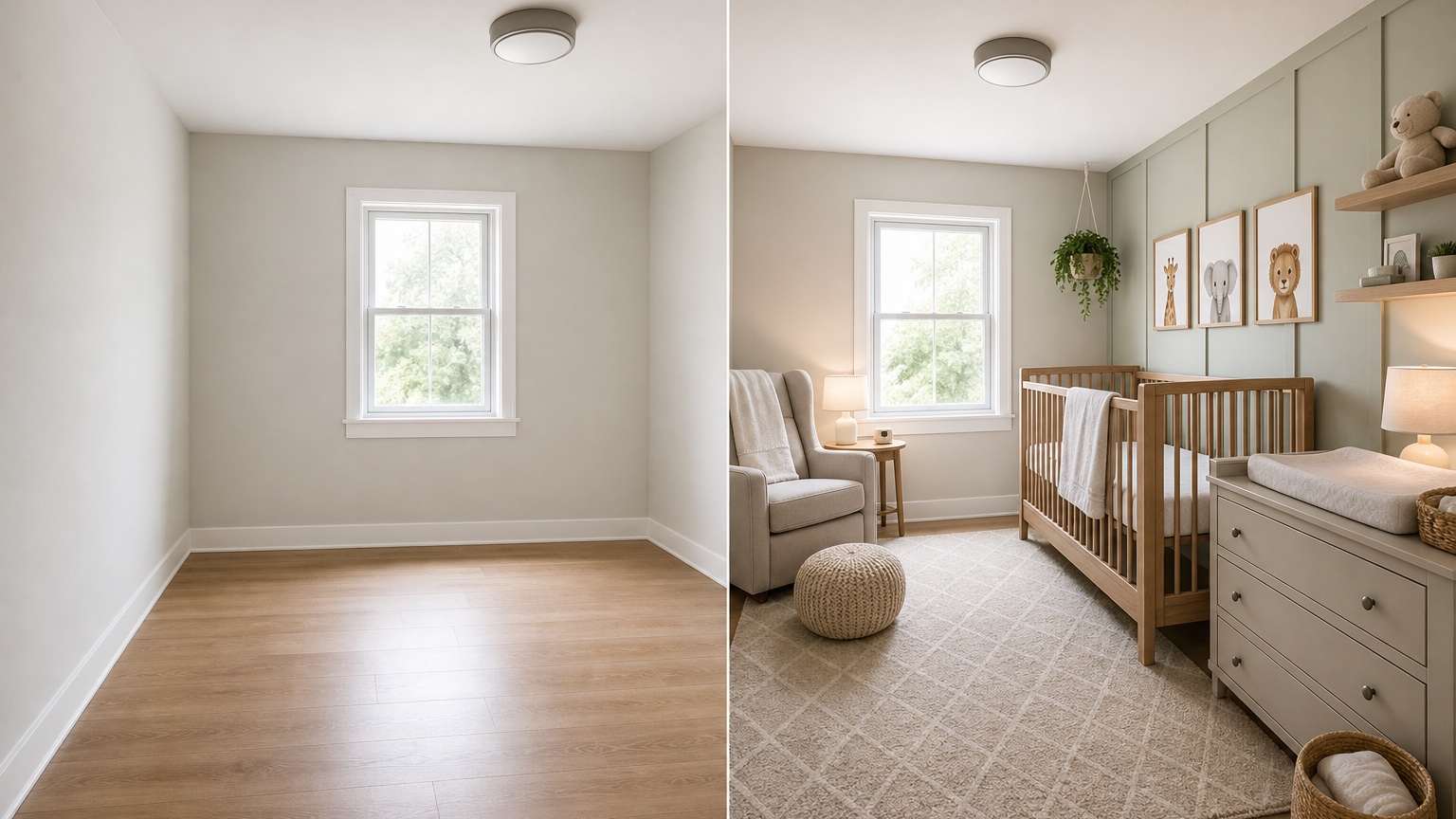
Because nursery images are persuasive, it is easy to accept unsafe details if they appear beautiful. Review results with a separate safety-first checklist. Did the AI place framed art, shelves, plants, cords, canopies, loose pillows, stuffed animals, or heavy decor over or inside the crib? Did it show a floor lamp within reach? Did it put the crib against a radiator, window treatment cord, unstable shelf, or crowded corner? If so, revise the prompt or ignore that detail.
Also check real product specifications. Crib dimensions, mattress fit, conversion kits, anchoring instructions, dresser stability, paint finish, rug backing, curtain hardware, outlet covers, and monitor placement all require real-world verification. If a generated image shows a changing pad on a dresser, confirm the dresser’s height, stability, anchoring, and the pad manufacturer’s instructions. If the room needs electrical work, talk to a qualified professional rather than relying on an image.
This does not make AI previews less useful. It simply puts them in the right role. Let the generator help you see palette, mood, zone relationships, storage direction, and visual balance. Let measurements, current safety guidance, product manuals, and professional advice decide what is actually installed.
Use remix to narrow the nursery plan
Remix works best when each round changes one decision. Keep the crib, dresser, and glider in the same positions while comparing palette options. Keep the palette and swap theme accents. Keep the theme and compare storage. This controlled approach prevents the whole room from changing every time, which is especially important when safety and furniture spacing matter.
Saved prompts and history are helpful during nursery planning because a promising result may drift in later rounds. If one version respects the room, avoids unsafe crib styling, and shows workable zones, save that prompt. If a later remix adds shelves above the crib or shrinks the dresser unrealistically, return to the earlier version and revise the prompt with stricter language.
A useful remix prompt might be: “Keep the same nursery layout, crib wall, glider position, dresser placement, window, closet, floor, and clear walking paths. Change only the palette to warm cream, soft sage, and natural wood. Keep all decor away from the crib and make storage practical for diapers, clothes, books, and blankets.”
Turning a nursery preview into a real room
Once a direction feels right, move from image to checklist. Measure the crib wall, dresser wall, chair corner, door swing, closet access, rug size, curtain length, and walkway. Compare exact product dimensions before ordering. Make a short list of what must be verified: crib and mattress fit, dresser anchoring, window covering safety, lamp placement, cord routing, rug backing, paint samples, and shelf mounting.
Use the first free credits in RedesAIgn for broad layout and palette exploration. If the room still has unresolved decisions, one-time credit packs can support targeted remixes for crib placement, glider corner, storage, or theme accents. Prompts help you state safety and practical constraints, reference images help guide mood, and history helps you return to the calm version that worked.
A nursery preview should make planning feel less chaotic. Choose the layout that supports care, the palette that feels peaceful, and the storage that will survive real routines. Then let safety checks, measurements, and product details guide the final purchases.
FAQ: AI nursery design generator
What does an AI nursery design generator do?
An AI nursery design generator uses a room photo and prompt to preview nursery layouts, crib placement, glider corners, dresser storage, lighting, wall colors, themes, rugs, curtains, and decor.
Can I rely on AI images for nursery safety?
No. AI images can help with visual planning, but you must verify crib safety, product specifications, anchoring, recalls, cord placement, sleep guidance, measurements, and installation details outside the image.
How should I prompt for a calm nursery?
Name the fixed room features, then ask for a crib zone, glider zone, dresser-changing area, closed storage, soft lighting, gentle palette, clear walking paths, and no shelves, cords, heavy art, pillows, or loose decor near the crib.
Can it help a nursery grow into a toddler room?
Yes. Prompt for flexible furniture, a durable dresser, washable rug, storage that can change uses, and theme accents that are easy to swap as the child grows.
Try these prompts in redesAIgn
Redesign this room with warm neutrals, layered lighting, and a functional seating layout.
Keep the architecture, but update furniture, rug, and wall color for a calm modern look.
Show a before-to-after concept with better traffic flow and fewer bulky pieces.
Related guides
- AI Bathroom Remodel Visualizer for Tile, Vanity, and Lighting Ideas
Visualize bathroom remodel ideas from a real photo with RedesAIgn. Compare finishes, fixtures, and layout limits before ordering materials.
- AI Bedroom Design Generator for Layout and Decor Ideas
Generate bedroom design concepts from your room photo with RedesAIgn. Compare layout and furniture directions before you buy or remodel.
- AI Dining Room Design Ideas From a Photo
Use AI dining room design to plan table size, chair clearance, chandelier alignment, rugs, storage, and lighting from a real room photo.
- AI Furniture Visualizer: Preview Furniture in Your Room Photo
Use an AI furniture visualizer to preview scale, placement, color, material, and fit in your room photo before buying or presenting furniture.
- AI Interior Design From Photo: Redesign Any Room Visually
Use AI interior design from photo workflows to preview room styles, furniture layouts, finishes, and decor ideas before buying anything.