AI Dining Room Design Ideas From a Photo
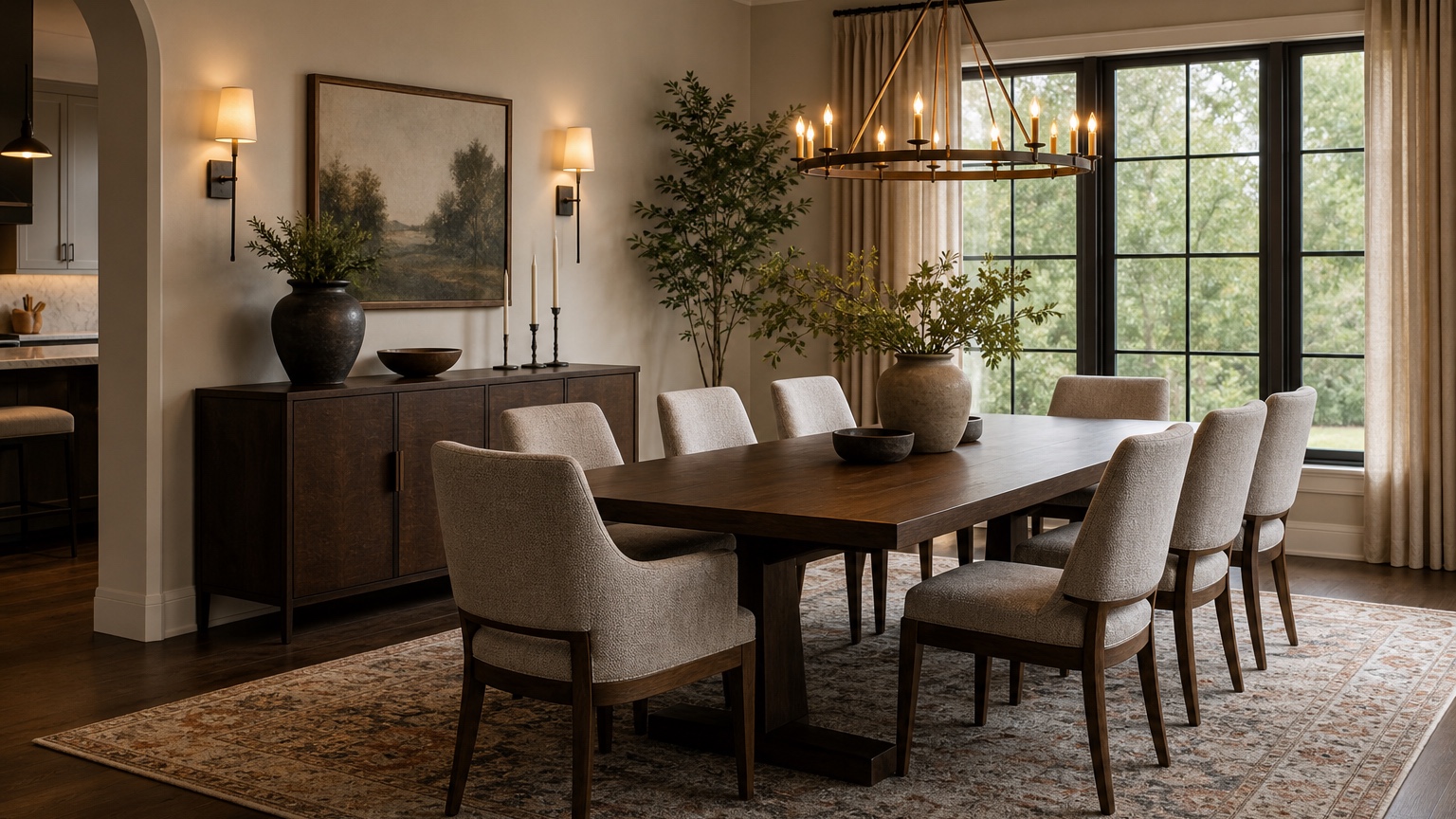
AI dining room design is especially useful when the room needs to work for hosting, not just for a pretty still image. A dining space can look acceptable on an ordinary weeknight and still fail the moment six people pull out chairs, someone carries a platter from the kitchen, a guest squeezes behind the host, or the chandelier hangs slightly off from the table. The problems are usually practical: table scale, walking paths, chair clearance, rug size, buffet storage, and lighting position.
A photo-based workflow helps homeowners and decorators test those choices before ordering a table, moving a heavy sideboard, replacing a pendant, or buying a rug that looks generous online but lands too small under real chairs. You can upload a current dining room photo, describe the hosting habits and fixed constraints, then generate visual options that show how the room might feel with a round table, longer rectangle, warmer lighting, better storage, or a quieter palette.
RedesAIgn supports this stage with 10 AI editors, prompts, remix, reference images, saved prompts, and history. You can start with 5 free AI credits with no credit card, then use one-time credit packs if you want more variations. Decorators can use generated concepts in commercial client work, while still treating measurements, product specifications, electrical work, and final purchasing decisions as separate professional steps.
Start with the dinner party you are planning for
A dining room prompt should begin with use, not with a style label. “Elegant dining room” can produce an attractive image, but it does not say whether the room must seat four every night, extend to eight at holidays, handle children, support remote work between meals, or act as the main path between the kitchen and living room. The more clearly you describe the room’s job, the more useful the result becomes.
Write down the real hosting pattern. Do you usually serve family-style from the table, or do platters live on a buffet? Does the table need leaves? Are chairs pulled out daily, or only for guests? Is the room open to a kitchen, part of a living room, or a separate space with doorways on several sides? A formal dining room may tolerate a larger table because people pass through less often. A dining area in an apartment may need slimmer chairs, a bench, or a round pedestal table to keep circulation comfortable.
A strong first prompt might read: “Use this photo to create a realistic AI dining room design for a homeowner who hosts six to eight people. Preserve the windows, doorways, floor, ceiling height, radiator, and existing wall opening to the kitchen. Improve table scale, chair clearance, chandelier alignment, rug size, buffet storage, and warm layered lighting. Keep the room comfortable to walk through when chairs are pulled out.”
For broader photo-based planning, compare this workflow with AI interior design from photo. If you are coordinating the dining area with an adjacent seating zone, AI living room design can help you keep sightlines, rugs, and lighting consistent across both spaces.
Take photos that show paths, not only the table
A dining room photo should reveal where people move. Stand in a doorway or corner and capture the table, chairs, chandelier or pendant, wall openings, windows, buffet wall, floor area, and the route to the kitchen. If the table is currently too large or too small, leave it in the photo so the AI has a scale reference. If there is no table yet, place painter’s tape, a cardboard template, or temporary chairs in the approximate footprint and mention that they are placeholders.
Include fixed features in the prompt even if they seem obvious. Say whether the floor stays, whether the chandelier location is hardwired and difficult to move, whether the sideboard is inherited and must remain, whether a wall mirror can change, and whether the room is a rental. If the dining area shares a space with the kitchen, use the same constraint-first approach you would use in an AI kitchen remodel visualizer: preserve fixed runs, openings, flooring, and major materials unless you are intentionally testing a larger change.
Choose table shape before choosing table style
The table shape controls the room more than the finish. A round table can soften a square room, make conversation easier, and remove sharp corners from a tight circulation path. It can also waste space in a long narrow room if it is too large. A rectangular table works well in longer dining rooms and often seats more people, but it needs enough width around the sides and ends. An oval table can be a useful compromise when the room wants length without hard corners.
Use the AI image to compare shape families while keeping the style quiet. Ask for one round pedestal option, one rectangular option, and one oval or racetrack option with the same chair count. Do not change the wall color, rug, lighting, and art in every version at first. If every variable changes, the image may persuade you with mood instead of answering the table question.
Chair clearance should be reviewed with skepticism. In real rooms, a comfortable dining chair needs space to slide back, and people need a path behind it if the room is a passage. A generated image may make a narrow gap look relaxed, so translate promising results into measurements before buying. As a working review habit, mark the table footprint on the floor and pull chairs out as they would be during dinner. If the tape test feels cramped, the image is only inspiration.
A practical prompt for this stage: “Create three realistic dining table options for this room while preserving windows, doorways, floor, chandelier junction box, and buffet wall. Compare a 48-inch round table for four to six, a narrow rectangular table for six, and an oval table for six. Keep clear circulation from the kitchen doorway to the living room opening and avoid oversized chairs.”
Align the chandelier with the table people will actually use
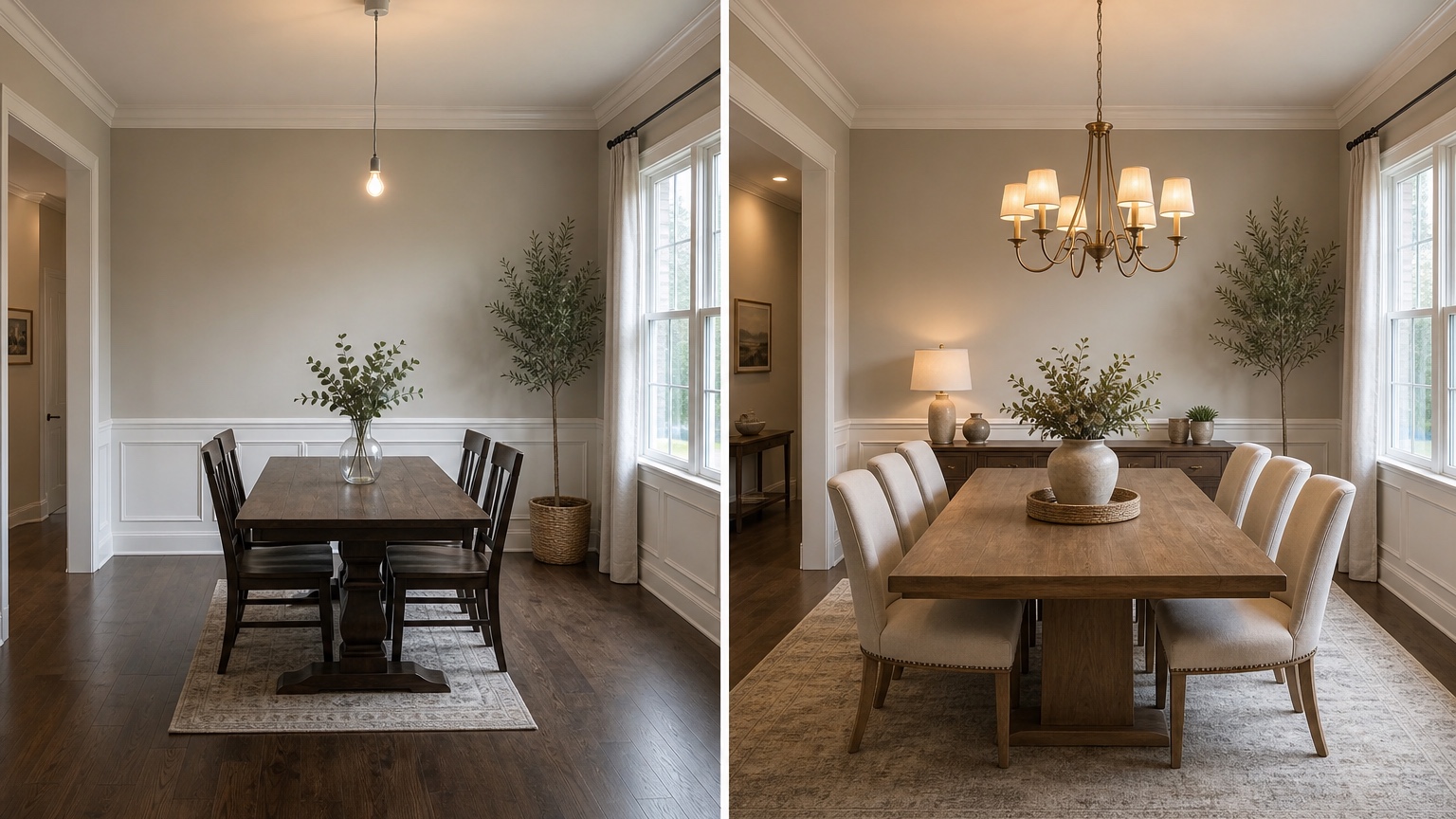
Dining room lighting often looks wrong because the fixture was centered in the room, but the table needs to sit slightly away from that center to respect a doorway, window, fireplace, or buffet. Sometimes the answer is to move the table; sometimes it is to use a swag, linear fixture, ceiling canopy, or electrician-approved relocation. AI dining room design can show the visual difference before you commit to the work.
When prompting, name the hardwired condition. If the junction box cannot move, ask for a table placement that works with it. If you are willing to move the fixture, ask for the chandelier centered over the final table, not over the ceiling. For a rectangular table, a linear chandelier or two pendants may read better than one small fixture. For a round table, a single pendant or round chandelier often feels more natural.
Height matters too. A fixture that hangs too high feels disconnected; one that hangs too low blocks faces and serving dishes. The exact height depends on ceiling height, fixture size, and table dimensions, but the visual goal is clear: the light should belong to the table zone, illuminate the surface warmly, and leave eye contact comfortable. Prompt for “warm dining light centered over the table, scaled to the table width, with the bottom of the fixture high enough for conversation.”
Plan the rug after chair movement, not before
Dining room rugs fail in a predictable way: they look large enough when chairs are tucked in and too small when guests sit down. A photo can help you judge visual balance, but the purchase should be based on the table plus the chair movement zone. Ask the AI to show a rug that supports the full dining group, then check whether the corners and edges make sense in your room.
The rug material also affects the dining experience. A high-pile rug may look cozy in an image but catch chair legs and collect crumbs. If you have children, pets, or frequent gatherings, prompt for a low-pile patterned rug that lets chairs slide and hides minor spills.
For open-plan dining, the rug defines the dining zone. It should relate to nearby living room rugs without matching them exactly. Ask for coordinated texture, color temperature, and scale. If you are still choosing furniture pieces, AI furniture visualizer is a useful companion for comparing table, chair, console, and storage shapes before narrowing the room concept.
Add storage where serving actually happens
A dining room without storage often becomes a room of compromises: serving pieces stored in the kitchen, candles scattered in drawers, linens in a closet, extra glassware in boxes, and mail sitting on the table. A buffet, sideboard, cabinet, or built-in-looking freestanding unit can make hosting smoother, but the depth and placement must respect chair movement.
Use AI to test the storage wall before buying. A long sideboard may balance a rectangular table, while a tall cabinet may work better in a narrow room with limited wall length. Glass-front storage can lighten a formal room but may look busy if the contents are mixed. Closed doors hide practical items and keep the room calmer. If a buffet will hold serving dishes during meals, prompt for usable top space, not only decorative styling.
A good storage prompt might say: “Add a slim sideboard on the long wall for linens, serving dishes, candles, and extra glassware. Keep enough space between the sideboard and pulled-out chairs. Style the top with one lamp, a tray, and simple art, not clutter.” This gives the image a hosting role instead of treating the buffet as background furniture.
If the room doubles as homework, a home office, or a game table, say that too. The best dining design may include closed storage for laptops, chargers, board games, placemats, and paperwork so the table can become clear quickly before dinner.
Use mood lighting to separate dinner from daytime tasks
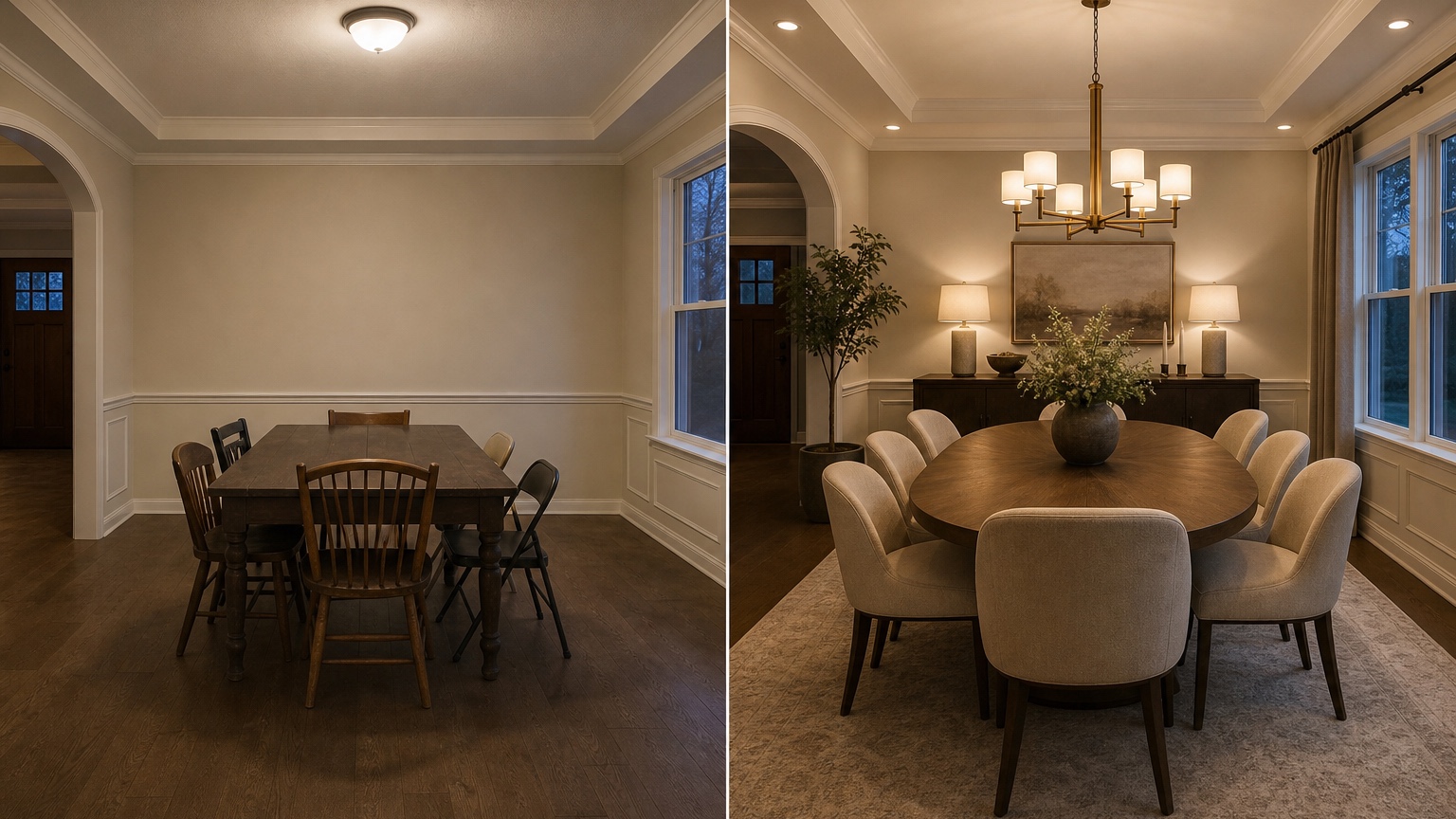
Dining rooms need more than one light level. Bright light helps with cleaning, homework, and setting the table. Softer light makes dinner feel relaxed. AI previews are helpful because they can show the same room as a daytime workspace, weeknight family dinner, or evening gathering with dimmer, warmer light.
Ask for layers: the main chandelier or pendant, buffet lamps, wall sconces if wiring is realistic, picture lights, candles, or small rechargeable lamps on a sideboard. Warm light is usually more flattering at the table than cold white light. If the current room feels harsh, prompt for “warm 2700K-style lighting, shaded bulbs, dimmable-looking layers, and no cold overhead glare.” If you cannot add hardwired fixtures, request plug-in or freestanding options.
For decorators, reference images can guide the atmosphere: candlelit traditional, warm modern, relaxed coastal, tailored apartment, or moody restaurant-inspired. Tell RedesAIgn to use the reference for lighting mood and material tone while preserving the real room.
Turn the best image into a photo-to-purchase checklist
Do not buy directly from an AI image. Use it to build a checklist. Start with measurements: room length and width, doorway swings, table footprint, pulled-out chair zone, chandelier position, sideboard depth, rug size, and walkway paths. Then list product qualities, not exact lookalikes: round pedestal table, slim upholstered chairs, low-pile patterned rug, warm brass linear chandelier, narrow closed sideboard, shaded buffet lamp, washable linen-look curtains.
Save the prompt that produced the most realistic scale. In RedesAIgn, saved prompts and history let you return to the version that respected your room instead of chasing a prettier but less practical scene. Use remix for controlled adjustments: keep the table and chandelier fixed while changing chair style; keep the rug and table fixed while changing wall color; keep the layout fixed while testing a darker buffet.
A final review question helps: would this room still work when every chair is occupied, the table is set, the lights are dimmed, and someone is carrying food from the kitchen? If the answer is yes, the design is doing its job. If the image only works with chairs tucked in and no one moving, revise the layout before thinking about finishes.
FAQ: AI dining room design
What is AI dining room design?
AI dining room design uses a real room photo and a prompt to create visual concepts for table shape, seating, lighting, rugs, storage, decor, and circulation. It is most helpful for comparing practical options before buying furniture or changing fixtures.
Can AI choose the right dining table size?
It can help you visualize table shapes and proportions, but you should still measure the room, mark the table footprint, pull chairs out, and confirm walkways before purchasing. Treat the image as a planning aid, not a measured furniture plan.
How do I keep the chandelier aligned in an AI design?
Tell the prompt whether the existing junction box must stay or can move. Ask for the chandelier centered over the final table placement, scaled to the table width, and high enough for comfortable conversation.
What should I include in the source photo?
Use a wide photo that shows the table area, chairs, chandelier, windows, doors, flooring, buffet wall, and route to the kitchen or living room. Add notes about fixed furniture, rental limits, and whether the room needs to seat more people for hosting.
Is RedesAIgn free to try for dining room ideas?
RedesAIgn starts with 5 free AI credits and no credit card is required. If you want more layout, lighting, or furniture variations, one-time credit packs are available.
Try these prompts in redesAIgn
Redesign this room with warm neutrals, layered lighting, and a functional seating layout.
Keep the architecture, but update furniture, rug, and wall color for a calm modern look.
Show a before-to-after concept with better traffic flow and fewer bulky pieces.
Related guides
- AI Bathroom Remodel Visualizer for Tile, Vanity, and Lighting Ideas
Visualize bathroom remodel ideas from a real photo with RedesAIgn. Compare finishes, fixtures, and layout limits before ordering materials.
- AI Bedroom Design Generator for Layout and Decor Ideas
Generate bedroom design concepts from your room photo with RedesAIgn. Compare layout and furniture directions before you buy or remodel.
- AI Furniture Visualizer: Preview Furniture in Your Room Photo
Use an AI furniture visualizer to preview scale, placement, color, material, and fit in your room photo before buying or presenting furniture.
- AI Interior Design From Photo: Redesign Any Room Visually
Use AI interior design from photo workflows to preview room styles, furniture layouts, finishes, and decor ideas before buying anything.
- AI Kitchen Remodel Visualizer: See Cabinet, Floor, and Color Ideas
Visualize kitchen remodel ideas from a real photo with RedesAIgn. Compare cabinets, counters, and backsplash before buying any materials.